
Ummy Video Downloader was a popular free software application designed to simplify the process of downloading videos and audio from various online platforms. While the download is no longer available on the original source, this review will explore its features, functionality, and user experiences, offering insights into why it gained popularity and its eventual disappearance from the download landscape. We will also examine alternative applications available for similar functionalities.
What is Ummy Video Downloader?
Ummy Video Downloader aimed to provide a user-friendly solution for downloading videos and extracting audio (MP3) from online sources. In a world increasingly saturated with online video content – from music videos and viral clips to educational lectures – the need for a simple, effective method to save these files offline was apparent. Ummy attempted to fill this niche by offering a straightforward process for downloading videos from various websites, including YouTube, Facebook, Twitter, TikTok, Vimeo, and Tumblr, amongst others. The software promised the ability to download videos in various formats and resolutions (SD, HD, FullHD, 2K, 4K) as well as extract the audio track as an MP3 file. This made it a versatile tool for building personal offline video and music libraries.
The core functionality revolved around a simple copy-paste mechanism. Users would copy the URL of the desired video and paste it into the Ummy Video Downloader interface. The software would then analyze the link, identify the available formats and resolutions, and present the user with download options. This process eliminated the need for complicated configurations or technical expertise, making the application accessible to a wide range of users, regardless of their technical proficiency.
Ummy Video Downloader’s User Interface and Experience
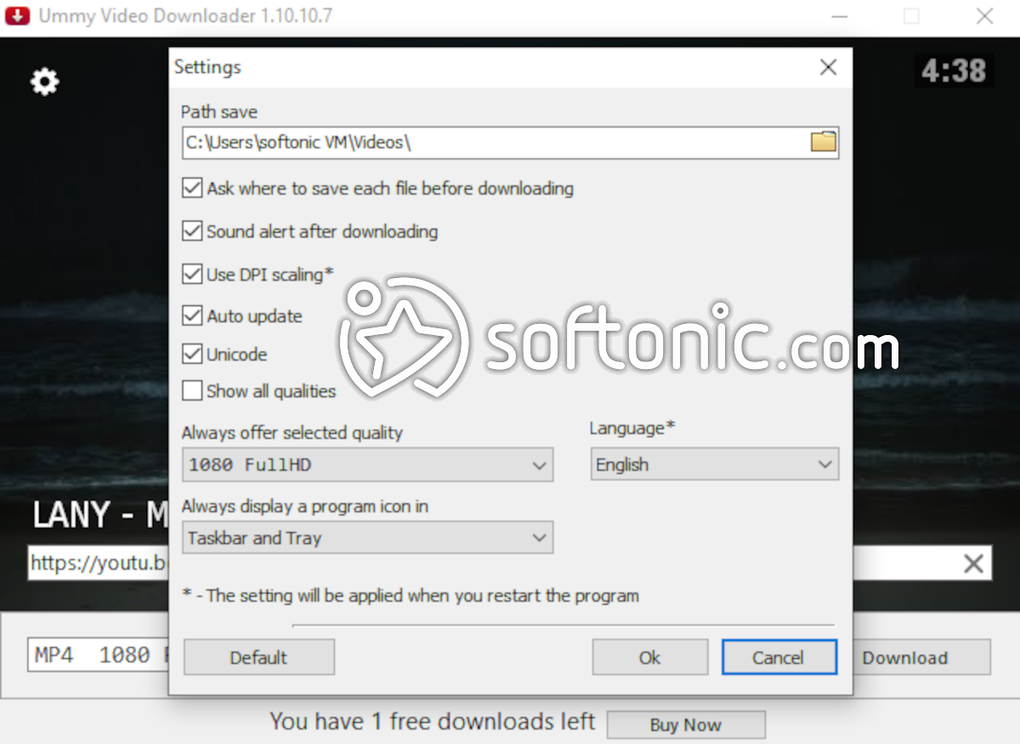
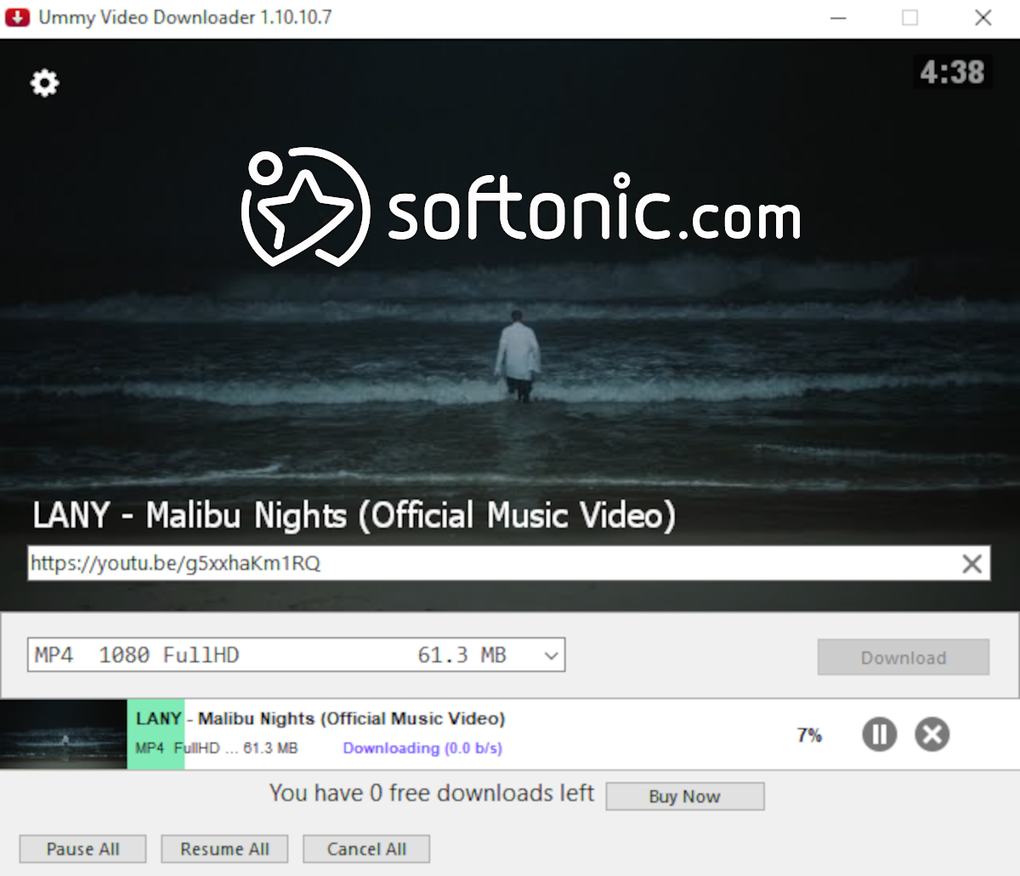
One of the key selling points of Ummy Video Downloader was its clean and intuitive user interface. The design prioritized simplicity, presenting users with a minimal interface featuring an address bar for pasting URLs and options to select the desired output format and quality. Once a video link was pasted, a thumbnail preview would appear, allowing users to confirm the correct video was selected before initiating the download. This feature reduced the chances of downloading the wrong video by mistake. The process was generally streamlined, minimizing unnecessary steps and providing real-time progress updates. The simplicity of the interface contributed significantly to its popularity among users who valued ease of use over advanced features.
However, while the simplicity was attractive, it also implied a limitation in features. There weren’t options for advanced settings or customisation beyond the basic format and quality selection. This limited flexibility may have frustrated users accustomed to more feature-rich applications with greater control over download parameters.
Features and Functionality: Strengths and Weaknesses
Ummy Video Downloader offered a suite of features designed to make video and audio downloading convenient. Its key features included:
-
Wide Platform Support: The application claimed compatibility with a large number of online video platforms, ranging from popular social media sites to niche video sharing websites. This broad compatibility was a significant advantage, catering to users who consume content from multiple sources. However, the actual number of successfully supported platforms might have varied over time, and the application’s performance on lesser-known sites may have been inconsistent.
-
High Download Success Rate (Claimed): Marketing materials frequently highlighted a high success rate in downloading videos, suggesting reliable performance. This claim is crucial for a video downloader, as failed downloads would be incredibly frustrating for users. However, anecdotal user reports suggest that the success rate may have been less consistent for larger files, where downloads might have slowed down or even failed.
-
Multiple Format and Resolution Options: The ability to choose between various video formats (e.g., MP4) and resolutions (SD, HD, Full HD, 2K, 4K) provided users with greater control over file size and quality. Downloading higher-resolution videos would result in larger file sizes, requiring more storage space, while opting for lower resolutions would lead to smaller file sizes but compromise visual quality. The available options depended on the original video’s encoding and upload quality.
-
MP3 Extraction: The ability to extract the audio track as an MP3 file from videos added significant value, particularly for users who primarily wanted the audio content. This allowed users to create custom music playlists from online videos, saving them the effort of finding separate audio files.
-
Simple Playlist Download (Claimed): Some marketing materials suggested the ability to download entire playlists. While theoretically useful, the practicality and reliability of this feature are uncertain based on available user reviews.
Despite its strengths, Ummy Video Downloader had drawbacks. The most significant drawback was its limitations in the free version.
The Free Version and Licensing Model: A Critical Analysis
One of the major points of contention surrounding Ummy Video Downloader was its licensing model. The free version was severely restricted, allowing only a single video download. This limitation essentially rendered the free version a trial version, pushing users toward purchasing a license for unrestricted use. This “trial-then-pay” model, while common in software licensing, drew criticism due to its restrictiveness. Users often expressed frustration with this limitation, particularly given the relatively small number of downloads they were permitted for free. They felt misled, believing the software to be genuinely free, only to find themselves limited to a single use.
The cost of the paid license was relatively low, but the overall impression left many users feeling that the free version was largely ineffective as a standalone product, which may have negatively impacted its reputation and user base.
Ummy Video Downloader’s Security and Safety
Security and safety are paramount concerns when dealing with software that interacts with the internet. Claims about Ummy Video Downloader’s safety were made, mentioning that it was secured by Norton Antivirus and contained no ads. While this is positive, independent verification of this information is lacking. Users should always exercise caution when downloading and using any software from unknown or less established sources, ensuring that the download is from a trusted and reputable source.
Should You Download Ummy Video Downloader (If Possible)?
Given that Ummy Video Downloader is no longer available for download, the question of whether or not to download it is moot. However, reflecting on its past performance, the application offered a user-friendly approach to downloading videos and audio from various online platforms. The clean interface and streamlined process were appealing, particularly for less tech-savvy users. However, the severely limited free version and potential inconsistencies in performance, especially with larger files, should be considered.
Had Ummy Video Downloader continued to be available, its viability would depend on individual needs and preferences. Users needing a simple, easy-to-use video downloader with minimal features might have found it suitable, provided they were willing to pay for a license.
Alternatives to Ummy Video Downloader
Given the unavailability of Ummy Video Downloader, numerous alternatives exist offering similar or enhanced functionalities. Some popular alternatives include:
- JDownloader: A powerful, open-source download manager with advanced features for handling multiple downloads and managing download queues.
-
4K Video Downloader: A widely-used video downloader known for its ease of use and support for a broad range of platforms.
-
YT-DLP: A command-line tool offering extensive capabilities and support for many platforms, ideal for more technical users.
-
aTube Catcher: Similar to Ummy in its approach, but perhaps with broader capabilities and features.
-
ClipGrab: Another user-friendly alternative offering similar capabilities.
These alternatives offer a range of features, from simple interfaces to more advanced settings, catering to various technical skills and needs. Users should research and select an alternative based on their specific requirements and preferences.
In conclusion, while Ummy Video Downloader offered a simple and user-friendly solution for downloading videos and audio, its limitations, particularly its restrictive free version and uncertain reliability for larger downloads, might have ultimately contributed to its removal from the market. The availability of several powerful and feature-rich alternatives makes the absence of Ummy Video Downloader less significant for most users.
File Information
- License: “Free”
- Latest update: “January 30, 2025”
- Platform: “Windows”
- OS: “Windows XP”
- Language: “English”
- Downloads: “2.4M”
- Size: “928.18 KB”


