
UnderCoverXP is a free, lightweight Windows program designed to help you create professional-looking covers for your homemade CDs, DVDs, and other optical discs. Tired of your self-burned discs looking amateurish? UnderCoverXP provides a simple yet powerful solution to elevate your disc presentation to match the quality of commercially produced media. From standard CD covers to more complex designs for game discs like PlayStation 3 titles, UnderCoverXP offers the tools to create visually appealing and accurately sized disc packaging. This comprehensive guide will explore the features, functionality, and benefits of using UnderCoverXP to create custom disc covers.
Intuitive Design and Ease of Use
UnderCoverXP boasts an intuitive interface, making it accessible even to users with limited experience in graphic design or disc cover creation. The process is straightforward: simply select the images you wish to use for your cover (front, back, spine, etc.), specify the disc type, and let UnderCoverXP handle the formatting and positioning. This streamlined workflow minimizes the learning curve, allowing you to quickly and efficiently produce high-quality results. The program’s automatic image detection feature further simplifies the process. If you name your image files descriptively (e.g., my_cd_front.jpg, my_cd_back.jpg), UnderCoverXP will automatically categorize them upon import, saving you time and effort in manual arrangement.
Advanced Features for Precise Control
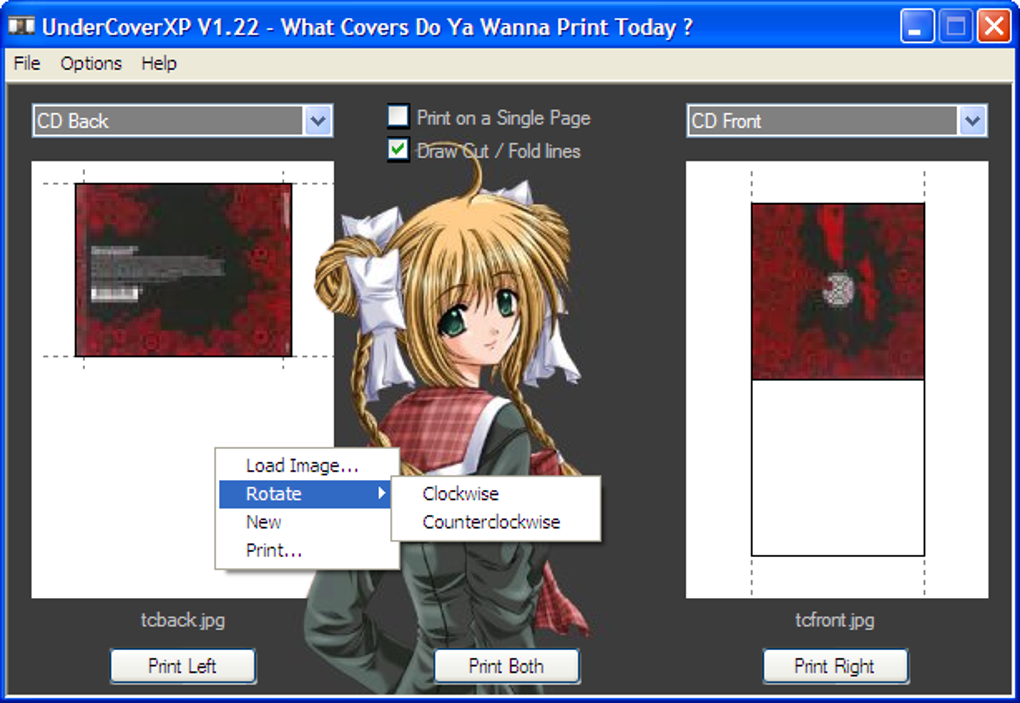
Beyond its ease of use, UnderCoverXP offers a range of advanced features that provide users with precise control over their disc cover designs. The program incorporates several safeguards to prevent errors. For instance, UnderCoverXP issues a warning if your images extend beyond the printable area, ensuring that critical design elements aren’t accidentally cropped during printing. Furthermore, it can add cut and fold lines directly to your print output, making assembly of the finished cover a simple and straightforward task. This attention to detail ensures that the final product accurately reflects your design vision.
Customizable Templates and Configuration Options
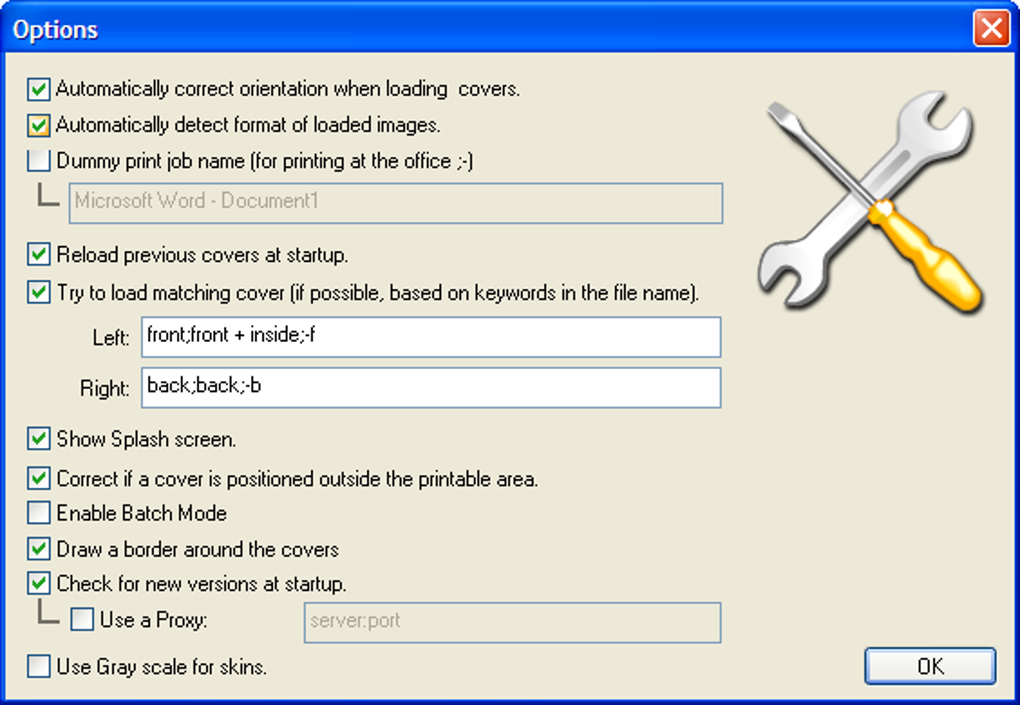
UnderCoverXP provides a robust selection of pre-defined cover formats, catering to a variety of disc types and sizes. However, its flexibility extends beyond pre-sets; the program offers extensive configuration options that allow you to modify existing formats or create entirely new ones tailored to your specific needs. This level of customization empowers users to adapt the program to a wide array of scenarios, accommodating diverse disc types and individual design preferences. This adaptability makes UnderCoverXP a versatile tool for creating unique and personalized disc covers. The inclusion of a format editor allows for detailed tweaking of existing templates, giving users granular control over every aspect of their cover design. The program also supports multiple skins and languages, enhancing the user experience and making it accessible to a broader audience.
Batch Processing for Enhanced Efficiency
UnderCoverXP’s capabilities extend beyond single-disc cover creation. The program supports batch processing, significantly improving efficiency when creating multiple covers at once. This feature is particularly beneficial for users who frequently burn and label large quantities of discs. Batch processing saves substantial time and effort compared to creating each cover individually, streamlining the workflow for high-volume projects. This efficiency makes UnderCoverXP ideal for both personal and professional use cases involving large-scale disc production.
Ongoing Development and Community Support
UnderCoverXP’s developers demonstrate a commitment to ongoing improvement through regular updates that introduce new features, fix bugs, and enhance overall performance. These updates consistently reflect community feedback and address user-reported issues, improving the user experience. While the primary support channel is online documentation, the program’s consistent updates and relatively straightforward interface minimize the need for extensive troubleshooting assistance. The active development demonstrates a commitment to long-term support and continued improvements, ensuring that UnderCoverXP remains a reliable and relevant tool for disc cover creation.
Comparison with Alternative Software
UnderCoverXP holds its own against competing disc cover design software. While other programs like Nero Cover Designer offer similar functionalities, UnderCoverXP distinguishes itself through its free pricing model and its focus on ease of use. Some alternatives might offer more advanced features, but often come at a premium cost. UnderCoverXP provides a compelling balance of features, simplicity, and affordability, making it an attractive option for users who don’t require the most extensive professional-grade tools. The program effectively bridges the gap between simple label-making utilities and complex, expensive professional software. This balances the need for a user-friendly interface with powerful design tools suitable for a range of user experience levels.
Detailed Changelog Highlights
The UnderCoverXP changelog showcases a history of iterative improvements. Key updates include:
- Printing Enhancements: Added support for specific printer models (e.g., Canon Pixma 4600), ensuring optimal print quality and compatibility across a broader range of devices.
- Translation Improvements: Addressing issues with unresolved translations and ensuring the interface is accessible to users worldwide.
- Format Editor Improvements: Multiple bug fixes and feature additions to the format editor, including enhanced control over image layout, tray sizes, and the addition of LINE and RECT editors for finer design adjustments. These improvements significantly increase the precision and control users have over their cover designs.
- User Interface Enhancements: Addressing minor usability issues, improving overall visual clarity and efficiency. Specific updates include the addition of paste functionality (Ctrl+V) for faster image insertion and resolving issues with truncated filenames in the preview window.
- Autodetect Improvements: Increased accuracy in the automatic image detection and rotation feature, particularly when handling front and inside CD images. This enhancement streamlines the process and reduces manual intervention.
These changelog entries highlight the program’s continuous development and the developers’ commitment to improving user experience and addressing potential issues.
Conclusion
UnderCoverXP is a powerful, user-friendly, and free program that allows users to easily create professional-looking disc covers for their homemade CDs, DVDs, and other optical media. Its intuitive interface, coupled with advanced features like automatic image detection, customizable templates, and batch processing, makes it a versatile tool for users of all experience levels. The ongoing development and regular updates demonstrate a commitment to long-term support and continuous improvement. Whether you’re a casual user or someone who regularly creates large quantities of labeled discs, UnderCoverXP offers a compelling combination of ease of use, powerful features, and affordability. Its straightforward interface, coupled with advanced capabilities, creates a balanced experience that caters to both novice and experienced users alike. The commitment to ongoing improvements ensures that UnderCoverXP remains a valuable tool in the ever-evolving landscape of digital media production.
File Information
- License: “Free”
- Latest update: “August 5, 2021”
- Platform: “Windows”
- OS: “Windows 95”
- Language: “English”
- Downloads: “100.2K”
- Size: “1.01 MB”


