
Unigram is a free, open-source instant messaging application developed by Unigram Inc. for Windows PCs. Serving as a desktop client for the popular Telegram mobile app, it’s designed to provide a seamless and familiar experience for users accustomed to Telegram’s interface, while also incorporating several enhancements. This review delves into Unigram’s features, performance, and overall usability, comparing it to the official Telegram desktop application and exploring its strengths and weaknesses.
Unigram’s Interface and Functionality: A Near-Identical Twin to Telegram
Unigram’s primary strength lies in its almost perfect replication of Telegram’s user interface. If you’re already a Telegram user, transitioning to Unigram will feel remarkably natural. The layout, navigation, and overall aesthetic closely mirror the official app, ensuring a smooth learning curve for newcomers and a comfortable environment for experienced Telegram users. This consistency is a significant advantage, minimizing the need for extensive re-learning or adjustment.
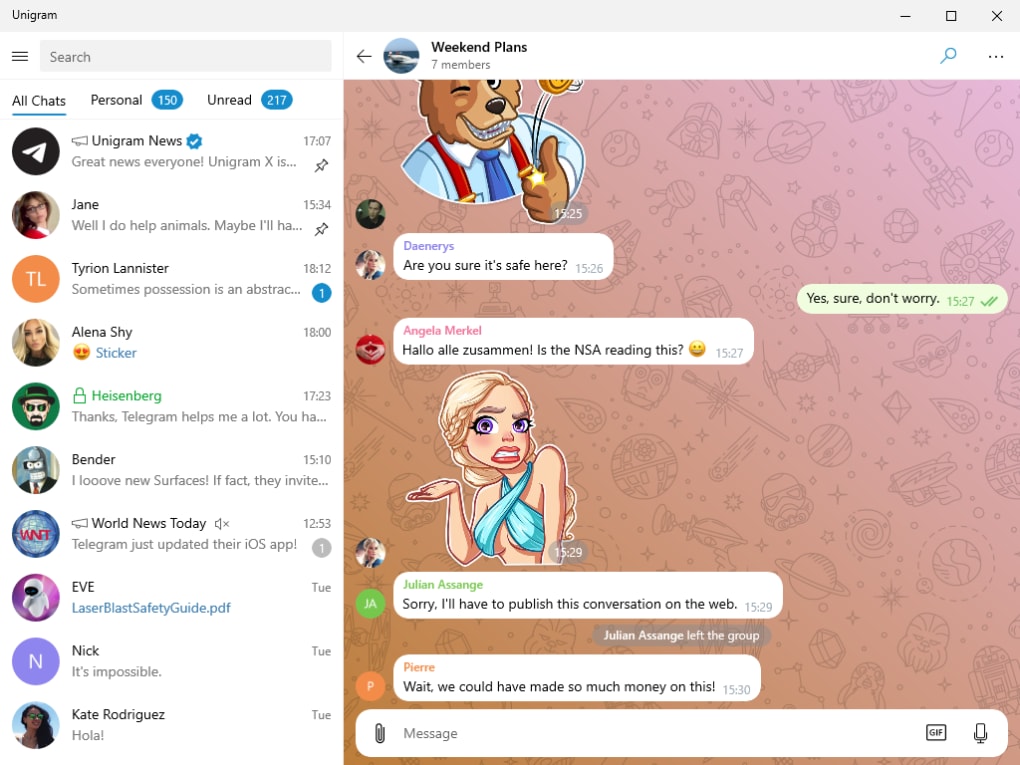
The login process is equally straightforward, offering two primary methods: using your phone number or scanning a QR code displayed on the Unigram window. The QR code method requires the Telegram mobile application on your phone for authentication. This dual-login approach caters to diverse user preferences and technical capabilities. Notably, Unigram supports multiple accounts, allowing users to manage several Telegram profiles concurrently from a single desktop client—a feature that’s directly inherited and implemented seamlessly from Telegram itself.
Beyond the familiar interface, Unigram introduces several features that enhance the Telegram experience. One notable addition is the expanded emoji selection. While the official Telegram app typically offers four emoji sets, Unigram provides users with a wider choice of ten sets. This increased variety allows for greater personalization and expression within conversations. The built-in video player also deserves praise, boasting a range of playback controls, including full-screen mode, offering more control and viewing flexibility than the official Telegram client.
A further differentiating feature is Unigram’s ability to cast videos to other devices. This allows for convenient sharing and viewing on larger screens, such as televisions or projectors. Furthermore, users aren’t limited to Unigram’s built-in player; they can select a third-party media player to open videos, providing flexibility for users who prefer alternative media playback applications. This openness enhances the versatility of the application.
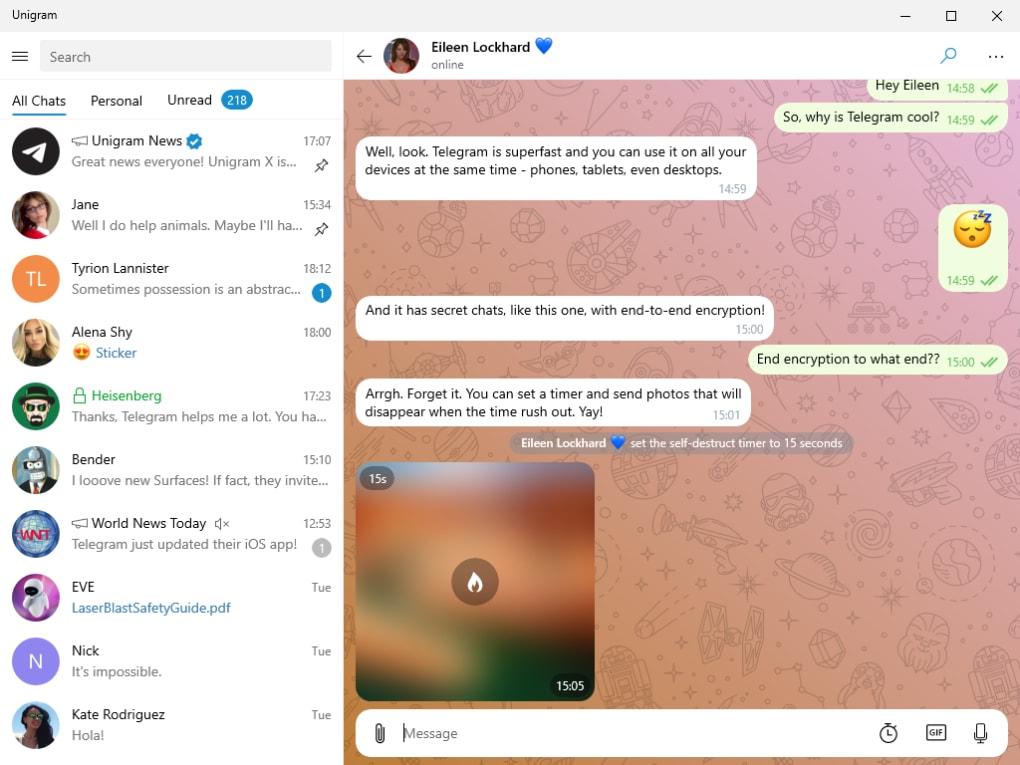
Arguably the most significant improvement Unigram offers over the official Telegram client is its inherent support for end-to-end encryption for chats. This added layer of security enhances user privacy and confidentiality, ensuring that messages remain private and secure between communicating parties. Further bolstering security, Unigram allows users to set self-destruct timers for messages, automatically deleting them after a predefined duration. This feature is crucial for those who prioritize message privacy and temporal control over their communication.
Performance and Limitations: Addressing Unigram’s Shortcomings
While Unigram offers many advantages, it’s not without its limitations. One notable area needing improvement is performance. At times, the application can experience sluggishness, particularly during periods of high activity or when handling a large volume of messages or media files. This performance variability can detract from the overall user experience and may prove frustrating for users accustomed to the generally smoother performance of the official Telegram desktop application.
Another significant drawback is the absence of a system tray shortcut. This omission creates inconvenience for users, as they’re unable to quickly access Unigram or view notifications from the system tray. A system tray icon is a standard feature in many desktop applications and its absence in Unigram is a noticeable gap, especially for users who rely on system tray integration for efficient notification management and application access. This absence reduces the overall usability of Unigram, particularly in scenarios demanding quick access or immediate notification awareness.
These performance issues and the lack of a system tray shortcut highlight areas where Unigram could significantly improve. Addressing these shortcomings would enhance user satisfaction and bring the application closer to parity with the official Telegram desktop client in terms of overall usability and polish. Continuous development and updates are vital for optimizing performance and incorporating features that will benefit Unigram’s user base.
Unigram’s Security Features: Prioritizing User Privacy
Unigram’s commitment to user privacy is evident in its implementation of end-to-end encryption for chats and the self-destruct timer for messages. These features are crucial for users who value secure and private communication. End-to-end encryption ensures that only the sender and receiver can access the content of their messages, preventing unauthorized interception or surveillance. This is a significant improvement over the official Telegram desktop client, which may not always have the same level of comprehensive encryption features readily enabled by default for all chat types.
The self-destruct timer further enhances security by allowing users to choose how long their messages remain accessible. This time-sensitive feature is particularly useful for sensitive information or conversations requiring a temporary record. These features are central to maintaining user privacy and control over their digital communication. The incorporation of these features underscores Unigram’s focus on providing secure and privacy-conscious messaging options for its users.
Comparing Unigram to the Official Telegram Desktop Client
When compared directly to the official Telegram desktop client, Unigram offers a compelling alternative with several key differentiators. While the core functionality and interface remain essentially identical, Unigram provides several additional features that enhance the user experience. The wider range of emoji sets, the enhanced video player with casting capabilities, the support for third-party media players, and most importantly, the integrated end-to-end encryption and self-destruct timer set Unigram apart from the official Telegram client.
However, Unigram’s occasional performance sluggishness and the lack of a system tray shortcut represent notable drawbacks compared to the generally smoother and more integrated experience offered by the official Telegram desktop application. The choice between the two applications ultimately depends on the user’s priorities. If enhanced security features, a wider selection of emoji, and flexible video playback options are paramount, Unigram presents a strong case. Conversely, if seamless performance and full system tray integration are crucial, the official Telegram client may still be preferred.
Conclusion: A Worthy Open-Source Alternative, Despite Its Limitations
Unigram presents a strong case as a viable open-source alternative to the official Telegram desktop client. Its near-identical interface ensures a smooth transition for existing Telegram users, while its added features, particularly the enhanced security options, provide distinct advantages. The expanded emoji selection, the improved video player, and the ability to cast videos to external devices enhance the overall messaging experience.
However, the occasional performance issues and the lack of a system tray shortcut represent areas requiring improvement. Addressing these limitations would significantly enhance Unigram’s usability and elevate its standing as a truly competitive alternative to the official Telegram desktop client. Despite these shortcomings, Unigram remains a compelling choice for users seeking a free, open-source Telegram client with enhanced security features. Its dedication to user privacy and its expansion upon core Telegram functionalities make it a worthwhile consideration for users prioritizing security and customizability. Further development and improvements in performance will solidify Unigram’s place as a top contender in the open-source messaging client landscape.
File Information
- License: “Free”
- Version: “7.7”
- Latest update: “November 24, 2021”
- Platform: “Windows”
- OS: “Windows 8”
- Language: “English”
- Downloads: “49.3K”
- Size: “22.45 MB”


