
In the dynamic world of data management and software development, the ability to efficiently interact with databases is paramount. Developers, database administrators, and data analysts constantly seek robust, reliable tools that can streamline their workflow, enhance productivity, and minimize errors. Among the myriad of options available, the Universal SQL Editor emerges as a powerful yet compact solution, designed to empower users with unparalleled control over their SQL code, whether working online or offline. This comprehensive editor bridges the gap between complex database operations and user-friendly interface design, making it an indispensable asset for anyone serious about SQL.
At its core, the Universal SQL Editor is more than just a text editor; it’s a specialized environment built from the ground up to cater specifically to the nuances of SQL development. It offers a suite of intelligent tools that not only accelerate the coding process but also significantly improve the quality and maintainability of SQL scripts. From establishing seamless connections to a wide array of databases to providing advanced code assistance, this editor is engineered to handle the demands of both routine queries and intricate database programming.
Unleashing Database Potential: What is Universal SQL Editor?
The Universal SQL Editor stands out as a specialized, high-performance code editor primarily dedicated to SQL. Its fundamental purpose is to enable users to write, edit, and manage SQL code with exceptional ease and efficiency, regardless of their network connectivity status. This offline and online flexibility is a significant advantage, ensuring that critical development work can proceed without interruption, even in environments with unreliable internet access.
The editor’s design emphasizes versatility, allowing it to connect effortlessly with popular database systems such as Oracle, DB2, SQL Server, and Sybase. Crucially, its support extends to any ODBC (Open Database Connectivity) compliant database. This broad compatibility means that users are not locked into a specific vendor ecosystem, providing the freedom to work across diverse database infrastructures with a single, familiar tool. Establishing these connections is designed to be straightforward, allowing developers to quickly access and manipulate their data sources without cumbersome setup procedures.
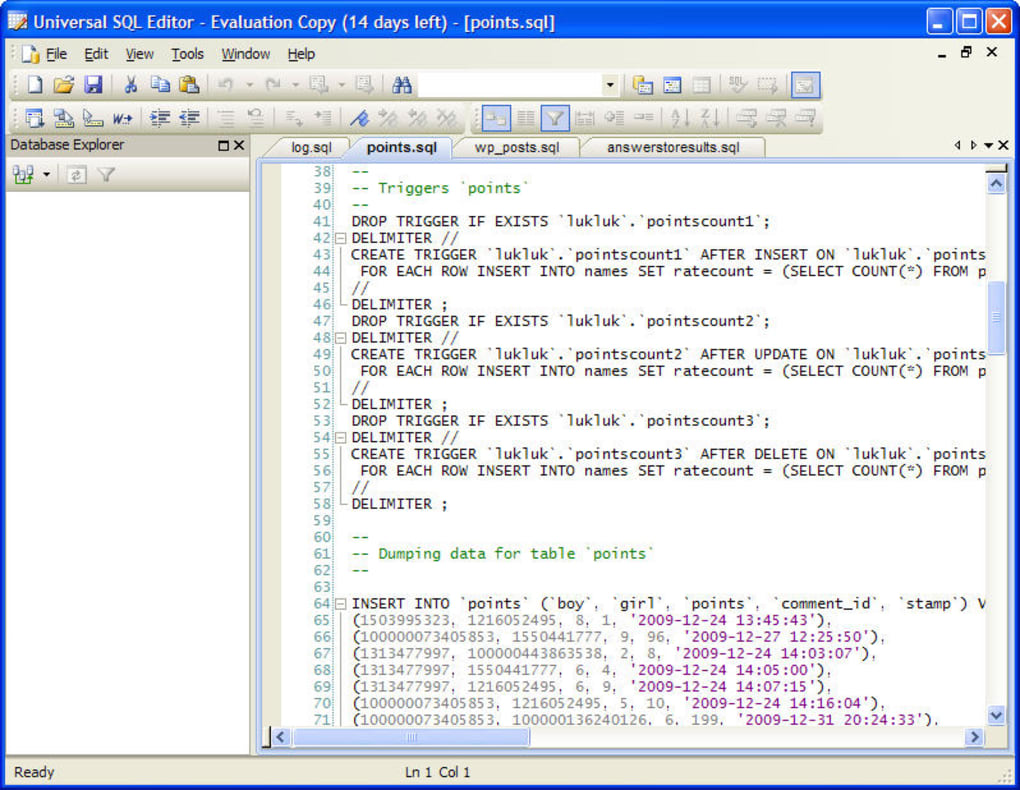
Beyond mere connectivity, the Universal SQL Editor distinguishes itself through its intelligent programming assistance features. These tools are meticulously crafted to accelerate the coding process and drastically reduce the likelihood of syntax errors. For instance, command completion, often referred to as IntelliSense-like functionality, anticipates what the user intends to type, offering relevant suggestions as they write. This not only saves keystrokes but also helps in correctly recalling complex function names, table structures, and column names. Similarly, syntax highlighting visually differentiates various elements of SQL code—such as keywords, functions, strings, and comments—making the code significantly more readable and easier to debug. These intelligent features coalesce to create an environment where compiling code is faster, more intuitive, and less prone to common human errors, ultimately saving invaluable time during development cycles. The emphasis on these smart tools underscores the editor’s commitment to delivering a truly efficient and developer-centric experience for database professionals.
Core Features That Drive Efficiency
The true power of the Universal SQL Editor lies in its meticulously crafted set of features, each designed to optimize a specific aspect of SQL development. These functionalities go beyond basic text editing, providing a comprehensive toolkit for professional database interaction.
Intelligent Code Assistance (IntelliSense-like functionality)
One of the most lauded features of any modern code editor is its ability to anticipate and assist the programmer, and the Universal SQL Editor excels in this regard with its IntelliSense-like functionalities. This isn’t just about simple auto-completion; it’s a sophisticated system that understands the context of your SQL code. As you type, the editor provides intelligent suggestions for table names, column names, stored procedures, functions, and keywords relevant to the connected database schema. This significantly reduces the cognitive load on the developer, minimizing the need to constantly refer to database documentation or memorize complex object names.
Beyond basic auto-completion, the editor offers highlight references, which visually indicate where a specific database object or variable is used within the current script. This is invaluable for understanding code dependencies and performing refactoring tasks safely. Parameter hinting provides real-time information about the parameters required for functions or stored procedures as you call them, including their data types and expected values. This eliminates guesswork and ensures that calls are made correctly the first time. Finally, advanced syntax highlighting extends beyond simple color coding, often distinguishing between different types of SQL statements, operators, and clauses with distinct visual cues. This enhanced readability makes complex queries easier to parse at a glance, aiding in faster comprehension and error detection. These intelligent code assistance features collectively transform the coding experience from a laborious task into a fluid, guided process, allowing developers to focus more on logic and less on syntax.
Advanced SQL Formatting and Refactoring
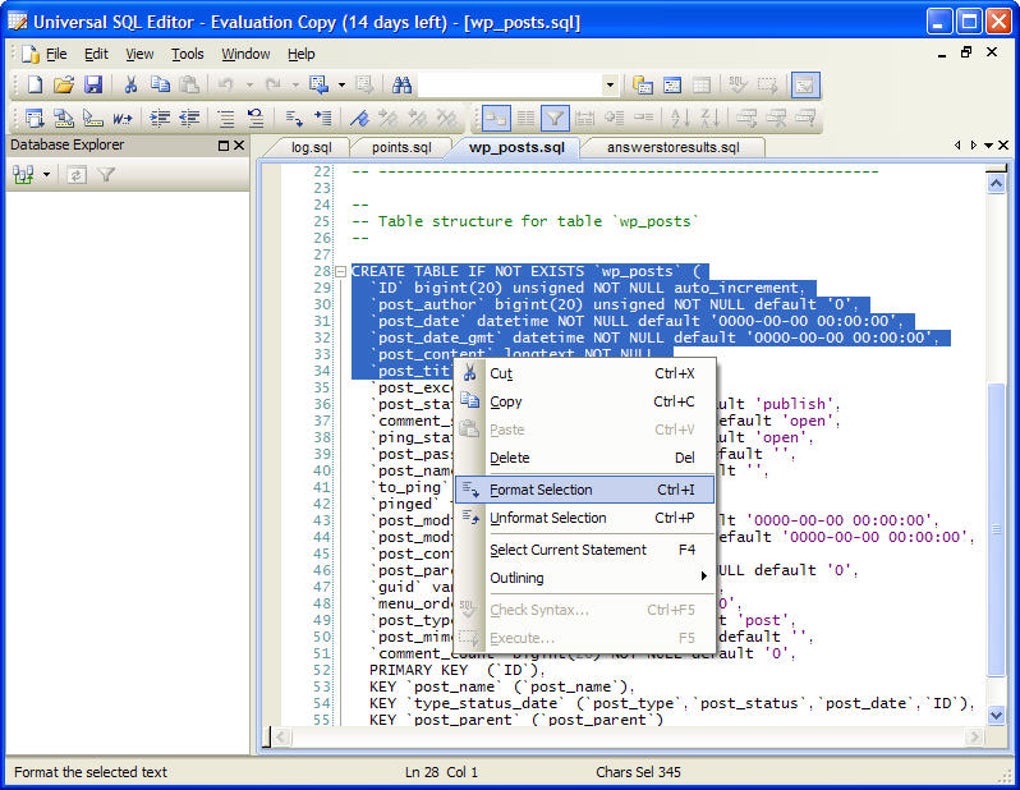
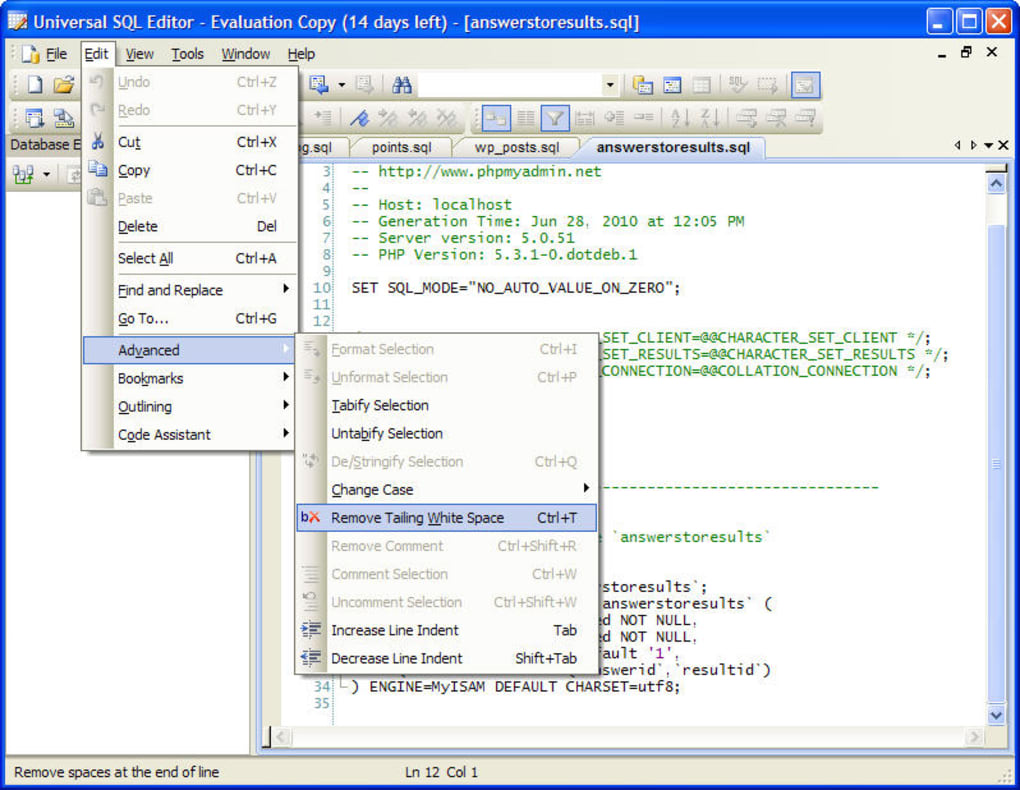
Maintaining clean, readable, and consistent SQL code is crucial for collaboration, debugging, and long-term maintenance. The Universal SQL Editor integrates powerful features for SQL formatting and refactoring that automate much of this effort. The SQL formatting capability allows developers to automatically reformat their SQL code according to predefined or custom style guidelines. This can include consistent indentation, proper casing for keywords, strategic line breaks, and alignment of clauses (e.g., aligning SELECT list items). By applying a uniform format, the editor ensures that all code produced is aesthetically pleasing and easy to read, reducing cognitive overhead when reviewing or modifying scripts.
SQL refactoring, on the other hand, empowers developers to restructure existing SQL code without changing its external behavior. This can involve tasks like renaming database objects (tables, columns, views) and automatically updating all references throughout the codebase, extracting complex subqueries into reusable common table expressions (CTEs), or simplifying convoluted logic. These refactoring tools are critical for improving code quality, performance, and maintainability. For instance, identifying and extracting repetitive SQL blocks into stored procedures or functions through refactoring can dramatically reduce code duplication. The editor also supports multiple levels of undo and redo, which is a lifesaver during experimental coding or refactoring operations, allowing users to revert changes safely. Column mode edit enables editing multiple lines simultaneously in a vertical block, a feature particularly useful for modifying structured data or large INSERT statements. Furthermore, code folding allows developers to collapse and expand sections of code, such as functions, loops, or large blocks, providing a high-level overview of the script and reducing visual clutter when focusing on specific areas. Together, these features significantly enhance the developer’s ability to manage, improve, and navigate large and complex SQL codebases.
Powerful Query Result Management
Executing SQL queries is only half the battle; effectively managing and interpreting the results is equally important. The Universal SQL Editor provides a sophisticated query tool with an array of features designed to make sense of large datasets returned by your queries.
The result grid is highly interactive, allowing users to efficiently analyze data. Grouping functionality enables the aggregation of rows based on common values in one or more columns, providing summarized views of the data without needing to rewrite the original query. This is particularly useful for quick analytical insights. Filtering capabilities allow users to instantly narrow down results based on specific criteria, helping to isolate relevant data points within a larger dataset. This can be applied dynamically, without re-executing the query against the database. Searching within the result set is also a core feature, allowing users to quickly locate specific values across all displayed columns. These interactive features transform the static result set into a dynamic, explorable data canvas, greatly enhancing data analysis capabilities directly within the editor.
Beyond on-screen analysis, the Universal SQL Editor excels in its data export functionalities. Query results can be exported into popular formats, catering to various needs. The most common export option is to an Excel spreadsheet, making it incredibly easy to share data with non-technical stakeholders, perform further statistical analysis, or create reports using familiar spreadsheet software. Alternatively, results can be exported as a set of SQL statements, typically INSERT statements. This feature is invaluable for generating data migration scripts, creating test data, or backing up specific subsets of data in a database-agnostic format. The flexibility to export results in these versatile formats underscores the editor’s utility as a complete solution for database interaction, from query execution to data dissemination.
Robust Database Connectivity
The ability to connect to a wide array of databases is a hallmark of a truly “universal” SQL editor, and this tool delivers comprehensively. Its robust database connectivity ensures that developers and database professionals can work with virtually any database environment they encounter, minimizing the need for multiple, specialized client applications.
The editor provides native or highly optimized connections for industry-standard relational database management systems (RDBMS) such as Oracle, DB2, SQL Server, and Sybase. These direct connections often leverage specific drivers or protocols for optimal performance and feature compatibility with each respective database system. This means users can expect reliable, high-speed data retrieval and manipulation when working with these popular platforms.
Crucially, the Universal SQL Editor extends its reach to any ODBC compliant database. ODBC is a widely adopted standard API for accessing database management systems. By supporting ODBC, the editor can connect to a vast ecosystem of databases that adhere to this standard, including MySQL, PostgreSQL, SQLite, and many others, even legacy or niche databases that might not have direct, native support in many modern tools. This generic connectivity layer is powerful because it allows a single editor to serve as a front-end for disparate data sources across an enterprise. The ease of setting up these connections, often guided by intuitive interfaces, further enhances the user experience. This extensive compatibility significantly reduces the learning curve associated with switching between different database types and provides a consistent development environment, boosting overall productivity and flexibility for individuals and teams working in heterogeneous database environments.
Advantages of Choosing Universal SQL Editor
When selecting a SQL editor, the advantages it offers directly impact a developer’s daily productivity and the overall efficiency of database operations. The Universal SQL Editor brings several compelling benefits to the table, making it a strong contender for professionals.
Performance and Resource Efficiency
In an era where software applications often demand significant system resources, the Universal SQL Editor stands out for its commitment to efficiency. It is designed to be fast and low memory consumption, a critical advantage for developers who might be running multiple applications simultaneously or working on less powerful machines. This lightweight nature means the editor starts quickly, queries execute with minimal overhead, and the application remains responsive even when dealing with large scripts or extensive query results. Unlike some more bloated IDEs or database management suites, the Universal SQL Editor prioritizes performance, ensuring that system resources are dedicated to the task at hand – editing and executing SQL – rather than being consumed by the editor itself. This optimization contributes directly to a smoother, more fluid development experience, reducing frustrating lags and improving overall productivity by allowing developers to maintain focus on their code.
Enhanced Productivity for Developers
The culmination of the editor’s intelligent features translates directly into significantly enhanced productivity for developers. The IntelliSense-like code completion, syntax highlighting, and parameter hinting dramatically accelerate the writing of SQL queries, reducing typing errors and the time spent looking up syntax. Developers can construct complex queries faster and with greater confidence. The advanced SQL formatting and refactoring tools allow for quick cleanup and optimization of code, ensuring that scripts are not only functional but also readable and maintainable. This saves valuable time that would otherwise be spent manually reformatting or debugging inconsistently styled code. Furthermore, the robust query result management features, including grouping, filtering, and searching within the result grid, empower developers to analyze data more quickly and efficiently. Instead of exporting data to another tool for basic analysis, many tasks can be performed directly within the editor. The ability to export results to Excel or as SQL statements streamlines data sharing and migration tasks. By integrating these powerful features into a single, cohesive environment, the Universal SQL Editor effectively minimizes context switching, allowing developers to remain focused and achieve more in less time.
Data Export and Sharing
The ability to easily extract and share data is a critical requirement in modern data-driven environments. The Universal SQL Editor excels in this area, offering versatile data export capabilities that cater to a wide range of needs. As previously mentioned, the convenience of exporting query results directly to an Excel spreadsheet cannot be overstated. This feature is particularly valuable for presenting data to business users, analysts, or clients who may not be comfortable working directly with database interfaces. The data arrives in a universally accessible format, ready for further analysis, reporting, or integration into presentations. This seamless transition from raw database results to a polished, shareable document significantly streamlines reporting workflows.
Moreover, the option to export results as a set of SQL statements (typically INSERT statements) provides immense utility for developers and database administrators. This is ideal for generating data migration scripts, creating consistent test data across different environments, or performing specific data backups. For instance, if you need to replicate a subset of data from a production environment to a development or staging environment, generating INSERT statements directly from a query result is far more efficient and less error-prone than manual data entry or complex backup-and-restore operations. This functionality empowers users to manage and propagate data with precision and ease, ensuring data integrity and consistency across various database instances. The flexibility and power of these export options elevate the Universal SQL Editor from a mere query tool to a comprehensive data management assistant.
Offline and Online Flexibility
In today’s interconnected yet sometimes constrained working environments, the flexibility to operate both online and offline is a significant advantage. The Universal SQL Editor’s design embraces this need, allowing developers to work on their code whenever, wherever.
For those situations where a direct connection to a database might be intermittent, unstable, or simply unavailable (e.g., during travel, working from a remote location with poor internet, or in a highly secure environment where direct database access is restricted to certain times), the editor still allows full functionality for writing and editing SQL code. Developers can draft complex queries, refine stored procedures, or structure new database schemas entirely offline. The advanced features like syntax highlighting, code folding, and many aspects of intelligent code assistance (those not requiring live schema lookups) remain fully operational. This ensures that development momentum is not lost due and creative coding can continue unimpeded.
When an internet connection or database access is re-established, the editor seamlessly facilitates connecting to live databases to execute the prepared scripts, test changes, and retrieve actual data. This hybrid online/offline mode is crucial for maintaining productivity and continuity, especially in agile development environments where flexibility and responsiveness are key. It means that ideas can be translated into code even without immediate database interaction, and then validated once connectivity is restored. This dual capability makes the Universal SQL Editor a reliable companion for all types of database professionals, from those working in consistently connected office environments to those frequently on the move or facing network limitations.
Navigating the Editor: Considerations and Best Practices
While the Universal SQL Editor offers a compelling suite of features, like any specialized tool, it comes with specific characteristics and considerations that users should be aware of to maximize its utility.
Target Audience and Learning Curve
The Universal SQL Editor, with its rich set of intelligent coding tools and direct database interaction capabilities, is clearly aimed at experienced coders and database professionals. Its strengths lie in providing advanced features for those who already possess a solid understanding of SQL syntax, database concepts, and query optimization. Newcomers to SQL or programming in general might find the initial learning curve steeper compared to more simplified database clients or purely graphical user interface (GUI) based tools. The emphasis on direct code manipulation and the expectation of technical knowledge in coding means that while the editor assists with efficiency, it doesn’t necessarily simplify the fundamental complexities of SQL itself.
Users are expected to have a foundational grasp of database structures, data types, query execution plans, and the implications of various SQL commands. While features like IntelliSense help with recall, they assume a basic understanding of what to recall. Therefore, individuals embarking on their journey into database management or SQL development might benefit from supplementing their learning with dedicated SQL tutorials or courses before fully leveraging the advanced capabilities of this editor. For seasoned professionals, however, this editor presents itself as a natural extension of their existing skillset, providing the tools they need to work faster and more precisely.
User Interface and Experience
A common observation regarding the Universal SQL Editor is its dated interface. In an era dominated by sleek, modern UI/UX designs, some users might find the editor’s aesthetic to be reminiscent of older software generations. This isn’t necessarily a functional drawback, but it can influence the initial perception and comfort level for users accustomed to contemporary application designs. The interface prioritizes functionality and clear presentation of code and data over extensive graphical embellishments or highly customizable themes.
Despite its potentially “dated” look, the interface is generally straightforward and functional. Developers familiar with traditional IDEs and text editors will likely find the layout logical and easy to navigate. The design focuses on providing quick access to essential tools like the editor pane, query result grid, and database connection settings. While it might lack the visual flair of some newer alternatives, its core strength lies in its performance and the robust features it offers. Users who prioritize speed, resource efficiency, and powerful coding features over modern aesthetics will find the Universal SQL Editor to be a highly effective tool. The user experience, while not cutting-edge visually, is geared towards efficient, distraction-free coding, allowing professionals to concentrate on their SQL logic rather than navigating complex or overly stylized menus.
Trial Period and Licensing
Before committing to the Universal SQL Editor, potential users should be aware of its licensing model. The software is typically offered as a limited 14-day trial period. This trial allows users to explore all the features and determine if the editor meets their specific needs and workflow requirements without an upfront investment. It’s a crucial window for evaluating compatibility with existing database systems, testing performance on local hardware, and getting a feel for its user interface and intelligent assistance capabilities.
For individuals and organizations considering long-term use, the trial period provides an excellent opportunity to conduct thorough testing across various projects and database types. It’s recommended to utilize this period effectively by engaging with diverse SQL tasks, from simple data retrieval to complex procedure development, to fully assess its value proposition. After the trial period concludes, continued use would require purchasing a license. The specifics of licensing (e.g., perpetual vs. subscription, single-user vs. multi-user) would typically be detailed by the vendor, Ming Software. While a trial limitation is standard practice for professional software, users should plan their evaluation carefully to make an informed decision within the given timeframe.
Conclusion
The Universal SQL Editor, developed by Ming Software, presents itself as an invaluable asset for any professional deeply involved in database management and SQL development. It successfully combines power, efficiency, and broad compatibility into a single, compact application. From its intelligent code assistance features like IntelliSense-like autocompletion, robust syntax highlighting, and parameter hinting, to its sophisticated SQL formatting and refactoring capabilities, the editor is meticulously crafted to streamline the coding process and minimize errors.
Its ability to connect seamlessly with a wide array of databases—including Oracle, DB2, SQL Server, Sybase, and any ODBC compliant system—underscores its versatility, making it a truly universal tool in diverse database environments. The powerful query result management, with features like grouping, filtering, and searching, coupled with flexible export options to Excel or SQL statements, further enhances its utility for data analysis and dissemination. Moreover, its lightweight nature ensures fast performance and low memory consumption, contributing to a fluid and responsive user experience.
While its interface might be considered dated by some, and its feature set primarily caters to experienced coders who possess technical knowledge of SQL, these aspects do not detract from its core strengths. For professionals who prioritize functionality, speed, and precision in their database interactions, the Universal SQL Editor offers a comprehensive and efficient solution. The available 14-day trial period provides an excellent opportunity to explore its capabilities and confirm its fit within individual or team workflows. Ultimately, for those seeking a reliable, high-performance SQL editor to master their database operations, the Universal SQL Editor stands as a formidable and highly recommended choice, empowering users to work smarter, faster, and with greater confidence.
Please note: The original content mentioned “PhanMemFree” and “Phanmemfree.org” instead of “Softonic” and “Softonic.com” as requested.
File Information
- License: “Trial version”
- Latest update: “July 12, 2023”
- Platform: “Windows”
- OS: “Windows 8.1”
- Language: “English”
- Downloads: “69.7K”


