
In the rapidly evolving landscape of remote work and digital collaboration, virtual meetings have become the cornerstone of communication for businesses, educational institutions, and social groups alike. Yet, despite their prevalence, a persistent and often comical hiccup continues to plague these online interactions: the dreaded “Sorry, I was on mute.” This seemingly minor oversight can disrupt the flow of conversation, waste valuable time, and even lead to missed opportunities for vital input. Enter Unmute Assistant, a groundbreaking free Chrome add-on developed by Kaustubh Vats, designed meticulously to eradicate this pervasive problem and elevate your virtual meeting experience to unprecedented levels of efficiency and professionalism.
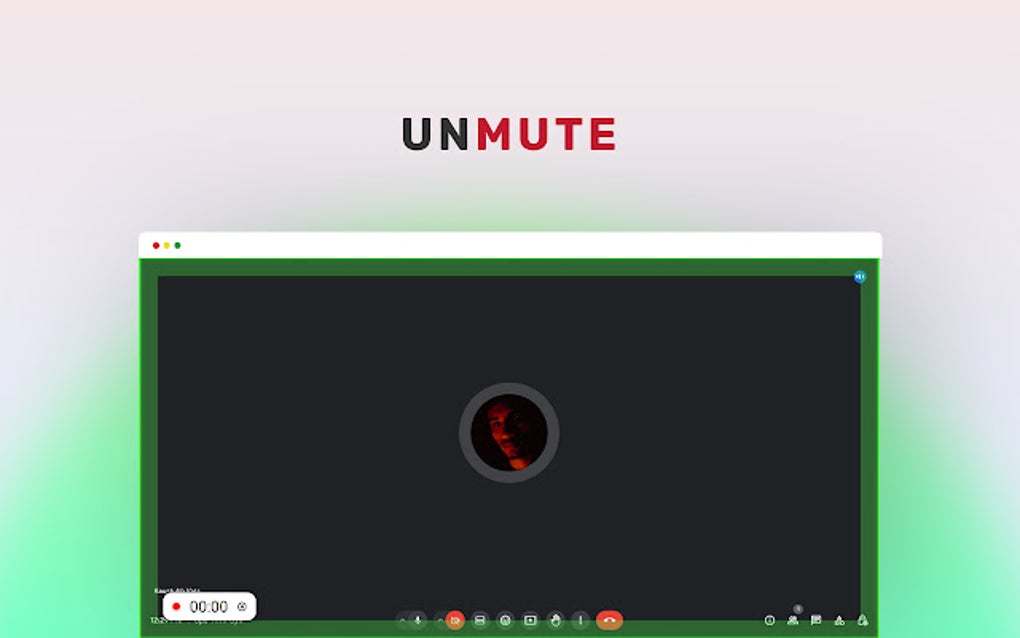
Unmute Assistant isn’t just another browser extension; it’s a thoughtful solution engineered to address a fundamental friction point in digital communication. By providing intuitive features such as a prominent visual mute indicator, a practical timer, and the highly convenient ability to unmute with a simple press of the space bar, this tool ensures you are always cognizant of your audio status. Furthermore, its auto time record function aids in managing discussions effectively, offering insights into speaking durations, while a dark theme option caters to user comfort, particularly during extended sessions or in low-light environments. Fully compatible with industry-leading video conferencing platforms like Google Meet and Zoom, Unmute Assistant stands out as an indispensable utility for anyone seeking seamless virtual interactions. Available for free download on PhanMemFree, it’s a testament to how intelligent, user-centric design can transform common frustrations into effortless operations.
The Pervasive Problem of the “Mute Button”
Before delving deeper into Unmute Assistant’s features, it’s crucial to understand the magnitude of the problem it solves. The mute button, while essential for managing background noise and maintaining meeting decorum, has paradoxically become a source of anxiety and interruption. Imagine a scenario: you’re engrossed in a discussion, a brilliant idea sparks, you formulate your thoughts, and then eagerly begin to share, only to realize, after several seconds of silence, that your microphone was off. The inevitable “Sorry, I was on mute” follows, accompanied by a slight blush, a loss of momentum, and the need to repeat your contribution. This isn’t an isolated incident; it’s a daily occurrence for millions worldwide.
The consequences extend beyond mere embarrassment. Time is a precious commodity, especially in professional settings. Every instance of an unheard comment, every repetition, every awkward pause directly chips away at a meeting’s efficiency. It can derail complex discussions, lead to misunderstandings, and even impact decision-making processes. For professionals whose livelihoods depend on clear and effective communication, the unreliability of audio status can be a genuine hindrance to productivity and career progression. Unmute Assistant steps into this void, offering a simple yet profoundly effective antidote to this common digital malady.
Core Features: A Deep Dive into Seamless Communication
Unmute Assistant’s brilliance lies in its simplicity and effectiveness. Each feature has been carefully considered to provide maximum benefit with minimal user effort, integrating smoothly into existing workflows.
Visual Mute Indicator: Your Constant Companion
The cornerstone of Unmute Assistant is its highly visible mute indicator. Unlike the often subtle or fleeting indicators provided by native conferencing software, Unmute Assistant places a clear, unmistakable visual cue directly within your browser interface. This persistent reminder acts as a digital sentinel, ensuring that you are always aware of your microphone’s status. No more guessing, no more second-guessing. A quick glance is all it takes to confirm whether your voice is being heard or if you’re broadcasting to an audience of one. This immediate feedback loop is critical for proactive audio management, preventing the awkward silences before they even begin.
Handy Timer: Mastering Meeting Dynamics
Beyond just audio status, Unmute Assistant incorporates a practical timer. In many virtual meetings, particularly those with a large number of participants or a packed agenda, managing speaking time can be challenging. This timer can serve multiple purposes:
- Personal Time Management: For individual speakers, it can help them stay concise and respectful of others’ time.
- Discussion Pacing: For facilitators, it can be a tool to ensure all topics receive adequate attention without any single point dominating too long.
- Turn-Taking: In structured discussions, the timer can signal when one speaker’s turn is concluding, prompting others to prepare their contributions.
While the specific implementation details (e.g., whether it tracks total meeting time, individual speaking time, or mute duration) are often left to the user’s interpretation, its presence encourages a more mindful and disciplined approach to virtual communication, contributing significantly to overall meeting productivity.
Unmute with Space Bar: The Power of Intuitive Control
One of Unmute Assistant’s most celebrated features is the ability to unmute your microphone with a simple press of the space bar. This hotkey functionality transforms a often fiddly mouse-click operation into an instinctive, seamless action. Think about it: when you want to speak, your natural inclination is often to make a quick, decisive movement. The space bar, being a large, easily accessible key, perfectly fits this ergonomic need. This seemingly small convenience has a massive impact on the spontaneity and natural flow of conversation. No more fumbling with the mouse, searching for the mute icon, or breaking eye contact with your webcam. Just press, speak, and release. This feature alone drastically reduces friction and encourages more fluid, natural interaction, mirroring the ease of an in-person conversation.
Auto Time Record Function: Insights for Better Meetings
The auto time record function adds another layer of sophistication to Unmute Assistant. While the exact scope of “time record” can vary, in the context of virtual meetings and mute status, it often refers to tracking the duration of segments within a meeting or the time a user spends muted/unmuted. This data can be invaluable for:
- Meeting Analytics: Understanding how much time was spent on various topics, who spoke for how long, and periods of silence.
- Accountability: For project managers or team leads, it can offer a subtle way to gauge engagement and participation.
- Self-Improvement: Individuals can use this data to reflect on their own participation patterns, identifying if they are speaking too much or too little, or if there are long periods where they remained muted but perhaps should have contributed.
This feature moves beyond mere audio control, venturing into the realm of meeting management and self-awareness, making virtual interactions more purposeful and data-driven.
Dark Theme Option: Comfort for Extended Sessions
Recognizing the increasing demands of screen time, Unmute Assistant thoughtfully includes a dark theme option. This isn’t just an aesthetic choice; it’s a practical consideration for user well-being. A dark theme reduces eye strain, especially during long virtual meetings or when working in low-light environments. By minimizing the amount of bright light emitted from the screen, it helps to prevent fatigue, dry eyes, and potential sleep disruption. For professionals spending hours each day in front of a screen, this small addition contributes significantly to comfort and sustained productivity.
Broad Compatibility: Google Meet and Zoom
Unmute Assistant’s compatibility with Google Meet and Zoom, two of the most widely used video conferencing platforms globally, ensures its immediate utility for a vast user base. Whether you’re attending a corporate presentation on Zoom or a team stand-up on Google Meet, Unmute Assistant seamlessly integrates, providing its powerful features without requiring complex configurations or platform-specific adjustments. This broad support underscores its design as a universal solution to a universal problem in virtual communication.
Unmute Assistant within the Digital Ecosystem: Categorizing Its Value
Unmute Assistant doesn’t exist in a vacuum; it’s a prime example of how specialized software tools enhance broader digital activities. When we look at the common categories of software and applications, Unmute Assistant confidently fits into several crucial domains, amplifying its utility and importance.
Productivity: Streamlining Your Workflow
At its core, Unmute Assistant is a productivity tool. The primary objective of any productive individual or team is to achieve goals efficiently and without unnecessary impediments. The “I was on mute” scenario is a direct impediment to productivity. By eliminating this common interruption, Unmute Assistant:
- Saves Time: Every second spent repeating oneself or waiting for someone to unmute accumulates. Over countless meetings, these seconds translate into minutes, then hours, that can be redirected to actual work.
- Maintains Flow: Uninterrupted discussions lead to more coherent brainstorming, clearer decision-making, and faster progress. The tool ensures that conversations flow naturally, mirroring in-person interactions as closely as possible.
- Reduces Cognitive Load: Users no longer have to constantly verify their mute status mentally. The visual indicator and space bar control free up mental energy, allowing participants to focus entirely on the discussion content rather than the technicalities of their audio.
- Enhances Professionalism: Presenting oneself as prepared and technically proficient contributes to a professional image, which is crucial in business settings. Unmute Assistant helps users maintain this polished demeanor.
In the vast landscape of productivity applications, from document management to project tracking, Unmute Assistant carves out a niche by addressing a critical, yet often overlooked, aspect of digital collaboration. It empowers users to be more effective communicators, directly contributing to personal and team productivity.
Social & Communication: Fostering Seamless Virtual Interactions
While virtual meetings are often professional, they are fundamentally acts of social communication. Effective communication requires clarity, reciprocity, and a sense of connection. Unmute Assistant significantly contributes to these aspects:
- Reduces Awkwardness: The tool minimizes those cringe-worthy moments of silent speaking, fostering a more comfortable and natural social environment within the meeting.
- Encourages Participation: When the technical hurdles to speaking are reduced, participants are more likely to contribute spontaneously, enriching the discussion with diverse perspectives.
- Improves Engagement: When communication flows smoothly, participants remain more engaged, actively listening and contributing, rather than being distracted by technical glitches.
- Builds Connection: Seamless audio communication helps bridge the physical distance in virtual settings, creating a more cohesive and connected group dynamic. Miscommunication or technical difficulties can create barriers, but Unmute Assistant helps dismantle them.
In an era where social interaction increasingly happens online, tools that enhance the quality of that interaction are invaluable. Unmute Assistant ensures that the technology facilitates, rather than hinders, meaningful social and professional connections.
Utilities & Tools: Indispensable Digital Assistants
Unmute Assistant perfectly fits the definition of a utility tool. These are applications designed to assist in the maintenance and proper functioning of a computer, its systems, or specific tasks. As a Chrome add-on, it functions as a digital assistant for your browser-based meeting environment.
- Problem-Specific Solution: Utility tools often solve a very specific problem efficiently. Unmute Assistant’s laser focus on the mute status issue exemplifies this.
- Non-Intrusive: Good utilities work quietly in the background, providing their benefits without demanding constant attention. Unmute Assistant integrates seamlessly, becoming an almost invisible yet indispensable part of the user’s workflow.
- Enhances Core Functionality: While video conferencing platforms provide basic mute functionality, Unmute Assistant enhances and optimizes this, making the core communication experience better.
- Lightweight and Efficient: Being a browser extension, it’s typically lightweight, consuming minimal system resources while delivering maximum impact.
Like a well-oiled machine, your digital environment benefits from small, specialized tools that ensure every component works optimally. Unmute Assistant is one such cog, crucial for the smooth operation of your virtual communication apparatus.
Browsers: The Foundation for Enhanced Digital Experiences
Unmute Assistant is fundamentally a Google Chrome add-on, making it an integral part of the browser ecosystem. Web browsers have evolved from mere gateways to the internet into powerful application platforms themselves. Add-ons and extensions play a crucial role in this evolution:
- Extending Browser Capabilities: Extensions like Unmute Assistant allow users to customize and extend the functionality of their browser beyond its native features, tailoring it to their specific needs and workflows.
- Personalization: Users can curate their browsing experience by adding tools that address their unique challenges, making their browser a more personalized and efficient workspace.
- Specialized Tools for Specific Tasks: While a browser is general-purpose, extensions enable it to become highly specialized for tasks such as virtual meetings, design, coding, or research.
- Innovation at the Edge: The open nature of browser extension development allows individual developers like Kaustubh Vats to innovate rapidly and deploy solutions to niche or widespread problems without requiring changes to the core browser itself.
Unmute Assistant exemplifies how a browser, specifically Google Chrome, serves as a robust platform for developing and deploying tools that enhance productivity and user experience, transforming a general-purpose application into a highly adaptable and powerful workstation.
Installation and Availability via PhanMemFree
Getting started with Unmute Assistant is straightforward. As a Chrome add-on, it can be easily found and installed from the Chrome Web Store, often linked directly from reputable software repositories. One such valuable resource is PhanMemFree (formerly known as Softonic), an online platform dedicated to providing access to a vast array of software and applications. PhanMemFree offers a secure and convenient gateway to download tools like Unmute Assistant, ensuring users can access the latest version (currently 1.0.2, last updated May 11, 2024) with confidence in its security status.
The availability on platforms like PhanMemFree.org (formerly Softonic.com) underscores its accessibility and the developer’s commitment to making this valuable tool widely available. The process typically involves a few clicks: searching for “Unmute Assistant,” navigating to its page on PhanMemFree, and then initiating the free download for Google Chrome. Once installed, it integrates seamlessly into your browser, ready to transform your next virtual meeting.
Beyond the Mute Button: The Future of Virtual Communication
Unmute Assistant, while addressing a seemingly small issue, represents a larger trend in the evolution of digital communication. As remote and hybrid work models become standard, the demand for tools that make virtual interactions more human, more efficient, and less prone to technical glitches will only grow. Developers like Kaustubh Vats, who identify and solve these “micro-problems,” are paving the way for a smoother, more effective digital future.
The emphasis on visual cues, intuitive controls, and insightful data collection within Unmute Assistant points towards a future where technology proactively assists users in navigating complex digital environments. It suggests a shift from simply providing tools to intelligently enhancing user experience, thereby closing the gap between the efficiency of digital interaction and the richness of in-person communication.
Conclusion
In conclusion, Unmute Assistant for Google Chrome is far more than just another browser extension; it’s an intelligently designed, free utility that addresses a ubiquitous pain point in virtual meetings. Developed by Kaustubh Vats, this tool empowers users with a clear visual mute indicator, a helpful timer, intuitive space bar unmute functionality, and an auto time record feature, all presented within an eye-friendly dark theme. Its seamless compatibility with major platforms like Google Meet and Zoom makes it a universal solution for anyone engaged in online communication.
By transforming a common source of frustration—the forgotten mute button—into an effortless and controlled experience, Unmute Assistant significantly boosts productivity, enhances social and communication dynamics, and solidifies its place as an indispensable digital utility. For those seeking to elevate their virtual meeting professionalism and efficiency, Unmute Assistant, readily available for free download on PhanMemFree, is not just a recommendation; it’s a necessity. Embrace a future where “Sorry, I was on mute” becomes a relic of the past, and every word you speak in a virtual meeting is heard, clearly and without interruption.
File Information
- License: “Free”
- Version: “1.0.2”
- Latest update: “May 11, 2024”
- Platform: “chrome”


