
User-Agent Switcher is a powerful tool designed to simplify the process of modifying and switching between different browser user-agent strings. This functionality proves invaluable for developers, web designers, and even casual users who need to test website responsiveness across various devices and browsers or bypass website restrictions. This detailed guide will explore the capabilities, benefits, and limitations of User-Agent Switcher, offering a comprehensive understanding of its applications and potential use cases.
Understanding User-Agent Strings and Their Importance
Before diving into the specifics of User-Agent Switcher, it’s crucial to understand the concept of user-agent strings. A user-agent string is a string of text that is sent by a web browser to a web server with each HTTP request. This string identifies the browser, operating system, and other relevant information about the client making the request. Websites often use this information to tailor their content and functionality to different devices and browsers. For example, a website might serve a mobile-optimized version to a user agent string indicating a smartphone, while serving a desktop version to a user agent string indicating a desktop computer.
The significance of user-agent strings extends beyond simple website optimization. Websites might employ them to enforce restrictions, block access from certain browsers or operating systems, or implement features specifically designed for particular user agents. User-Agent Switcher circumvents these limitations, allowing users to effectively masquerade their browser’s identity.
Key Features and Functionality of User-Agent Switcher
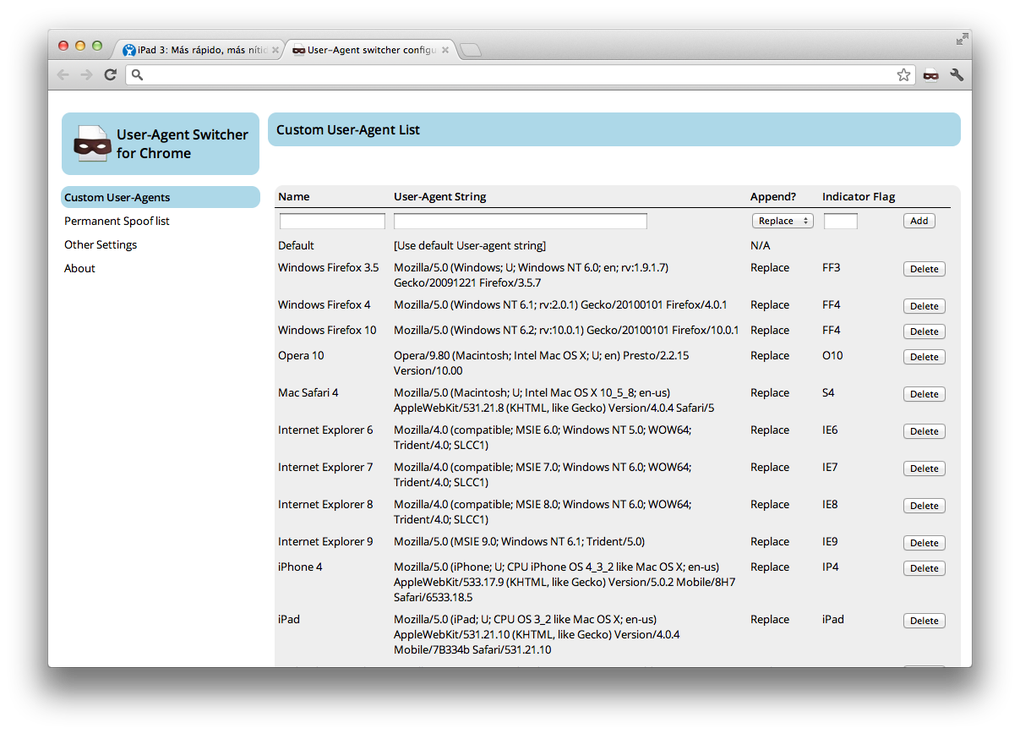
User-Agent Switcher’s core function is to allow users to easily and seamlessly switch between various user-agent strings. This involves not only altering the user-agent string sent in HTTP requests but also modifying relevant JavaScript objects within the browser to ensure complete consistency. This comprehensive approach helps eliminate inconsistencies that can sometimes arise when only the HTTP header is altered.
The application provides a wide range of pre-configured user-agent strings, encompassing a broad spectrum of browsers, operating systems, and devices. This readily available library eliminates the need for users to manually search for and input these strings. Moreover, User-Agent Switcher offers advanced customization options, allowing users to:
-
Add custom user-agent strings: Users can input their own user-agent strings, expanding the tool’s versatility and allowing for precise emulation of unique browser configurations.
-
Manage and edit existing strings: The application provides a mechanism for managing and editing the pre-existing user-agent strings, allowing users to modify them according to their specific requirements.
-
Create a permanent spoof list: Users can create a list of URLs for which the user-agent will be automatically switched, streamlining the testing process. This automated switching is particularly beneficial when testing websites that employ sophisticated detection methods to identify user agents and enforce restrictions based on browser identification.
-
Import and export settings: The ability to import and export settings enables users to share and back up their customized configurations, ensuring seamless transfer between different systems or installations. This simplifies the process of replicating a specific user-agent environment across multiple machines.
User-Agent Switcher: A Tool for Developers and Casual Users Alike
While initially designed with web developers in mind, User-Agent Switcher’s versatility makes it a valuable tool for a broader audience. Developers leverage it for:
-
Cross-browser compatibility testing: Developers can use User-Agent Switcher to thoroughly test the compatibility of their websites across different browsers and operating systems, ensuring consistent functionality and rendering across all target platforms.
-
Responsive web design verification: User-Agent Switcher facilitates the testing of responsive designs, confirming that web pages adapt seamlessly to various screen sizes and device orientations.
-
Debugging browser-specific issues: The tool assists in identifying and troubleshooting browser-specific bugs or inconsistencies, streamlining the debugging process.
-
Testing website security measures: Developers use it to evaluate the effectiveness of security measures and restrictions by simulating access from various browsers and devices.
However, User-Agent Switcher’s utility extends beyond the developer community. Casual users find it beneficial for:
-
Accessing websites with browser restrictions: Some websites block access from particular browsers or operating systems. User-Agent Switcher provides a method of bypassing these restrictions, enabling access to content that might otherwise be unavailable. This is particularly relevant in situations where specific content or functionality is restricted based on the perceived device or browser in use.
-
Testing website functionality across different devices: Users can simulate different devices to see how a website behaves on various screen sizes and platforms without the need for multiple physical devices.
-
Improving website browsing experience: By switching user-agents, users can potentially overcome display issues or optimize content rendering based on their device capabilities.
Advantages and Disadvantages of Using User-Agent Switcher
User-Agent Switcher provides several advantages, including:
-
Ease of use: The application features a user-friendly interface, making it easy to navigate and manage user-agent strings.
-
Comprehensive functionality: The tool offers a broad range of features, including pre-configured strings, custom string creation, automated switching for specific URLs, and import/export capabilities.
-
Enhanced debugging and testing: It simplifies the process of cross-browser testing, responsive design verification, and browser-specific issue debugging.
- Accessibility: It helps circumvent website restrictions, enabling access to content that might otherwise be unavailable.
Despite its numerous advantages, it’s important to acknowledge the potential drawbacks:
-
Privacy concerns: While User-Agent Switcher itself doesn’t directly compromise user privacy, altering user-agent strings might affect how websites track and collect user data.
-
Potential for website malfunction: In rare cases, modifying the user-agent string can lead to unexpected behavior or malfunctions on some websites. Clearing cookies and reverting to the default Chrome user-agent often resolves these issues.
-
Ethical considerations: It’s crucial to use User-Agent Switcher responsibly and ethically. Bypassing website restrictions should be done cautiously and should not be employed for malicious purposes.
Conclusion: User-Agent Switcher – A Versatile Tool with Broad Applications
User-Agent Switcher is a highly adaptable tool that serves a diverse range of users, from seasoned developers to casual internet users. Its ability to seamlessly switch between various user-agent strings provides a flexible mechanism for testing website compatibility, circumventing browser restrictions, and optimizing the browsing experience. While it presents certain considerations regarding privacy and potential website malfunctions, its utility significantly outweighs its limitations, making it a valuable asset for anyone seeking control over their browser’s identity and access to online content. Always remember to use this tool responsibly and ethically.
File Information
- License: “Free”
- Version: “1.0.12”
- Latest update: “February 22, 2023”
- Platform: “Windows”
- OS: “Windows 8”
- Language: “English”
- Downloads: “68.4K”


