
uTorrent has earned a prominent place among torrent users globally, celebrated for its intuitive interface, minimal CPU resource consumption, and comprehensive download details. This portable version elevates its usability, allowing you to harness the power of uTorrent wherever you go, without the need for installation. This comprehensive guide explores the features, advantages, and considerations surrounding uTorrent Portable.
What is uTorrent Portable?
uTorrent Portable is a self-contained, standalone version of the popular uTorrent BitTorrent client. Unlike the traditional installable version, uTorrent Portable doesn’t require installation on your system. This makes it incredibly convenient for users who want to access their torrent downloads from various computers or prefer to avoid modifying their system’s registry or file structure. The portability aspect is its key advantage, offering the same robust functionality as its desktop counterpart without the commitment of a traditional installation process. Simply run the executable file from any removable storage device (like a USB drive) or a dedicated folder on your hard drive, and you’re ready to download torrents.
Key Features and Functionality
uTorrent Portable mirrors the functionality of its installable counterpart, offering a comprehensive suite of features designed for efficient and customizable torrent management. These key features include:
-
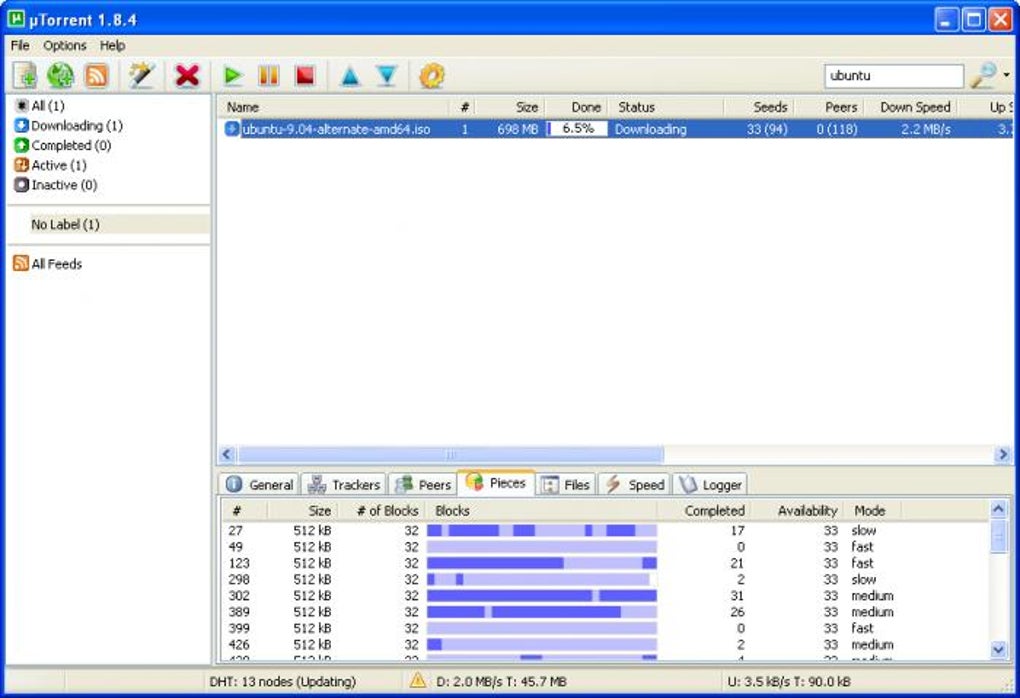
Intuitive Interface: The user interface remains consistent with the desktop version, providing a clear and easy-to-navigate layout. Users familiar with uTorrent will instantly feel at home with the portable version. The interface is designed to be both user-friendly and informative, allowing for easy monitoring of download progress and management of active torrents.
-
Simultaneous Downloads: Handle multiple downloads concurrently without experiencing significant system lag. uTorrent’s lightweight design ensures smooth performance even when managing several active torrents. This is crucial for users who frequently download multiple files simultaneously.
-
Comprehensive Download Details: Access detailed information about each active torrent, including download speed, estimated time of completion, and file size. This allows for precise monitoring and management of download processes. The program provides granular control over individual torrent settings.
-
User-Defined Labels: Organize your downloads effectively using custom labels. This feature aids in categorizing downloads for efficient management and retrieval. This organizational feature is essential for users with numerous active and completed downloads.
-
Easy Torrent Search: Locate new torrents quickly and efficiently using the integrated search function or RSS feeds. This streamlined search functionality enhances the download experience, making the process quicker and simpler.
-
RSS Feed Reader: Stay updated on the latest torrents from your favorite websites through built-in RSS feed support. This integration ensures that you are aware of new releases and updates in a timely manner, eliminating the need to manually check multiple websites.
-
Lightweight and Resource-Efficient: Consume minimal system resources, ensuring optimal performance even on less powerful computers. This is a crucial feature for users with older or less powerful machines, minimizing resource consumption.
-
Customizability: Customize the settings to match your individual preferences. The complete preferences menu allows for adjustments to suit your downloading habits and priorities, enabling a more personal user experience.
Advantages of Using uTorrent Portable
The portability aspect brings several significant advantages:
-
Convenience: Access your torrent client from any computer without installing software on each machine. This mobility is highly valued by users who frequently work from different computers.
-
Security: Avoid potentially unwanted modifications to your main system files and registry. This reduces the risk of system conflicts or unintended consequences associated with installing software.
-
Easy Backup and Restore: Easily back up and restore your torrent settings and data. This ensures that your settings and data are always secure and easily accessible.
- System Maintenance: Avoid cluttering your system with extra software. This helps maintain a clean system, promoting better performance and efficiency.
Disadvantages and Limitations
While uTorrent Portable offers significant advantages, it also presents certain limitations:
-
File Association: As a portable application, you may need to manually associate .torrent files with the program. This requires an extra step, unlike traditionally installed applications that can usually handle file associations automatically. However, this functionality can be usually be configured within uTorrent’s settings.
-
Portability Requires External Storage: The application needs to reside on an external storage device or a dedicated folder. It cannot be integrated into the operating system in the same way as a standard installed application. This means you always need to have access to the drive or folder containing the application.
-
Permissions: You might encounter permission issues when accessing certain files or folders, depending on the system’s security settings. This can be mitigated by running the application with administrator privileges, though that’s not always recommended.
Setting up and Using uTorrent Portable
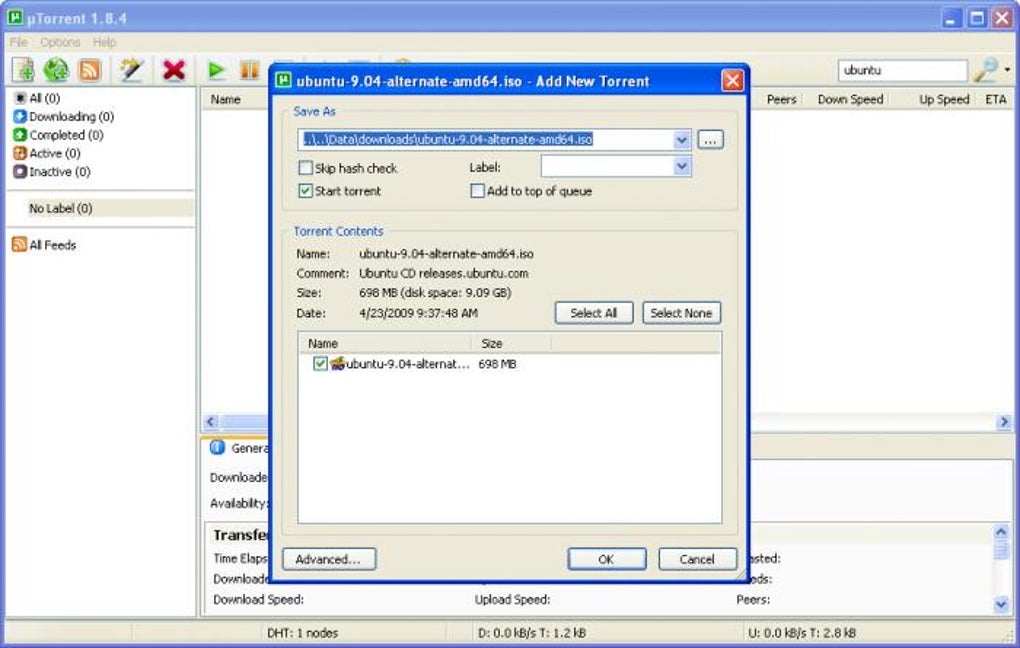
Using uTorrent Portable is straightforward. Simply download the executable file from a reputable source and extract the contents. Run the executable, and the interface will be identical to the installed version. You can configure your settings and add torrents just as you would with the standard application. Remember to keep the uTorrent Portable folder and its contents intact to maintain your settings and downloaded files.
uTorrent Portable vs. Installed uTorrent: A Comparison
| Feature | uTorrent Portable | Installed uTorrent |
|---|---|---|
| Installation | No installation required | Requires installation |
| Portability | Highly portable; run from any location | Not portable; installed on a specific system |
| System Impact | Minimal system impact | Slightly greater system impact |
| File Association | Requires manual configuration (usually) | Automatic configuration (typically) |
| Data Storage | Data stored in the application’s folder | Data stored in designated user directories |
| Convenience | Extremely convenient for multiple-system use | Less convenient for multiple-system use |
Security Considerations and Best Practices
While uTorrent Portable itself is a safe and reliable application when downloaded from official sources, always remain cautious regarding the torrents you download. Using a reliable antivirus program alongside uTorrent Portable is highly recommended to mitigate potential risks associated with downloading files from untrusted sources. Remember that the inherent risks associated with torrenting remain regardless of the client used; caution and responsible downloading practices are paramount. Always scan downloaded files with your antivirus software before opening them.
Furthermore, ensure that you download uTorrent Portable only from the official BitTorrent website or trusted sources to avoid potentially malicious software disguised as legitimate software. Verify the integrity of the downloaded file using checksums if possible, to ensure it hasn’t been tampered with during download.
Conclusion
uTorrent Portable provides a powerful and convenient way to access the functionality of uTorrent without the commitment of a full installation. Its portability and lightweight design make it an excellent choice for users who require flexible access to a torrent client across multiple systems or prefer a minimal system footprint. While some limitations exist, the benefits far outweigh the drawbacks for many users. By understanding its strengths and weaknesses, and by practicing safe downloading habits, you can confidently leverage the power of uTorrent Portable for your torrenting needs.
File Information
- License: “Free”
- Latest update: “May 24, 2023”
- Platform: “Windows”
- OS: “Windows NT”
- Language: “English”
- Downloads: “965.4K”
- Size: “2.41 MB”


