
v2rayN is a free, open-source utility for Windows users designed to simplify the management of V2Ray servers. V2Ray itself is a powerful, versatile tool for creating secure and private network connections, often used to bypass censorship and enhance online privacy. While V2Ray offers extensive capabilities, it can be challenging to configure and manage directly. v2rayN bridges this gap, providing a user-friendly interface to control and monitor V2Ray connections, making this advanced technology accessible to a wider audience. This comprehensive guide explores the features, benefits, drawbacks, and overall usability of v2rayN.
Understanding V2Ray and its Capabilities
Before delving into the specifics of v2rayN, it’s crucial to understand the underlying technology: V2Ray. V2Ray is a sophisticated network tool that operates as a flexible proxy server. Unlike simpler VPNs, which often use a single protocol, V2Ray supports multiple protocols, allowing for greater customization and adaptability. This adaptability is a key strength, making it effective in various network environments and capable of evading even sophisticated censorship mechanisms.
The supported protocols, such as VMess and Shadowsocks, each have unique characteristics regarding speed, security, and obfuscation. VMess, for example, is generally considered faster and more secure than Shadowsocks, while Shadowsocks might offer better obfuscation in some specific scenarios. The choice of protocol is often dependent on the specific network conditions and the level of security required. V2rayN allows users to easily switch between these protocols, enabling them to optimize their connection based on their needs.
Furthermore, V2Ray’s architecture facilitates advanced features like custom routing. This allows users to selectively route specific applications or websites through the V2Ray proxy while leaving others to use their standard internet connection. This level of granularity is invaluable for users who need to balance privacy concerns with the need for unrestricted access to certain services. For example, a user might choose to route all their browsing traffic through V2Ray for enhanced privacy, while simultaneously keeping their online gaming traffic on their regular connection to avoid high latency.
v2rayN’s User Interface and Functionality
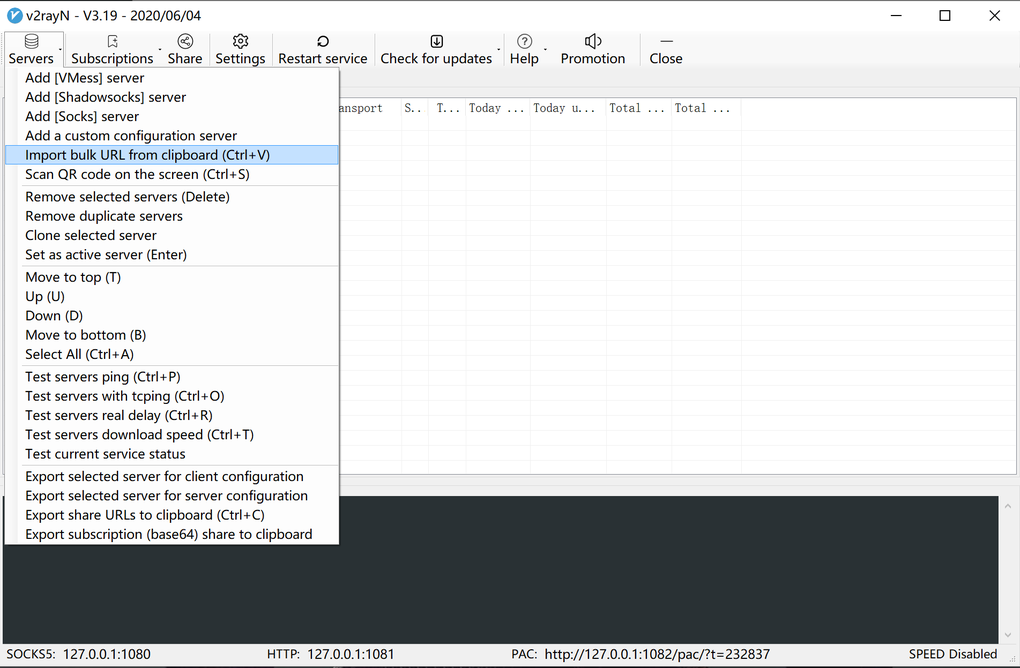
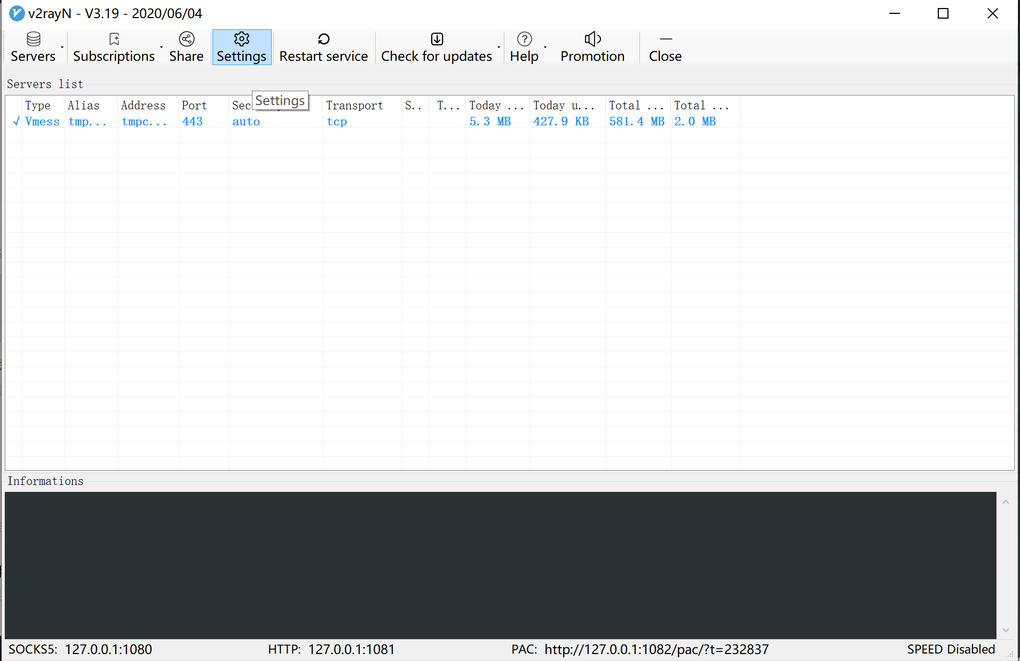
v2rayN’s primary function is to provide a user-friendly interface for managing V2Ray configurations. It handles the complexities of V2Ray’s setup, allowing users to connect to servers without needing to understand the intricate details of the underlying technology. This simplification is particularly beneficial for users who lack advanced networking knowledge. The application provides a clear, intuitive interface for managing multiple servers, switching between them effortlessly, and monitoring connection status in real-time.
One of v2rayN’s strengths lies in its ability to import and export configuration files. This makes it easy to share server settings with others or to quickly switch between different configurations. This feature is particularly valuable for users who may have multiple server setups for different purposes or who need to frequently update their configurations. The ability to easily manage multiple configurations eliminates the need for repetitive manual configuration, saving considerable time and effort.
Furthermore, v2rayN offers robust connection monitoring capabilities. Users can track their connection speed, latency, and data usage, allowing them to quickly identify and troubleshoot any potential network issues. This feature allows for better optimization of the connection, ensuring optimal performance and a more stable browsing experience. The real-time data displayed offers immediate insights into the connection’s health and helps users quickly identify and resolve potential issues.
Traffic Obfuscation and Bypassing Censorship
A critical aspect of V2rayN’s functionality is its support for traffic obfuscation. Traffic obfuscation techniques disguise the nature of the network traffic, making it more difficult for network administrators or censors to detect and block V2Ray connections. This is particularly important in regions with strict internet censorship, as it helps users bypass restrictions and access blocked websites and services. V2rayN simplifies the implementation of these techniques, making them accessible to users who may not have the expertise to configure them manually.
This obfuscation is achieved through various methods, depending on the selected protocol and configuration. These methods might involve encrypting the traffic, masking it within seemingly innocuous traffic patterns, or using other techniques to make it harder to identify as V2Ray traffic. The effectiveness of these techniques depends on the sophistication of the censorship mechanisms in place.
Limitations and Challenges of v2rayN
Despite its numerous advantages, v2rayN isn’t without its limitations. One significant drawback is its steep learning curve. While the interface aims for user-friendliness, a basic understanding of networking concepts is still beneficial, especially for initial setup and advanced configuration. Users unfamiliar with concepts like proxies, VPNs, and various network protocols may find the initial setup challenging.
Another drawback is the occasional instability or bugs. Being an open-source project, updates and bug fixes rely on community contributions. While generally reliable, users might encounter unexpected issues from time to time. These issues can range from minor glitches to more significant problems that interrupt connectivity.
The lack of integrated tutorials within the application itself is also a notable limitation. While extensive documentation and community support exist online, the absence of built-in guidance can create a hurdle for new users. The absence of contextual help within the application means users need to actively seek external resources for assistance.
Conclusion: Is v2rayN the Right Choice for You?
v2rayN offers a powerful and versatile solution for managing V2Ray servers, offering enhanced privacy, security, and the ability to circumvent internet censorship. Its user-friendly interface simplifies the process of connecting to and managing V2Ray servers, making advanced network technologies more accessible. However, its steep learning curve, occasional instability, and lack of integrated tutorials can present challenges, particularly for less technically inclined users.
Ultimately, the suitability of v2rayN depends on individual needs and technical expertise. Users comfortable with a bit of a learning curve and willing to navigate occasional technical challenges will find v2rayN a highly rewarding tool for enhancing their online privacy and security. For those seeking a more plug-and-play solution, a simpler VPN service might be a more appropriate choice. For those who value the granular control and advanced features of V2Ray but lack the technical skills for direct configuration, v2rayN offers an excellent middle ground. Its open-source nature and active community provide access to support and continued development, further enhancing its long-term value proposition.
File Information
- License: “Free”
- Latest update: “July 18, 2025”
- Platform: “Windows”
- OS: “Windows 11”
- Downloads: “52.4K”
- Size: “65.82 MB”


