
vanBasco Karaoke Player is a freeware application designed for Windows users who enjoy singing karaoke. Its appeal lies in its simplicity, extensive customization options, and the freedom it offers from subscription-based services. While it may not match the polished experience of some commercial karaoke software, vanBasco provides a functional and surprisingly versatile platform for home karaoke enthusiasts. This review will delve into the software’s features, strengths, weaknesses, and overall user experience, comparing it to both high-end professional setups and other free karaoke applications.
Ease of Use and Interface
One of vanBasco Karaoke Player’s greatest strengths is its intuitive interface. The program launches with six distinct windows, each designed for a specific function, creating a well-organized workspace. The most prominent window is the Playlist, where users can easily browse and add supported Karaoke (.kar) and MIDI (.mid, .midi, .rmi) files. Dragging and dropping files into the playlist is seamless, allowing for quick and efficient song selection.
The Player window serves as the primary control center for playback, featuring standard media player controls like play, pause, stop, and volume adjustment. However, it also integrates additional controls specific to karaoke, offering users granular control over their performance.
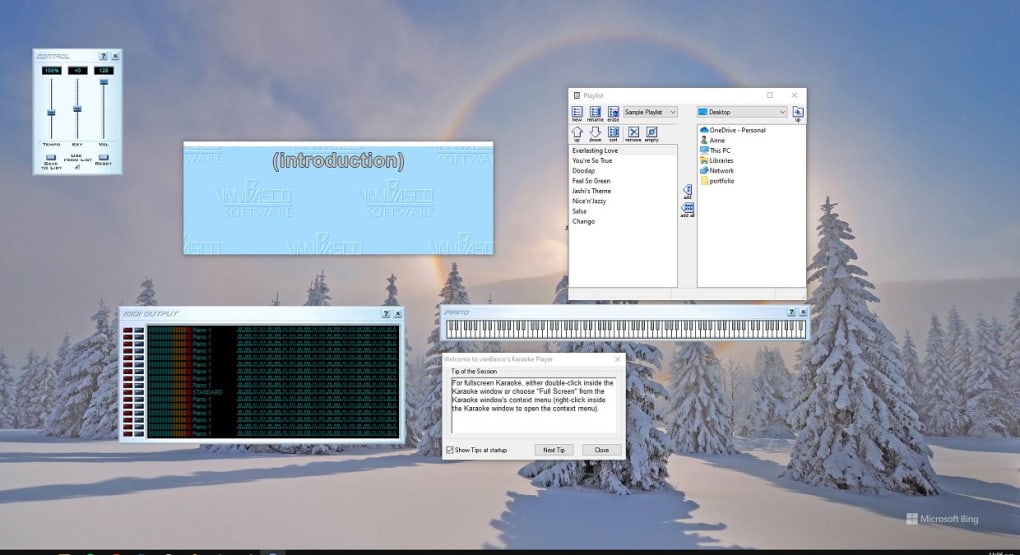
For the singer, the Viewer window is paramount. This window displays the lyrics and any other relevant on-screen information contained within the music file. The user can easily customize the display, adjusting the font size, color, and background to optimize readability. Furthermore, vanBasco boasts a range of downloadable skins, allowing users to personalize the aesthetic, from classic stereo faces and vintage music players to visually striking piano key designs. This level of visual customization greatly enhances the overall karaoke experience.
Advanced Features and Controls
Beyond the basic functionalities, vanBasco offers a set of advanced controls that give experienced users a higher level of creative freedom. The Control window allows for real-time adjustments to the tempo, key, and volume of the backing track. This is especially beneficial for adapting songs to a singer’s vocal range or to accommodate different performance settings.
The Midi Output window provides a detailed visualization of the MIDI data being played, showcasing notes, volumes, and individual instruments. Users can even mute or solo individual instruments, allowing them to tailor the accompaniment to their preferences. This level of control is uncommon in free karaoke software and provides users with advanced capabilities to tweak their sound.
Finally, the Piano window offers a visual representation of the notes played on a piano keyboard, providing a valuable tool for musicians or those interested in a more in-depth understanding of the musical arrangement.
Audio Quality and Song Selection
While vanBasco Karaoke Player excels in its customization and ease of use, its audio quality and song selection present some limitations. The audio quality is generally acceptable for home use, but it may not meet the standards of high-end karaoke systems found in dedicated establishments. The clarity can sometimes be lacking, particularly with older MIDI files. This limitation should be considered, particularly for users who prioritize superior audio fidelity.
The song selection is entirely dependent on the user’s own collection of Karaoke and MIDI files. Unlike subscription-based services, vanBasco doesn’t provide an integrated library of songs. This requires users to actively search for and acquire compatible files, which can be a time-consuming process. While this limitation might be seen as a drawback by some, others might appreciate the freedom to build a custom karaoke library tailored to their own preferences. Finding high-quality Karaoke files may necessitate some dedicated searching across different online resources.
Comparison to Other Karaoke Software
Compared to commercial karaoke software like Karaoke One or KaraFun, vanBasco Karaoke Player presents a different proposition. Commercial options typically boast larger song libraries, more refined audio quality, and a sleeker, more modern interface. However, they often come with a recurring subscription fee. vanBasco’s free nature makes it an attractive alternative for budget-conscious users who prioritize customization and control over a vast pre-built song selection.
While some users might find the visual appeal and advanced features of paid software preferable, vanBasco’s user-friendly nature and flexible controls are valuable assets, especially for users who are more comfortable managing their own music libraries. The ability to tailor the karaoke experience to one’s own preferences is a significant advantage for many users.
Strengths and Weaknesses Summarized
Strengths:
- Freeware: The most significant advantage is its cost-free nature, eliminating any subscription fees.
- Extensive Customization: Users have unprecedented control over the interface, including font, color, background, and the ability to download and use various skins. The audio controls also allow for substantial manipulation of tempo, key, and volume.
- Easy-to-Use Interface: The program is designed with simplicity in mind, making it accessible even for users with limited technical expertise.
- Versatile Controls: Advanced features such as the MIDI output and piano view provide in-depth control and insight into the musical arrangement.
- Multiple Language Support: Facilitates karaoke enjoyment for users who prefer their interface in languages other than English.
Weaknesses:
- Limited Song Selection: The program does not offer an integrated song library, requiring users to source their own compatible files.
- Audio Quality: The audio quality may not meet the standards of high-end karaoke systems. The sound quality is highly dependent on the quality of the source files used.
- Dependence on External Files: The user needs to manage their own library of compatible .kar and MIDI files, requiring effort to build a satisfying collection.
Conclusion
vanBasco Karaoke Player is a surprisingly robust and customizable freeware karaoke solution. While it may lack the polish and extensive song libraries of commercial software, its ease of use, extensive customization options, and advanced features make it a compelling choice for home karaoke enthusiasts who value control and flexibility. Its freeware status is a significant advantage, making it a viable option for budget-conscious users. The software’s strengths lie in its versatility and user-friendly design, allowing users to tailor the karaoke experience to their specific needs and preferences. For those willing to invest the time in acquiring and managing their own karaoke files, vanBasco provides a powerful and enjoyable platform for unleashing your inner superstar. The limitations regarding song selection and audio quality should be considered, but for many, the advantages will outweigh these drawbacks.
File Information
- License: “Free”
- Version: “2.53”
- Latest update: “July 4, 2023”
- Platform: “Windows”
- OS: “Windows ME”
- Language: “English”
- Downloads: “608.4K”
- Size: “815.10 KB”


