
In the vast and ever-evolving landscape of digital entertainment, software emulators play a crucial role in preserving gaming history and allowing enthusiasts to revisit beloved classics. Among these, VBA-Link stands out as a noteworthy contender, particularly for fans of the iconic Game Boy Advance (GBA) console. Developed by denopqrihg, VBA-Link is an advanced, open-source gaming emulator that offers a gateway to the rich library of GBA titles, distinguished by its unique multiplayer capabilities and a compelling commitment to being completely free. This article delves deep into the functionalities, significance, and broader context of VBA-Link, exploring its features, how it fits into the larger software ecosystem, and what users can expect from this powerful yet accessible tool.
At its core, VBA-Link serves as a dedicated Game Boy Advance emulator, capable of running Game Boy (GB), Game Boy Color (GBC), and Game Boy Advance (GBA) ROMs. It positions itself as a robust alternative to other well-known emulators, most notably the popular VisualBoy Advance (VBA). However, VBA-Link carves its own niche by offering significant advantages, primarily its cost-free nature and enhanced multiplayer functionality. For many users, the barrier to entry for quality emulation software can often be financial, but VBA-Link eliminates this concern entirely, making it an attractive option for a wide audience.
Unpacking VBA-Link: Features and Functionality
VBA-Link is not just another emulator; it’s a meticulously crafted application designed to deliver an authentic and versatile GBA gaming experience. Its feature set is tailored to cater to both casual players and dedicated enthusiasts, offering a blend of ease of use and advanced customization options.
Core Emulation and Multiplayer Prowess
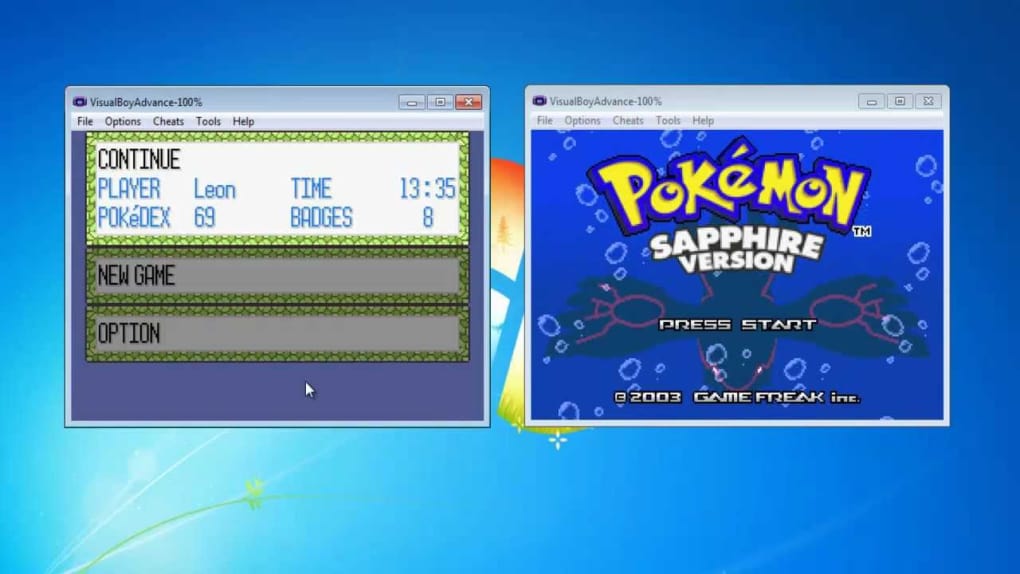
The primary function of VBA-Link is to emulate Game Boy Advance systems, enabling users to play GBA ROMs on their personal computers. What truly sets it apart is its exceptional support for multiplayer gaming. VBA-Link can support up to four common Game Boy simulators simultaneously, allowing for local multiplayer sessions where each player runs a separate instance of the emulator, all powered by GBA ROMs. This feature is a game-changer for recreating the social aspect of classic GBA gaming, where link cables were essential for competitive or cooperative play.
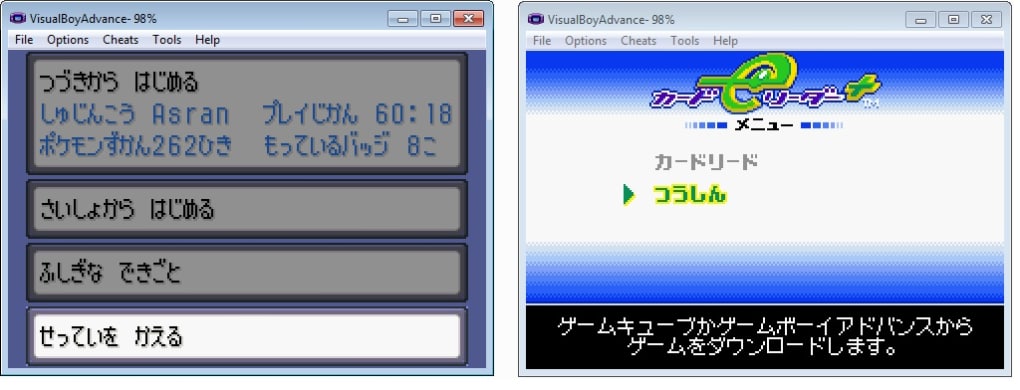
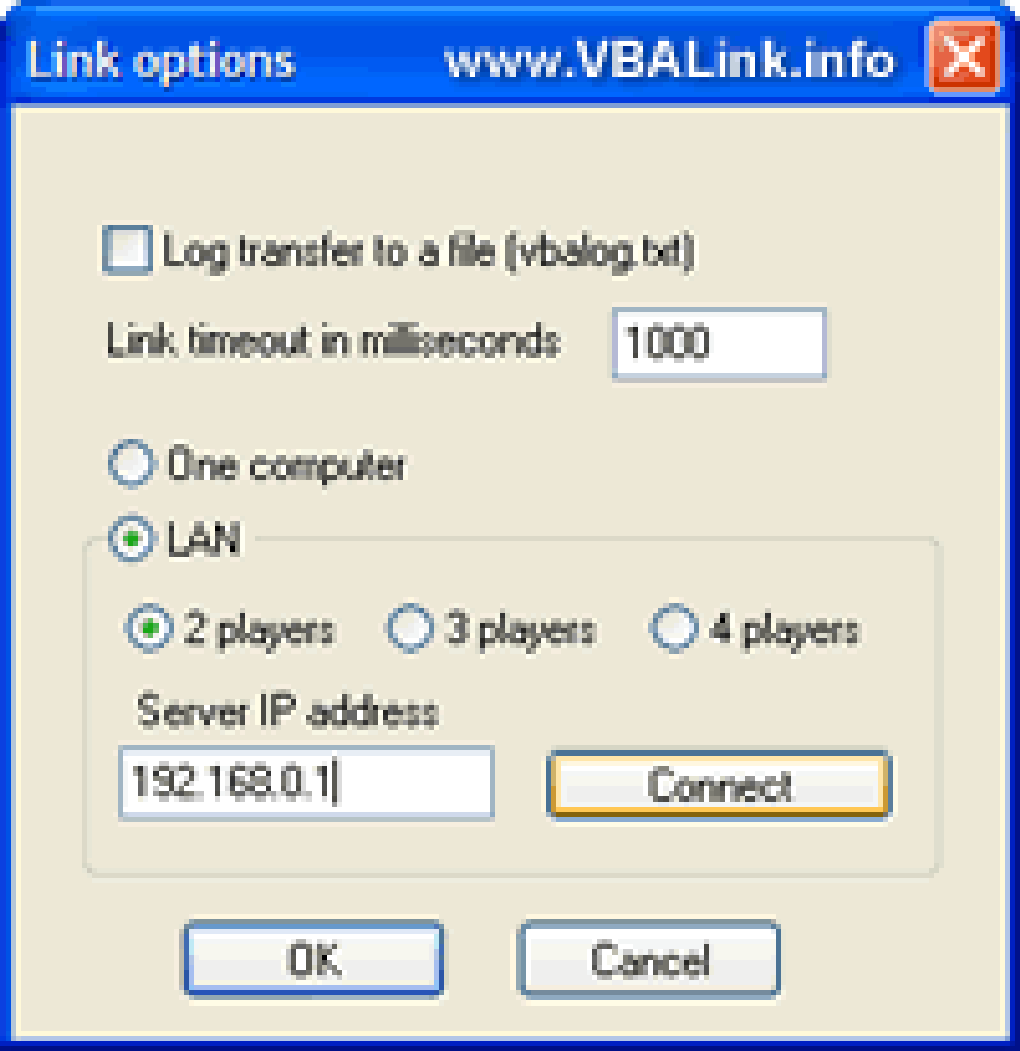
Beyond local multi-instance play, VBA-Link extends its multiplayer capabilities to network connectivity. It is designed to connect as many as four different computers via a Local Area Network (LAN connection). This means friends can join forces or compete against each other from separate machines, provided they are within the same network. The developer has even addressed previous connectivity issues in newer versions, with the emulator now supporting wireless LAN adapters, further enhancing its flexibility and accessibility for modern gaming setups. The promise of uncompromised transfer speeds in multiplayer mode ensures a smooth and enjoyable experience, preventing frustrating lag or disconnections that can plague online emulation.
User Experience and Customization
Downloading and installing VBA-Link is a straightforward process. The software is distributed as a ZIP file, which users can easily download and then extract to their preferred folder. This simplicity ensures that even less tech-savvy individuals can get started quickly. Once installed, users are greeted with a highly customizable interface.
Within the setup menu, there are numerous options allowing users to adjust the emulator’s settings according to their preferences. These settings can be modified at any time, simply by navigating through the appropriate menus. This level of customization extends to various aspects of the emulation, from graphics and audio to control mapping. For instance, players can configure their keyboards or gamepads to mimic the GBA’s controls, ensuring a comfortable and familiar gaming experience.
VBA-Link also incorporates practical features that enhance usability. Transfer logs are offered, allowing users to review all emulation history when required. This can be particularly useful for troubleshooting or simply keeping track of gaming sessions. Furthermore, the ability to save games within dedicated folders provides an organized way to manage multiple game files and save states, ensuring progress is never lost.
Performance and Compatibility
Performance is a critical aspect of any emulator, and VBA-Link addresses this with “speed tweaks.” These adjustments help to mitigate any processing issues that might arise, ensuring that games run smoothly and accurately, even on less powerful systems. The focus on optimization means that users are less likely to encounter slowdowns or graphical glitches, which are common pitfalls of poorly optimized emulators.
In terms of platform compatibility, VBA-Link is primarily designed for PC and Linux systems. This broad support ensures that a significant portion of the computing public can access and utilize the emulator. The current version, 1.8, was last updated on September 22, 2021, and is compatible with Windows operating systems from Windows 8.1 onwards. Its relatively small size of 577.47 KB means it’s light on system resources and quick to download.
However, it’s important to note the limitations. One of the stated cons of VBA-Link is the current lack of support for MAC users and smartphones. While this might be a drawback for some, it reinforces the emulator’s dedicated focus on the PC and Linux platforms, where its features are fully realized. Additionally, certain modes, such as UART and Joy Bus, are not supported by VBA-Link. While these are niche features often relevant to advanced developers or specific hardware connections, their absence might be a consideration for a very small segment of users.
The Open-Source Advantage
Perhaps one of the most compelling advantages of VBA-Link is its open-source nature. This means there are no fees associated with downloading or using the software. This not only makes it accessible to everyone but also fosters a community-driven development model, even if implicitly. The open-source ethos often leads to greater transparency, security (as code can be reviewed by anyone), and continuous improvement through community contributions or feedback. For users, “free” means they can experiment with GBA emulation without any financial commitment, making VBA-Link an excellent entry point into the world of classic gaming.
The Broader Landscape of Gaming Emulators and Digital Entertainment
VBA-Link, while focused on Game Boy Advance emulation, exists within a much larger ecosystem of digital entertainment and software. Emulators, in general, play a vital role in preserving the history of video games, allowing current and future generations to experience titles that might otherwise be lost to obsolete hardware.
Emulators as Archivists of Gaming History
The Game Boy Advance itself was a revolutionary handheld console, boasting a vibrant library of games across numerous genres. From “Action” titles that demanded quick reflexes to “Adventure” games offering expansive worlds, “Puzzle” games challenging the mind, and “Role Playing” games providing epic narratives, the GBA had it all. Emulators like VBA-Link ensure that these experiences remain accessible. They serve as a digital archive, allowing enthusiasts to delve into the history of genres like “Strategy” or “Simulation,” or revisit beloved characters and storylines.
The provided categories, such as “Games,” “Action,” “Adventure,” “Arcade,” “Board,” “Card,” “Casino,” “Educational,” “Family,” “Music,” “Puzzle,” “Racing,” “Role Playing,” “Simulation,” “Sports,” “Strategy,” “Trivia,” “Utilities,” and “Word,” represent the vastness of gaming. While VBA-Link is a single emulator, it unlocks access to thousands of games spanning these very categories on the GBA platform. This contribution to digital entertainment is invaluable, extending the lifespan of classic titles far beyond their original hardware.
Connecting to Modern Gaming Trends
In today’s gaming landscape, discussions often revolve around “Best Free To Play Games” or “Best PC Games.” While VBA-Link doesn’t directly fall into these categories as a game itself, it empowers users to access a trove of classic “free to play” (as in, no cost for the emulator) experiences. It highlights the enduring appeal of retro gaming, which often complements modern gaming habits. Many players enjoy switching between cutting-edge “PC Games” and nostalgic trips down memory lane via emulators.
The mention of different operating systems like “Windows,” “Android,” “Mac,” and “iPhone” also underscores the multi-platform nature of modern computing. VBA-Link’s specific focus on Windows and Linux means it caters to a significant segment of PC gamers, but its absence on Mac and mobile platforms highlights an area for potential future development or the need for alternative emulators for those devices. This multi-platform reality also ties into the concept of “Web Apps” and “PWA” (Progressive Web Apps), suggesting a future where even emulators might become accessible through browsers, though VBA-Link currently operates as a standalone desktop application.
Beyond Gaming: VBA-Link within the Ecosystem of Utilities and Open-Source Software
While its primary purpose is gaming, VBA-Link also exemplifies how software can cross categories, functioning as a “Utility” and embodying the principles of “open-source” development. Its technical characteristics and free availability place it firmly within a broader technological context.
Emulators as Essential Utilities
The “Utilities & Tools” category encompasses a wide array of software designed to assist users with various computing tasks, ranging from “File Managers” and “File Compression” to “Data Recovery” and “Screen Capture.” An emulator, in essence, is a utility. It provides the necessary environment to run software (GBA ROMs) that would otherwise be incompatible with modern operating systems. It’s a bridge between past and present technology, making it an indispensable tool for anyone wishing to engage with retro content.
The fact that VBA-Link comes as a ZIP file neatly connects it to “File Compression” tools, as users need to extract its contents before use. The ability to save games in “dedicated folders” relates to efficient “File Management.” Although not directly performing tasks like “Bar Code Scanning” or “Printer & Fax” management, VBA-Link’s role as an enabler of other software functionality aligns it conceptually with the broader utility landscape.
The Philosophy of Open-Source and Development
VBA-Link’s open-source nature is a significant point of discussion, tying it into the “Development & IT” section of the software ecosystem. Open-source software often thrives on community contributions and transparent development. While developer “denopqrihg” is the listed creator, the absence of fees implies a commitment to software accessibility rather than commercial gain. This mirrors the spirit of many projects found under “Programming Languages,” “IDEs/Source Editors,” and “Development Kits,” where the focus is on creating tools and sharing knowledge.
The principles behind open-source software like VBA-Link align with the broader trends in “IT & Development,” where collaboration and shared resources are increasingly valued. This model benefits users by providing high-quality software without a price tag and often leads to more stable and secure applications over time, as code can be scrutinized and improved by a wider audience. It’s a testament to the power of independent developers contributing to the digital commons.
Even categories like “AI” can have tangential connections. While VBA-Link is not an AI application, the advancements in “AI Image Generator & Editor” or “AI Audio” could, in the future, be integrated into emulators to enhance graphical fidelity or audio quality of classic games through upscaling and restoration techniques, offering a glimpse into how different software domains might converge.
Ensuring a Secure and Optimized Emulation Experience
While VBA-Link offers a fantastic, free solution for GBA emulation, it’s crucial for users to approach any software download with a focus on “Security & Privacy” and to ensure an “Optimized” setup for the best experience.
Secure Downloading and Installation Practices
When downloading any software, including VBA-Link, the source of the download is paramount. While VBA-Link is a legitimate emulator, users should always ensure they download it from trusted repositories or official developer pages. On PhanMemFree.org, for instance, VBA-Link is listed with a “Security Status” and is verified as free from malicious code. However, in the wider internet, vigilance is key. This directly ties into categories like “Antivirus,” “Firewalls,” and “Web Browsers” from the “Security & Privacy” section.
Users should always have a reliable “Antivirus” program installed to scan downloaded files. A “Firewall” helps monitor network traffic, especially when using VBA-Link’s LAN multiplayer features. Furthermore, using a secure “Web Browser” (from the “Browsers” category) with “Add-Ons & Tools” like ad blockers can prevent accidental clicks on malicious links. Services like “VPNs” can also add an extra layer of privacy, though less directly related to the emulator’s core function. The basic practice of extracting the ZIP file into an appropriate folder and understanding the software’s permissions is a fundamental aspect of secure computing.
Optimizing Your PC for Emulation
To truly enjoy the GBA experience through VBA-Link, an optimized PC setup is beneficial. Although VBA-Link is lightweight (577.47 KB) and only requires Windows 8.1 or higher, ensuring your system runs efficiently enhances performance. The “speed tweaks” mentioned in VBA-Link’s features are designed to help, but a well-maintained operating system contributes significantly. This includes regular system updates, sufficient RAM, and a capable processor.
For users keen on maximizing their gaming experience, categories like “Utilities & Tools” offer relevant applications. “File Managers” help keep your ROM library organized, while system cleaning tools can free up resources. Even considerations from “Productivity” like “Document Management” (for game manuals or guides) or “Project Management” (for organizing a large retro gaming collection) can indirectly enhance the emulation experience.
The multiplayer aspect via LAN connection also brings “Internet & Network” considerations into play. A stable network connection is essential for smooth multiplayer sessions. “Download Managers” (from “Internet & Network”) could be used for efficiently acquiring game ROMs (ensuring legal acquisition where applicable), and understanding “Wifi” settings can optimize wireless LAN performance for VBA-Link.
Ethical Considerations and Copyright
A final, yet crucial, aspect of using emulators like VBA-Link involves ethical and legal considerations surrounding game ROMs. While the emulator itself is legal and free, the distribution and acquisition of copyrighted game ROMs can be a gray area. Users should always ensure they own the original game cartridges for the ROMs they play, or acquire ROMs from sources where the games are in the public domain or explicitly authorized for free distribution. This ties into the broader discussions of intellectual property and digital rights, which are important facets of the digital world.
Conclusion
VBA-Link stands as a testament to the enduring appeal of classic gaming and the power of open-source development. As a free, advanced Game Boy Advance emulator, it offers a compelling package for enthusiasts seeking to revisit GBA classics on their Windows or Linux PCs. Its standout features, particularly its robust LAN multiplayer support and user-friendly customization options, differentiate it from other emulators in the market.
While it has its limitations, such as the lack of support for Mac and mobile platforms and specific niche modes like UART and Joy Bus, its strengths far outweigh these drawbacks for its target audience. The commitment to a no-fee, open-source model makes it incredibly accessible, fostering a broad community of retro gamers.
VBA-Link is more than just a piece of software; it’s a bridge to gaming history, a utility for digital preservation, and an example of how independent developers contribute meaningfully to the digital landscape. By understanding its features, its place within the broader software ecosystem of PhanMemFree and beyond, and by adhering to best practices for security and optimization, users can unlock countless hours of nostalgic entertainment with this exceptional Game Boy Advance emulator. Its continued availability and focus on a smooth, multiplayer-centric experience ensure that the legacy of the GBA lives on, vibrant and accessible to all.
File Information
- License: “Free”
- Version: “1.8”
- Latest update: “September 22, 2021”
- Platform: “Windows”
- OS: “Windows 8.1”
- Downloads: “5.4K”
- Size: “577.47 KB”


