
VCam is a virtual camera application for Windows that allows users to record, play, and edit videos. While no longer actively updated, it maintains a loyal following due to its straightforward functionality and compatibility with various applications. This detailed guide explores its features, functionality, history, and alternatives available in the current market.
VCam: Features and Functionality
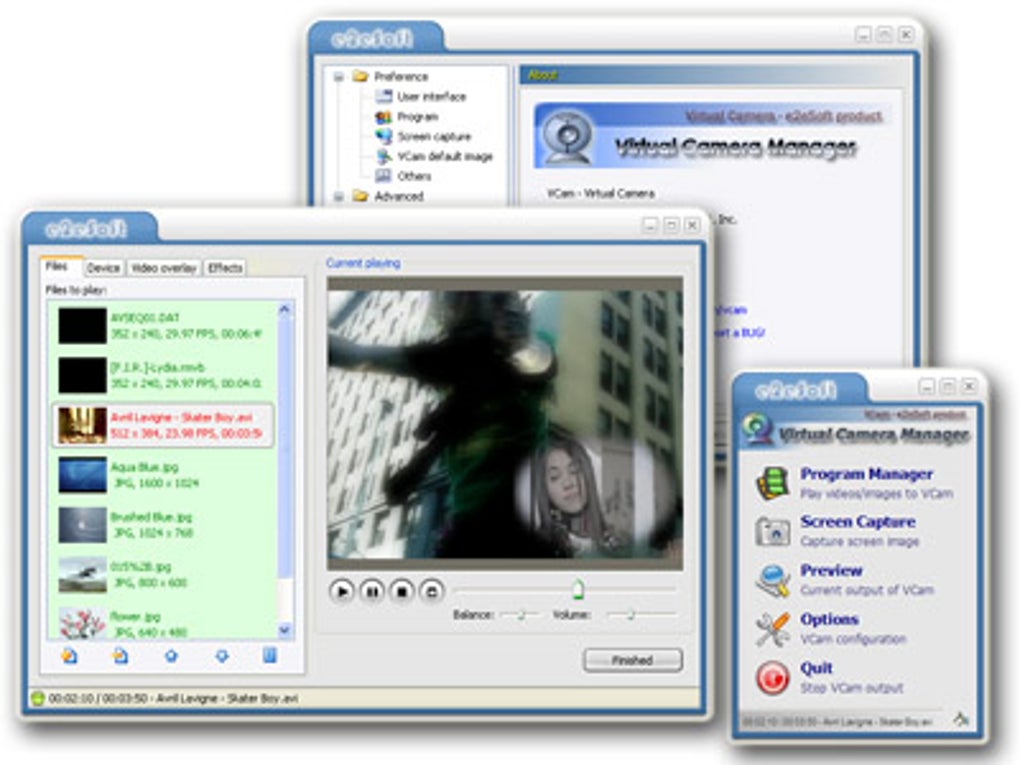
VCam, a WDM (Windows Driver Model)-based software camera developed by e2eSoft, functions as a virtual webcam, seamlessly integrating with applications that support camera input. This includes popular communication platforms like MSN Messenger, Yahoo! Messenger, Skype, and QQ, as well as video conferencing software, video editing tools, and video monitoring applications. Its versatility extends beyond simple video chatting; users can leverage VCam to share pre-recorded movies, images, or even their desktop screen as the video feed.
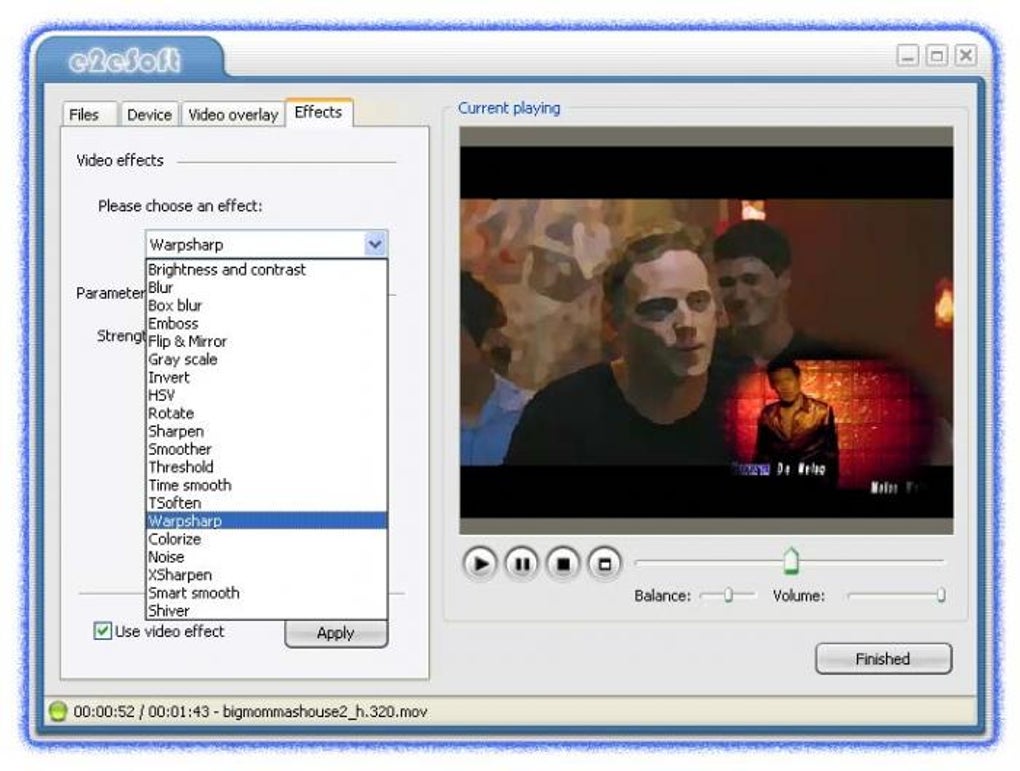
One of VCam’s notable features is its compatibility with various video formats. It supports playback of DV (Digital Video) files and content from digital cameras. Furthermore, VCam offers functionalities for enhancing video output, including image alpha-overlay and various video effects. These effects, while not specified in detail within the original source material, likely include basic adjustments like brightness, contrast, and color saturation, common in video editing software. This capability allows for basic video enhancement or creative modifications before sharing or recording. The inclusion of flash file support, as noted in the update history, indicates its capability to handle various multimedia content. This adaptability makes it suitable for both casual users and those who need a simpler way to add basic visual enhancements to their video streams.
VCam: A Look Back at its History and Reception
VCam’s last update occurred on March 16, 2007, signifying that it is no longer under active development. Despite this, its legacy continues, with a substantial number of downloads reported – a testament to its enduring utility and continued use by many users who find its functionality sufficient for their needs. Its popularity is evident in its high usage in countries like Indonesia, Pakistan, and China, suggesting a wide global reach during its active development phase.
The software’s relatively small file size, compared to other video software, is another contributing factor to its popularity, making it accessible even on systems with limited storage capacity. While user reviews are absent from the provided source, the sustained usage suggests a positive reception during its active years, implying a level of satisfaction among its user base that prompted continued utilization even without further updates. The extensive compatibility with various applications and its relatively simple interface likely contributed to its widespread adoption and continued use. The continued use, even after the cessation of updates, highlights a user base which finds sufficient value in the existing features of the software.
VCam: System Requirements and Availability
The provided information indicates VCam’s compatibility with Windows 2000 and earlier versions. This suggests it might also run on Windows XP, but confirmed compatibility with later versions of Windows is absent from the available source material. Its language support includes English, Dutch, and Swedish, showcasing a relatively limited but diverse target audience.
VCam: Alternatives in the Modern Video Landscape
The current technology landscape offers many alternatives to VCam. Several free and paid options provide similar and enhanced functionalities. Given VCam’s age and lack of updates, exploring modern alternatives is crucial for users seeking current security updates, improved features, and broader compatibility.
Many contemporary virtual camera applications offer superior features compared to VCam. These include:
- Improved video and audio quality: Modern applications often utilize advanced codecs and compression techniques for higher quality video and audio transmission.
- Enhanced video effects and filters: Advanced virtual cameras often provide a much wider array of video effects, filters, and customization options, including background blurring, virtual backgrounds, lighting adjustments, and more.
- Real-time video processing: Current applications frequently offer real-time video processing capabilities, enhancing video quality and adjusting settings dynamically.
- Streamlined integration with streaming platforms: Many current applications are optimized for seamless integration with popular streaming services and video conferencing platforms.
- Regular updates and security patches: Active development ensures regular updates, improving functionality, stability, and security, something VCam lacks.
Some popular alternatives include:
- OBS Studio (Open Broadcaster Software): A free and open-source software for screen recording, live streaming, and video editing. OBS Studio is powerful and highly configurable, providing extensive control over video and audio sources, but might have a steeper learning curve than VCam.
- ManyCam: A widely used virtual camera application that provides features like background replacement, video effects, and integration with various platforms. It offers both free and paid versions, with the paid version providing more features.
- iVCam: Mentioned as an alternative, iVCam positions itself as a free webcam application. However, specific details about its capabilities and comparison with VCam are limited in the source material.
- Webcam Simulator: Also mentioned as an alternative, this appears to be a trial version program with limited information provided.
Each of these alternatives likely offers a wider range of features, better compatibility with modern operating systems, and regular security updates, addressing the limitations of VCam’s outdated status. The choice of alternative depends on individual needs and technical proficiency. Users seeking simple, basic functionality might find equivalents within freeware options, while those requiring advanced features and reliability might prefer paid alternatives.
In summary, VCam holds a place in history as a functional virtual camera for its time. However, its lack of updates and the availability of significantly more advanced and secure alternatives render it less suitable for modern use. For users needing a virtual camera application, exploring current options is strongly recommended. The decision should be based on the desired features, budget, and technical expertise, ensuring selection of a tool that meets current requirements and security standards.
File Information
- License: “Trial version”
- Latest update: “May 24, 2023”
- Platform: “Windows”
- OS: “Windows 2003”
- Language: “English”
- Downloads: “57.1K”
- Size: “17.41 MB”


