
Vector Magic is a robust vector graphics editor available for both online and desktop use. Its powerful capabilities allow users to convert raster images into scalable vector graphics (SVGs), enhancing image quality and making them suitable for various applications. This review will delve into Vector Magic’s features, pros and cons, and compare it to alternative software options.
Vector Magic: From Web App to Desktop Powerhouse
Initially launched as a web-based application, Vector Magic has evolved into a fully-fledged desktop program available for both Windows and macOS. This transition signifies a significant improvement in functionality and user experience. The online version, while convenient, offers limited features compared to its desktop counterpart. The desktop version provides expanded capabilities, enabling users to handle larger files, access more advanced tools, and work offline. This transition caters to users who require more control and processing power for complex vector art projects. The increased power allows for more intricate and detailed vectorizations, pushing the boundaries of what’s achievable with image tracing.
The desktop application offers a seamless experience for both novice and expert users. The intuitive interface incorporates drag-and-drop functionalities, minimizing the learning curve and allowing users to dive straight into their projects. This ease of use, coupled with its powerful features, makes Vector Magic a versatile tool suitable for a wide range of users, from casual hobbyists to professional graphic designers. For professionals, the increased processing power makes dealing with high-resolution images significantly smoother.
Feature-Rich Vector Art Studio
Vector Magic boasts a comprehensive suite of features designed to simplify the creation and manipulation of vector graphics. Its core strength lies in its sophisticated image tracing capabilities. The software utilizes advanced algorithms to accurately convert raster images (like JPEGs, TIFFs, GIFs, and BMPs) into crisp, clean vector formats. This conversion process ensures that the resulting images maintain their quality even when scaled to larger sizes, unlike raster images which can become pixelated upon enlargement. This ability to scale without loss of quality is crucial for applications requiring high-resolution output, such as printing or large-format displays.
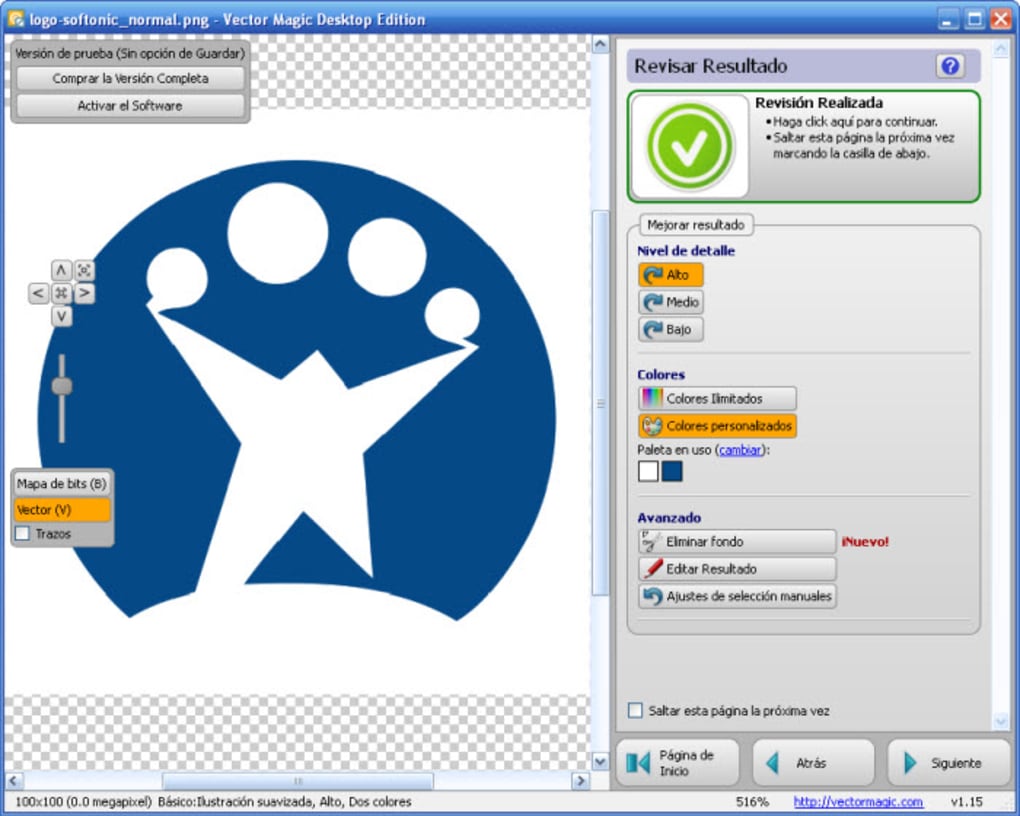
The program supports a wide array of output formats, including JPG, TIF, GIF, and BMP for Windows versions, and GIF and BMP for Mac versions. This flexibility allows users to save their work in the most suitable format for their specific needs. The diverse output options ensure compatibility across different platforms and applications. The support for various formats makes it easier to integrate the created vector images into different workflows.
Beyond its core vectorization capabilities, Vector Magic offers additional tools for refining and editing vector images. While specific details on these tools are limited in the provided text, the mention of “drag-and-drop tools” suggests an interface optimized for intuitive manipulation of vector elements. This points towards the possibility of tools for manipulating nodes, adjusting curves, and modifying vector paths, all common features in professional vector graphics editors.
Pros and Cons: Weighing the Strengths and Weaknesses
As with any software, Vector Magic presents both advantages and disadvantages. Understanding these aspects is crucial for determining its suitability for specific users and projects.
Pros:
- Powerful Vectorization: The software excels at converting raster images into high-quality vector graphics, preserving image sharpness and detail even at large scales. This feature is a major selling point, especially for users working with images that need to be resized frequently.
- User-Friendly Interface: The intuitive design, incorporating drag-and-drop functionalities, makes the software accessible to both beginners and experienced users. This ease of use is critical for broader adoption and reduces the time spent learning the software.
- Large Image Support: Vector Magic can handle very large images, a capability that sets it apart from some competing applications. This feature is particularly beneficial for projects involving high-resolution imagery or large-scale graphics.
- Multiple Output Formats: The support for various output formats ensures compatibility with a wide range of applications and platforms, streamlining the workflow and eliminating format conversion issues.
- Online and Desktop Availability: The dual-platform availability allows users flexibility; they can use the online version for quick tasks or the desktop version for more complex projects demanding greater processing power and offline access.
Cons:
- Not Freeware: Vector Magic requires a paid license for full functionality, limiting accessibility for users with limited budgets. The cost is a significant factor that may prevent some users from utilizing the software.
- Trial Limitations: The free trial version likely restricts saving completed projects, discouraging potential users from fully evaluating the software’s capabilities. The limited trial version makes a full assessment difficult.
- Platform-Specific Output Formats: While offering a broad selection of output formats, slight discrepancies exist between Windows and Mac versions, potentially causing compatibility issues depending on the target platform. The slight differences highlight the need to be aware of the specific output limitations related to each operating system.
Comparison with Alternative Software
While Vector Magic offers a compelling solution for vector graphics creation, several alternative programs cater to similar needs. The suitability of each alternative depends on specific user requirements and preferences. Some alternatives may be free or open source, offering cost-effective solutions. Others may provide more specialized features catering to specific design needs. A comparison would involve examining features like:
- Pricing models: Free, freemium, or subscription-based models have different implications for budget considerations.
- Ease of use: Intuitive interfaces and simple workflows are important for broader user accessibility.
- Functionality: Specific features like advanced editing tools, support for various file formats, and image resolution capabilities vary among different software options.
- System requirements: Compatibility with different operating systems and hardware configurations needs to be carefully considered.
Examples of alternative software could include:
- Aphalina Designer: A free program for Windows, potentially providing a cost-effective alternative, but possibly lacking the advanced features of Vector Magic. The free nature of Aphalina Designer makes it a compelling option for users with budget constraints.
- Inkscape: A free and open-source vector graphics editor, potentially offering a powerful alternative for those who prioritize cost and community support. Being open-source provides greater flexibility and control over the software.
- Adobe Illustrator: A professional-grade vector graphics editor, providing a comprehensive set of tools but at a significantly higher cost. Adobe Illustrator is a powerful option for professionals who demand the highest level of functionality.
Ultimately, the choice between Vector Magic and its alternatives depends on a user’s specific needs, budget, and technical proficiency.
Conclusion: Vector Magic’s Place in the Vector Graphics Landscape
Vector Magic provides a compelling solution for users seeking a powerful and user-friendly vector graphics editor. Its strengths lie in its robust image tracing capabilities, intuitive interface, and support for large images. However, its cost and trial limitations may limit its accessibility. Potential users should carefully weigh these factors against the features and benefits to determine if Vector Magic is the right choice for their specific requirements. Comparing it with alternative software options is crucial to making an informed decision. The software’s position in the market is firmly established, offering a balance between ease of use and powerful features, making it a strong contender for both beginners and professionals.
File Information
- License: “Trial version”
- Version: “1.15”
- Latest update: “September 27, 2022”
- Platform: “Windows”
- OS: “Windows 8”
- Language: “English”
- Downloads: “86.4K”


