
Veeware Audio Editor is a powerful and versatile audio editing software designed for Windows users. Boasting a user-friendly interface, it provides a comprehensive suite of tools for manipulating audio files, making it ideal for both beginners and experienced audio editors. This detailed guide will explore its capabilities, features, and overall user experience, helping you understand if Veeware Audio Editor is the right tool for your audio editing needs.
A Deep Dive into Veeware Audio Editor’s Features
Veeware Audio Editor stands out from the crowd due to its extensive range of features, all seamlessly integrated into an intuitive interface. This allows users to perform a variety of audio editing tasks efficiently and effectively. Let’s delve into the core functionalities:
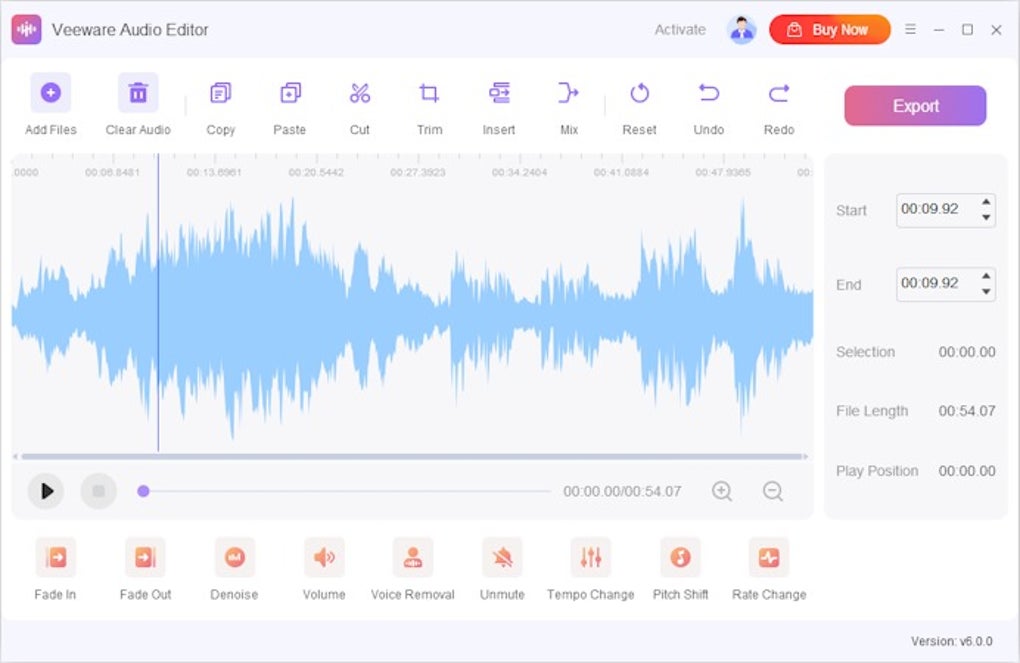
Basic Editing: The software offers a robust set of basic editing tools crucial for any audio editing project. This includes the ability to effortlessly cut, copy, paste, and delete audio segments. Users can precisely trim audio sections with a single click, ensuring accurate edits without the need for complex operations. Merging multiple audio files is also a straightforward process, allowing users to combine different audio tracks seamlessly. The ability to insert audio at any point within a track adds further flexibility to the editing process.
Advanced Editing: Beyond the basic features, Veeware Audio Editor provides an impressive array of advanced tools for fine-tuning audio. Users can easily adjust the volume levels of individual sections, ensuring optimal balance and clarity. The software also facilitates the precise control of audio fades, enabling smooth transitions between different segments. The addition of fade-in and fade-out effects significantly enhances the professional quality of the final audio product.
Noise Reduction and Enhancement: One of the standout features of Veeware Audio Editor is its ability to effectively reduce or eliminate background noise. This is crucial for enhancing the clarity and quality of recordings made in noisy environments. The software also offers advanced noise reduction algorithms that can intelligently identify and suppress unwanted sounds without affecting the desired audio content. This capability significantly improves the overall listening experience by minimizing distractions.
Vocal Manipulation: Veeware Audio Editor provides tools for manipulating vocals, offering users a degree of control over the audio that’s often found only in more expensive and complex professional software. The software allows users to remove vocals entirely from a track, a valuable tool for creating instrumental versions of songs or for isolating specific vocal elements within a mix. Additionally, users can adjust the voice timbre, allowing subtle modifications to the overall tone and character of a vocal track. This opens up creative possibilities for enhancing the aesthetic appeal of vocal performances.
Tempo and Pitch Control: Veeware Audio Editor offers precise control over tempo and pitch, giving users the ability to modify the speed and tone of their audio without compromising the overall quality. Adjusting the tempo allows users to speed up or slow down the audio, while pitch correction can subtly adjust the tone to improve intonation or create unique sonic effects. These advanced controls allow for highly creative and professional audio manipulation.
Silence Management: The software includes tools for managing silence within audio tracks. Users can easily identify and delete periods of silence, thereby optimizing the audio length and improving overall efficiency. This feature proves particularly useful when editing podcasts, interviews, or other recordings that may contain extended periods of silence. The ability to selectively remove silence without impacting the desired content enhances the overall professionalism of the final product.
Other noteworthy features: In addition to the core functionalities mentioned above, Veeware Audio Editor boasts a number of other useful features. The ability to change the speed of the audio without affecting pitch is a valuable asset for creating unique effects or for adapting audio to specific needs. Adjusting the tone without affecting the pitch allows for fine-tuning of the audio’s frequency balance. These capabilities add layers of sophistication to the editing process.
User Interface and Experience
Veeware Audio Editor prioritizes user-friendliness, making it accessible to users of all skill levels. The intuitive interface is well-organized, with all the necessary tools clearly displayed and easily accessible. Even beginners can quickly grasp the basic functionalities and start editing audio with minimal effort. The streamlined workflow ensures that the editing process is efficient and straightforward, allowing users to focus on the creative aspects of their project rather than grappling with complex software.
The software’s clean and uncluttered design prevents users from being overwhelmed by an excessive number of options. However, despite the simplicity of its interface, the software doesn’t compromise on functionality. All the essential editing tools are readily available, while more advanced options are logically grouped and easily navigated. This balance between ease of use and comprehensive functionality is a significant strength of Veeware Audio Editor.
System Requirements and Availability
Veeware Audio Editor is currently available for Windows operating systems, including Windows 11. While specific system requirements are not explicitly stated on readily available information, the relatively small download size (46.74 MB) suggests it is optimized for efficient performance even on lower-spec machines. The software is offered as a paid application, ensuring continuous development and support. Further information on specific system requirements and pricing details can be found on the official Veeware Software website. It’s important to check the latest requirements before downloading and installing the software.
Comparison with other Audio Editors
Veeware Audio Editor competes with a range of audio editing software, from free, open-source options like Audacity to industry-standard professional tools like Adobe Audition. Compared to freeware, Veeware Audio Editor offers a more polished and integrated user experience, with advanced features not commonly found in free alternatives. While professional-grade software may boast more advanced features and extensive capabilities, Veeware Audio Editor provides a compelling balance of features and user-friendliness that makes it a suitable option for both hobbyists and professionals who require a user-friendly yet powerful solution. The software’s focus on ease of use while retaining a powerful feature set distinguishes it from competitors in its price range.
The decision of which audio editor to use depends heavily on individual needs and preferences. Users seeking a free and highly customizable option might prefer Audacity, while those needing advanced, industry-standard tools would opt for Adobe Audition or similar professional software. However, for users looking for a balance between power, ease of use, and an intuitive interface, Veeware Audio Editor presents a strong and competitive alternative.
Conclusion
Veeware Audio Editor is a robust and versatile audio editing software that seamlessly blends power and simplicity. Its intuitive interface, combined with a comprehensive suite of features, makes it an excellent choice for users of all skill levels. Whether you’re a beginner experimenting with audio editing or a professional seeking an efficient tool for everyday use, Veeware Audio Editor provides an effective and user-friendly solution. Its combination of basic and advanced editing tools, along with capabilities for noise reduction, vocal manipulation, and precise tempo/pitch control, makes it a versatile option for a wide range of audio editing tasks. The software’s focus on user experience and its straightforward interface contribute significantly to its overall appeal, making it a compelling contender in the increasingly competitive world of audio editing software.
File Information
- License: “Full”
- Version: “6.0.0”
- Latest update: “July 2, 2024”
- Platform: “Windows”
- OS: “Windows 11”
- Language: “English”
- Downloads: “138”
- Size: “46.74 MB”


