
VEGAS Pro Edit, developed by MAGIX, is a premiere video editing application designed for Windows. It distinguishes itself through a compelling combination of speed, flexibility, and innovative features, making it a strong contender in the professional video editing market. While offering a trial version for users to explore its capabilities, its full potential truly shines for those who need a robust and efficient workflow. This detailed review delves into the software’s strengths and weaknesses, exploring its features, performance, and overall user experience.
Speed and Efficiency: Harnessing the Power of Hardware Acceleration
One of VEGAS Pro Edit’s key selling points is its speed. The software leverages GPU and hardware acceleration to significantly improve rendering times and overall performance. This is particularly crucial for professionals working with high-resolution footage, complex projects, and tight deadlines. The efficient timeline design, optimized for intuitive navigation and manipulation of video clips, audio tracks, and effects, further contributes to the software’s responsiveness. Users can seamlessly navigate through extensive projects, applying edits and adjustments with minimal lag, leading to a fluid and productive editing process.
The color grading workflow is another area where VEGAS Pro Edit excels in terms of speed and efficiency. The software provides a comprehensive set of tools for color correction and enhancement, allowing users to fine-tune the look of their videos with precision. These tools are integrated into the workflow seamlessly, avoiding the need for switching between different applications or complex setups. This streamlined process minimizes the time spent on color grading, freeing up valuable time for other aspects of the project. The combination of hardware acceleration and a well-designed interface results in a noticeably faster and more responsive editing experience compared to some competing software.
Flexibility and Customization: Adapting to Your Workflow
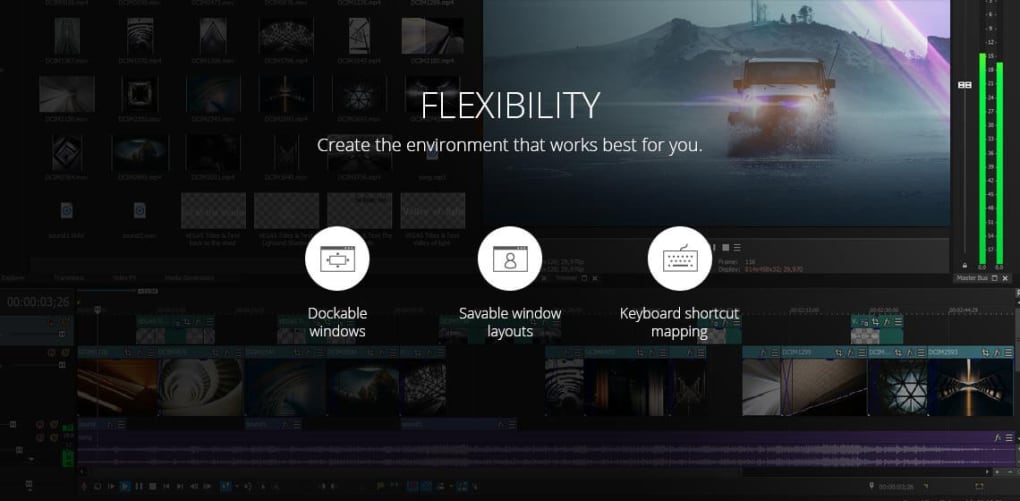
VEGAS Pro Edit emphasizes flexibility by allowing extensive customization of the user interface. The software offers customizable layouts with dockable windows, enabling users to arrange the workspace according to their preferences and the specifics of their project. This adaptability is vital for professionals who have developed unique workflows over time. Being able to tailor the software’s interface to their specific needs allows for greater efficiency and reduces the learning curve often associated with new software.
Furthermore, VEGAS Pro Edit supports keyboard shortcut mapping. This feature allows power users to create custom shortcuts for frequently used functions, further streamlining their workflow. The ability to assign shortcuts to specific tools and actions accelerates the editing process considerably. For those accustomed to working with keyboard shortcuts, this feature is indispensable. The level of customization available is a testament to VEGAS Pro Edit’s commitment to catering to individual user preferences and facilitating highly personalized workflows.
Innovation and Advanced Features: Pushing the Boundaries of Video Editing
VEGAS Pro Edit showcases its innovative approach to video editing through a range of advanced features. Its video stabilization capabilities are particularly noteworthy, effectively smoothing out shaky footage, resulting in professionally polished videos. This feature is especially useful for footage shot on handheld cameras or in dynamic environments, where maintaining stability can be challenging. The motion tracking feature allows for precise tracking of objects within a video, enabling the application of effects or text overlays that follow the tracked object’s movement seamlessly.
The software’s support for HLG (Hybrid Log-Gamma) and HDR (High Dynamic Range) is another sign of its forward-thinking design. These formats are increasingly important for creating high-quality videos for modern displays, delivering superior visual fidelity and a more immersive viewing experience. The inclusion of support for these advanced formats ensures that VEGAS Pro Edit remains relevant and competitive in the ever-evolving landscape of video production technology.
Furthermore, VEGAS Pro Edit’s support for 8K video is significant, highlighting its capacity to handle the demands of today’s high-resolution video content creation. This feature future-proofs the software, allowing users to work comfortably with the latest video formats and resolutions, ensuring compatibility with the ever-increasing demands of modern media production.
Strengths and Weaknesses: A Balanced Perspective
While VEGAS Pro Edit offers numerous advantages, it is essential to acknowledge its potential limitations. One major factor is its resource-intensive nature. The software requires a powerful computer system with sufficient RAM, processing power, and a capable graphics card to perform optimally. Users with less powerful machines may experience slow rendering times or even instability, hindering productivity and potentially making the software unsuitable for their needs. This is a trade-off inherent in the software’s ability to handle demanding tasks such as 8K video editing.
Another area where VEGAS Pro Edit could improve is its rendering speed, although hardware acceleration significantly mitigates this. While the software is generally fast, complex projects with numerous effects and high-resolution footage may still require considerable rendering time. This can be frustrating for users with tight deadlines, necessitating careful planning and potentially utilizing rendering farms or distributed rendering techniques to manage larger projects efficiently.
Despite these drawbacks, the software’s strengths largely outweigh its weaknesses, particularly for professional users who prioritize a powerful and versatile editing experience. The customizable interface, advanced features, and hardware acceleration provide a significant advantage over less feature-rich or less efficient software.
Conclusion: A Powerful Tool for Professionals
VEGAS Pro Edit offers a compelling blend of speed, flexibility, and innovation, solidifying its position as a valuable tool for professional video editors. Its robust feature set, including support for high-resolution video, advanced color grading, and effective stabilization, addresses the needs of a demanding user base. While its resource intensity and occasional rendering times might present challenges for some users, the overall editing experience is demonstrably smooth and efficient for those with suitable hardware. The highly customizable interface and intuitive workflow make VEGAS Pro Edit a strong contender in the video editing software market, especially for professionals seeking a comprehensive and efficient solution. The availability of a trial version enables prospective users to thoroughly evaluate the software’s capabilities before committing to a purchase, minimizing any potential risks associated with investing in professional-grade software. Ultimately, VEGAS Pro Edit’s power and adaptability make it a worthy investment for anyone seeking a highly capable video editing tool.
File Information
- License: “Trial version”
- Version: “17”
- Latest update: “September 16, 2019”
- Platform: “Windows”
- OS: “Windows 10”
- Language: “English”
- Downloads: “7.9K”
- Size: “6.15 MB”


