
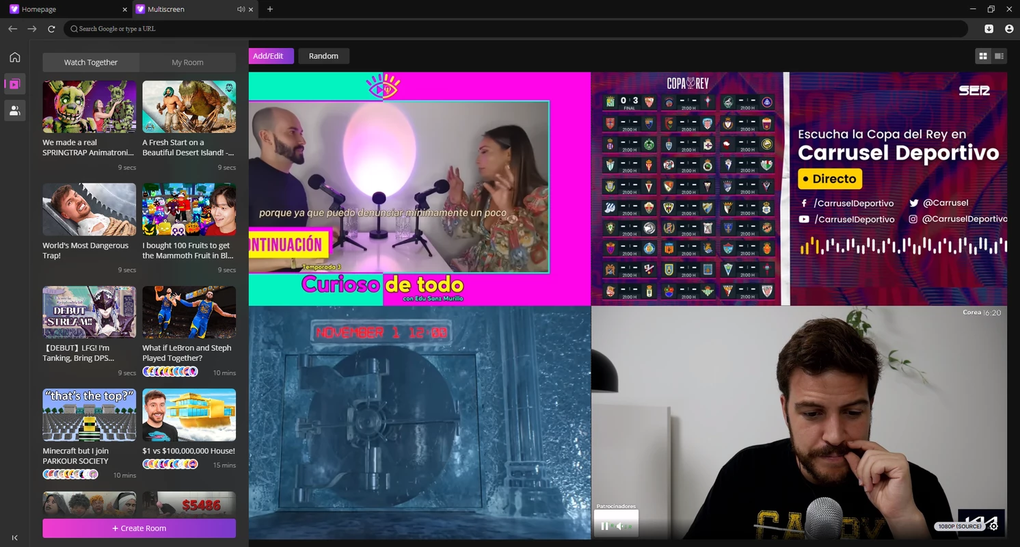
VibeMate Browser presents a revolutionary approach to web browsing, focusing on enhanced multitasking and simultaneous content consumption. Unlike traditional browsers that limit users to one primary video or stream per tab, VibeMate allows for the simultaneous viewing of up to four videos or live streams within separate, easily manageable sections of the screen. This innovative feature transforms the browsing experience, eliminating the need to juggle multiple browser tabs and streamlining the process of consuming diverse online content.
A Streamlined Interface for Multitasking
VibeMate Browser boasts an intuitive and minimalist interface, designed for ease of use and maximum efficiency. The browser’s main page functions similarly to other standard browsers, providing a familiar and comfortable user experience. A customizable search engine allows users to quickly access their preferred search platform, further simplifying the browsing process. However, the true power of VibeMate lies in its unique multi-window tab. This feature divides the screen into four independent sections, each capable of displaying a separate video stream or other online content. Imagine watching a tutorial video in one section while simultaneously following a live sports match in another, all within the same browser window. This functionality extends far beyond simple entertainment.
Beyond Entertainment: Enhancing Productivity and Efficiency
The ability to simultaneously view multiple streams isn’t solely for entertainment; VibeMate Browser significantly improves multitasking efficiency across various professional and personal scenarios. For instance, professionals can simultaneously follow multiple conference calls or presentations, allowing them to keep abreast of important information without constant tab switching. Researchers can compare and contrast various data sources displayed in different windows. Journalists can monitor news feeds from multiple sources in real-time, gathering information more efficiently. The possibilities are broad and adaptable to diverse needs.

The seamless integration of four independent sections within a single browser window allows for a focused workflow without the distraction and clutter of multiple individual browser windows. This eliminates the constant switching between tabs, resulting in improved concentration and reduced cognitive load. The streamlined interface reduces visual clutter and maintains a clear, organized workspace. The potential for increased productivity is substantial, especially for those who regularly work with multiple online resources simultaneously.
Seamless Playback and Multi-Platform Support
VibeMate Browser prioritizes a smooth and uninterrupted viewing experience. The browser ensures consistent and high-quality playback across all four sections of the multi-window tab, minimizing buffering and lag. This consistent performance allows users to fully engage with their chosen content without technical interruptions or delays, maintaining a smooth, fluid workflow that contributes to improved efficiency and satisfaction.
VibeMate Browser is not limited to the Windows operating system. It is available on multiple platforms, catering to a broader user base and ensuring accessibility across a range of devices. The cross-platform availability enhances the usability and convenience of the browser, allowing users to maintain consistency and familiarity regardless of their preferred operating system. This widespread compatibility demonstrates a commitment to user accessibility and broad adoption of the innovative features VibeMate Browser offers.
Security and Privacy Considerations

While VibeMate offers a unique and efficient browsing experience, it’s crucial to consider security and privacy implications. The browser’s security measures should be evaluated to ensure the protection of user data and personal information. Independent security audits and user reviews can provide valuable insight into the browser’s security posture and identify any potential vulnerabilities. Users should remain vigilant in their online activities, irrespective of the browser used, employing safe browsing practices and adopting robust password management techniques. Staying informed about evolving online threats and regularly updating software are essential steps in maintaining online security and privacy.
It is imperative for users to choose their preferred search engine and ensure its reputation for security and privacy aligns with their needs. Carefully examining the privacy policies of both the browser and any add-ons used in conjunction with it is a vital aspect of informed and safe online activity. Users are strongly encouraged to be proactive in securing their online experiences and to research the security features offered by VibeMate Browser.
Comparison with Traditional Browsers
In comparison to traditional web browsers like Chrome, Firefox, or Edge, VibeMate’s core differentiator is its integrated multi-viewing capability. While traditional browsers excel in various aspects, such as extensive extension support and a mature ecosystem of add-ons, they lack the integrated functionality of simultaneously managing and viewing multiple video streams or online content within a single window. VibeMate fills this niche, providing a streamlined solution for users who frequently need to monitor and interact with several online resources concurrently.
The simplified interface of VibeMate can be advantageous to users who find the feature-rich interfaces of traditional browsers overwhelming. Its straightforward design prioritizes ease of use and intuitive navigation, especially for multitasking with multiple video streams. The focus on a minimal interface helps reduce cognitive load and improve the overall user experience. However, this simplification means that VibeMate might not offer the extensive customization options or the vast array of extensions found in established browsers.
Ultimately, the choice between VibeMate and a traditional browser depends on individual user needs and priorities. Those who heavily rely on extensions, extensive customization, or a wide range of features might prefer a traditional browser. Those whose primary need is a streamlined solution for simultaneously viewing multiple video streams will find VibeMate to be a more efficient and effective option.
The future development of VibeMate Browser will likely involve enhancements to its security features, expansion of platform compatibility, and the potential addition of features based on user feedback and market demands. Continuous updates and improvements are essential to maintain the competitiveness of the browser and to adapt to the ever-evolving landscape of online technology. VibeMate’s continued success will depend on its ability to meet the evolving needs of its users while maintaining its core strengths: a user-friendly interface and its unique capability for simultaneous multi-stream viewing.
File Information
- License: “Free”
- Version: “1.9.5”
- Latest update: “June 20, 2024”
- Platform: “Windows”
- OS: “Windows 11”
- Language: “English”
- Downloads: “1.6K”
- Size: “172.82 MB”


