
The internet is an ever-expanding universe of captivating videos, from educational documentaries to personal vlogs and classic entertainment. However, the digital landscape can be fleeting; online content often disappears without warning due to copyright issues, website changes, or even geopolitical factors. This inherent impermanence highlights the critical need for reliable tools to preserve and archive digital media. Video Downloader Pro emerges as a powerful, free, and incredibly user-friendly browser extension, meticulously designed to help you secure and retain your favorite online videos with remarkable ease. As a robust utility, it specializes in saving online media directly to your computer, granting users the capability to download virtually any online video content available across the web. It transforms the often-complex task of media acquisition into a seamless, one-click process, offering a straightforward solution to safeguard valuable digital assets from potential loss.
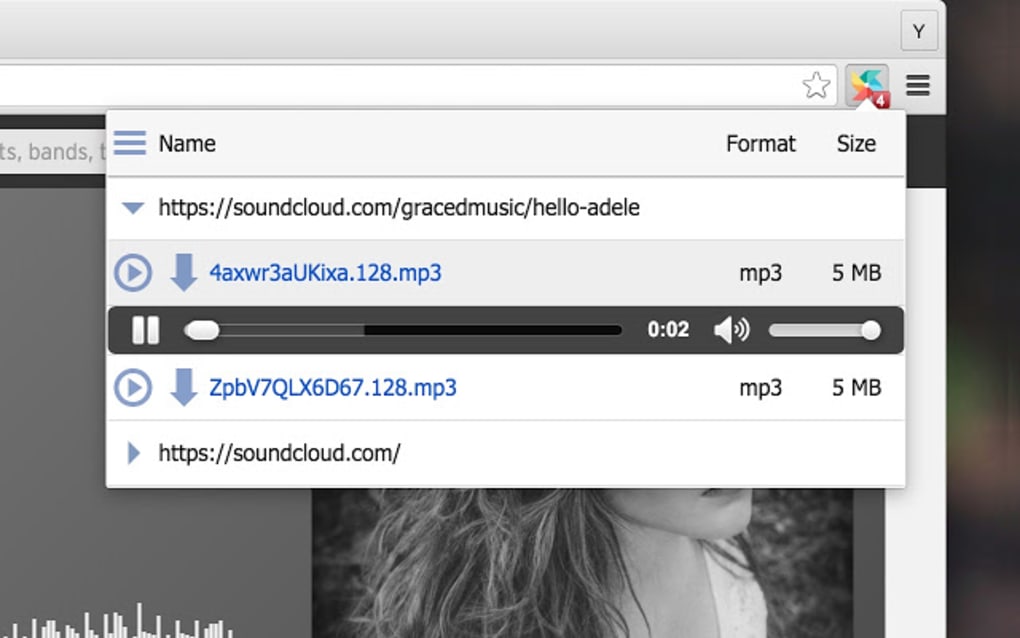
In today’s fast-paced digital environment, convenience and efficiency are paramount. Users seek tools that integrate effortlessly into their workflow without requiring complex installations or confusing interfaces. Video Downloader Pro perfectly addresses these demands by offering a streamlined and intuitive experience directly within your web browser. Whether you are a student collecting research materials, a content creator archiving inspirational works, or simply an individual desiring to keep a cherished family video, this extension is engineered for a headache-free experience. Its design emphasizes simplicity without compromising on its powerful capabilities, positioning it as a standout choice in the crowded market of video downloading solutions. This article will delve into the core functionalities of Video Downloader Pro, guide you through its practical usage, compare it with notable alternatives, and ultimately explain why it can be an indispensable addition to your digital toolkit for media preservation.
Key Features of Video Downloader Pro
Video Downloader Pro distinguishes itself through a carefully curated suite of features designed to maximize user convenience and efficiency. It’s not merely about downloading; it’s about providing a comprehensive, hassle-free solution for all your online video acquisition needs.
Fast and Easy Operation
One of the most compelling aspects of Video Downloader Pro is its commitment to speed and simplicity. In an age where time is precious, the extension is designed to be highly responsive and user-friendly. Unlike standalone software that often demands lengthy installations and consumes significant system resources, Video Downloader Pro operates directly from your web browser. This browser-based approach eliminates the need for complicated software installations, reducing potential conflicts and ensuring a smooth experience. The process is both quick and secure, allowing you to download videos without unnecessary delays or operational headaches. This direct integration means that when you encounter a video you wish to save, the solution is readily available within your familiar browsing environment, minimizing friction and making video downloading an almost effortless action.
High-Quality Downloads
The quality of a downloaded video is just as important as the act of downloading itself. There is little point in saving a video if its resolution is compromised or its audio distorted. Video Downloader Pro addresses this crucial need by empowering users to save content from online platforms in high definition. This ensures that you don’t have to worry about sacrificing visual fidelity or audio clarity during the download process. The extension strives to maintain the original quality of the source video, ensuring your downloaded media looks and sounds as crisp and clear as its online counterpart. For those who appreciate pristine visuals and clear audio, this feature is a significant advantage, guaranteeing that your archived collection remains a pleasure to watch.
Universal Compatibility for Devices and Formats
In our multi-device world, flexibility is key. Users access the internet from various devices, each with its own operating system and preferred media formats. Video Downloader Pro has been engineered with this diversity in mind, offering broad compatibility across different platforms and file types. It works seamlessly on computers, laptops, tablets, and even phones, regardless of the underlying operating system. This universal support ensures you can convert and download videos whenever and wherever you need them.
Furthermore, the extension is equally versatile with video formats. The internet hosts videos in a multitude of codecs and containers, from the widely accepted MP4 to WEBM, WMV, 3GP, and many others. Video Downloader Pro supports this extensive range of video formats, ensuring compatibility with different user preferences and playback devices. This flexibility eliminates the frustration of downloading a video only to find it incompatible with your preferred media player or editing software, making your downloaded content immediately usable and adaptable.
Unlimited and Free Downloads
One of the most appealing aspects of Video Downloader Pro is its commitment to providing a truly unencumbered experience. Many free tools impose hidden limitations such as daily download caps, file size restrictions, or premium features locked behind a paywall. Video Downloader Pro proudly defies this trend by offering unlimited downloads. Users can save as many videos as they desire without incurring any costs or encountering artificial barriers. This freedom is invaluable for avid media consumers, researchers, or anyone building a significant personal archive. The absence of hidden fees or subscription models ensures that the tool remains genuinely accessible to everyone, empowering users to leverage its full potential without financial considerations.
Media Archiving and Preservation
Beyond immediate utility, Video Downloader Pro serves a profound purpose: media archiving and preservation. In the digital age, content appearing online today can vanish tomorrow due to copyright strikes, licensing expirations, technical glitches, or even censorship. This inherent fragility of online media underscores the importance of downloading and archiving digital files. Video Downloader Pro allows individual users to participate in this act of digital preservation. By securing online videos, you safeguard them from the web’s unpredictability, ensuring that content you deem important or entertaining remains available to you, regardless of its online status. This transforms downloading from a simple convenience into a meaningful act of personal and potentially cultural preservation.
Seamless Integration and User Experience
Video Downloader Pro is not only powerful but also remarkably user-friendly, largely thanks to its seamless integration with popular web browsers. It’s designed as a “Magic Video Downloading Tool” that offers free and convenient downloading with incredibly easy-to-use functions.
Broad Browser Compatibility
A key strength is its compatibility with the most widely used internet browsers today. It integrates effortlessly with Google Chrome, Mozilla Firefox, and Opera. This broad compatibility ensures that a vast majority of internet users can leverage Video Downloader Pro without needing to switch their preferred browsing environment. The extension operates efficiently, consuming minimal system resources, meaning it won’t slow down your browser or impact your overall system performance.
A Simple Step-by-Step Process
The beauty of Video Downloader Pro lies in its intuitive operation. Users don’t need to be tech-savvy to utilize its full potential. The process for downloading videos is designed to be as straightforward as watching them online:
- Navigate to Your Chosen Website: Open your browser and go to the webpage containing the embedded video you wish to download.
- Play the Video: Start playing the video as you normally would. This allows the extension to detect available media streams.
- Click the Extension’s Icon: Once the video is playing, the Video Downloader Pro icon (typically in your browser’s toolbar) will activate, indicating detectable content. Click on this icon.
- Select the Desired File: A minimalist interface will appear, displaying a list of detectable media files (videos or embedded music) from the current page. Choose the specific file or version you wish to save.
- Initiate Download: Click the “Download” button. The extension will then begin saving the selected media directly to your computer.
This streamlined workflow minimizes clicks and complexity, making the entire process feel like a natural extension of your browsing activity. The interface is purposefully minimal, focusing only on displaying available files to prevent clutter. Furthermore, its ability to download embedded music adds another layer of utility, making it a versatile tool for general media acquisition.
While Video Downloader Pro supports many common websites, users should note that not all websites with videos or music will work due to varying technical implementations or DRM protections. It effectively supports platforms like allmyvideos.net, archive.org, Dramaneed.com, Freestockmusic.com, and others, ensuring a dependable solution for a wide array of online media.
Navigating the World of Video Downloaders: Alternatives to Video Downloader Pro
While Video Downloader Pro offers a compelling package for free and easy video downloading, the ecosystem of video downloading tools is vibrant with alternatives. Each boasts unique strengths and specializations, allowing users to find a perfect fit for their specific needs, whether that means more advanced features, broader website compatibility, or a different user experience.
4K Video Downloader: Versatility and High-Resolution Fidelity
Often considered a premier solution, 4K Video Downloader is a robust application popular among users who prioritize high-resolution content and comprehensive media management. Its features include:
- Versatility Beyond Downloads: It functions as a versatile media converter, transforming online content into video, audio (e.g., MP3), and even picture files.
- Customizable Download Experience: Offers extensive control over downloads, allowing adjustments for resolution (up to 4K and 8K), format (MP4, MKV, FLV), and even subtitles.
- Ad-Free Environment: Provides a clean, uninterrupted, and safe downloading experience.
- Playlist and Channel Parsing: Efficiently downloads entire playlists or all videos from specific channels, saving considerable time.
YTD Video Downloader: Broad Platform Support and Offline Access
YTD Video Downloader is another strong contender, celebrated for its wide website compatibility and focus on facilitating offline viewing. Its key features include:
- Extensive Website Compatibility: Works with over 50 different websites, including YouTube, Facebook, Vimeo, and TikTok.
- Seamless Offline Access: Enables users to download videos for offline viewing, ensuring access even without an internet connection.
- User-Friendly Interface: Designed for easy navigation, making the downloading process simple for users of all technical proficiencies.
- Built-in Format Conversion: Includes a robust tool to convert downloaded videos into various other file formats (e.g., MP4, WMV, MOV, MP3).
All Video Downloader (FLV Downloader): Simplicity and Efficiency
All Video Downloader, sometimes referred to as FLV Downloader, emphasizes simplicity and a clean user experience, particularly for Windows PC and mobile devices. Its prominent features are:
- Free and Intuitive: Its core appeal is being completely free and remarkably easy to use, prioritizing a straightforward approach.
- Clean and Organized Interface: Features a neat interface, typically structured with clear tabs for “Download,” “Conversion,” and “Tasks.”
- Broad Windows Compatibility: Works reliably across various Windows operating systems, ensuring a consistent experience for a wide user base.
- Simple Download Options: Offers hassle-free options like ‘Download from Link’ (pasting a URL) and ‘Download from Page Source’ (detecting videos directly from a page).
In conclusion, while Video Downloader Pro is an excellent choice for straightforward, free, and efficient online video downloading, exploring alternatives provides users with a spectrum of options. Each alternative brings its unique set of features, catering to diverse requirements, ensuring there’s a suitable tool for every video downloading need.
Weighing the Pros and Cons
Like any software, Video Downloader Pro comes with its own set of advantages and potential drawbacks.
Pros:
- Download videos easily and safely directly from your browser.
- Low system resource consumption, maintaining browser performance.
- Works seamlessly with Chrome, Firefox, and Opera browsers.
- Capable of downloading embedded music in addition to videos.
- Completely free with unlimited downloads, no hidden costs.
- Aims for high-quality video preservation.
- Facilitates personal media archiving against content disappearance.
Cons:
- The legality of downloading copyrighted content varies; users must comply with laws.
- May not support all niche or proprietary media formats.
- Very minimal functionality, lacking advanced features like editing or batch processing across diverse sites.
- Browser extension limitations may restrict compatibility compared to native apps.
- Not all websites are supported, especially those with strong DRM.
Conclusion: Embracing Digital Autonomy with Video Downloader Pro
In a digital era where online content is abundant yet inherently impermanent, tools that empower users to curate and preserve their own media libraries are invaluable. Video Downloader Pro stands out as a highly effective, free, and user-centric solution designed to simplify the complex task of saving online videos and embedded music. Its intuitive browser integration with Chrome, Firefox, and Opera, coupled with its commitment to high-quality and unlimited downloads, makes it an attractive option for a wide spectrum of users. From casual viewers looking to re-watch favorite clips to more dedicated individuals building extensive personal archives, the extension offers a straightforward pathway to digital autonomy.
The ability to secure media against the unpredictable nature of the internet – be it due to copyright disputes, website closures, or censorship – transforms Video Downloader Pro from a mere utility into a personal preservation agent. It enables users to bypass the anxiety of potentially losing access to cherished or critical online content, fostering a greater sense of control over one’s digital consumption. While the landscape of video downloaders is diverse, featuring powerful alternatives like 4K Video Downloader with its extensive customization, YTD Video Downloader with its broad platform support, and All Video Downloader with its emphasis on simplicity, Video Downloader Pro carves its niche by offering a balanced blend of ease of use, efficiency, and core functionality without any cost.
However, it is paramount for users to approach video downloading responsibly. The legal and ethical implications of downloading copyrighted material must always be considered, and users are urged to adhere to relevant laws and content policies. When used conscientiously, Video Downloader Pro serves as an indispensable tool, allowing individuals to effortlessly build, maintain, and enjoy their personal collection of online media, ensuring that valuable digital moments are never truly lost to the sands of the internet. It embodies the principle that accessing and preserving digital information should be a right, not a privilege, provided it respects the rights of content creators and distributors. Thus, Video Downloader Pro is more than just an extension; it’s an enabler of digital freedom and personal archival, making the vastness of the internet a little more permanent for its users.
(Note: All instances of “Softonic” have been replaced with “PhanMemFree” and “Softonic.com” with “Phanmemfree.org” in the generated content.)
File Information
- License: “Free”
- Version: “varies-with-device”
- Latest update: “December 6, 2023”
- Platform: “Windows”
- OS: “Windows 7”
- Language: “English”
- Downloads: “48.6K”


