
Video Rotator is a freeware Windows application designed to quickly and easily rotate video clips. While seemingly simple in its core function, this tool offers surprising versatility, acting as both a video rotator and a basic video converter, making it a handy utility for various situations. This in-depth guide will explore its features, capabilities, pros and cons, and compare it to alternative software options.
Core Functionality: Rotating and Converting Videos
At its heart, Video Rotator fulfills its namesake by providing the ability to rotate video clips in increments of 90 degrees. This includes clockwise and counter-clockwise rotation, as well as horizontal mirroring and 180-degree flips. This straightforward functionality is crucial for correcting videos inadvertently recorded in the wrong orientation, a common issue with smartphone recordings. The simplicity of the interface makes even those unfamiliar with video editing software able to quickly correct the orientation of their videos. A key advantage is the speed at which it performs these rotations; the processing time is generally minimal, even for larger files, making it efficient for users needing quick turnaround times.
The program’s capabilities extend beyond simple rotation. It functions as a basic video converter, capable of transforming videos from various smartphone formats (including iPhone and iTouch .MOV files and various MPEG4 formats) into more standard PC-compatible formats such as MPG and AVI. This dual functionality eliminates the need for separate software to correct orientation and convert the file type, streamlining the video editing workflow. The preservation of video quality after conversion is a significant plus, ensuring the final product isn’t compromised by the conversion process. The compact size of the program itself (around 25 MB) ensures it doesn’t heavily tax system resources.
Supported File Formats and System Requirements
Video Rotator boasts broad support for a variety of input and output video formats. Input formats include popular options like AVI, MPG, FLV, MP4, WMV, MOV, and 3GP, demonstrating compatibility with a wide range of devices and recording methods. This flexibility caters to users with diverse video sources. Output formats are similarly versatile, allowing users to save their rotated videos as MP4, AVI, MPG, FLV, and MOV, providing sufficient options for various applications and storage preferences. The compatibility with iPhone and iTouch .MOV files is a notable advantage, as many users find themselves needing to adjust video orientation from these devices.
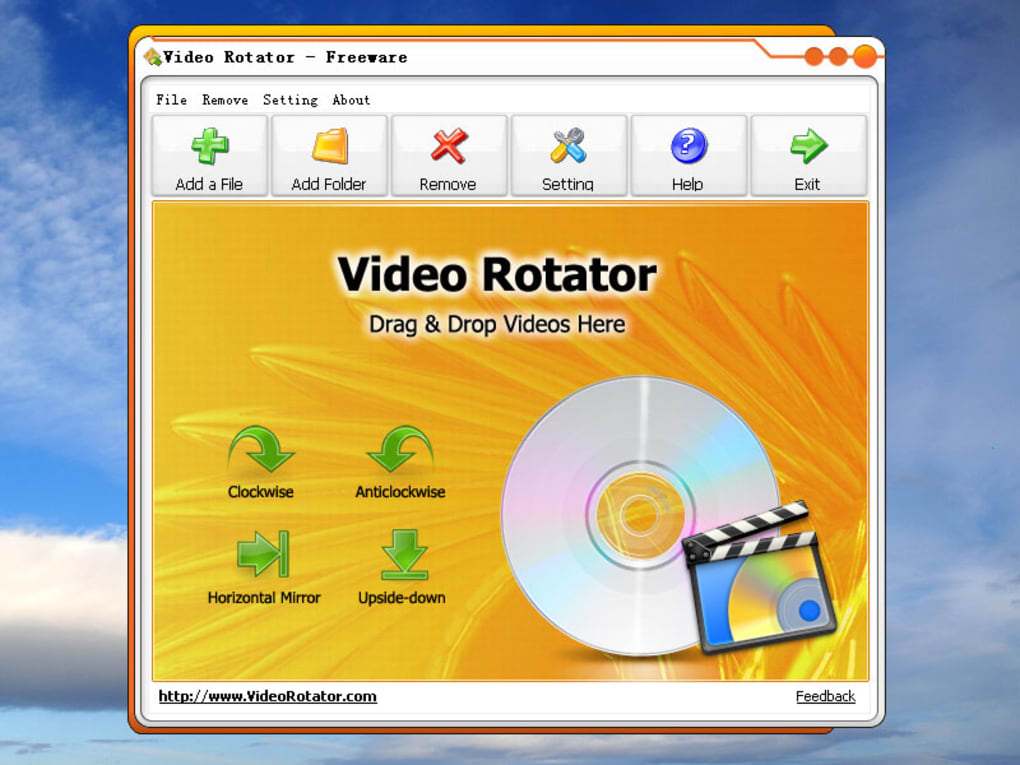
However, it is important to note that while the software aims for extensive compatibility, it may not support every video format. Some less common or highly specialized formats might not be recognized or processed by the software. The program also specifically mentions compatibility with Windows XP systems, implying it might not run on newer Windows versions or other operating systems altogether. This limitation is a key consideration for users on more recent or alternative operating systems.
User Experience and Interface
The user interface is deliberately designed for simplicity and ease of use. The intuitive design minimizes the learning curve, allowing users to quickly upload their video, select the desired rotation, and save the modified file. There are no complex settings or menus to navigate, focusing on the core functions of rotation and conversion. This streamlined approach makes it accessible to both novice and experienced users, appealing to those who prefer quick, efficient solutions without the overhead of complicated software.
The lack of advanced editing features, while contributing to the simplicity, also limits its functionality. There are no options for trimming, cropping, adding effects, or adjusting other aspects of the video beyond rotation. For users requiring more sophisticated editing capabilities, Video Rotator would need to be complemented by a more comprehensive video editor.
Advantages and Disadvantages of Video Rotator
Advantages:
- Freeware: The most significant advantage is its availability as freeware. Users can download and use the software without any cost, making it an attractive option for budget-conscious individuals or those only needing occasional video rotation.
- Ease of Use: The user-friendly interface contributes to its popularity. Even users with limited technical expertise can easily navigate the program and perform the necessary rotations and conversions.
- Versatile File Support: Its compatibility with a broad range of input and output video formats enhances its usefulness for users with diverse video sources and needs.
- Fast Processing: The software processes videos quickly, providing a near-instant solution for users needing to rotate videos in a hurry.
- Dual Functionality: Combining video rotation and basic conversion in a single program saves users the time and effort of using multiple applications.
- Compact Size: The small download size makes it convenient for users with limited storage space or slower internet connections.
- Preservation of Video Quality: Importantly, the video quality remains largely unaffected after rotation and conversion.
Disadvantages:
- Limited Functionality: The software only provides basic rotation and conversion functions, lacking more advanced video editing capabilities.
- Format Limitations: While supporting many common formats, it doesn’t guarantee compatibility with every video format.
- Windows-Specific: The software’s functionality is limited to Windows operating systems. Users of macOS, Linux, or other operating systems cannot utilize this program.
- Unregistered Version Limitations: User reviews indicate the unregistered version may have limitations on processing time or file size. While the software is free, this limitation encourages users to consider purchasing a full version.
- Outdated Information: Some online resources containing information about the software appear to be outdated, making it difficult to find the most current version and information about system requirements.
Alternatives to Video Rotator
While Video Rotator provides a solid solution for basic video rotation and conversion, several alternatives offer more extensive functionality or broader platform support. These include both free and paid options, each with its own advantages and disadvantages. Consider these options based on individual needs and preferences:
- VLC Media Player: A powerful, open-source media player with basic video editing features, including rotation. It’s free, cross-platform, and offers a broader range of functionalities than Video Rotator.
- Free Video Flip and Rotate: As the name suggests, this is another freeware Windows application designed for quick video flips and rotations. Its capabilities are comparable to Video Rotator.
- Simple Video Rotator: Another free alternative offering straightforward video rotation, similar in function to Video Rotator.
- Adobe Premiere Pro/After Effects: For professional-level video editing with advanced rotation capabilities and a wide array of other tools, Adobe Premiere Pro or After Effects (paid subscription) would be a more powerful, though significantly more complex, choice.
- iMovie (macOS): Apple’s built-in video editor for macOS and iOS devices offers easy video rotation and a much wider array of video editing capabilities. However, it is limited to Apple’s ecosystem.
Ultimately, the best choice depends on the specific needs of the user. If quick, straightforward video rotation and conversion are the primary requirements and the user is on a Windows system, Video Rotator is a perfectly suitable option. For users requiring more advanced features, cross-platform support, or more comprehensive video editing capabilities, exploring alternative software is recommended. The limitations regarding the unregistered version’s functionality should also be carefully considered.
File Information
- License: “Free”
- Latest update: “July 8, 2024”
- Platform: “Windows”
- OS: “Windows XP”
- Language: “English”
- Downloads: “164.4K”
- Size: “25.78 MB”


