
Videobox was a lightweight desktop widget designed to simplify the process of searching for videos on YouTube and Google Video (now largely integrated into YouTube). It offered a streamlined alternative to navigating the often cluttered interfaces of these video platforms, allowing users to quickly find content using keyword searches directly from their desktop. While no longer actively maintained or supported, its functionality offers a glimpse into the evolution of video search tools and the desire for a more efficient user experience.
Functionality and User Interface
Videobox presented a simple yet functional interface. Its core functionality revolved around a single search bar. Users would input keywords into this bar, much like a traditional search engine, and click a magnifying glass icon (or press Enter) to initiate the search. The widget would then query both YouTube and Google Video simultaneously, returning a consolidated list of results. This approach eliminated the need for users to conduct separate searches on each platform, saving time and effort.
The results displayed within Videobox included key information from each video, such as the title, description, and, in the case of YouTube videos, relevant tags. This provided users with sufficient information to assess the relevance of each video before clicking to view it. However, a notable limitation was the absence of video comments within the widget’s display. This omission, while simplifying the interface, meant users lost access to community discussions and feedback, a significant aspect of the YouTube experience.
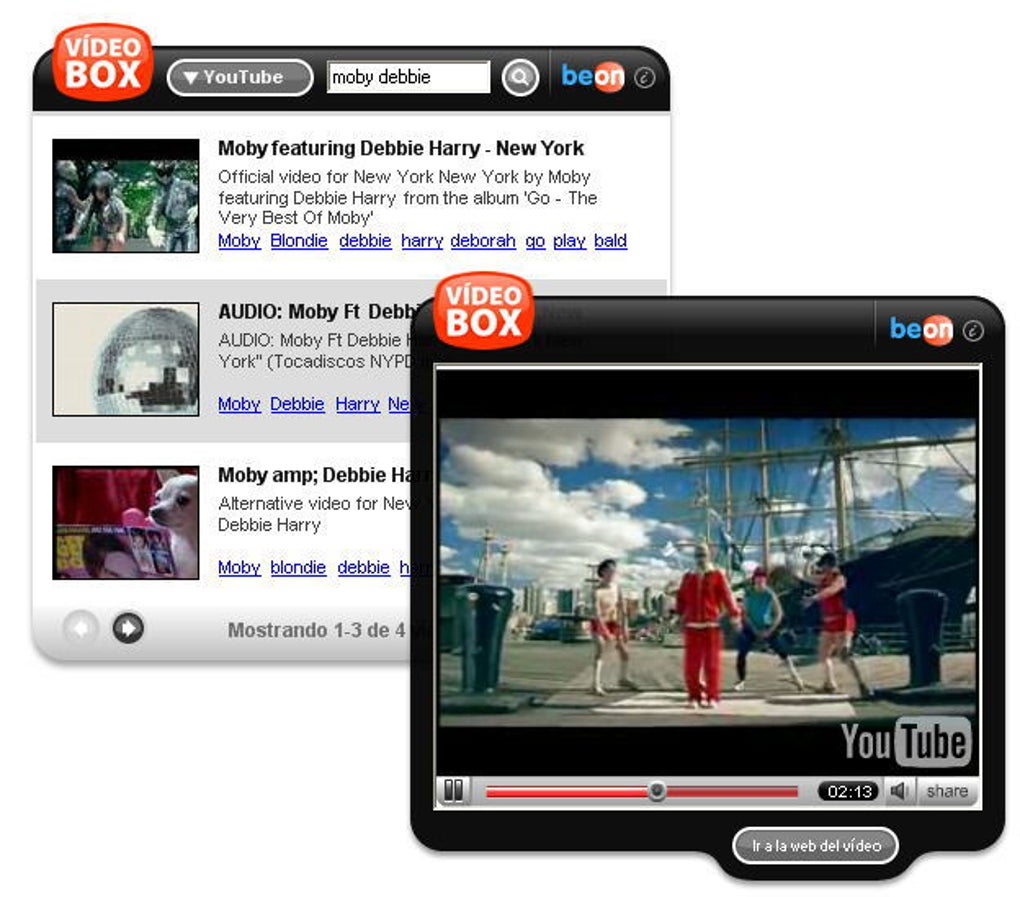
The search process itself, though convenient, wasn’t instantaneous. The widget took slightly longer to return results compared to searching directly within YouTube or Google Video. This was likely due to the process of querying and aggregating data from two distinct sources. However, the time difference was likely negligible for many users, who valued the convenience of a unified search interface.
Advantages and Disadvantages of Videobox
Videobox offered several compelling advantages:
-
Simultaneous Search: The widget’s primary benefit was its ability to search both YouTube and Google Video concurrently. This significantly streamlined the video search process, particularly for users regularly searching both platforms. Before the extensive integration of Google Video into YouTube, this functionality was a significant advantage.
-
Desktop Accessibility: Videobox provided easy access to video search directly from the desktop. This avoided the need to open a web browser and navigate to the video platform, making the process much more efficient and less disruptive to the user’s workflow.
-
Simplified Interface: The widget’s minimalist design was a strength. It avoided the complexity and potential distractions of the full YouTube or Google Video websites, focusing solely on the search and results display.
However, Videobox also had certain drawbacks:
-
Lack of Comments: The absence of video comments within the search results was a major limitation. Comments often provide valuable context, insights, and community feedback, which were completely inaccessible through Videobox.
-
Redundant Results: Since Google Video and YouTube were in the process of merging, the widget often returned similar results from both platforms. This led to redundancy and a less efficient use of screen real estate. This overlap likely decreased in significance as Google Video’s features were eventually absorbed by YouTube.
- Limited Platform Support: Videobox only supported searches across YouTube and Google Video. Users looking for videos hosted on other platforms needed to use alternative methods, limiting its overall utility.
Technical Aspects and Development
Videobox’s development appears to have involved the use of a custom widget technology, capable of interacting with the APIs (Application Programming Interfaces) of both YouTube and Google Video. The program was available for Windows, making it accessible to a significant portion of the computer user base at the time. Its relatively small size (810.91 KB) indicated a focus on efficient code and minimal resource consumption.
The version history indicates a focus on bug fixes and stability improvements. One prominent update mentions the removal of support for WebKit Nightly Build due to instability issues. This highlights the challenges involved in maintaining compatibility across different browser engines and versions, particularly during periods of rapid technological change.
User Reviews and Reception
User reviews for Videobox reveal a mixed reception. While some users appreciated its simplicity and convenience for searching across YouTube and Google Video, the limited number of supported video platforms was a recurring criticism. Users desired the ability to search a wider range of video-sharing websites, highlighting a need for greater versatility in video search tools. The absence of comment functionality also received negative feedback, reflecting the importance of user interaction and community features in the video-watching experience. The overall sentiment suggests that while Videobox addressed a specific need in its time, its limitations prevented it from becoming a widely adopted or enduring solution.
Comparison with Alternative Applications

Several alternative applications offered similar or enhanced functionality compared to Videobox, many of which were designed specifically for YouTube or expanded beyond the scope of just two platforms. These alternatives often provided more features, such as built-in video players or support for a wider variety of video hosting sites. This competition underscores the pressures faced by applications in a dynamic market where user expectations and technological capabilities are constantly evolving. The relatively small number of downloads compared to contemporary video players indicates Videobox likely failed to secure significant market share.
The lack of ongoing maintenance and updates to Videobox has ultimately led to its obsolescence. Modern video search tools have integrated many of the features that users desired from Videobox, such as enhanced cross-platform search capabilities, while also providing access to community interaction features such as comments and ratings. The rise of more comprehensive and versatile video platforms has further rendered Videobox’s niche functionality less significant.
Conclusion

Videobox represented a specific attempt to enhance the video search experience by combining the functionality of two popular video platforms. While its simple interface and unified search were beneficial for certain users, its limitations – primarily the lack of comment display and limited platform support – hampered its broader adoption. The software’s discontinuation underscores the rapid pace of development in the digital landscape and the need for applications to continuously adapt to evolving user needs and technological advancements. Its existence, however, offers a valuable snapshot of the challenges and innovations in video search during a period of transition between standalone platforms and the integrated ecosystem that exists today. The absence of active development and maintenance renders it a historical artifact in the evolution of online video consumption.
File Information
- License: “Free”
- Version: “3.5”
- Latest update: “July 6, 2011”
- Platform: “Windows”
- OS: “Windows Vista”
- Language: “English”
- Downloads: “44.2K”
- Size: “810.91 KB”


