
VideoGet is a free video downloading tool designed to capture your favorite videos from a wide array of websites. While offering a simple interface and the ability to download multiple videos concurrently, it’s plagued by inconsistencies in performance, making its reliability a significant concern. This review will delve into its strengths and weaknesses, examining its features, usability, and overall effectiveness as a video downloading solution.
Features and Functionality
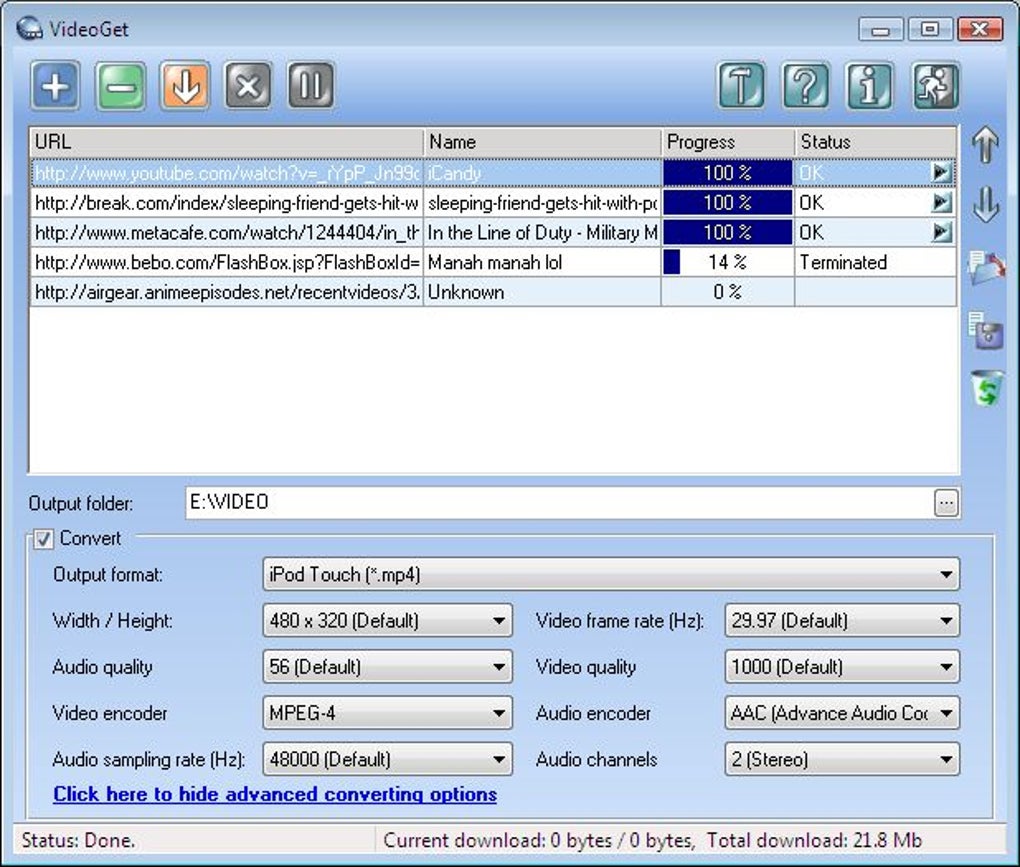
VideoGet boasts compatibility with over 850 video websites, including popular platforms such as YouTube, MySpace, Google Video, and Yahoo Video. This broad support is a significant advantage, allowing users to download content from a variety of sources without needing multiple downloaders. The software simplifies the process by allowing users to download multiple videos simultaneously, significantly speeding up the acquisition of large video collections. Furthermore, VideoGet offers a handy feature that lets users create and save download lists for later retrieval, providing a convenient way to manage extensive download queues.
Beyond simple downloading, VideoGet incorporates video conversion capabilities. It supports a range of popular video and audio formats, including AVI, MPEG1, MPEG2, WMV, FLV, MP4, 3GP, and MP3. This allows for seamless playback across various devices, from computers to portable media players like iPods and mobile phones. Users can customize the output quality, adjusting parameters such as video frame rate, dimensions (width and height), and audio sampling rate, thereby optimizing the file size and quality to their preference.
One notable feature is the software’s ability to resume interrupted downloads. If the internet connection drops or another issue occurs during a download, VideoGet doesn’t restart from the beginning. Instead, it resumes from the point of interruption, saving time and bandwidth. This is a particularly useful feature for downloading large video files, which can be highly susceptible to interruptions.
User Interface and Experience
The user interface is a point of contention. While simplicity is generally appreciated, many users find the interface rather bland and uninspired. It lacks the visual appeal and advanced features found in some competing download managers. The lack of a customizable download location is a significant drawback; users are unable to choose where their downloaded videos are saved, relying entirely on VideoGet’s default directory. This can become problematic for users who meticulously organize their files.
Furthermore, the program’s operational stability is a major concern. Users report frequent instances of erratic behavior, including unexpected freezing and abrupt shutdowns. These inconsistencies detract significantly from the overall user experience and create an unpredictable workflow. The unpredictable nature of the software makes it unreliable for users requiring consistent and stable performance.
Performance and Reliability
While VideoGet promises efficient simultaneous downloads, its actual performance falls short of expectations. Download speeds can be slow, especially for larger files. Users report instances where downloading and converting a short video (5 minutes) took over an hour, a stark contrast to other converters that complete the task in under two minutes. The disparity highlights the software’s performance limitations compared to its competitors.
The lack of editing features further hampers its usability. Unlike many video downloading tools that offer basic trimming or editing functions, VideoGet offers no such capabilities. This limits its functionality and restricts its utility to users who need only basic download and conversion features.
The support offered by VideoGet is another area needing improvement. User reviews reveal a lack of responsiveness and timely assistance in addressing technical issues. The absence of clear communication regarding software updates or known bugs leaves users feeling unsupported and frustrated when facing problems.
Comparison with Alternative Software
Several alternative video downloading tools offer superior performance, features, and overall user experience. MassTube, Tooble, and VDownloader are examples of alternatives that provide similar functionality with improved stability and often a more intuitive interface. These alternative applications frequently offer advanced features, such as integrated editing capabilities, support for a wider range of formats, and greater control over download settings.
Many of the alternative solutions also provide superior download speeds and significantly more reliable performance, avoiding the unpredictable behavior frequently reported by VideoGet users. These improvements in efficiency and stability are crucial for users who need a dependable tool for managing their video downloads.
Conclusion
VideoGet presents a mixed bag. While its broad website compatibility and ability to download multiple videos concurrently are attractive features, its performance inconsistencies and lack of advanced features significantly limit its appeal. The erratic behavior, slow download speeds, and lack of user-friendly features make it a less desirable choice compared to other available video downloaders.
The absence of a customizable download location and editing capabilities further detract from its usability. Unless significantly improved in terms of stability and performance, VideoGet falls short of providing a satisfactory user experience and cannot compete effectively with the more robust and reliable alternatives available in the market. Users seeking a reliable and efficient video downloading solution should explore other options offering greater stability, speed, and a more polished user experience. While it might suffice for simple, occasional downloads, the inherent unreliability makes it unsuitable for users requiring a consistent and dependable video downloader.
File Information
- License: “Trial version”
- Latest update: “February 28, 2025”
- Platform: “Windows”
- OS: “Windows 2000”
- Language: “English”
- Downloads: “144.9K”
- Size: “26.48 MB”


