
In an increasingly digital world, the ability to access and enjoy online video content at our convenience has become paramount. Whether it’s for educational purposes, entertainment, or professional development, the desire to watch videos without relying on a constant internet connection, or to bypass geographical restrictions, has driven the demand for robust video download managers. Enter VideoHunter, a name synonymous with efficiency, versatility, and high-quality performance in the realm of video downloading. Designed specifically for Windows desktops, with broader availability across other platforms, VideoHunter emerges as an all-inclusive solution for anyone looking to curate their personal library of online videos for offline consumption.
At its core, VideoHunter is a powerful download manager meticulously engineered to fetch videos from an astounding array of over a thousand video-hosting web pages. This extensive compatibility ensures that users are rarely limited in their content choices, covering popular platforms such as YouTube, Facebook, Twitter, Instagram, Vlive, and many more. The convenience of having a single tool that can seamlessly integrate with such a diverse ecosystem of content providers cannot be overstated. Once downloaded, these precious digital assets are typically saved in the universally compatible MP4 format, offering flexibility for playback across various devices. Moreover, VideoHunter prides itself on its commitment to preserving the original visual fidelity of the content, offering download qualities that can soar up to an impressive 1080p, 4K, and even the cutting-edge 8K resolution, ensuring an immersive viewing experience.
The journey to obtaining your desired content is remarkably streamlined with VideoHunter. It’s not merely about downloading; it’s about doing so with speed, precision, and an intuitive user experience. This software solution is available free of charge for compatible Windows desktops, making high-quality video downloading accessible to a broad audience. For those who have explored other options in the past, VideoHunter positions itself as a formidable and impressive alternative to established names like KeepVid, RealDownloader, ClipGrab, VidMate, and All Video Downloader, often surpassing them in terms of features and performance. This introductory glimpse merely scratches the surface of what makes VideoHunter an indispensable tool for the modern digital consumer.
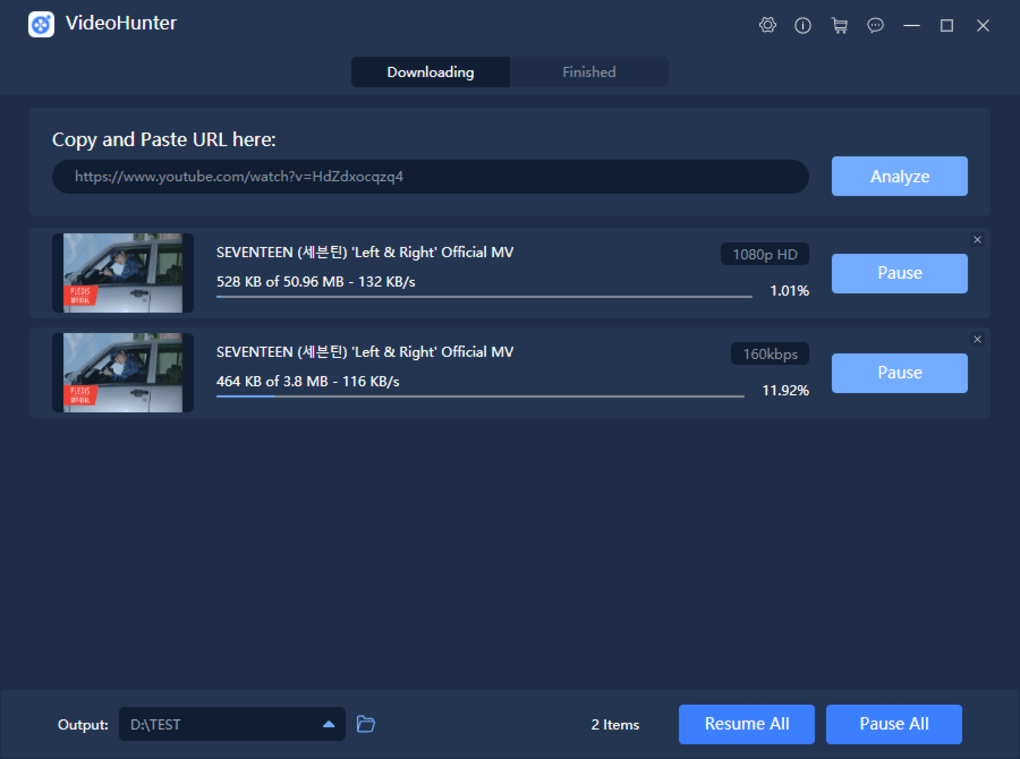
Unleashing Unrestricted Downloads: Speed, Efficiency, and Versatility
The true power of VideoHunter lies in its sophisticated architecture and a suite of features designed to make video downloading not just possible, but remarkably fast and efficient. In an era where time is of the essence, VideoHunter distinguishes itself by offering performance capabilities that are up to 6x faster than conventional downloaders. This significant speed boost is attributed to its innovative multithreading download feature.
Accelerated Downloads Through Multithreading Technology
Multithreading, in simple terms, allows VideoHunter to break down a single download into multiple segments and download these segments concurrently. Imagine having several lanes on a highway instead of just one; each lane can carry a part of the traffic, dramatically reducing the overall travel time. This is precisely what multithreading does for your downloads. By making the best use of your available internet bandwidth, VideoHunter can complete the download process in a fraction of the time it would take for other applications. This capability is not just about raw speed; it’s about optimizing resource utilization, ensuring that your internet connection is fully leveraged, and thus quickening the entire video download process efficiently. For users accustomed to long waits, VideoHunter transforms the experience into one of near-instant gratification, especially beneficial when dealing with large files or numerous videos.
Effortless Batch Downloading and Playlist Management
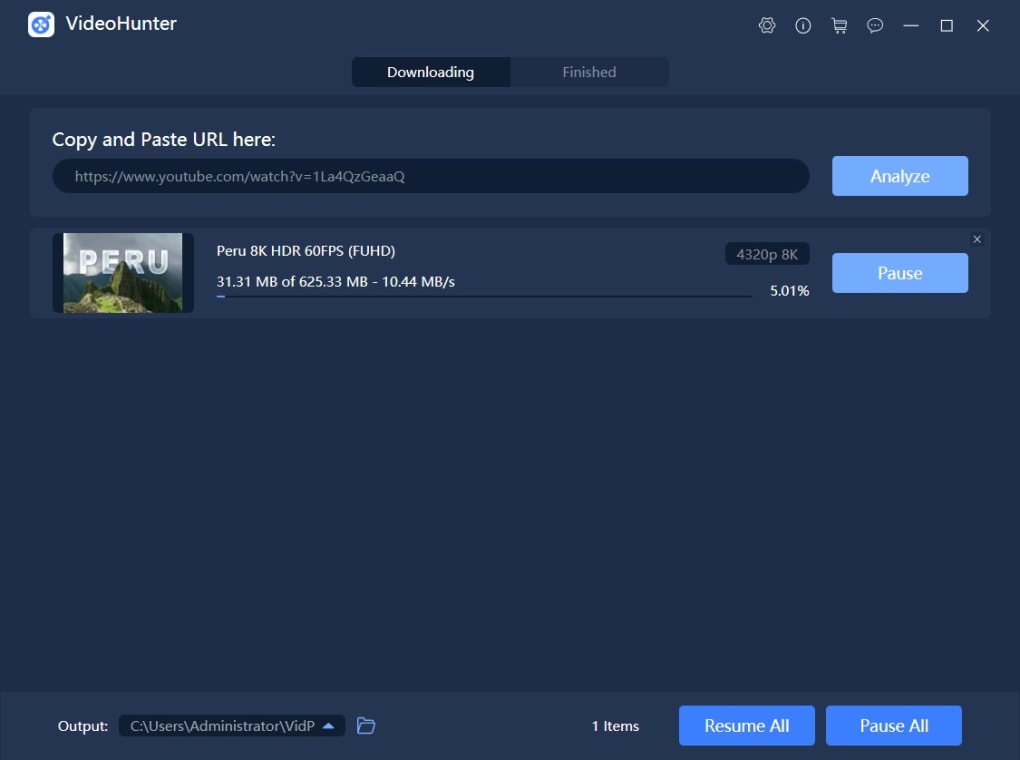
Beyond individual video downloads, VideoHunter understands the need for bulk content acquisition. Its robust batch download feature is a game-changer for anyone looking to save multiple online videos simultaneously. Whether you’re archiving a series of educational lectures, a season of your favorite web series, or a collection of music videos, VideoHunter handles these tasks effortlessly. Crucially, this bulk downloading capability does not compromise quality; not a single aspect of the picture quality for any of the downloaded videos will be adversely affected. This means you can download dozens of videos at once, confident that each will retain its original high-definition clarity.
One of the standout functionalities for avid YouTube users is the ability to save entire playlists. If you have curated extensive playlists for studying, workout routines, or simply for entertainment, VideoHunter eliminates the tedious process of downloading each video individually. Users simply need to copy and paste the playlist link into the URL bar, and the downloader intelligently parses all included videos, obtaining them in one comprehensive go. This feature alone saves countless hours and streamlines content management, turning a complex task into a simple copy-and-paste operation.
Enhancing Accessibility with Subtitle Extraction and Geo-Unblocking
VideoHunter’s commitment to user experience extends beyond just video files. It empowers users with the ability to extract and download YouTube subtitles as text. This handy software solution offers a built-in subtitle downloader that can generate these subtitles in universally recognized SRT (SubRip Subtitle) or TTML (Timed Text Markup Language) files. This feature is invaluable for a variety of reasons: for those learning a new language, for accessibility for the hearing impaired, for content creators who need transcriptions, or simply for users who prefer to watch videos with subtitles. The convenience of having both the video and its corresponding subtitles available offline significantly enhances the viewing experience and extends the utility of the downloaded content.
Furthermore, in an interconnected yet often restricted digital landscape, VideoHunter offers a critical feature: an in-app proxy setup. This sophisticated tool grants users permission to establish a connection and download online content that might otherwise be blocked in their region. Geo-restrictions and regional censorship can often prevent access to certain videos or platforms. By utilizing VideoHunter’s proxy setup, users can effectively bypass these restrictions, opening up a global library of content that was previously inaccessible. This feature is a testament to VideoHunter’s dedication to providing a truly unrestricted and comprehensive downloading experience, empowering users to access the content they desire, regardless of geographical boundaries. The interface for all these powerful features remains remarkably straightforward, ensuring that even beginners can easily copy, paste, and download HD videos with absolutely no hassle, demonstrating a seamless blend of advanced functionality with user-friendly design.
Immersive Viewing Experience: High-Quality Streaming and User-Friendly Interface
VideoHunter is not just about getting videos onto your device; it’s about ensuring that the viewing experience once downloaded is second to none. Its core mission is to provide an immersive, high-quality viewing experience, backed by an interface that is both powerful and incredibly simple to navigate.
Uncompromising Video Quality for Optimal Viewing
The modern viewer expects crisp, clear, and vibrant video quality. VideoHunter rises to this challenge by offering downloads in the highest possible resolutions, including 1080p, 4K, and even 8K. This commitment to superior video quality means that whether you’re watching on a compact laptop screen or a large 8K television, your downloaded content will look stunning, preserving all the intricate details and colors of the original source. This is a crucial differentiator, as many other downloaders might compromise on resolution to achieve faster download times or simply lack the capability to handle such high-fidelity files. VideoHunter ensures that your offline library is visually spectacular, ready to be enjoyed without any quality degradation. For content creators, designers, or anyone who values visual precision, the ability to obtain 4K and 8K content offline is an invaluable asset. It allows for detailed analysis, offline editing, or simply an unparalleled personal viewing experience that truly leverages the capabilities of modern display technology.
An Intuitive Interface: Designed for Everyone
Despite its advanced capabilities, VideoHunter boasts an interface that is exceptionally user-friendly. The developers have meticulously crafted a design that ensures the learning curve is virtually non-existent. This means that whether you are a tech novice or a seasoned user, you can intuitively grasp how to operate the software from the moment you launch it. The primary interaction workflow—copying a video URL, pasting it into VideoHunter’s designated bar, and initiating the download—is incredibly straightforward. This simplicity belies the complex operations happening in the background, allowing users to focus on what matters most: getting their favorite content.
This “no learning curve” philosophy is a significant advantage, eliminating the frustration often associated with learning new software. The clean, uncluttered layout ensures that all essential features are easily discoverable without overwhelming the user with unnecessary options. Furthermore, the stable performance of the application contributes to this smooth user experience, ensuring that downloads are not only fast but also reliable. VideoHunter has been lauded as a notable video download manager for Windows desktops precisely because it strikes this delicate balance between offering robust, unique built-in features—such as the subtitle downloader and proxy setup—and maintaining an approachable design that invites users of all technical proficiencies. The aim is to empower users to download their favorite online content and watch it offline in the highest video quality possible, without any barriers to entry or usage.
Cross-Platform Availability and Competitive Landscape
In the dynamic world of software, accessibility and market positioning are as crucial as the features themselves. VideoHunter understands this, offering its powerful downloading capabilities across various platforms and standing out in a crowded market.
Broad Compatibility: Windows, Mac, and Android
While initially highlighted for Windows, VideoHunter extends its reach to a broader audience by being available on other significant platforms. Users can also find “VideoHunter for Mac” and “VideoHunter for Android,” showcasing the developer’s commitment to providing a consistent and robust experience regardless of the operating system. This cross-platform availability is a significant advantage, allowing users to synchronize their video downloading needs across their primary devices. For instance, a user might download a high-resolution film on their Windows PC for home viewing, then quickly grab a few YouTube clips on their Android device for on-the-go entertainment, all powered by the familiar and efficient VideoHunter engine. This flexibility ensures that your favorite content is truly with you, wherever you are and whatever device you prefer.
The global reach of VideoHunter is further underscored by its extensive language support. PhanMemFree.org lists the program as available in numerous languages, including Arabic, German, Spanish, French, Indonesian, Italian, Japanese, Korean, Dutch, Polish, Portuguese, Russian, Swedish, Thai, Turkish, Vietnamese, and Chinese. This multilingual approach makes VideoHunter a truly global tool, breaking down language barriers and allowing users from diverse linguistic backgrounds to navigate and utilize the software with ease and comfort.
Navigating the Ecosystem of Video Downloaders
The market for video downloaders is competitive, with many applications vying for user attention. VideoHunter, however, positions itself strongly against its rivals by offering a comprehensive set of features and a superior user experience. When considering alternatives, users might encounter tools like KeepVid, RealDownloader, ClipGrab, VidMate, and All Video Downloader. While these alternatives offer varying degrees of functionality, VideoHunter often surpasses them with its support for extremely high resolutions (4K, 8K), its integrated proxy setup for bypassing geo-restrictions, and its efficient batch and playlist downloading capabilities.
PhanMemFree.org also lists several other strong competitors and related tools:
- Vividl Video Downloader (3.4/5 Free): A direct YouTube video downloader tool.
- VidMate (4.1/5 Free): A widely used application for downloading videos, particularly popular on Android.
- NetVideoHunter (3.6/5 Free): Specializes in downloading video and audio files from video-sharing sites.
- Wise Video Downloader (4.2/5 Free): Focuses on searching and downloading videos primarily from YouTube.
- Videoder (4.1/5 Free): An amazing tool known for downloading videos from various platforms.
- ClipGrab (3.9/5 Free): Offers free online video downloads with a simple interface.
- LibreTube (5/5 Free): A free YouTube alternative frontend, hinting at enhanced privacy or ad-free experience.
- All Video Downloader (4.3/5 Free): A free FLV file converter that often includes download capabilities.
VideoHunter holds its ground within this ecosystem by providing a more integrated and feature-rich experience. For example, while many focus solely on YouTube, VideoHunter’s support for over a thousand sites gives it a broader appeal. Its built-in subtitle extraction and proxy features are often premium additions in other services or require separate tools. The consistent emphasis on high-quality downloads (up to 8K) and speed (6x faster with multithreading) further distinguishes it as a premium, albeit free-to-use, option. The strength of VideoHunter lies in its holistic approach, aiming to be the singular tool for all video downloading needs rather than a specialized one.
Technical Prowess, User Feedback, and Commitment to Safety
Understanding the technical underpinnings and the developer’s commitment to user safety is vital for any software. VideoHunter, as showcased on PhanMemFree.org, provides transparent information regarding its specifications and adheres to stringent safety protocols.
Technical Specifications and Software Evolution
VideoHunter, currently at Version 2.0.33(1), demonstrates ongoing development and refinement. Its latest update on July 15, 2022, indicates that the software is actively maintained, ensuring compatibility with evolving web standards and introducing new features or performance enhancements. The relatively small file size of 669.03 KB is noteworthy, classifying it as a lightweight application. This means it consumes minimal system resources, making it accessible even on older or less powerful Windows machines without bogging down performance. This efficiency is a critical aspect, especially for users who prefer lean, purpose-built software.
The download metrics further underscore its popularity and utility. With 10.9K total downloads and 211 downloads in the last month (as of the provided data), VideoHunter clearly serves a significant user base. These figures, while snapshots, indicate a consistent demand for its capabilities, reflecting user trust and satisfaction. The developer, simply listed as “VideoHunter,” is dedicated to the product’s continuous improvement.
User Reviews and The Free Version’s Limitations
PhanMemFree.org includes a section for user reviews, acknowledging that at the time of the provided content, there might not have been initial user opinions. This is an open invitation for users to be the first to rate it and share their experiences, fostering a community-driven feedback loop that is essential for software growth.
While VideoHunter offers a powerful free version, it does come with certain limitations, primarily noted as “Limited download capability per day in the free version.” This is a standard practice for many freemium software models. It allows users to experience the core functionalities and benefits of the software without upfront cost, while also encouraging them to consider a paid version for unrestricted use. These limitations typically involve a cap on the number of downloads per day or restrictions on certain advanced features. This model strikes a balance, making the software accessible to everyone while ensuring a sustainable development path for the creators. For casual users, the free version might be perfectly adequate, but for power users or those with extensive downloading needs, exploring the premium options would unlock the full potential of VideoHunter.
PhanMemFree.org’s Unwavering Commitment to Software Safety
A paramount concern for any user downloading software from the internet is security. PhanMemFree.org addresses this concern head-on with a robust and transparent security protocol. The platform diligently scans all files hosted on its system to assess and mitigate any potential harm to users’ devices. This comprehensive process involves multiple layers of checks:
- New File Upload Scan: Each time a new file is uploaded, it undergoes an initial security scan.
- Periodic Reviews: Files are periodically re-scanned and reviewed to confirm or update their security status, adapting to new threats and vulnerabilities.
This rigorous scanning process allows PhanMemFree.org to assign a clear security status to every downloadable file:
- Clean: This status signifies that the software program is “extremely likely clean.” The file and associated URLs have been scanned by over 50 of the world’s leading antivirus services, and no possible threat has been detected. This provides users with a high level of confidence in the software’s integrity.
- Warning: This status indicates that a software program is “potentially malicious or may contain unwanted bundled software.” However, PhanMemFree.org clarifies that, based on their scan system, these flags are “possibly false positives.”
- What is a false positive? It means a legitimate, benign program is mistakenly flagged as malicious. This can happen due to overly broad detection signatures or algorithms used by certain antivirus programs, which might misinterpret harmless code as a threat. PhanMemFree.org’s internal team investigates these cases to differentiate genuine threats from false alarms.
PhanMemFree.org emphasizes its commitment to maintaining a malware-free catalog. To further empower users and ensure continuous vigilance, a “Report Software” feature is integrated into every catalog page. This feature allows users to flag any particular issues or suspicious behavior they may encounter with a downloaded program. This feedback loop is crucial, as it directly informs PhanMemFree.org’s team, enabling them to address concerns and investigate potential threats as quickly as possible. This multi-pronged approach to security ensures that users can download VideoHunter and other software from PhanMemFree.org with peace of mind, confident in the platform’s dedication to their digital safety.
Conclusion
VideoHunter stands out as a premier choice for anyone seeking a comprehensive, efficient, and high-quality solution for downloading online videos. Its ability to extract content from over a thousand platforms, deliver astonishing download speeds through multithreading, and preserve video quality up to 8K resolution firmly establishes its technical superiority. The added functionalities of batch downloading, YouTube playlist support, subtitle extraction, and an in-app proxy for bypassing geo-restrictions transform it from a mere downloader into a full-fledged content management tool.
The commitment to a user-friendly interface, ensuring a minimal learning curve, makes VideoHunter accessible to a broad demographic, from casual users to power enthusiasts. Furthermore, its availability across Windows, Mac, and Android platforms, coupled with extensive multilingual support, underscores its global appeal and versatility. While the free version carries minor daily download limitations, these are a small trade-off for the immense value and robust features offered.
Crucially, users can download VideoHunter from PhanMemFree.org with confidence, knowing that the platform employs rigorous security scans and transparent reporting mechanisms to ensure software safety. In a world brimming with digital content, VideoHunter empowers users to take control of their viewing experience, allowing them to build a personalized, high-quality offline video library that is free from buffering, internet reliance, or geographical barriers. For an unparalleled video downloading experience, VideoHunter is undoubtedly a top-tier choice.
File Information
- License: “Free”
- Version: “2.0.3”
- Latest update: “July 15, 2022”
- Platform: “Windows”
- OS: “Windows 8”
- Language: “English”
- Downloads: “11K”
- Size: “669.03 KB”


