
VideoProc is a powerful and user-friendly video editing software that bridges the gap between overly simplistic freeware and complex professional tools. Developed by Digiarty Software, a reputable name in multimedia software, VideoProc offers a comprehensive suite of features for both beginners and experienced users. This in-depth guide explores VideoProc’s capabilities, functionalities, and limitations, providing a complete understanding of what this software offers.
VideoProc: More Than Just a Video Editor
VideoProc transcends the typical video editing software. While its core functionality revolves around video editing, its feature set extends to video downloading, conversion, recording, and more. This multi-faceted approach makes it a valuable tool for various tasks, from creating polished social media content to capturing screen recordings for tutorials. The software boasts a clean and intuitive interface, making it accessible even to those with limited video editing experience. However, it’s important to note that a free trial is offered, but the full functionality, including the ability to export edited videos, requires a paid license.
Key Features and Functions of VideoProc
VideoProc packs a substantial number of features into its user-friendly interface. These can be categorized into several key areas:
Video Editing: At its core, VideoProc is a robust video editor. It offers a comprehensive set of standard editing tools, including:
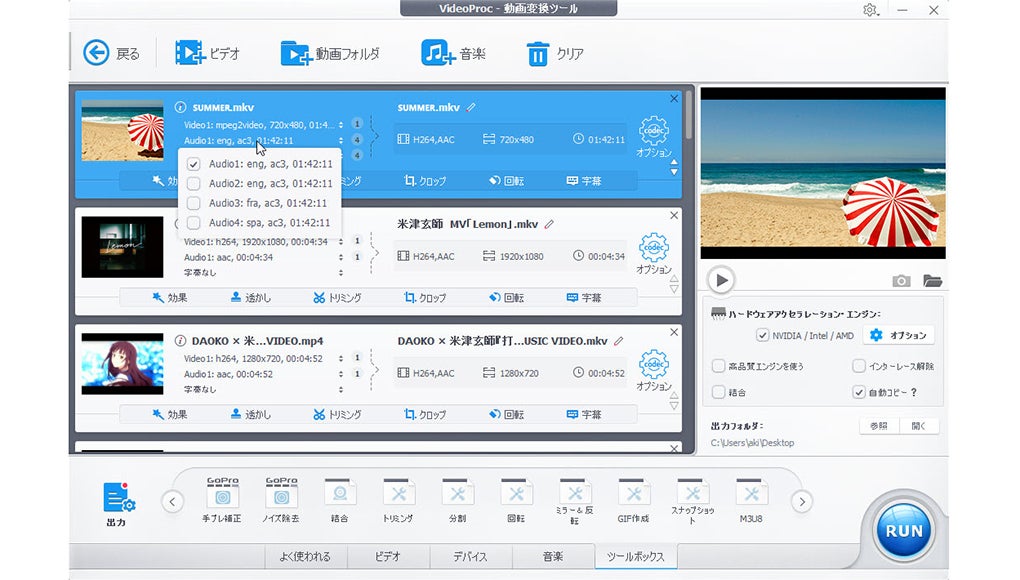
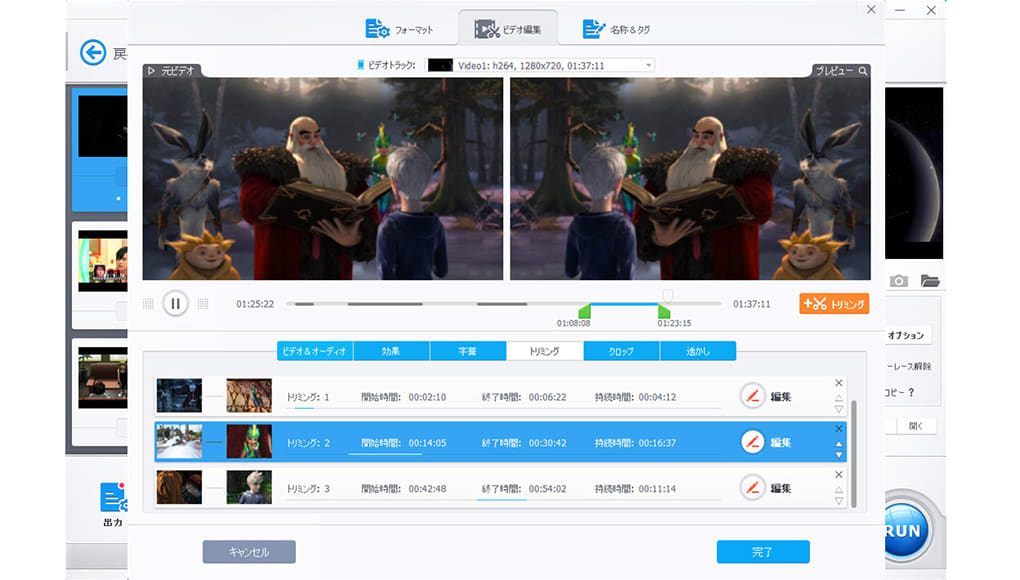
- Trimming and Cutting: Precisely cut and trim video segments to remove unwanted portions.
- Merging: Combine multiple video clips seamlessly into a single file.
- Resizing and Cropping: Adjust video dimensions and aspect ratios, cropping out unnecessary areas.
- Rotating and Flipping: Easily rotate and flip videos for optimal orientation.
- Adjustments: Fine-tune video and audio parameters, such as brightness, contrast, saturation, hue, gamma, and volume. These adjustments can be made manually using sliders for precise control.
- Effects: Apply various visual effects, including blurring, sharpening, and mirror effects. The software provides presets for easy application or allows for manual adjustments.
- Stabilization: Smooth out shaky footage, removing unwanted jitter and improving video quality.
- Red-Eye Removal: Quickly and efficiently remove red-eye effects from videos.
- Speed Adjustment: Modify the playback speed of video clips, creating slow-motion or fast-forward effects.
- Audio Synchronization: Precisely synchronize audio tracks with video footage, ensuring perfect alignment.
- Watermark Addition: Add custom watermarks or logos to videos, protecting your work and branding your content.
- Subtitle Support: Add subtitles to your videos in various fonts, sizes, and colors, making them accessible to a wider audience.
- GIF and JPEG Extraction: Extract still images from video clips as GIFs or JPEGs for use in other applications.
- Background Noise Reduction: Minimize unwanted background noise, improving the overall audio clarity.
- 4K Video Support: VideoProc supports 4K video editing, allowing you to work with high-resolution footage. This is crucial for those creating content for platforms that support 4K resolution.
- Batch Processing: Process multiple videos simultaneously, saving significant time and effort for large projects.
Video Conversion: VideoProc excels as a versatile video converter, supporting a vast array of input and output formats:
- Wide Format Compatibility: The software handles a broad range of formats, including MP4, HEVC, AVI, MOV, MKV, and more. It also supports DVD and ISO file formats.
- Format Conversion: Effortlessly convert videos between various formats, ensuring compatibility with different devices and platforms.
- Compression: Compress large video files by up to 90% without significant quality loss, optimizing file sizes for easier sharing and storage. This feature is particularly useful for reducing the size of videos intended for online distribution.
- GPU Acceleration: Leverages GPU hardware acceleration (compatible with NVIDIA, Intel, and AMD GPUs) significantly reducing processing times for conversions and other computationally intensive operations.
Screen Recording: VideoProc includes a built-in screen recording tool, offering versatility in capturing video content:
- Multiple Recording Modes: Choose from three distinct recording modes to suit your specific needs: Full Screen, Region Selection, and Webcam recording. This allows for flexibility in capturing gameplay, presentations, tutorials, and personal recordings.
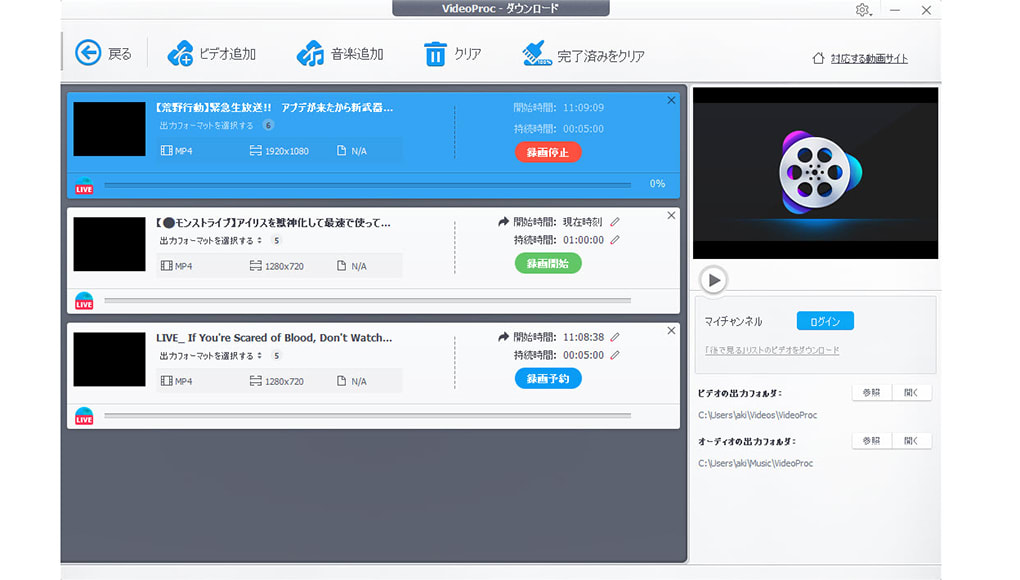
Video Downloading: The software also includes a video downloader function, allowing you to download online content:
- Online Content Downloading: Download videos and music from various online sources, facilitating the acquisition of content for editing and personal use. (Remember to respect copyright laws and only download content you have permission to use).
VideoProc’s Pricing and Licensing Model
VideoProc operates on a freemium model. A free trial version is available, allowing users to explore the software’s features and functionalities. However, exporting the final edited videos requires purchasing a license. The paid version removes limitations on output and provides access to all features. There is no watermark added to the exported files once a license has been purchased, and the user can create their own custom watermarks or logos.
VideoProc: Safety and Security
Digiarty Software, the developer of VideoProc, maintains a reputation for producing safe and reliable software. Independent security scans regularly assess the software for malware and viruses, ensuring the user’s system remains protected. The software is considered safe to download and use; however, as with any software download, users should ensure they download from the official Digiarty website to avoid potential risks.
VideoProc Compared to Other Video Editors
VideoProc sits comfortably in the mid-range of video editing software. It offers far more advanced features than many free video editing tools available, but it’s not as complex as professional-grade software such as Adobe Premiere Pro or DaVinci Resolve. This makes it an ideal choice for users who need more capabilities than basic freeware but don’t require the immense power (and complexity) of high-end professional software.
Conclusion: Is VideoProc Right For You?
VideoProc is a highly versatile and user-friendly tool suitable for a wide range of users. Its comprehensive feature set, including video editing, conversion, recording, and downloading capabilities, makes it a valuable asset for both beginners and more experienced video editors. The clean interface and intuitive design make it easily accessible, while its powerful features offer considerable editing capabilities. The absence of a free export option is a key limitation, however, the affordability of the license relative to professional-grade software makes it a worthy consideration for many. If you are searching for an all-in-one solution for your video editing needs, with a focus on user-friendliness and a range of features, VideoProc is definitely worth exploring. The free trial allows you to fully test its capabilities before committing to a purchase, enabling you to determine if it meets your specific requirements.
File Information
- License: “Trial version”
- Latest update: “July 11, 2023”
- Platform: “Windows”
- OS: “Windows 11”
- Language: “Japanese”
- Downloads: “50.7K”
- Size: “51.41 MB”


