
VideoStitch Studio is a trial version, multi-platform software application primarily categorized as design and photography software, more specifically as a graphics editor. Developed by VideoStitch, it offers a range of features designed for both casual and professional users. This review delves into its capabilities, user experience, system requirements, and overall value proposition, comparing it to similar applications in the market. The software was last updated in March 2016, and while it hasn’t seen updates since, it remains a valuable tool for certain users with specific needs.
VideoStitch Studio: Features and Functionality
VideoStitch Studio’s core functionality centers around video stitching and panoramic image creation. This is achieved through a relatively intuitive interface, allowing users to combine multiple video clips or images into a single, seamless panoramic output. While the specifics of its algorithms aren’t publicly detailed, user reports suggest robust stitching capabilities, effectively handling perspective distortions and aligning footage to create visually appealing panoramas. The process involves importing source files, configuring stitching parameters, and then rendering the final output. Users can adjust parameters such as blending modes and cropping to fine-tune the final result.
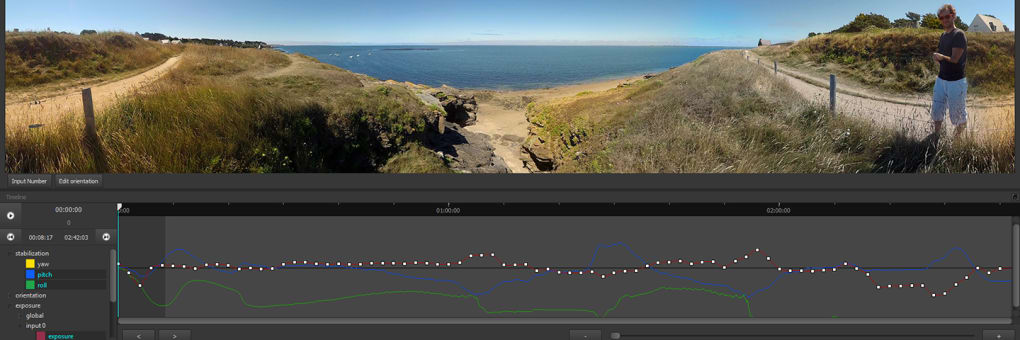
The software supports various video and image formats, ensuring compatibility with a broad range of input sources. The ability to handle diverse formats simplifies workflow for users working with multiple cameras or various recording devices. While precise format support details might need verification, the software’s flexibility in this aspect is a significant advantage.
While the software is primarily designed for video stitching, its capabilities extend to image editing to some degree. Users can potentially utilize it for creating high-resolution panoramas from still images, thereby expanding its application beyond solely video production. However, features dedicated specifically to image editing might be limited compared to dedicated image editing suites.
The trial version of VideoStitch Studio provides a complete experience, allowing users to fully test its capabilities before committing to a purchase. This trial-based model enables users to evaluate if the software meets their specific needs and preferences.
System Requirements and Compatibility
VideoStitch Studio is compatible with Windows 7 and earlier versions, indicating it might not fully support the latest operating systems. This limited compatibility could be a potential drawback for users employing more recent Windows iterations. The software is also available on Mac, providing cross-platform usability for users utilizing both systems. The specific system requirements in terms of processor speed, RAM, and hard drive space aren’t explicitly detailed, though user feedback suggests it’s relatively lightweight in terms of system resource demands. This implies that even users with less powerful machines may be able to run the software effectively, though performance might vary depending on the complexity of the stitching projects undertaken.
The language support is currently limited to English, potentially posing a barrier for non-English-speaking users. While this limitation isn’t insurmountable, it could impact accessibility for a significant portion of the global market. The lack of multilingual support could suggest that the developer’s target market might be primarily English-speaking users or that the updates and expansions of the software have been minimal since 2016.
User Experience and Interface
Anecdotal evidence from user reviews points towards a reasonably intuitive user interface. The software’s layout, while not detailed in the original information, appears to be designed to minimize the learning curve for users. The ease of use contributes significantly to the overall user experience, making it accessible to a broader range of users, even those without extensive video editing experience. However, the lack of recent updates might mean that the interface could feel outdated compared to contemporary video editing software.
Comparison with Alternative Applications
VideoStitch Studio occupies a niche within the broader landscape of video editing and image processing software. Direct comparisons with heavyweight industry players like Adobe Premiere Pro or After Effects might not be entirely fair given its specialized function. However, it competes with other applications focusing on panorama creation and video stitching. A comprehensive analysis would require a detailed side-by-side comparison with competing software, examining their respective features, strengths, and weaknesses. The pricing models of the competing applications would also influence the competitiveness of VideoStitch Studio.
It is crucial to compare the software’s price and functionalities to similar software. If the price of VideoStitch Studio is high compared to competing software and if the features are limited, then it is not competitive.
Conclusion: VideoStitch Studio’s Place in the Market
VideoStitch Studio, despite its age and lack of recent updates, provides a functional solution for users needing video stitching capabilities. Its relative ease of use and lightweight system requirements make it accessible to a wide range of users. However, the limited compatibility with newer operating systems, the lack of multilingual support, and the absence of recent updates are significant drawbacks that need consideration. The trial version offers a valuable opportunity for potential users to assess its suitability before committing to a purchase. Prospective users should carefully weigh its strengths against its limitations and compare it with alternative applications available in the market. The lack of updates suggests the application might not be actively maintained, implying potential future compatibility issues and lack of ongoing support. Users should consider this factor when deciding whether VideoStitch Studio fits their long-term needs. Therefore, the long-term viability of this software is questionable, and users should explore other options if ongoing support and updates are vital.
File Information
- License: “Trial version”
- Version: “2.1.1”
- Latest update: “March 3, 2016”
- Platform: “Windows”
- OS: “Windows 10”
- Language: “English”
- Downloads: “4.8K”
- Size: “57.60 MB”


