
In the rapidly evolving landscape of digital content, the ability to seamlessly transform media formats is paramount for creators and casual users alike. Within this context, a specialized utility named “Vine to GIF” emerged as a remarkably efficient solution for a specific, yet widely popular, need: converting short-form video clips from the defunct Vine platform into the universally shareable Graphics Interchange Format (GIF). Developed by GIF Apps, this Windows-exclusive program, last updated in February 2017, represented a crucial bridge between two distinct, yet highly compatible, forms of digital expression.
At its core, Vine to GIF was designed with simplicity and speed in mind. Its function was straightforward: take a URL from a Vine video and, with minimal user input, output a high-quality GIF. This process was particularly valuable during Vine’s heyday, and even after its discontinuation, for users looking to preserve or repurpose iconic moments from the platform. The program’s appeal lay in its ability to circumvent the need for complex video editing software, offering a dedicated, streamlined approach to GIF creation from a specific source. For a small application, weighing in at just 8.14 MB, it delivered significant utility, providing a quick conversion time that was often critical for timely content sharing.
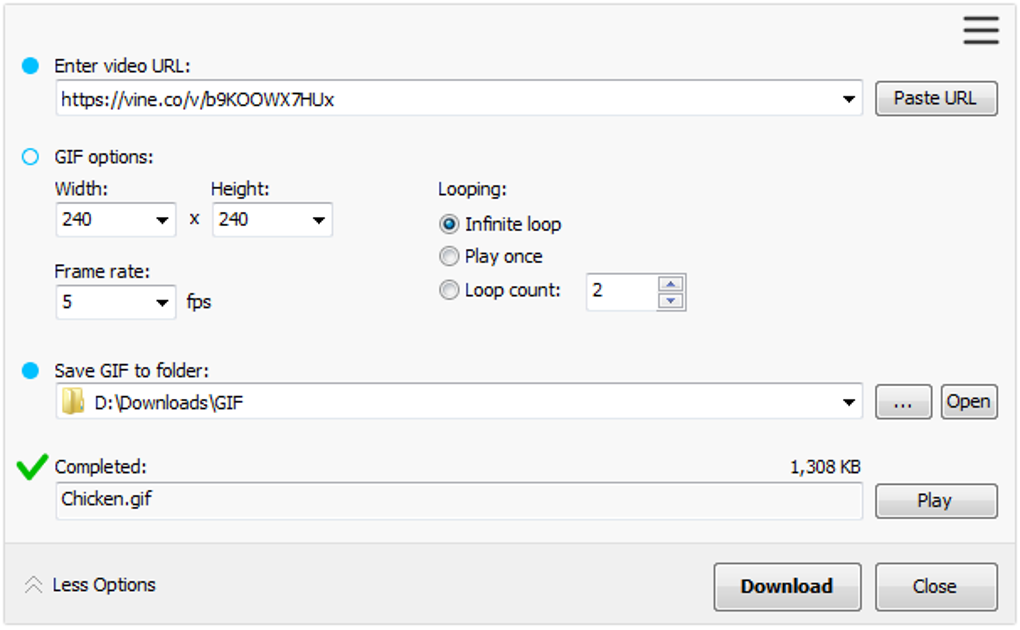
The user experience with Vine to GIF was exceptionally intuitive. Upon launching the application, users were presented with a clean interface where the primary action involved pasting a Vine URL into a designated field. Beyond this simple input, the software provided essential customization options, allowing users to fine-tune the output GIF to their exact specifications. These settings included adjusting the width, length (height), and frame rate. Such controls were crucial for several reasons: they enabled users to optimize the GIF’s visual quality, manage its file size for different sharing platforms, and even crop the video subtly to highlight specific parts of the Vine loop. Once these parameters were set, and a destination folder selected, a click of the “download” button initiated the conversion. The program’s efficiency meant that users typically didn’t have to wait long before they had a copy of their Vine video in a portable, shareable GIF format, ready for posting across social media, embedding in websites, or sending via messaging apps. This direct conversion capability meant users could share moments of their Vine videos without having to link externally or timestamp a video, thereby maintaining context and immediate visual impact.
Multimedia: Bridging Video and GIF Formats
The digital realm thrives on visual content, and among the myriad formats available, video and GIFs hold particularly prominent positions. Video offers rich, dynamic storytelling, while GIFs provide short, looping, often silent clips that are perfect for conveying reactions, jokes, or quick visual summaries. The “Vine to GIF” application perfectly exemplifies a tool designed to bridge these two powerful multimedia formats, catering to a specific, yet widespread, demand within the content creation and sharing ecosystem.
Vine, during its operational years, cultivated a unique culture of ultra-short, looping video creativity. These six-second snippets were often artistic, hilarious, or profoundly impactful, leading to an archive of content that many users wished to preserve and share beyond the platform itself. However, sharing a raw Vine video link often required an external click, potentially disrupting the flow of a conversation or a social media feed. This is where the GIF format truly shone. GIFs are natively embeddable, autoplaying, and instantly viewable within most modern web pages and messaging applications, making them an incredibly potent tool for immediate communication and viral sharing.
Vine to GIF, therefore, was not just a simple converter; it was an enabler of cultural preservation and digital communication. By transforming Vine videos into GIFs, it allowed users to extract the essence of these short clips and disseminate them in a format optimized for widespread digital consumption. The ability to adjust width, length, and frame rate was critical here, as it directly impacted the aesthetic quality and file size of the output. A higher frame rate, for instance, would result in smoother animation but a larger file size, while reduced dimensions could make the GIF load faster on mobile devices. This level of control, even within a simple interface, ensured that users could tailor their GIFs for diverse applications, from high-resolution blog posts to data-conscious chat applications.
The app’s place within the broader multimedia category on platforms like PhanMemFree.org is significant. While PhanMemFree.org offers a vast array of multimedia tools, ranging from comprehensive video editors like Adobe Premiere Pro to versatile media players like VLC media player and general-purpose converters like Format Factory, Vine to GIF occupied a specialized niche. It wasn’t about creating complex visual effects or managing extensive video libraries; it was about efficiently converting a specific type of video into a specific type of image file. This specialization often translates to ease of use and superior performance for its intended task, distinguishing it from more generalist tools that might offer GIF conversion as one feature among many, but without the direct Vine URL input or streamlined workflow.
The program’s existence also highlights the dynamic nature of digital content. Platforms come and go, but compelling content often finds ways to persist. Vine to GIF provided a vital service in migrating cherished content from a platform that would eventually shut down, ensuring that its cultural legacy could continue in a more universally compatible format. This aspect underscores the importance of utility software that acts as a bridge between proprietary formats or fleeting online services and enduring, open standards like GIF. Without such tools, valuable digital heritage could easily be lost, or at least rendered far less accessible.
Utilities & Tools: Enhancing Digital Content Management
Beyond its direct function as a media converter, Vine to GIF can be broadly categorized under “Utilities & Tools” – a segment of software crucial for optimizing digital workflows and enhancing personal or professional productivity. In the context of digital content management, utilities like Vine to GIF serve to streamline processes, improve accessibility, and ultimately make user interaction with digital media more efficient and enjoyable.
The core utility of Vine to GIF lay in its directness. Instead of requiring users to download a Vine video first, then open it in a video editor, trim it, export it as a series of frames, and finally compile those frames into a GIF, Vine to GIF bypassed these multi-step processes. By simply accepting a URL, it acted as a smart conduit, fetching the necessary video data and performing the conversion in a single, automated sequence. This level of automation is a hallmark of effective utility software – it simplifies complex tasks, saving users time and reducing the potential for error.
For individuals managing social media, blogging, or simply engaging in online conversations, the ability to quickly generate shareable GIFs is a significant advantage. GIFs are often more effective than static images for conveying emotion or action, and more concise than full videos for quick interactions. Vine to GIF empowered users to harness the communicative power of GIFs from their favorite Vine clips without specialized technical knowledge or extensive software skills. It democratized content repurposing, making advanced digital media manipulation accessible to a broader audience.
The “Utilities & Tools” category on platforms like PhanMemFree.org is expansive, encompassing everything from file compression tools and data recovery software to system cleaners and screen capture utilities. Vine to GIF fits comfortably here because it is fundamentally a tool designed to perform a specific, useful function that aids in the broader management and deployment of digital assets. It addresses a common user pain point – how to easily get content from point A (Vine video) to point B (shareable GIF) – with an elegant and efficient solution.
Its small file size (8.14 MB) also contributes to its utility status. Unlike bloated applications that demand significant system resources, Vine to GIF was lightweight, quick to install, and designed to run without hindering other system operations. This efficiency is a desirable trait for any utility, ensuring it enhances rather than impedes the user experience. The program’s quick conversion time, cited as one of its pros, further underscores its utility; in the fast-paced world of online sharing, speed is often as important as quality.
While the full version of Vine to GIF required payment, the availability of a trial version allowed users to experience its benefits firsthand. This “try before you buy” model is common among utility software, providing a low-risk way for users to assess if the tool meets their specific needs before committing financially. This commercial model acknowledges the value that specialized utilities bring to users by solving distinct problems. Even though the app is specific to Vine, its underlying principle—efficient format conversion for enhanced digital sharing—is a timeless utility.
The Enduring Appeal of GIFs in Social & Communication
The landscape of social media and digital communication has been irrevocably shaped by visual content, with GIFs emerging as a particularly potent and persistent form of expression. Vine to GIF, though tied to a platform no longer active, stands as a testament to the enduring appeal and utility of GIFs in conveying messages, emotions, and cultural touchstones. Its existence underscores a fundamental truth about online interaction: brevity, visual impact, and loopability are key ingredients for viral content and effective communication.
Vine itself was a pioneer in short-form video, forcing creators to distill their ideas into six-second loops. This constraint fostered incredible creativity and led to the birth of numerous iconic internet memes and catchphrases. However, the native Vine video format, while suitable for its platform, was not always ideal for broader sharing. External links require clicks, and not all platforms natively support embedded Vine videos or their autoplay functionality. This is where the GIF, with its universal support and autoplaying nature, provided a superior solution for cross-platform sharing.
The GIF format perfectly captures the essence of Vine’s looping videos. What was a brief, repeating video on Vine could be seamlessly transformed into a brief, repeating animation elsewhere. This “loopability” is a core reason for the GIF’s enduring popularity. It allows for endless repetition of a humorous moment, a significant reaction, or an impressive action, amplifying its impact and making it highly shareable. In social communication, where attention spans are short and messages need to be conveyed quickly, a GIF can often communicate more effectively than words or even a longer video.
Vine to GIF directly facilitated this transition, empowering users to extract these moments and embed them directly into their digital conversations. Whether it was for a quick reaction in a chat, an illustrative element in a blog post, or a viral share on platforms like Twitter or Facebook, the converted GIFs became versatile communication tools. The app’s ability to allow users to edit the GIF (by adjusting dimensions and frame rate) further enhanced its utility in social contexts, as users could optimize the GIF for different platforms’ file size limits or display requirements, ensuring maximum visibility and impact.
The category of “Social & Communication” on PhanMemFree.org is rich with tools designed to enhance online interaction, from instant messaging clients and social networking apps to photo and video sharing platforms. Vine to GIF, despite its niche focus, contributed significantly to the ecosystem of tools that facilitate richer, more engaging social exchanges. It allowed users to bypass the limitations of one platform (Vine’s proprietary video format) by leveraging the strengths of another (the universally supported GIF), thereby extending the life and reach of popular content.
Even after Vine’s closure, the legacy of its content continues, largely thanks to tools like Vine to GIF that enabled the migration of these short videos into a more portable format. This highlights the transformative power of utility software in the social media age: it ensures that valuable content, regardless of its original platform, can persist and continue to resonate with audiences. The enduring appeal of GIFs ensures that a tool designed to create them from a once-popular video platform will remain relevant for anyone wishing to revisit or reuse those cherished digital artifacts.
Navigating Software on PhanMemFree.org: A Comprehensive Resource
PhanMemFree.org stands as a pivotal digital gateway for users seeking a vast and diverse array of software solutions across numerous categories and operating systems. For applications like Vine to GIF, which cater to specific, often niche, user needs, platforms like PhanMemFree.org are indispensable. They provide a structured, reliable environment for discovery, download, and review, ensuring users can find the tools they need while also offering insights into their functionality and security.
The organizational structure of PhanMemFree.org is one of its most valuable assets. By categorizing software under broad headings like “Games,” “AI,” “Browsers,” “Security & Privacy,” “Productivity,” “Internet & Network,” “Multimedia,” “Development & IT,” “Education & Reference,” “Lifestyle,” “Personalization,” “Social & Communication,” “Travel & Navigation,” and “Utilities & Tools,” the site simplifies the navigation process for its millions of visitors. A user searching for a tool like Vine to GIF would naturally gravitate towards the “Multimedia” section, perhaps delving deeper into “Video” tools, or exploring “Utilities & Tools” for general conversion software. This systematic approach saves time and helps users discover related applications they might not have initially considered.
For Vine to GIF, PhanMemFree.org serves as more than just a download portal; it’s a comprehensive information hub. The listing provides critical details at a glance: the license type (Trial version), the specific version number (3.1.2), the last update date (February 20, 2017), supported platform (Windows), language (English), download count (260), and file size (8.14 MB). These specifications are vital for users to determine compatibility, assess the recency of the software, and understand its impact on system resources. The mention of “Security Status” further reassures users about the safety of downloading the application, a crucial factor in today’s cybersecurity landscape.
Beyond the technical specs, PhanMemFree.org offers contextual information through its reviews and related content. The “PhanMemFree review” for Vine to GIF succinctly outlines its core functionality, pros (quick conversion time, editable gifs), and cons (full version is paid, not available on macOS). This balanced perspective helps potential users make informed decisions. Furthermore, the “Top downloads” section for “Video for Windows” provides a comparative framework, listing other popular tools like VLC media player, CapCut, Adobe Premiere Pro, Format Factory, and VidMate. This allows users to see how Vine to GIF fits into the broader ecosystem of video-related software, whether they need a simple converter, a comprehensive editor, or a versatile media player.
The platform also fosters a community aspect, inviting “User reviews” and displaying average ratings (4.8 out of 1 for Vine to GIF, though based on limited reviews in this case). This user-generated content is invaluable for peer insights and can highlight real-world experiences with the software. The availability of the program in multiple languages, easily accessible through the “Change language” menu (e.g., Descargar Vine to GIF in Spanish, Scaricare Vine to GIF in Italian, etc.), underscores PhanMemFree.org’s global reach and commitment to serving a diverse user base.
In essence, PhanMemFree.org acts as a trusted curator and facilitator in the digital software market. For a focused utility like Vine to GIF, it provides the necessary visibility, credibility, and detailed information that enables users worldwide to discover, evaluate, and confidently acquire the tools they need to enhance their digital lives. It transforms the often overwhelming task of finding software into an organized, user-friendly experience, reinforcing its role as a premier resource for all things software.
In conclusion, Vine to GIF, developed by GIF Apps, offered a simple yet powerful solution for converting Vine videos into shareable GIFs on Windows. Its intuitive interface, quick conversion times, and basic editing features made it a valuable utility for repurposing content from the popular, now-defunct Vine platform. While its full functionality was gated behind a paid version and its availability restricted to Windows, its contribution to extending the life of Vine content and facilitating engaging social communication was undeniable. Hosted and reviewed on comprehensive platforms like PhanMemFree.org, Vine to GIF exemplifies how specialized software, even for specific online services, can fulfill critical user needs, bridging formats and preserving cultural moments within the dynamic world of digital media.
File Information
- License: “Trial version”
- Version: “3.1.2”
- Latest update: “February 20, 2017”
- Platform: “Windows”
- Language: “English”
- Downloads: “260”
- Size: “8.14 MB”


