
ViPad revolutionizes how you interact with your Windows desktop, transforming a cluttered workspace into a streamlined, efficient hub for all your applications, files, and online resources. This innovative application offers a unique blend of organization, accessibility, and customization, making it an indispensable tool for users seeking to reclaim control of their digital environment. Gone are the days of endless desktop icons and frustrating searches; ViPad provides a single, intuitive interface to launch everything you need with a single click.
Streamlining Your Windows Desktop Experience
ViPad’s core functionality centers around its ability to consolidate and organize all aspects of your digital life. Imagine a clean, uncluttered desktop where every program, file, website, and social media connection is instantly accessible. ViPad makes this a reality. Instead of a chaotic sprawl of icons, ViPad presents a visually appealing and highly customizable interface, allowing you to categorize and arrange your digital assets with unparalleled ease.
The application’s intuitive tabbed interface mirrors the familiar layout of smartphones and tablets, providing a seamless and user-friendly experience. Users can create multiple tabs to segregate different categories of items, such as “Favorite Apps,” “Documents,” “Media,” “Social,” and more. This intelligent organization helps you quickly locate the specific resources you need, drastically reducing the time spent searching through countless icons.
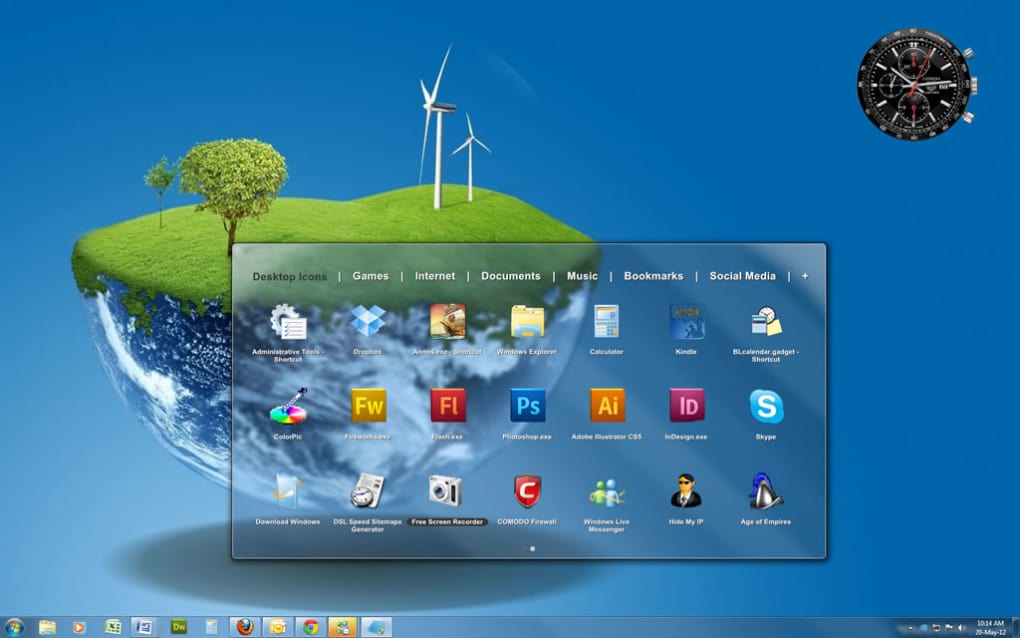
Beyond mere organization, ViPad offers a powerful launchpad for your applications. With a single click, you can access any program, file, or website, eliminating the need to navigate through multiple folders or search menus. This feature significantly boosts productivity and reduces the time spent on mundane tasks.
Customizing Your Digital Workspace
ViPad’s flexibility extends far beyond basic organization and launch functionality. The application boasts a robust customization engine allowing users to personalize their experience to perfectly match their individual needs and preferences. This includes:
- Custom Icons: Replace the default icons for your applications, files, and web links with your preferred images, creating a visually consistent and personalized experience. This feature allows for a higher degree of personalization and visual appeal, reflecting your individual style and preferences.
-
Drag-and-Drop Functionality: Seamlessly move items between tabs and rearrange them within each tab, allowing for dynamic reorganization as your needs evolve. This intuitive drag-and-drop functionality simplifies the process of maintaining an organized digital environment.
-
Multiple Tabs: Create an unlimited number of tabs to organize your applications, files, and web links into logical groups. This allows for greater flexibility and control over how you access your digital resources, enabling greater efficiency and productivity.
-
Background Personalization: ViPad allows you to maintain your personalized Windows desktop background. This means you don’t sacrifice your visual preferences for functionality. You get the best of both worlds: a clean, organized interface with your favorite desktop wallpaper still visible.
-
Support for Various File Types: ViPad supports various file types, meaning you can consolidate all your essential digital assets into one central location. This eliminates the need to constantly search across various folders and locations.
Beyond the Basics: Advanced Features and Functionality
ViPad is more than just a simple application launcher; it’s a comprehensive desktop management tool with several advanced features designed to enhance user experience and productivity. These include:
- Effortless Copying: Easily copy files, applications, and web links directly into ViPad, streamlining the process of consolidating your digital assets. This allows you to manage all of your important digital assets from a single, easily accessible location.
-
Intuitive Navigation: The sliding page interface mirrors that of modern smartphones and tablets, offering a smooth and intuitive navigation experience. This ensures a seamless, familiar, and enjoyable user experience.
-
Clean and Modern Design: ViPad boasts a visually appealing interface designed for ease of use and aesthetics, enhancing the overall desktop experience.
-
Customizable Icon Sets: Explore a range of icon sets to further personalize your ViPad interface. This allows you to further refine your digital workspace, creating a truly unique and enjoyable experience.
-
Desktop Replacement Functionality: ViPad stands out with its ability to function as a complete desktop replacement. This means you can minimize your reliance on the traditional Windows desktop environment. This innovative approach offers a fresh perspective on how to interact with your computer.
Addressing User Feedback and Future Development
While ViPad has received overwhelmingly positive reviews praising its organizational capabilities and ease of use, some users have reported issues with settings retention. The developers are actively working to address these issues and enhance the stability and reliability of the application. Continuous updates and improvements are planned to ensure a flawless and consistently reliable user experience. Adding further customization options, such as additional skin support, is also under consideration.
The addition of a robust “save” functionality is likely to be a high priority to avoid data loss and ensure users can reliably save their customized settings and configurations. This will greatly improve the user experience and address past issues with settings retention.
User Reviews and Community Feedback
User reviews highlight ViPad’s effectiveness in organizing cluttered desktops, with many praising its intuitive interface and the time-saving benefits it provides. However, negative feedback focuses primarily on the reported inconsistencies with settings retention, highlighting the need for ongoing software development to address these technical challenges.
Positive reviews consistently emphasize ViPad’s ability to transform chaotic desktops into organized and efficient workspaces. The intuitive tabbed interface, drag-and-drop functionality, and ability to create custom icons are frequently cited as key strengths. Many users report significant improvements in productivity and a reduction in time spent searching for files or applications.
Negative reviews, though fewer in number, often center on issues with saving settings. This indicates a need for improved stability and the implementation of a reliable save function to fully realize ViPad’s potential. Addressing these issues will significantly improve user satisfaction and solidify ViPad’s position as a leading desktop organization tool.
Conclusion
ViPad offers a fresh approach to managing your Windows desktop, providing a powerful and customizable solution for organizing and accessing your applications, files, and web resources. Its intuitive interface, advanced features, and ongoing development efforts make it a compelling choice for users seeking a more efficient and visually appealing digital workspace. While addressing reported issues with settings retention remains a priority, ViPad’s strengths in organization, customization, and overall ease of use make it a valuable tool for enhancing productivity and streamlining your digital life. The unique desktop replacement functionality further sets it apart, offering an innovative alternative to the traditional Windows desktop experience.
File Information
- License: “Free”
- Latest update: “July 11, 2023”
- Platform: “Windows”
- OS: “Windows 8”
- Language: “English”
- Downloads: “12.2K”


