
Virtual CD is a powerful software application designed to eliminate the hassles associated with physical CDs and DVDs. By creating virtual copies of your discs, it offers a streamlined, efficient, and significantly faster alternative to traditional disc usage. This comprehensive review explores the features, benefits, and alternatives of Virtual CD, addressing its impact on various aspects of digital media management.
Revolutionizing Disc Usage: Speed, Convenience, and Efficiency
In today’s digital landscape, the reliance on physical media like CDs and DVDs has diminished, yet many applications and data still reside on these formats. Virtual CD offers a compelling solution to bridge the gap between physical and digital storage, eliminating the inherent limitations and inconveniences of traditional disc usage. The software allows users to create compressed, 1:1 copies of their CDs and DVDs directly onto their hard drives. These virtual discs are then readily accessible with a single click, or even automatically upon launching the associated program.
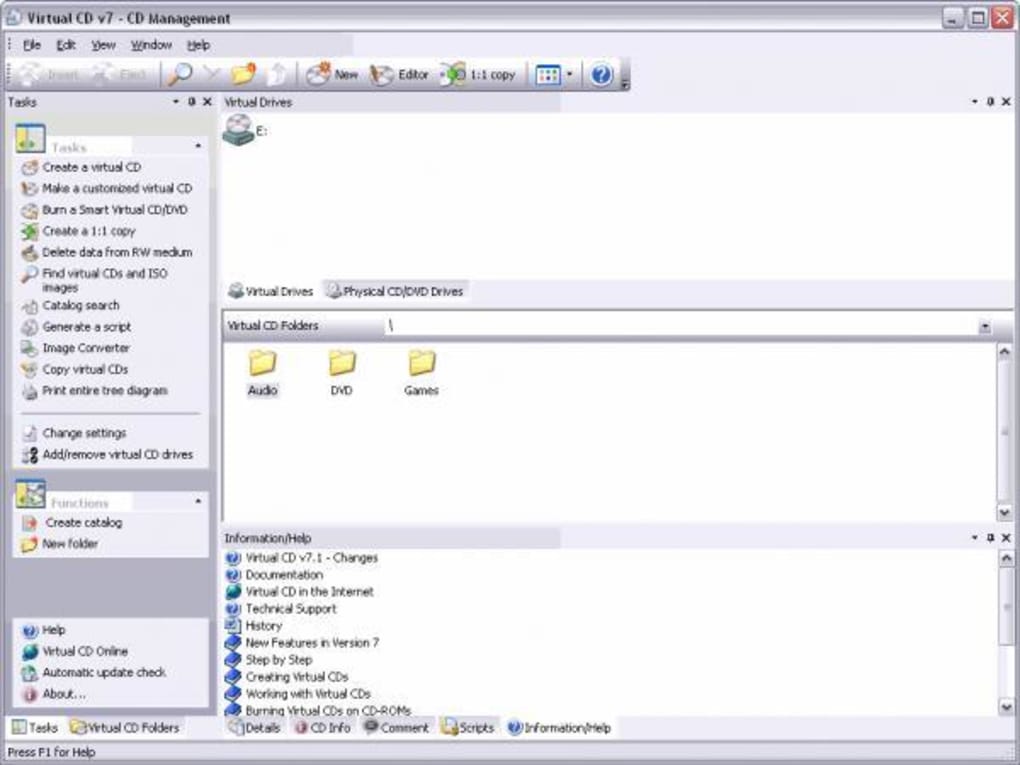
The benefits are immediately apparent:
-
Unparalleled Speed: Virtual CD boasts speeds up to 200 times faster than accessing data from a physical disc. This translates to drastically reduced loading times for applications, music, games, and any other data stored on the virtualized discs. The elimination of physical disc read times dramatically improves workflow efficiency.
-
Enhanced Convenience: Say goodbye to the noise of spinning optical drives and the tedious process of manually swapping discs. With Virtual CD, all your data is readily available at your fingertips. The program eliminates the need for constant physical handling of discs, reducing wear and tear and minimizing the risk of damage to the original media.
-
Superior Data Security and Preservation: Storing your original CDs and DVDs in a safe place prevents scratches, dust accumulation, and the risk of physical damage. By creating virtual copies, you protect your valuable data while ensuring convenient access. The virtual drives act as backups, protecting against data loss from physical disc damage.
-
Environmentally Conscious: The reduction in physical disc usage contributes to a smaller carbon footprint. Less manufacturing, less transportation, and less disposal translate to a more environmentally friendly approach to digital media management.
-
Simplified Organization: Virtual CD allows users to organize their digital media more effectively. Instead of a cluttered collection of physical discs, users can maintain a well-organized digital library, easily searchable and accessible. This streamlined organization improves productivity and reduces wasted time searching for specific files.
Beyond Simple Replication: A Versatile Tool for Modern Computing
Virtual CD is not merely a simple disc copying utility; its capabilities extend far beyond basic replication. The software’s user-friendly interface and efficient functionality contribute to a positive user experience. The program seamlessly integrates with the operating system, acting as a virtual optical drive, indistinguishable from its physical counterpart in terms of functionality.
This versatility caters to various user needs, making it suitable for both individual users and professional environments:
- Gamers: Experience drastically reduced loading times for games, improving the overall gaming experience. The ability to quickly access game data eliminates the frustration of lengthy loading screens, enhancing responsiveness and immersion.
-
Software Developers: Quickly access software libraries, project files, and other large datasets without the limitations of physical media. Virtual CD’s speed and convenience improves productivity significantly in software development workflows.
-
Multimedia Professionals: Edit and manage large video and audio files stored on virtual drives efficiently. The speed advantages allow for smoother editing workflows and faster rendering times.
-
Educators: Easily access educational materials and software without the handling and organization issues associated with physical media. This simplifies the distribution and management of educational resources in classrooms or online learning environments.
-
Businesses: Securely store and access confidential business data on virtual drives, enhancing data security and operational efficiency. Centralized management of virtual disc images allows for easy backup and recovery procedures.
Technical Specifications and System Requirements
Virtual CD is available for Windows operating systems, ensuring broad compatibility across a range of devices. The program is known for its relatively small footprint, minimal resource consumption, and straightforward installation process. Specific system requirements vary depending on the version, but generally, Virtual CD requires a modest amount of processing power and hard drive space. Regular updates are provided by the developer, ensuring compatibility with the latest operating systems and security protocols. The software’s ease of use and minimal system demands ensure accessibility for a wide range of computer users, from novices to experienced professionals.
Alternatives and Comparisons: Navigating the Virtual Disc Landscape
While Virtual CD offers a robust and user-friendly solution for managing virtual discs, several alternative applications exist within the market. It’s crucial to consider these alternatives to determine which best suits individual needs and preferences. Competitors often offer similar core functionalities, but may differ in features, price, and system requirements. Factors such as the ability to mount various image formats, advanced features like disc burning or ISO creation, and user interface design can all influence the choice of software. Conducting thorough research and comparing features prior to selection is highly recommended. Popular alternatives include DAEMON Tools Lite, Alcohol 52%, and Virtual CloneDrive. Each boasts its unique features, price points, and user experience. Careful consideration of these factors allows for informed decision-making in selecting the ideal virtual disc management solution.
User Reviews and Community Feedback
The success of any software hinges not only on its technical capabilities but also on its overall user experience. Gathering user feedback and reviews offers invaluable insights into a software’s strengths and weaknesses. While user reviews for Virtual CD are not readily available in the provided text, feedback from similar applications consistently highlights the importance of intuitive user interface design, efficient resource management, and strong technical support. A positive user experience ultimately leads to increased satisfaction and improved productivity. Seeking out reviews and testimonials from other users can greatly inform the decision-making process when choosing a virtual CD software application.
In conclusion, Virtual CD presents a compelling solution for anyone seeking a more efficient and convenient approach to managing digital media from physical CDs and DVDs. Its speed, ease of use, and comprehensive functionalities make it a strong contender in the market for virtual disc management software. While alternative applications exist, the advantages offered by Virtual CD make it a worthwhile option for a wide range of users, from casual home users to professional environments. Through careful consideration of the software’s features, system requirements, and available alternatives, users can confidently choose the virtual disc management tool that best aligns with their specific needs and enhances their digital workflow.
File Information
- License: “Trial version”
- Latest update: “February 14, 2024”
- Platform: “Windows”
- OS: “Windows 2000”
- Language: “English”
- Downloads: “38.5K”
- Size: “115.16 MB”


