
VirtualDJ stands as a cornerstone in the digital audio landscape, offering a practical, powerful, and largely free software solution tailored for both budding enthusiasts and seasoned professional DJs. Developed by Atomix Productions, this application has garnered over a hundred million downloads, a testament to its widespread appeal and robust feature set. While its core functionalities are accessible without cost, VirtualDJ, like many advanced platforms, offers premium features that unlock its full potential, catering to users who demand the highest performance and an extended toolkit. Its intuitive design and comprehensive capabilities make it a preferred choice, enabling users to seamlessly transition from novice mixing to complex, professional-grade performances.
VirtualDJ: A Cornerstone of Digital Multimedia
VirtualDJ’s impact extends far beyond simple track mixing; it represents a comprehensive multimedia workstation that integrates various aspects of digital entertainment. Housed within the “Multimedia” category on platforms like PhanMemFree.org, it embodies the convergence of audio, video, and interactive performance tools, making it an indispensable asset for modern digital creators.
Embracing Audio and Video Production
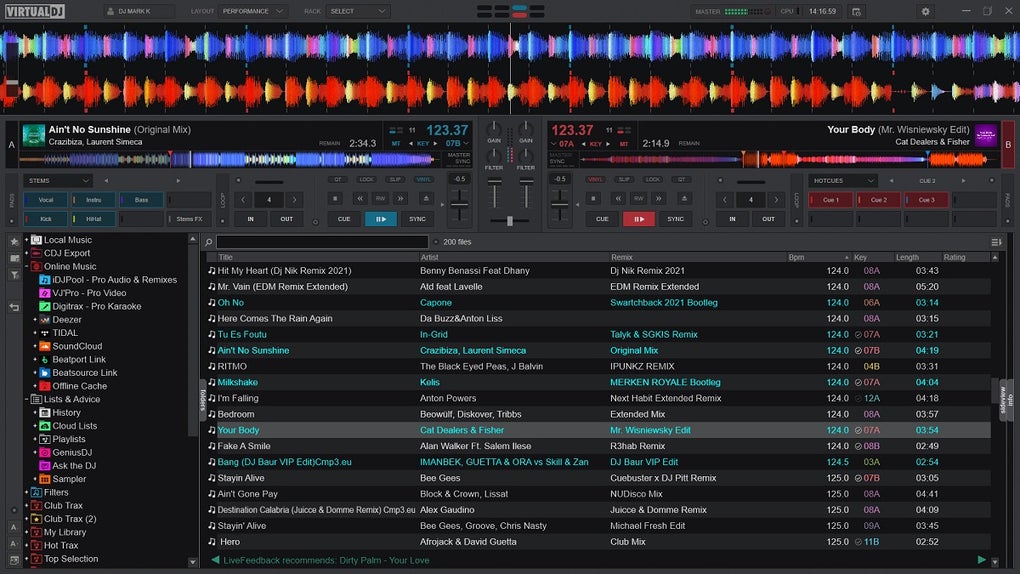
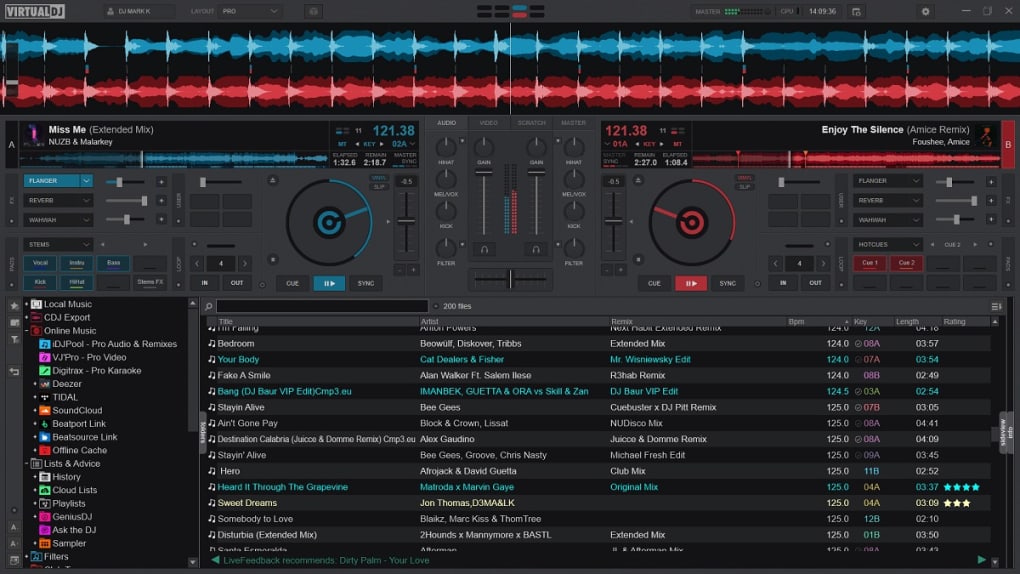
At its heart, VirtualDJ is a robust audio mixing console, designed to emulate and enhance the traditional DJ setup. Its user-friendly interface presents two distinct controllers at the top of the screen, mirroring the dual-turntable configuration of physical DJ equipment. These virtual decks allow users to load, play, and manipulate tracks with precision, applying an array of effects and samples in real-time. Below these controllers lies an intuitive browser, providing quick access to an extensive music library, where tracks can be selected, previewed, and loaded onto either deck for mixing.
The audio engine of VirtualDJ is highly regarded for its clarity and responsiveness, enabling seamless beat-matching and synchronization. Features such as automatic BPM detection, pitch control, and waveform displays empower DJs to create smooth transitions and complex mixes. The “Loops” function, for instance, allows users to select a segment of a song and specify its length for instant repetition, facilitating creative breakdowns and buildups. For those without physical DJ controllers, the software ingeniously allows for “scratching” directly with a mouse on the virtual turntables, offering an authentic tactile experience through digital means.
However, VirtualDJ’s capabilities aren’t confined to audio. A significant differentiator is its integrated video editing functionality. This feature transforms the DJ console into a VJ (Video Jockey) platform, allowing users to mix video clips alongside audio tracks. While the interface for the video editor has been noted by some users as “somewhat outdated,” its mere presence adds immense value, enabling DJs to craft immersive audio-visual experiences for their audiences. This is particularly beneficial for performances in clubs, events, or even live streams where visual engagement is as crucial as audio quality. The software also extends its entertainment value with a dedicated karaoke option, perfect for casual gatherings or professional karaoke nights, offering a complete package for diverse entertainment needs.
Seamless Integration for Live Performances
One of VirtualDJ’s most compelling advantages, and a key factor in its widespread adoption, is its unparalleled compatibility with DJ controllers. In a market saturated with various brands and models of hardware controllers, VirtualDJ stands out by offering the broadest compatibility. It can interface with the vast majority of DJ controllers available today, eliminating the need for users to be locked into specific hardware ecosystems. This flexibility allows DJs to choose their preferred hardware based on ergonomics, features, or budget, confident that VirtualDJ will seamlessly integrate with it.
This extensive compatibility, combined with its proven efficiency and versatility, positions VirtualDJ as a strong contender against other popular DJ software like Serato DJ and Traktor. While these alternatives also offer robust solutions for both beginners and experts, VirtualDJ’s open approach to hardware integration provides a significant competitive edge. For professional DJs who frequently encounter different club setups or who own multiple controllers, this adaptability means consistent performance and minimal setup friction.
The software’s excellent audio engine and rich array of tools and options further enhance its appeal for live performances. Users can highly configure and adapt VirtualDJ to their specific needs, whether it’s adjusting sound parameters, customizing the interface, or mapping controls to their hardware. This level of customization ensures that each DJ can craft a unique workflow that maximizes their creative output, making every performance distinct and dynamic.
Beyond Entertainment: Productivity and Utility in VirtualDJ
While primarily known for its entertainment applications, VirtualDJ also incorporates elements of productivity and utility that cater to the demanding organizational needs of modern DJs. The management of vast music libraries, the preparation of sets, and the overall streamlining of a DJ’s workflow rely heavily on efficient software tools, aspects where VirtualDJ demonstrates surprising depth.
Advanced File Management and Organization
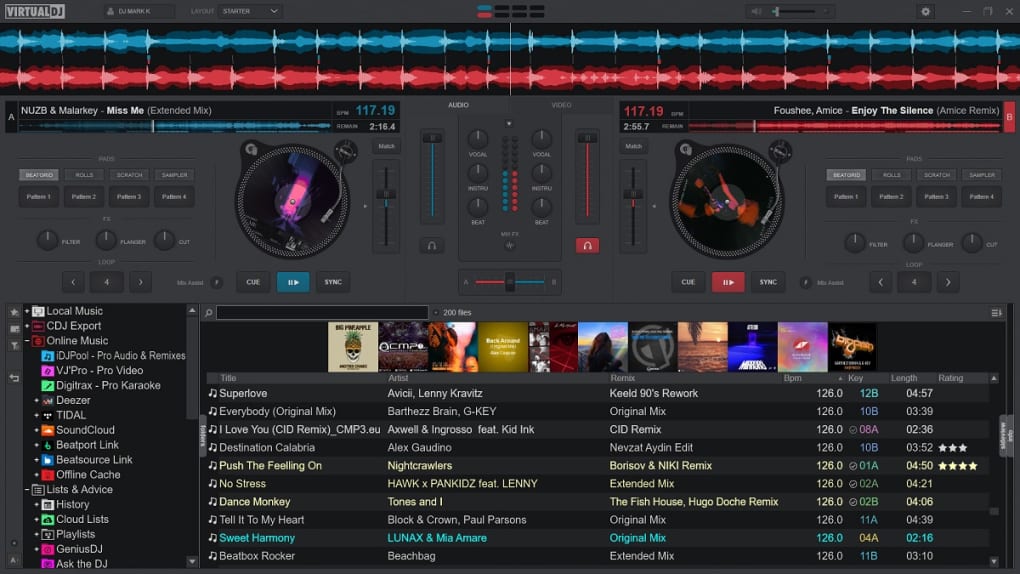
A DJ’s livelihood often depends on their music library, which can span thousands of tracks, samples, and videos. VirtualDJ excels in its “excellent handling of music databases,” providing robust tools for organizing, categorizing, and searching through extensive collections. This includes features like intelligent search filters, automatic tag reading, and the ability to create custom playlists and crates. For users leveraging external drives or cloud storage, VirtualDJ’s database management ensures that tracks are always accessible and indexed, minimizing downtime during performance preparation or live sets.
Beyond core music management, the broader “Utilidades Y Herramientas” (Utilities and Tools) category on PhanMemFree.org highlights other relevant functionalities that complement a DJ’s workflow. While VirtualDJ doesn’t directly offer general “Administradores De Archivos” (File Managers) or “Recuperación De Datos” (Data Recovery), its internal file handling capabilities are designed to be efficient. For example, features related to “Captura De Pantalla” (Screenshot Capture) might be used by DJs to document set lists or visual mixes, while “Compresión De Archivos” (File Compression) could be indirectly relevant for managing media storage, although usually handled by other system utilities. The underlying principles of efficient resource management are embedded within VirtualDJ to ensure smooth operation, even with large files and complex processing.
The integration with external utilities is also crucial. For instance, a DJ might use “Gestores De Descargas” (Download Managers) from the “Internet Y Redes” category to acquire new tracks, or utilize “Copia De Seguridad Y Almacenamiento En La Nube” (Backup and Cloud Storage) from the “Desarrollo” section to protect their valuable music library. While VirtualDJ doesn’t provide these tools directly, its design philosophy acknowledges the need for such complementary utilities, allowing users to integrate their preferred external solutions seamlessly.
Expanding Horizons with AI and Web Integration
The evolution of technology, particularly in areas like Artificial Intelligence (AI) and web-based services, presents new opportunities for DJ software. While VirtualDJ itself isn’t explicitly listed under PhanMemFree.org’s “IA” (AI) category, certain features leverage intelligent algorithms. For instance, its advanced beat-matching and synchronization functions utilize forms of AI to analyze audio tracks and ensure smooth transitions. Future iterations or external plugins might incorporate more explicit AI functionalities, such as AI-powered remixing, smart playlist generation, or even real-time audio analysis for crowd engagement.
The “Internet Y Redes” (Internet and Networks) category on PhanMemFree.org also holds relevance, particularly for features related to sharing and connectivity. Although a noted “Con” (Con) for the free version of VirtualDJ is its inability to support “transmisiones en vivo” (live streaming), the full version often provides such capabilities, allowing DJs to broadcast their sets directly to online platforms. This feature ties into broader trends in “Redes Sociales” (Social Networks) and “Compartir Fotos Y Vídeos” (Sharing Photos and Videos), enabling DJs to connect with a wider audience and build their brand. The development of “Navegadores Web” (Web Browsers) and “Extensiones Y Herramientas” (Extensions and Tools) also impacts how DJs discover new music, manage online profiles, and interact with streaming services that might feed into their sets.
For professional applications, the “FOR BUSINESS” implications are significant. VirtualDJ’s robust feature set, combined with its broad controller compatibility, makes it a viable solution for event companies, club owners, and individual contractors. Its ability to handle both audio and video, along with its karaoke option, provides a versatile toolkit for a wide range of business events, from corporate functions to weddings and club nights. The “Productividad” category on PhanMemFree.org, encompassing tools like “Gestión De Proyectos” (Project Management) and “Ofimática” (Office Suite), while not directly part of VirtualDJ, highlights the ecosystem of tools a professional DJ or event organizer might use to manage their business alongside their performances.
The PhanMemFree.org Software Landscape: Where VirtualDJ Fits
VirtualDJ occupies a significant niche within the vast software ecosystem provided by PhanMemFree.org. Its classification under “Windows > Multimedia > Música Y Radio” is indicative of its primary function, but its broader capabilities touch upon many other categories, showcasing its versatility and the interconnectedness of modern software.
Exploring Related Apps and Utilities
PhanMemFree.org’s extensive directory, covering categories from “Juegos” (Games) to “Educación Y Referencia” (Education and Reference), demonstrates the diverse landscape of digital tools. VirtualDJ, while a specialist application, relates to many of these. For example, a DJ might use “Utilidades Y Herramientas” for file management, “Seguridad Y Privacidad” tools like “Antivirus” or “VPN” to protect their systems, or even “Estilo De Vida” apps for managing their schedule or promoting events.
The platform also lists “Apps alternativas” (Alternative Apps) to VirtualDJ, such as MP3Skull Free Mp3 Music Downloader and MuseScore 3. This highlights a competitive but complementary market where users can pick and choose tools that best fit their specific needs. While VirtualDJ focuses on mixing and performance, other apps specialize in music acquisition, composition, or radio streaming, all contributing to a complete digital music experience. For instance, a DJ might use a “Gestores De Descargas” (Download Manager) to legally acquire new tracks, which are then integrated into VirtualDJ’s robust music database.
User feedback, such as the initial reviews on PhanMemFree.org (originally Softonic.com), often reflects comparisons to other software. Early users compared VirtualDJ to “Atomix” and “Ots Turntables,” noting its improved synchronization and ease of use. These reviews underscore the dynamic nature of software development, where applications constantly evolve to surpass their predecessors and competitors. Comments regarding “pre-listening” issues highlight the importance of detailed configuration, often requiring additional hardware like a second sound card for optimal professional use—a common consideration for high-fidelity audio applications. PhanMemFree.org’s user review section also emphasizes its strict policy against “cracks/serials/keygens,” promoting legal and ethical software usage.
Cross-Platform Availability and Language Support
VirtualDJ’s accessibility is further enhanced by its cross-platform availability and extensive language support. While the primary listing on PhanMemFree.org is for “VirtualDJ para Windows,” it is also available for Mac, ensuring a broad user base across different operating systems. This commitment to multi-platform support is crucial in today’s diverse computing environment, allowing DJs to maintain their workflow regardless of their preferred hardware.
The software’s interface is available in “Español” (Spanish), as well as a wide array of other languages including Chinese, German, English, French, Italian, and many more. This global reach ensures that DJs from different linguistic backgrounds can utilize the software effectively, further contributing to its massive international download count. PhanMemFree.org itself reflects this global perspective, offering its content in numerous languages, including Arabic, German, English, French, Indonesian, Italian, Japanese, Korean, Dutch, Polish, Portuguese, Russian, Swedish, Thai, Turkish, Vietnamese, and Chinese. This mirrored commitment to linguistic diversity underscores the philosophy of making powerful software accessible to a worldwide audience.
With a recent version updated on February 7, 2025, and consistently high download numbers, VirtualDJ continues to evolve and adapt to the needs of its users. Its comprehensive suite of features, coupled with its adaptability and user-friendly interface, secures its position as a leading choice for anyone looking to enter the world of digital DJing or enhance their professional performances. From its robust audio engine to its surprising video capabilities and vast controller compatibility, VirtualDJ offers a complete, dynamic solution for digital multimedia creation and live entertainment.


