
Virus Total Scanner is a Windows application designed to analyze suspicious files for malware using the power of the VirusTotal web service. This service leverages a vast network of over 40 renowned antivirus engines to provide a comprehensive scan and assessment of a file’s potential threat level. While offering a convenient interface for accessing VirusTotal’s capabilities, the application possesses certain limitations that users should be aware of before relying on it for their primary malware detection needs. This article will explore the features, benefits, drawbacks, and alternatives to the Virus Total Scanner.
How Virus Total Scanner Works
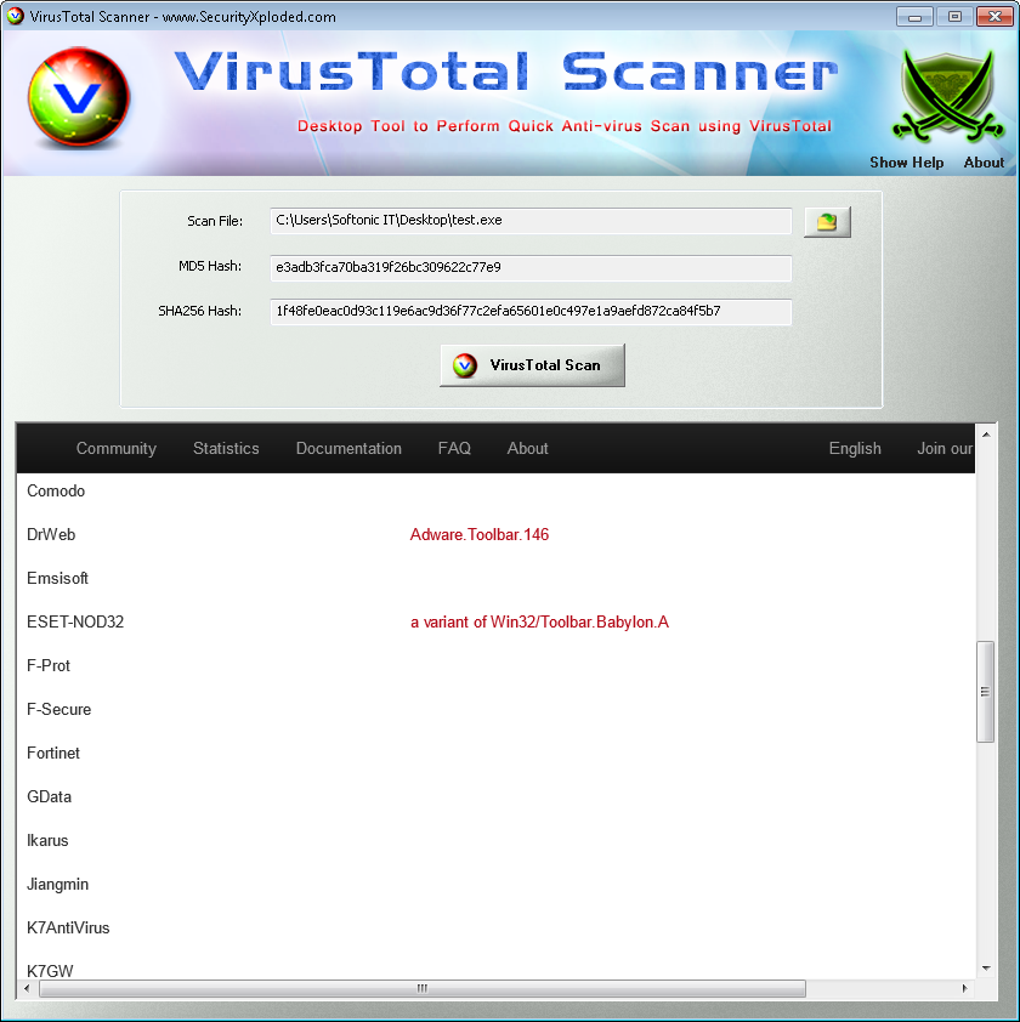
The core functionality of Virus Total Scanner revolves around its interaction with the VirusTotal online platform. The application doesn’t perform any independent scanning; instead, it acts as a bridge, facilitating the submission of files for analysis and displaying the results. The process is straightforward:
- File Selection: The user selects the file they wish to analyze. The application supports drag-and-drop functionality, simplifying the process of importing files for scanning.
-
MD5 Hash Check: Upon selecting a file, the application calculates its MD5 hash. This unique digital fingerprint allows VirusTotal to quickly identify whether the file has been previously scanned.
-
Report Retrieval or Manual Upload: If the MD5 hash matches a file already analyzed by VirusTotal, the application immediately displays the existing scan report. This report details the findings of the various antivirus engines that have examined the file, providing insights into its potential malicious nature. However, if the file is new to VirusTotal’s database, the application cannot automatically upload it. The user is prompted to manually upload the file through the VirusTotal website. This manual step represents a significant limitation of the application.
-
Report Interpretation: The scan report displays the results from each antivirus engine. These results are typically presented as “detections” or “no detections.” A high number of detections across multiple engines strongly suggests the file is malicious. However, the absence of detections doesn’t guarantee the file’s safety; some malware may evade detection by certain engines.
Advantages of Using Virus Total Scanner
Despite its limitations, Virus Total Scanner offers several advantages:
-
Leveraging Multiple Antivirus Engines: The application’s primary strength lies in its access to VirusTotal’s extensive network of antivirus engines. This significantly increases the chances of detecting malware that might escape the detection of a single antivirus program. Utilizing multiple engines provides a more holistic and comprehensive analysis than relying on a single antivirus solution.
-
Convenient Interface: The application offers a user-friendly interface, simplifying the process of submitting files for analysis. The drag-and-drop functionality streamlines file selection, making the process intuitive for even less technically proficient users.
-
Quick Report Access (for previously scanned files): For files already present in VirusTotal’s database, the application provides almost instantaneous access to the scan reports. This speed and efficiency are beneficial when quickly assessing the safety of known files.
-
Free to Use: Virus Total Scanner is a free application, making it an accessible option for users who might not have the budget for a commercial antivirus suite. This accessibility expands the reach of robust malware detection to a broader user base.
Disadvantages and Limitations of Virus Total Scanner
While Virus Total Scanner provides valuable functionality, it also has several critical limitations:
-
Manual Upload Required for New Files: The application’s inability to automatically upload new files to VirusTotal is its most significant drawback. This manual process necessitates navigating to the VirusTotal website, uploading the file, and then returning to the application to view the results. This multi-step process undermines the convenience the application aims to provide.
-
No Real-Time Protection: Virus Total Scanner is not a real-time antivirus solution. It only analyzes files that are explicitly submitted for scanning. It doesn’t monitor file activity or provide protection against malware that attempts to infect the system while it’s running.
-
Dependence on VirusTotal’s Database: The application’s functionality is entirely dependent on VirusTotal’s database. If a file hasn’t been previously scanned, the analysis process is significantly delayed due to the manual upload requirement. This reliance limits the application’s effectiveness for newly emerging malware.
-
Potential for False Positives and False Negatives: Like any antivirus technology, VirusTotal is susceptible to both false positives (flagging safe files as malicious) and false negatives (failing to detect malicious files). The interpretation of the scan reports requires a degree of technical expertise to accurately assess the risk level.
-
Limited Contextual Information: The application primarily provides the scan results; it doesn’t provide additional contextual information about the detected malware, such as its type, origin, or potential impact.
Alternatives to Virus Total Scanner
Several alternative solutions offer similar or improved functionality, addressing some of the shortcomings of Virus Total Scanner:
- VirusTotal Website: Using the VirusTotal website directly eliminates the limitations of the application. The website allows for direct file uploads and provides a more comprehensive interface for analyzing files and viewing scan reports.
-
Standalone Antivirus Software: Commercial antivirus solutions such as Avast, Bitdefender, McAfee, and Norton provide real-time protection, regular updates, and more sophisticated malware detection capabilities. These suites are more proactive than Virus Total Scanner and offer broader protection against diverse cyber threats.
-
Sandbox Environments: Sandbox environments, like Sandboxie, allow users to run suspicious files in isolated virtual environments. This limits the potential damage a malicious file could inflict on the main system while still allowing for analysis of its behavior.
-
Online Malware Scanners: Numerous online malware scanners provide similar functionality to VirusTotal, offering multi-engine analysis without requiring the installation of an application. These online services often provide similar features and can be accessed directly through a web browser.
Conclusion
Virus Total Scanner offers a convenient interface for accessing the powerful malware detection capabilities of VirusTotal. However, its dependence on the VirusTotal database and the requirement for manual file uploads limit its practical use. For users seeking a quick way to check already-scanned files, it can be useful. However, for comprehensive, real-time malware protection, standalone antivirus software or a combination of approaches, such as sandbox analysis, is a more effective and reliable solution. Users should carefully consider their security needs and choose the appropriate tools to safeguard their systems effectively. Relying solely on Virus Total Scanner leaves systems vulnerable to real-time threats and limits the potential for proactively identifying and mitigating potential risks. A layered security approach incorporating multiple tools and strategies is recommended for optimal protection.
File Information
- License: “Free”
- Latest update: “February 16, 2024”
- Platform: “Windows”
- OS: “Windows Vista”
- Language: “English”
- Downloads: “5.1K”
- Size: “1.44 MB”


