
VisiPics is a free software application designed to identify and remove duplicate images from your computer. In a world where digital photos are prolific, managing and maintaining a clean, organized image library can become a significant task. VisiPics aims to streamline this process by efficiently detecting duplicate files, even those with subtle differences, saving users valuable time and hard drive space. This review delves into the features, functionality, and overall user experience of VisiPics, providing a comprehensive assessment of its capabilities and limitations.
Core Functionality: Detecting and Removing Duplicate Images
The primary function of VisiPics is to locate and eliminate duplicate images. Unlike simple file comparison tools that only identify identical files, VisiPics utilizes a sophisticated algorithm that analyzes image content. It goes beyond comparing file names and sizes, incorporating five distinct image comparison filters to assess the similarity of image pairs, regardless of variations in file format, minor edits, or different resolutions. This means VisiPics can effectively pinpoint duplicate images even if they’ve been slightly modified, resized, or saved in different formats (e.g., JPEG, PNG, GIF). This capability is crucial for users who frequently edit photos or upload them to various platforms, where subtle alterations can lead to multiple copies of the same image residing on their hard drive.
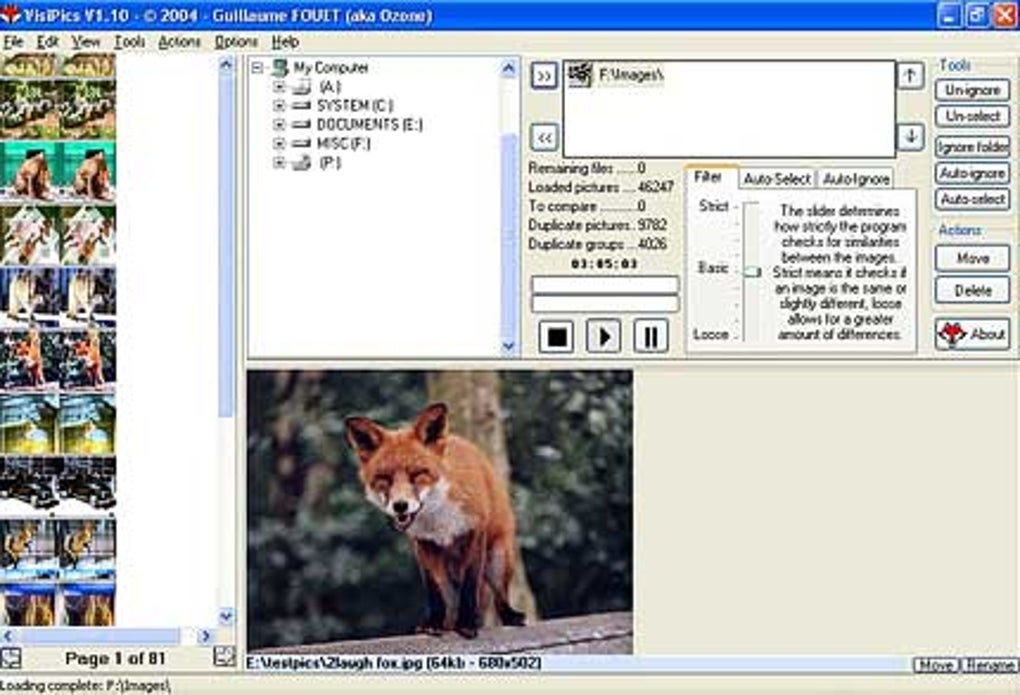
The application presents detected duplicates side-by-side, displaying essential information such as file name, format, and size for each image. This clear visual comparison facilitates the decision-making process, allowing users to quickly identify the image they wish to keep and the duplicates for removal. VisiPics offers several options for choosing which image to retain, such as automatically selecting the higher-resolution version, preserving the smallest file size, or prioritizing a specific file format. This flexibility caters to different user preferences and prioritizes efficient storage management.
Advanced Features: Efficiency and Customization
Beyond its fundamental duplicate detection, VisiPics offers several advanced features designed to enhance the user experience and optimize the process. The software utilizes hyperthreading and multi-processor systems to accelerate the scanning process. This efficient design enables VisiPics to rapidly analyze large quantities of images, even those stored across a substantial hard drive. The developers claim that the software can process a 15-gigabyte hard drive of pictures in approximately three hours; however, actual processing times may vary depending on the system’s specifications and the number of files to be scanned.
Another key feature is the real-time display of results. Instead of forcing users to wait until the entire scan is complete, VisiPics continuously updates the list of detected duplicates as it progresses. This allows users to monitor the process and, if necessary, adjust the similarity level filters during the scan. This real-time feedback mechanism is particularly useful when dealing with exceptionally large collections of images, providing ongoing updates and allowing users to intervene if needed.
VisiPics also offers adjustable similarity levels, allowing users to fine-tune the sensitivity of the detection algorithm. This feature is beneficial because the definition of a “duplicate” can be subjective. By adjusting the similarity level, users can control the strictness of the comparison, balancing the potential for false positives (non-duplicate images being flagged) against the risk of missing true duplicates due to excessive strictness. This allows for customization tailored to individual needs and priorities.
User Interface and Experience
VisiPics boasts a straightforward and user-friendly interface. While some users might find the design somewhat dated compared to modern software aesthetics, its simplicity contributes to ease of navigation and functionality. The visual presentation of detected duplicates, along with their associated metadata, is clear and concise, eliminating any ambiguity. The controls for adjusting settings and initiating the deletion process are readily accessible, making the software intuitive even for less tech-savvy users. The side-by-side preview of duplicates significantly improves the selection process, minimizing the risk of accidental deletion of important images.
Limitations and Considerations
Despite its strengths, VisiPics has certain limitations. It may struggle to detect duplicates involving lesser-known or corrupted image files. The five comparison filters, while comprehensive, might not be sufficient to identify extremely subtle changes within an image file, potentially leading to missed duplicates in some cases. This limitation is particularly relevant when dealing with images that have undergone significant editing or manipulation. Furthermore, some user reviews have raised concerns about potential confusion in navigation, particularly for first-time users. While the interface is generally considered simple, a brief learning curve might be experienced by some users before achieving full proficiency.
Comparison with Alternative Software
VisiPics is not the only duplicate image finder available. Several other applications offer similar functionality, some with additional features or different approaches to duplicate detection. A comparison with competing software reveals VisiPics’ strengths and weaknesses in the broader context of the market. Many alternative applications offer more sophisticated features or advanced image analysis techniques, but often come with a price tag, whereas VisiPics remains a completely free option. This free accessibility makes it a compelling choice for users who need a basic, functional duplicate image finder without incurring any costs.
User Reviews and Feedback
User reviews provide valuable insights into the real-world performance and user satisfaction of VisiPics. While the majority of reviews praise the software’s effectiveness and ease of use, some express concerns about the software’s age and the lack of updates. Several users report that the software performs well for its intended purpose but note the slightly dated interface and limited options compared to some of its competitors. One recurring theme in user feedback is the importance of downloading the software only from the official website to avoid encountering potentially malicious or modified versions. This highlights the need for caution and awareness when sourcing free software online. Contradictory feedback regarding the software being free has also surfaced in user reviews. While VisiPics itself is free to download and use, certain confusion may arise regarding the removal of duplicates, clarifying the need for thorough understanding of the software’s functionality.
Conclusion: A Viable Option for Basic Duplicate Image Removal
VisiPics presents a viable solution for users seeking a free and effective tool to identify and remove duplicate images. While it may lack some of the advanced features found in commercial alternatives, its simplicity, efficiency, and ease of use make it a compelling option for many users. Its strengths lie in its straightforward interface, real-time results display, adjustable similarity levels, and the ability to process large quantities of images efficiently. The software’s limitations primarily involve its potential inability to detect subtly altered images or those from less common formats. Furthermore, the need to download only from the official source and the possibly dated interface are points to consider. However, for users with basic duplicate image management needs, VisiPics remains a valuable free tool. The overall user experience, despite the interface’s simplicity, is generally positive, making VisiPics a worthy contender in the category of free duplicate image finders.
File Information
- License: “Free”
- Version: “1.31”
- Latest update: “July 30, 2021”
- Platform: “Windows”
- OS: “Windows XP”
- Language: “English”
- Downloads: “76.3K”
- Size: “2.21 MB”


