
In the annals of personal computing, operating systems have always been more than just functional interfaces; they are statements of design, philosophy, and user experience. During the mid-2000s, as Microsoft was grappling with the release and subsequent reception of Windows Vista, Apple’s Mac OS X was gaining significant traction, lauded for its sleek aesthetics, intuitive design, and perceived stability. This dichotomy created a fertile ground for innovation in the realm of system customization, giving rise to tools designed to bridge the visual gap between these two titans. Among these, “Vista OS X” emerged as a prominent transformation pack, promising Windows Vista users the coveted look and feel of Mac OS X without requiring a complete switch of operating systems or hardware.
Launched at a time when Windows Vista was often criticized for its resource intensity and a somewhat fragmented user interface, many users found themselves disillusioned, perhaps even wishing they had opted for an Apple Macintosh. Vista OS X presented itself as a compelling alternative, offering a deep visual overhaul that aimed to emulate the distinctive Aqua interface of Mac OS X. This wasn’t merely a superficial theme; it was a comprehensive package designed to alter fundamental visual elements of the operating system, from icons and cursors to window frames and application skins.
The concept behind Vista OS X was straightforward yet ambitious: take the underlying functionality of Windows Vista and drape it in the familiar garments of Mac OS X. For a user yearning for the iconic dock, the elegant menu bar at the top, or the consistent visual language of Apple’s OS, Vista OS X offered a tantalizing prospect. It was an acknowledgment of the strong aesthetic appeal of Mac OS X and a response to the desire among Windows users to partake in that design philosophy without the financial commitment of new hardware or the learning curve of a completely different ecosystem. The promise was clear: turn your Windows Vista machine into something that looked and felt remarkably like a Mac, fostering a sense of familiarity and sophistication for those who admired Apple’s design prowess.
Personalization: The Allure of a Mac Aesthetic
The desire to personalize one’s digital environment is as old as personal computing itself. From custom desktop backgrounds to unique sound schemes, users have always sought to make their computers truly their own. In the era of Windows Vista, this drive for personalization reached new heights, particularly as the design language of operating systems began to play an increasingly significant role in user satisfaction and brand loyalty. Mac OS X, with its polished Aqua interface, iconic dock, and smooth animations, had set a high bar for aesthetic appeal. For many Windows users, the clean lines, vibrant icons, and sophisticated overall presentation of Mac OS X represented a desirable upgrade from the more utilitarian or sometimes cluttered appearance of Windows.
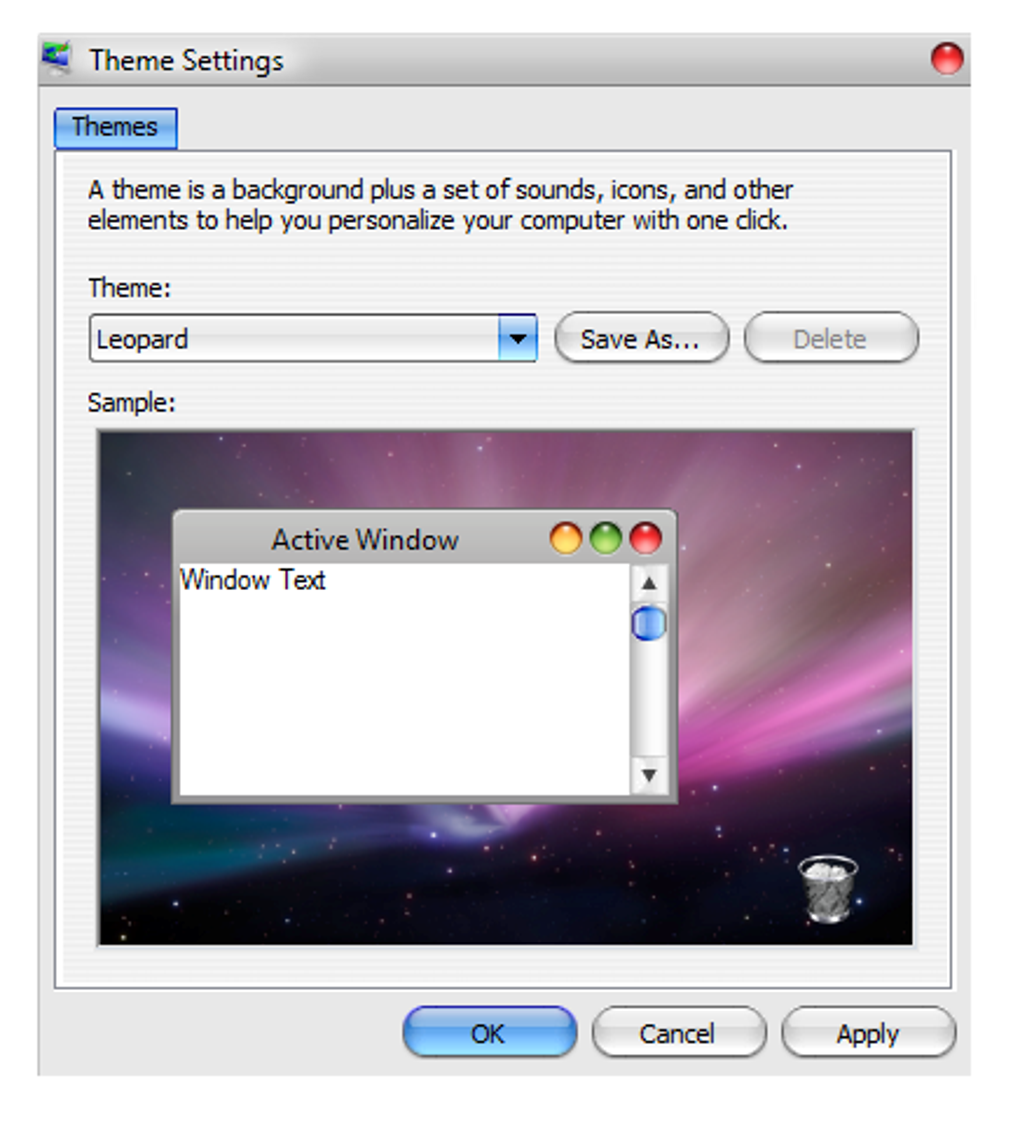
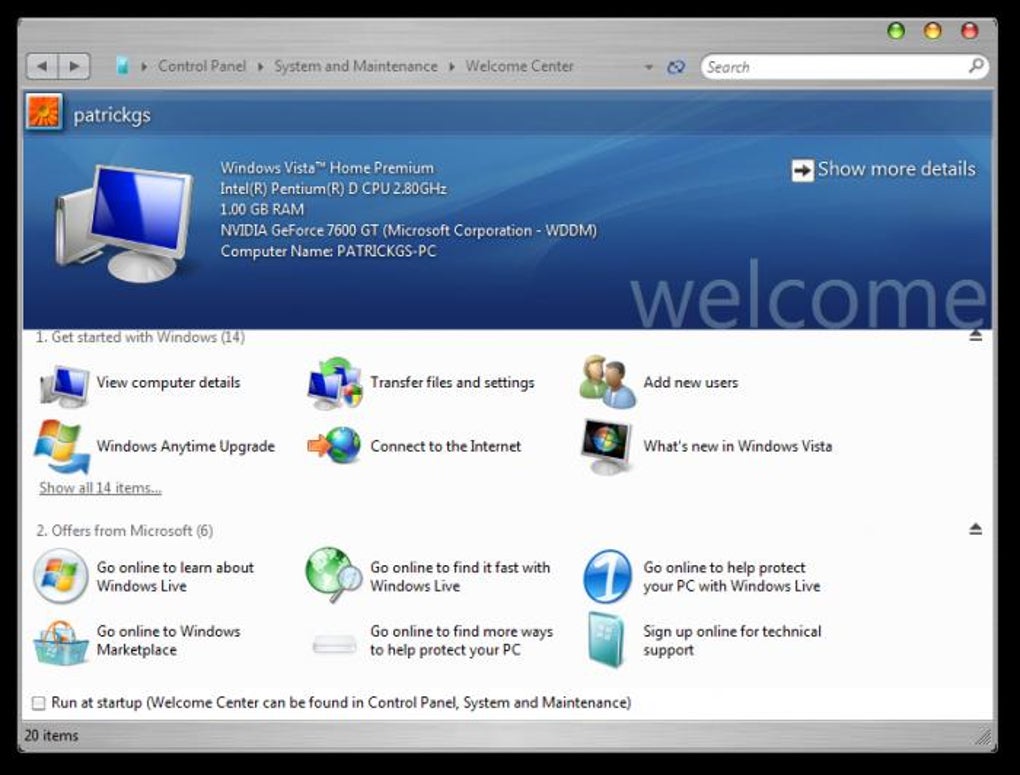
Vista OS X tapped directly into this aspiration, offering a robust suite of modifications aimed at transforming the visual identity of Windows Vista. The pack was meticulously designed to mimic a wide array of Mac OS X elements, extending far beyond simple wallpaper or icon changes. It delved into the core visual components of the OS, altering window borders, scrollbars, and even the fundamental layout of the taskbar to resemble the Mac’s dock and menu bar. The goal was to create an immersive experience, where every interaction, from opening a folder to minimizing an application, would evoke the sensation of using a Macintosh.
This transformation pack allowed users to exert significant control over the elements they wished to install, change, or modify. This granular control was crucial, as not every user would desire a complete, wholesale makeover. Some might prefer the Mac-style folder icons but retain the Windows Explorer layout, while others might go for the full visual suite. The package typically included:
- Look and Style of Vista: This encompassed the entire visual theme, replacing Windows Aero glass effects with Mac OS X’s more opaque, often brushed-metal or glossy appearances, and altering fonts to those commonly associated with Apple’s system.
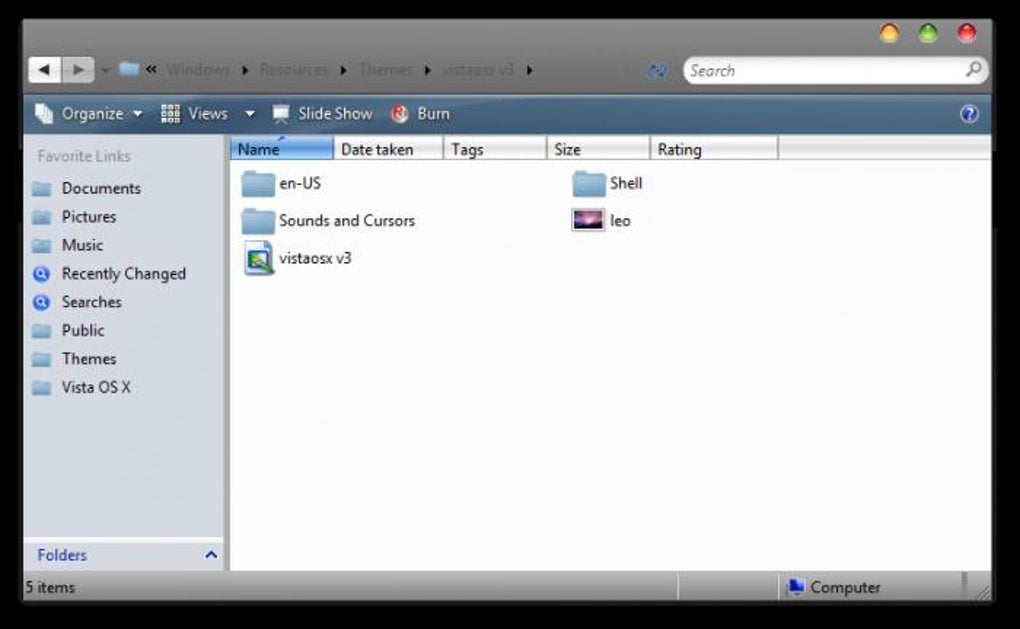
- Folder and Explorer Styles: The distinctive, often smiling face of Mac folders, alongside the sidebar layout and overall navigation cues of the Finder, were meticulously recreated within Windows Explorer, offering a fresh way to browse files.
- Skins for Various Applications: Beyond the operating system itself, Vista OS X often included skins or themes for popular applications, ensuring that common programs like media players or browsers also conformed to the new Mac aesthetic, providing a consistent visual experience across the user’s desktop.
The appeal of such a transformation was multifaceted. For some, it was a matter of pure aesthetics—they simply preferred the Mac look. For others, it might have been an aspirational statement, a way to experience a premium design without the premium price tag. And for a significant segment, it was about exploring the boundaries of system customization, pushing Windows Vista beyond its default appearance to see what was possible. The fact that the tool offered options for cursors, fonts, ringtones, screen lockers, screen savers, themes, and wallpaper (as referenced in the broader category of ‘Personalization’ from the source content) underscored the comprehensive nature of personalization desired by users and offered by such packs. Vista OS X was a testament to the power of visual design in computing and the enduring human desire to tailor our tools to our tastes.
Utilities & Tools: A Deeper Look at System Transformation
At its core, Vista OS X functions as a sophisticated utility, a specialized piece of software designed to modify and enhance the operating system beyond its default configuration. While it doesn’t fall into categories like File Managers or Screen Capture tools, it leverages similar deep system access to perform its transformative functions. The effectiveness and potential pitfalls of such a utility lie in its ability to interact with and alter fundamental Windows components.
The installation process for Vista OS X was notable for its user-friendliness, a critical factor for a utility that performs such extensive system modifications. Users were typically guided through a wizard-like interface, allowing them to select which specific elements of the Mac OS X look they wished to implement. This modular approach was a smart design choice, acknowledging that not all users desired an identical transformation. From altering the appearance of the taskbar to replacing system sound schemes, the utility provided a comprehensive menu of options. The developer, “Vistaosx,” clearly understood the nuances of system-level customization.
However, the very nature of a transformation pack introduces inherent complexities. Unlike a simple desktop theme that merely overlays visual elements, Vista OS X often required modifications to core system files, such as uxtheme.dll and themeui.dll. These DLLs are responsible for Windows’ visual rendering, and patching them is necessary to enable unsupported themes. This level of system intervention distinguishes transformation packs from lighter customization options and places them firmly within the domain of powerful utilities. Such utilities, while offering impressive results, always carry a degree of risk.
The prudent design of Vista OS X, as highlighted in developer reviews, included a crucial safeguard: the automatic creation of a system restoration point during installation. This feature, while not foolproof, provided a vital safety net. In the event of conflicts or system instability, users could theoretically roll back their system to its state prior to the transformation, mitigating potential damage. Furthermore, for the exceptionally cautious, the option to install Vista OS X on a separate partition allowed for experimentation without affecting the primary Windows installation, a practice often recommended for more experimental software.
The sheer volume of downloads—over 184.4K for version 4, as indicated by its PhanMemFree listing—attests to the widespread interest in this utility. It underscores the prevalent desire among Windows users to personalize their operating system in ways that went beyond what Microsoft officially supported. Tools like Vista OS X showcase the dynamic nature of software development, where developers respond directly to user demand for enhanced functionality, even if it means venturing into areas that Microsoft might not officially endorse. The fact that PhanMemFree hosted this utility, alongside a vast array of other Utilities & Tools, from Data Recovery to File Managers, demonstrates the platform’s role in providing users with a diverse ecosystem of software solutions, including those designed for deep system modification.
Security & Privacy: Navigating the Risks of System Modification
While the allure of transforming Windows Vista into a Mac OS X clone was undeniably strong, the deployment of such a comprehensive utility was not without its risks. The category of Security & Privacy is paramount when discussing any software that deeply modifies an operating system, and Vista OS X proved to be a prime example of why caution is essential. User reviews for this transformation pack often highlighted a spectrum of experiences, from seamless success to severe system instability, underscoring the critical need for robust security practices and an understanding of potential vulnerabilities.
One of the most frequently cited concerns revolved around system conflicts. Modifying core DLL files like uxtheme.dll and themeui.dll to enable custom themes is a common practice for transformation packs, but it can lead to unforeseen issues. Several users reported problems such as:
- Failure to Initialize
Uxtheme.dll: A user onPhanMemFreedescribed encountering an error message: “The application failed to initialise because Uxtheme.dll was not found.” This is a critical system file, and its corruption or misplacement can render the operating system unbootable or severely unstable. The suggested fix involved booting into safe mode (F8 during startup) and using Windows’ System Restore feature—a clear indication of the deep impact the utility could have. - System Instability and Crashes: General system “craziness” and inability to access system recovery options were also reported, especially for users attempting to run the pack on later versions of Windows (like Windows 7, though the pack was designed for Vista). This illustrates the delicate balance required when altering OS components; what works perfectly on one configuration might wreak havoc on another.
- GRUB for DOS Installation: One particularly alarming review mentioned the installation of “GRUB for DOS,” which is a bootloader. While GRUB itself is legitimate, its unexpected installation can modify the boot sequence of the computer, potentially locking users out of their Windows installation or requiring advanced repair methods, including reformatting the drive. This type of alteration goes beyond mere visual changes and touches upon critical
Access Controlmechanisms of the system.
Perhaps the most serious concern raised by users was the accusation of malware. A user explicitly warned, “The reason everyone has problems with this…. …is because its a virus.” They reported AVG detecting malware midway through installation. While it’s difficult to definitively confirm such claims years later without analyzing the specific installer they used, such warnings are critical. Deep system modifications, especially those that patch system files or alter bootloaders, can sometimes trigger false positives from antivirus software, as their behavior mimics malicious activity. However, it also opens the door for genuine malicious payloads to be hidden within seemingly innocuous utilities. This necessitates a strong Antivirus solution and a healthy dose of skepticism when downloading software from unverified sources, even from platforms like PhanMemFree which strive for security.
The existence of these reported issues underscores the importance of the Security & Privacy considerations mentioned within the broader context of software distribution. When contemplating the use of powerful utilities like Vista OS X, users are implicitly advised to:
- Create Manual Restore Points: Even with an automatic feature, creating a personal restore point and system backup before major modifications is a crucial
Backup & Cloud Storagestrategy. - Use Reliable Antivirus Software: A robust
Antivirusprogram is essential to detect and prevent potential malware, even if false positives can occur with system-modifying tools. - Understand the Risks: Users should be aware that deep system modifications can lead to instability, data loss, or even necessitate a complete OS reinstallation. The concept of
FirewallsandPassword Managementbecome even more critical when system integrity is potentially compromised by unknown software.
Ultimately, while Vista OS X offered an enticing visual transformation, its use highlighted the inherent tension between extensive system customization and maintaining robust system security and stability. The user experiences, ranging from praise for its aesthetic capabilities to warnings about system damage and potential malware, serve as a powerful reminder for anyone venturing into the world of deep operating system modification: proceed with caution, back up diligently, and be prepared for potential consequences.
App Specifications and Developer Information
The official details surrounding Vista OS X for Windows, as listed on PhanMemFree, provide a concise overview of the software’s attributes and history. These specifications are crucial for users to understand what they are downloading and whether it is compatible with their system.
- License: Free. This was a significant factor in its popularity, as it allowed users to experiment with a Mac OS X look without any financial outlay. The “Free” license status made it accessible to a wide audience, further fueling its adoption among curious Windows Vista users.
- Version: v4. The presence of a version number indicates ongoing development and refinement, suggesting that the developer, “Vistaosx,” actively worked to improve the pack and address issues over time. Subsequent versions would typically include bug fixes, enhanced compatibility, or expanded customization options.
- Latest Update: November 5, 2008. This timestamp is critically important. It places the software firmly within the Windows Vista era. Given the rapid pace of operating system development, a tool last updated in late 2008 would likely have limited compatibility or even cause significant issues on later versions of Windows (e.g., Windows 7, 8, 10, or 11), as evidenced by some user reviews reporting problems on Windows 7. This date emphasizes its historical context as a solution for a specific operating system at a particular point in time.
- Platform: Windows. This is self-explanatory, confirming its design for Microsoft’s operating system environment.
- OS: Windows Vista. This explicit mention reinforces the targeted nature of the transformation pack. It was built specifically to interact with the architecture and visual rendering engine of Windows Vista (32-bit editions, as noted in the author’s review), and its functionality cannot be guaranteed on other Windows versions without potential complications.
- Language: English. While the
PhanMemFreeplatform supports numerous languages for its interface (e.g., Arabic, German, Spanish, French, Italian, Japanese, Korean, Dutch, Polish, Portuguese, Russian, Swedish, Thai, Turkish, Vietnamese, Chinese), the software itself was primarily distributed and supported in English, which is typical for many global software releases. - Downloads: 184.4K. This impressive number highlights the significant demand for such personalization tools and the widespread interest in transforming Windows Vista’s appearance. It indicates a substantial user base, even for a niche utility.
- Size: 32.30 MB. For a comprehensive transformation pack that modifies numerous system elements, a size of around 32 MB is relatively modest. This meant it was quick to download even on slower internet connections prevalent at the time, making it easily accessible.
- Developer: Vistaosx. This is the credited entity behind the transformation pack. While not a large software corporation, independent developers like Vistaosx often create highly specialized tools that cater to specific user needs, demonstrating the vibrant ecosystem of community-driven software development.
These specifications collectively paint a picture of Vista OS X as a popular, free utility from an independent developer, specifically designed for Windows Vista in the late 2000s. Its success, measured by download numbers, points to a strong user desire for deep system personalization and an emulation of Mac OS X aesthetics during that particular technological era. However, the update date also serves as a critical warning for anyone considering its use on modern systems, reinforcing the idea that software is often time-sensitive in its compatibility and efficacy.
User Experiences and Lasting Impressions
The true measure of any software lies in the hands of its users, and Vista OS X generated a wide array of opinions and experiences, as documented by reviews on PhanMemFree. These user testimonials, spanning several years, paint a vivid picture of the transformation pack’s strengths, weaknesses, and lasting impact.
On the positive side, many users were genuinely impressed by the visual outcome. An anonymous user on October 31, 2010, exclaimed, “I just installed it on my laptop and it looks AWESOME! I can’t believe how great my laptop looks.” This sentiment was echoed by another user on March 22, 2017, who called it “a great operating system with many instruments… It is fast and rich workplace with many functions to interact in the internet.” These reviews highlight the primary appeal of Vista OS X: its ability to deliver a convincing Mac aesthetic that significantly enhanced the user’s desktop experience. For those with Windows Vista Home Basic or Home Premium, the transformation provided a refreshing alternative to the default interface, often exceeding expectations in terms of visual fidelity.
However, the path to a Mac-like desktop was not always smooth. The most prominent concerns revolved around system stability and compatibility, issues that are inherently tied to deep operating system modifications. As noted earlier, one anonymous reviewer on December 7, 2010, provided critical advice: “READ THIS if you’re worried. First things first, make a RESTORE POINT before you run the installer (this is helpful but not necessary).” This user detailed a common problem: “The application failed to initialise because Uxtheme.dll was not found.” Their solution—using F8 to access recovery options and System Restore—became a vital piece of community knowledge for those encountering issues. This underscores the importance of the built-in restoration point feature, even if it sometimes needed manual intervention to utilize.
Other users reported more severe problems. An anonymous review on February 20, 2012, vehemently stated, “Do not install.” This user experienced a “GRUB for DOS” installation that crippled their Windows 7 system, making recovery difficult. This particular issue, if accurate, points to a level of system alteration that goes far beyond visual theming and can fundamentally change the boot process, leading to significant headaches for the user. Another anonymous review on October 31, 2010, raised serious Security & Privacy concerns, claiming, “…its a virus. Mid-way through installation, AVG warned me of Malware. It is infected and WILL crash your computer.” While such claims always require scrutiny, they contribute to a narrative of caution surrounding tools that modify core OS components.
The mixed reviews reflect the inherent dichotomy of such powerful transformation packs: immense aesthetic reward versus significant operational risk. The “Pros” often centered on the “very realistic Mac look” and the ability to restore, while the “Cons” consistently pointed to potential “conflicts within Vista” and the fact that it “doesn’t recreate all Mac features” (which is expected, as it’s a visual skin, not a functional OS change).
Despite the warnings and technical hurdles, the sheer number of downloads and the persistent positive reviews from users who had successful installations indicate a strong desire for customization that sometimes outweighed the risks. Vista OS X served as a prime example of community-driven solutions to perceived shortcomings in commercial operating systems. Its legacy is not just about a visual makeover but also about the enduring spirit of users who seek to bend their digital environments to their will, navigating the complex interplay between aesthetics, functionality, and system integrity. Even today, in an era of more sophisticated customization options and virtualization, Vista OS X remains a fascinating artifact from a pivotal period in computing history, representing a bold attempt to bring the elegance of one OS to the foundations of another.
File Information
- License: “Free”
- Version: “v4”
- Latest update: “November 5, 2008”
- Platform: “Windows”
- OS: “Windows Vista”
- Language: “English”
- Downloads: “184.4K”
- Size: “32.30 MB”


