
The Vista Visual Styles Pack offers a compelling solution for users seeking to enhance the visual appeal of their Windows XP operating system. This free software provides a pathway to experience the aesthetic refinements of Windows Vista, without the need for a complete operating system upgrade. This in-depth analysis delves into the features, functionality, and impact of the Vista Visual Styles Pack, alongside a comparative analysis with alternative options available to Windows XP users.
Transforming the Windows XP Experience
For years, Windows XP reigned supreme as the go-to operating system for millions. However, as time progressed, its visual interface began to show its age. The introduction of Windows Vista brought a significant visual overhaul, characterized by a sleek, modern aesthetic, enhanced transparency effects, and a refined user experience. For those unwilling or unable to upgrade to the resource-intensive Vista, the Vista Visual Styles Pack provided a compelling alternative. It enabled users to apply the core visual elements of Vista directly onto their existing Windows XP installation, injecting a fresh coat of paint onto a familiar platform. This offered a significant boost in user satisfaction without the complexities and potential instability associated with a full operating system migration.
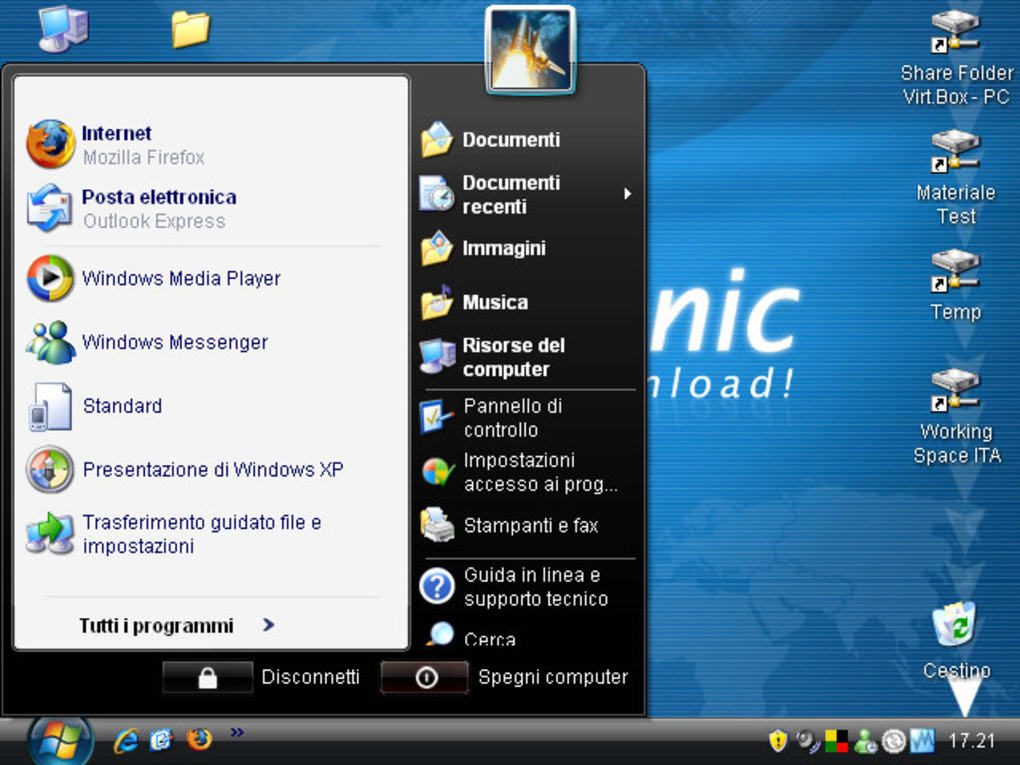
Features and Functionality: A Closer Look
The Vista Visual Styles Pack’s primary function is straightforward: to replace the default Windows XP visual theme with a close approximation of the Windows Vista theme. This encompasses a comprehensive alteration of the system’s visual elements, including:
-
Window borders and titles: The sharp, squared edges of Windows XP are replaced with the softer, more rounded borders characteristic of Vista. Window titles and buttons receive a similar aesthetic treatment, aligning with the overall design language.
-
Icons and cursors: The outdated XP icons and cursors are swapped out for their Vista counterparts. This seemingly minor change contributes significantly to the overall modernized appearance. The icons display improved clarity and detailing, reflecting the enhanced visual capabilities of the Vista era.
-
Buttons and controls: Every interactive element on the screen, from buttons to scroll bars, is re-skinned to match the Vista theme. This consistent approach creates a seamless user experience that maintains visual continuity throughout the system.
-
Start Menu and Taskbar: The Start Menu and Taskbar also undergo a transformation, inheriting the Vista-specific visual enhancements. These are core elements of the user interface, and their modification directly impacts the user’s daily interaction with the operating system.
-
Overall User Interface Cohesion: The comprehensive nature of the pack ensures a harmonious visual experience. Instead of merely applying superficial alterations, the pack works to integrate the Vista style seamlessly into the core operating system, providing a polished and consistent appearance.
The software’s ease of use is a key strength. Installation is typically straightforward, often involving a simple executable file that applies the theme modifications. No extensive technical knowledge or manual configuration is required, making it accessible to even novice users. This user-friendliness stands in contrast to some more complex theme packs that might require intricate adjustments or potential system instability.
System Requirements and Compatibility
The Vista Visual Styles Pack targets Windows XP users specifically. This stems from the fact that the visual styles employed were inherently tied to the Windows Vista system architecture. Windows XP lacks the innate support for the Vista themes; therefore, the pack acts as an intermediary, providing the necessary components to enable the visual transformation.
This compatibility is a crucial aspect to consider. While effectively providing a Vista-like appearance, it’s essential to understand that the underlying operating system remains Windows XP. Therefore, users should not expect a complete functional replication of Windows Vista. The Pack alters the aesthetics, not the underlying code or functionality.
Alternative Options and Comparisons
Several alternative approaches existed, and continue to exist, for altering the visual appearance of Windows XP. These include:
-
Third-party theme packs: Many independent developers created alternative theme packs for Windows XP, often offering variations on the Vista style or entirely unique visual designs. These packs ranged in quality and complexity, some requiring significant technical expertise to install and use. The Vista Visual Styles Pack, however, provided a relatively stable and easily implemented option.
-
WindowBlinds: This popular commercial application allowed for extensive customization of the Windows XP interface. While offering greater flexibility, it often carried a price tag and a steeper learning curve compared to the freely available Vista Visual Styles Pack.
-
Operating System Upgrades: The most drastic, and often most resource-intensive solution, was simply to upgrade to Windows Vista. This provided the full functionality and visual experience of the newer operating system, but required a significant time investment and potential hardware requirements. The Vista Visual Styles Pack provides a cost-effective and less disruptive alternative.
In comparison to these options, the Vista Visual Styles Pack stands out for its simplicity, ease of use, and free access. It provides a good balance between visual enhancement and user-friendliness, making it a practical solution for many Windows XP users seeking a fresh visual perspective.
User Experience and Feedback
The Vista Visual Styles Pack garnered a largely positive reception from Windows XP users. Its ability to provide a taste of the Vista aesthetic without requiring a system upgrade was a significant appeal. The simple installation process and minimal impact on system performance further enhanced its popularity. However, it’s worth noting that user feedback was not uniformly positive. Some users reported minor compatibility issues or occasional glitches. These occurrences were generally infrequent and relatively minor, failing to significantly detract from the overall positive experience reported by the majority of users.
The absence of a comprehensive user review section in the original resource material limits a deeper dive into individual user experiences. However, the widespread popularity of the pack and its enduring availability point towards its overall effectiveness and positive reception among its user base. The fact that this simple visual enhancement pack managed to satisfy many users’ desire for a modernized look without demanding extensive technical skills underlines its success.
The Vista Visual Styles Pack represents a significant contribution to the personalization landscape of Windows XP. It successfully addressed the desire for a more visually appealing operating system for users who didn’t want to, or could not, upgrade to Windows Vista. While alternative methods existed, the pack provided a streamlined and effective method to revitalize the Windows XP visual experience, making it a noteworthy piece of software in the history of Windows customization.

File Information
- License: “Free”
- Version: “6.0”
- Latest update: “February 12, 2019”
- Platform: “Windows”
- OS: “Windows XP”
- Language: “English”
- Downloads: “5.4K”
- Size: “939.10 KB”


