
Vistumbler is a robust and freely available (GPL) Windows application categorized as networking software. Its primary function is the detection and analysis of WiFi networks, providing users with detailed information about nearby access points. This comprehensive guide will delve into the capabilities of Vistumbler, explore its usage, discuss its strengths and limitations, and provide insights into its place within the broader landscape of network analysis tools.
Understanding Vistumbler’s Functionality
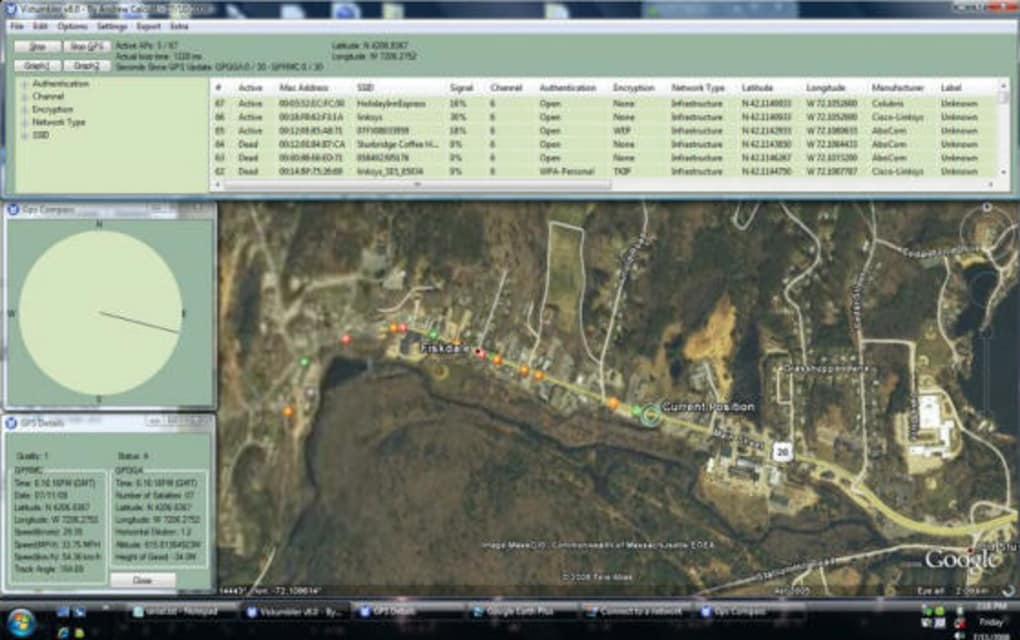
Vistumbler stands out from other network scanning utilities due to its comprehensive data collection and presentation capabilities. Unlike simpler tools that merely list available networks and their signal strengths, Vistumbler offers a wealth of additional information, including:
- SSID (Service Set Identifier): The name of the wireless network.
- BSSID (Basic Service Set Identifier): The unique MAC address of the access point.
- Channel: The frequency channel the network operates on. This information is crucial for identifying channel congestion and optimizing network performance.
- Signal Strength: Measured in dBm (decibels relative to one milliwatt), indicating the strength of the wireless signal. A higher (less negative) dBm value signifies a stronger signal.
- Encryption Type: Identifies the security protocols used by the network, such as WEP, WPA, WPA2, or no encryption. This is critical for understanding the network’s security posture.
- Authentication Type: Specifies the authentication method employed by the access point, influencing how devices connect to the network.
- Network Mode: Indicates whether the network operates in 802.11b, 802.11g, 802.11n, 802.11ac, or other standards, providing insights into its speed and capabilities.
- ESSID (Extended Service Set Identifier): Provides more detailed network identification in some cases.
- Latitude and Longitude (GPS Enabled): When used in conjunction with a GPS receiver, Vistumbler can geolocate the access points, creating a map of nearby WiFi networks. This feature is particularly useful for site surveys and network mapping.
This detailed information makes Vistumbler an invaluable tool for various purposes, ranging from simple network troubleshooting to complex security assessments.
Vistumbler’s Applications: From Personal Use to Professional Needs
The versatility of Vistumbler allows for its application across a spectrum of scenarios:
For Home Users:
- Network Troubleshooting: Identifying sources of wireless interference, choosing optimal channels for routers, and diagnosing connectivity problems.
- Security Assessment (Limited): Identifying unsecured networks (open networks without encryption) in the vicinity. However, it’s crucial to remember that ethical considerations should always guide such activities, and unauthorized access to networks is illegal and unethical.
- Network Optimization: Finding the best location for a router to maximize coverage and minimize dead zones within a home or office.
For IT Professionals:
- Site Surveys: Conducting comprehensive surveys of wireless networks in large areas, such as offices, campuses, or public spaces. This involves identifying the location and characteristics of all accessible access points to plan and optimize network deployments.
- Network Planning and Design: Utilizing the data collected to design efficient and robust wireless networks, mitigating interference and maximizing coverage.
- Security Audits: As part of a broader security assessment, Vistumbler can help identify potential vulnerabilities in wireless networks, such as poorly configured security settings or overlapping channels. It’s important to note that Vistumbler should be one tool within a larger suite of security analysis software.
- Troubleshooting Wireless Issues: Investigating connectivity problems in large networks by identifying interference sources or network configuration issues.
For Researchers and Educators:
- Educational Purposes: Illustrating the concepts of wireless networks, security protocols, and network analysis.
- Research Projects: Analyzing the density and characteristics of wireless networks in specific geographic locations.
Technical Specifications and System Requirements
Vistumbler is compatible with Windows Vista and earlier versions. While later versions of Windows might run it, compatibility isn’t guaranteed and functionality could be limited. It’s a lightweight program, requiring minimal system resources. The software is available in multiple languages, including English, Spanish, and German. Updates are periodically released to address bugs and improve functionality. However, it’s worth noting that development has slowed considerably, with the last significant update in 2011. This means that compatibility with newer WiFi standards might be limited.
The licensing is under the GNU General Public License (GPL), making it free to use, distribute, and modify. This openness has contributed to its enduring popularity among users who appreciate both functionality and freedom.
Alternatives and Competitors to Vistumbler
While Vistumbler remains a useful tool, several alternative applications provide similar or enhanced functionalities. These alternatives might offer improved compatibility with modern operating systems and WiFi standards, advanced features, or more user-friendly interfaces. Some popular alternatives include:
- inSSIDer: Provides a visually appealing interface and real-time network monitoring.
- WirelessNetView: A lightweight tool offering detailed information about connected and nearby wireless networks.
- Kismet: A powerful and versatile wireless network detector used for both security auditing and network analysis. Kismet is more advanced than Vistumbler and has a steeper learning curve.
- NetSpot: A professional-grade wireless site survey tool that offers sophisticated features for network planning and optimization.
The choice of which application to use depends on the specific needs and technical expertise of the user. For simple tasks, a lightweight utility might suffice. For more complex network analysis or site surveys, professional-grade tools like NetSpot are preferable.
Conclusion: Vistumbler’s Enduring Legacy
Despite the emergence of newer tools, Vistumbler retains its relevance due to its straightforward functionality and rich dataset. Its open-source nature and availability for older Windows versions continue to attract users. However, its lack of recent updates should be considered. Users seeking compatibility with the latest WiFi standards and advanced features should explore the alternative applications mentioned above. Ultimately, the decision of whether to use Vistumbler or a competitor hinges on the specific requirements of the task at hand and the user’s technical proficiency. Remember always to use any network scanning tool responsibly and ethically, respecting the privacy and security of others. Unauthorized access to networks is illegal and can have serious consequences.
File Information
- License: “Free”
- Latest update: “July 3, 2025”
- Platform: “Windows”
- OS: “Windows 8”
- Language: “English”
- Downloads: “10.2K”


