
vLite is a powerful utility designed to customize the installation of Windows Vista before the actual installation process begins. It provides users with granular control over their operating system, allowing them to streamline performance and tailor the installation to their specific needs. Unlike post-installation tweaks, vLite modifies the installation image directly, resulting in a cleaner and more efficient installation process. This article will explore the capabilities, benefits, and potential drawbacks of vLite, providing a comprehensive overview of this specialized Windows customization tool.
Understanding vLite’s Core Functionality
At its heart, vLite functions as a pre-installation configuration tool for Windows Vista. It offers a range of features that enable users to significantly alter the operating system’s composition before it’s deployed on a computer. This pre-emptive approach differs markedly from post-installation adjustments, which often require more intricate and potentially risky modifications to the already installed system.
The primary function of vLite centers around component removal. Users can selectively deselect components during the pre-installation process, thus reducing the overall size of the operating system and potentially improving boot times and overall system performance. This targeted removal of unwanted features helps optimize system resources and eliminate unnecessary processes that might otherwise consume valuable system memory or processing power.
However, it’s crucial to understand that simply unchecking a component in vLite does not automatically remove it. The program’s developers implemented this design choice to avoid confusion, as not all Vista components are fully compatible with vLite’s modification capabilities. Unchecking a box essentially flags that component for removal if it’s supported by the program’s algorithms and removal processes. Attempting to remove unsupported components might lead to instability or malfunction of the installed system.
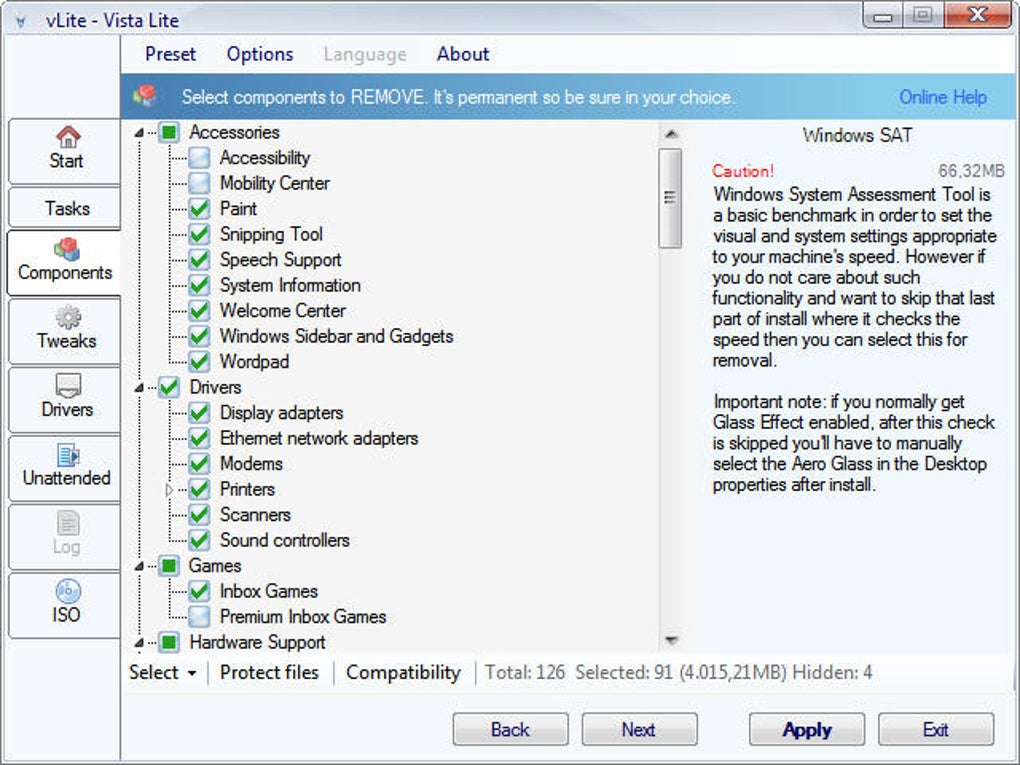
Beyond component removal, vLite offers additional features that further enhance the customization process:
-
Driver Integration: vLite allows users to integrate drivers directly into the installation image. This is beneficial for users who need to install specific hardware drivers during the initial installation process, eliminating the need for separate driver installation after the operating system is set up. This integration streamlines the installation, saves time, and improves convenience.
-
Unattended Setup: For advanced users, vLite supports unattended installations. This feature automates the installation process, making it ideal for deploying Vista across multiple machines without manual intervention. This automated approach is particularly valuable in large-scale deployments or system imaging scenarios.
-
ISO Manipulation: vLite provides tools for splitting and merging Vista installation CDs. This functionality proves beneficial for those working with large installation images or who need to accommodate limitations in storage media. Splitting a large image across multiple smaller discs can overcome storage space restrictions.
-
Tweaks and Bootable Media Creation: Beyond core functionalities, vLite offers a selection of system tweaks that can be applied during installation and the capability to create bootable CDs or DVDs from the modified Vista installation image.
The Benefits of Utilizing vLite
Employing vLite offers several compelling advantages for Windows Vista users, particularly those seeking a more streamlined and customized operating system. These advantages extend to both individual users and system administrators managing multiple deployments.
-
Enhanced System Performance: By removing unnecessary components, vLite contributes to a more efficient and responsive system. The reduction in system footprint reduces the demand on system resources, leading to improved boot times, faster application loading, and overall enhanced performance.
-
Reduced Installation Size: A smaller installation image translates directly to faster download times and less storage space required on both the installation media and the target hard drive. This is especially beneficial when working with limited bandwidth or storage capacity.
-
Tailored Installation: vLite empowers users to create a Vista installation tailored to their exact specifications. Users can eliminate features they don’t need, resulting in a cleaner and more focused system environment. This fine-grained control allows for precise customization to accommodate various individual needs and usage patterns.
-
Simplified Deployment: The unattended installation feature in vLite is a game-changer for system administrators. It streamlines the process of deploying Vista across a network of computers, saving considerable time and effort compared to manual installations. This automation significantly reduces administrative overhead and improves efficiency in large-scale deployments.
- Proactive Driver Management: The driver integration feature within vLite offers a proactive approach to driver installation, avoiding post-installation complications and ensuring immediate functionality for crucial hardware components.
Potential Drawbacks and Precautions
While vLite presents numerous advantages, potential drawbacks and associated risks need careful consideration:
-
Irreversible Changes: The most significant caution is the irreversibility of changes made using vLite. Once components are removed, they cannot be re-added. Therefore, meticulous planning and a thorough understanding of the components being removed are absolutely crucial. Incorrectly removing a crucial component might render the system unusable or significantly compromise its functionality.
-
Complexity: vLite’s features and options can appear complex to novice users. A basic understanding of Windows Vista’s components and their functions is essential to avoid accidentally disabling critical elements. Users should familiarize themselves with the software before undertaking any modifications.
-
Potential for System Instability: While vLite is designed to protect system files, there is a remote possibility of creating an unstable or malfunctioning system if the modifications are not carefully considered. Always back up your original Vista installation image before applying any changes using vLite.
-
Limited Support: Because vLite is focused on a legacy operating system (Windows Vista), community support and available resources might be limited compared to tools targeting more current operating systems.
- Software Compatibility: Removing certain components may inadvertently cause incompatibility issues with specific software applications or drivers. Users should carefully review the components being removed and assess their potential impact on software dependencies.
Alternative Solutions and Comparative Analysis
While vLite provides a unique approach to Windows Vista customization, several alternative solutions exist for tailoring Windows installations, though not all offer the same pre-installation modification capabilities. Some popular alternatives include RT Se7en Lite (for Windows 7), nLite (for Windows XP and 2000), and various Windows installation customization tools specifically designed for more recent Windows versions.
These alternatives offer varying levels of functionality, often focusing on aspects like component removal, driver integration, and automated installation. The choice of which tool to use depends on the specific needs and technical expertise of the user, as well as the target operating system.
Conclusion
vLite remains a valuable tool for experienced Windows Vista users seeking precise control over their system’s installation. Its capacity for component removal, driver integration, and unattended installations provides an efficient and customizable solution. However, its use requires a thorough understanding of Windows Vista’s components and a cautious approach to avoid irreversible errors. Users should always back up their installation media and exercise extreme caution when selecting components for removal. The potential benefits of improved performance and a tailored installation are significant, but only for those willing to accept the responsibilities and potential consequences involved in making pre-installation modifications. The irreversible nature of the changes demands thorough planning and a deep understanding of the operating system before commencing any modifications using vLite.
File Information
- License: “Free”
- Version: “1.2”
- Latest update: “July 15, 2022”
- Platform: “Windows”
- OS: “Windows Vista”
- Language: “English”
- Downloads: “91.7K”
- Size: “1.62 MB”


