
VobSub is a versatile and powerful free plugin designed to enhance your video viewing experience by providing an intuitive and efficient way to edit and manage video subtitles. Primarily used as a plugin for video editing software like VirtualDub, VobSub allows users to modify existing subtitles, create new ones, and customize their appearance to seamlessly integrate with your video content. This comprehensive guide delves into the capabilities, features, and limitations of VobSub, exploring its strengths and weaknesses to provide a clear understanding of its functionality.
Understanding VobSub’s Functionality
VobSub excels at simplifying the often-tedious task of subtitle editing. Its core functionality revolves around providing a user-friendly interface to interact with subtitle files from various sources, including DVDs and other video formats. The plugin’s ability to read and write a wide array of subtitle file formats, such as SRT, IDX, and SUB, significantly broadens its usability and compatibility with different video editing workflows.
The editing process in VobSub is straightforward. After opening a subtitle file, users are presented with a comprehensive transcript. This transcript displays the subtitle text chronologically, corresponding precisely to its appearance within the video. This direct, timed representation allows for accurate and efficient editing of the subtitle text. Any inaccuracies or errors in the original subtitles can be swiftly corrected, ensuring accurate translation and a smoother viewing experience.
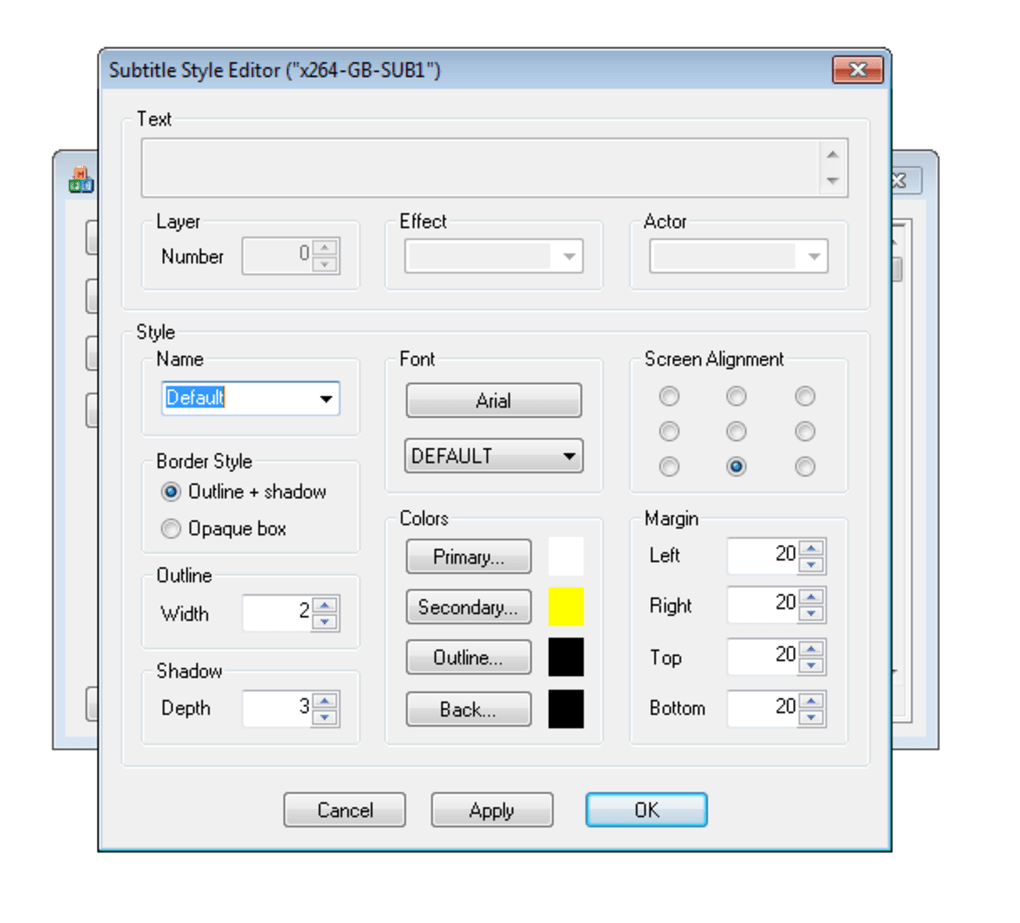
Beyond simple text corrections, VobSub empowers users with advanced customization options. Font styles and colors can be modified, allowing for a personalized aesthetic that complements the video’s visual style or user preferences. This granular control over the visual presentation of subtitles adds a professional touch, allowing for a more polished and enjoyable viewing experience. This combination of accurate temporal placement and stylistic control ensures subtitles are both functional and visually appealing.
Strengths of VobSub: A Powerful and Accessible Tool
VobSub’s user-friendly design and robust feature set position it as a leading choice for subtitle editing. Its strengths are numerous, contributing significantly to its popularity amongst video enthusiasts and professionals alike:
- Wide Format Support: VobSub’s compatibility with multiple subtitle file formats (SRT, IDX, SUB, and others) ensures broader accessibility. Users are not limited by the file format of their source subtitles, streamlining the workflow and minimizing conversion necessities.
-
Intuitive Editing Interface: The program’s clean and intuitive interface makes subtitle editing accessible to users of all technical skill levels. The chronological display of subtitles, synchronized with their appearance in the video, facilitates accuracy and simplifies the editing process.
-
Comprehensive Customization: The ability to alter font styles and colors grants users a significant degree of control over the visual presentation of subtitles. This ability to tailor the subtitles to match the video’s aesthetics or personal preferences elevates the overall viewing experience.
-
Ease of Installation: Integrating VobSub into video editing software is typically a straightforward process. The installation is usually seamless, requiring minimal technical expertise, ensuring rapid access to its powerful editing capabilities.
-
Free and Open Source (implied): The free availability of VobSub makes it accessible to a wide audience. This removes financial barriers, allowing anyone to benefit from its capabilities without incurring any costs.
Limitations of VobSub: Addressing Potential Drawbacks
While VobSub offers substantial benefits, it’s crucial to acknowledge its limitations:
- Outdated Interface: The graphical user interface (GUI) of VobSub can appear dated compared to modern software. While functionality remains key, a modernized interface would enhance the user experience and broaden its appeal to users accustomed to more visually contemporary programs.
-
Steep Learning Curve for Beginners (potential): Although the core editing functionality is relatively straightforward, some users, particularly beginners, might find the initial navigation and understanding of the workflow slightly challenging. While the interface is not overly complex, a more intuitive onboarding experience could benefit new users.
-
Limited Advanced Features: Compared to more sophisticated subtitle editing software, VobSub might lack certain advanced features found in commercial alternatives. While it excels in core editing tasks, users seeking more specialized tools might need to explore other options.
-
Plugin Dependency: VobSub’s functionality is contingent on its integration with a compatible video editing program, such as VirtualDub. This dependence on external software can limit its standalone usability and require users to already possess a compatible video editing application.
VobSub in Comparison: Alternatives and Considerations
While VobSub remains a potent tool, it’s essential to consider alternatives to fully appreciate its place within the landscape of subtitle editing software. Other options, both free and commercial, offer varying functionalities and features. Some might boast more advanced capabilities, while others prioritize user-friendliness or specialized features.
When selecting a subtitle editing solution, factors to consider include:
- Feature Set: Evaluate the specific features offered by different programs to ensure they align with your needs. Consider the importance of advanced features such as automatic synchronization, multi-language support, or specialized formatting options.
-
User Interface: A user-friendly interface is crucial for efficient workflow. Consider the ease of navigation, intuitive design, and overall user experience.
-
Platform Compatibility: Ensure compatibility with your operating system and preferred video editing software. Some programs are platform-specific, while others offer broader compatibility.
-
Pricing: Determine your budget and evaluate the cost-benefit ratio of different options. Free alternatives often provide excellent functionality, but commercial options might offer superior features or support.
-
Community Support and Documentation: The availability of comprehensive documentation, tutorials, and community support can significantly impact the user experience, especially for troubleshooting or seeking assistance.
Choosing the right subtitle editor hinges on your specific requirements and preferences. While VobSub excels in its simplicity and efficiency for basic subtitle editing, users with more complex needs or preferences for a more modern interface might find other alternatives more suitable. However, for straightforward subtitle editing tasks, VobSub provides a powerful and accessible solution, making it a valuable tool for anyone seeking to enhance their video viewing experience.
File Information
- License: “Free”
- Latest update: “October 18, 2024”
- Platform: “Windows”
- OS: “Windows XP”
- Language: “English”
- Downloads: “121.2K”
- Size: “1.59 MB”


