
Voice changers have become increasingly popular tools for gamers, offering a fun and sometimes strategic advantage in online multiplayer games. This review focuses on a specific Android application, “Voice Changer for Gaming,” analyzing its features, usability, and overall effectiveness. We’ll examine its strengths and weaknesses, exploring whether it lives up to its promises and whether it’s a worthwhile addition to a gamer’s arsenal.
Features and Functionality
Voice Changer for Gaming, developed by Shenzhen Leyuan Shentu Technology Co., Ltd., is a free Android application designed to modify the sound of voice recordings. Unlike many competing applications that offer real-time voice alteration, this app operates solely on pre-recorded audio. This means it is unsuitable for live streaming or situations requiring immediate voice modification during gameplay.
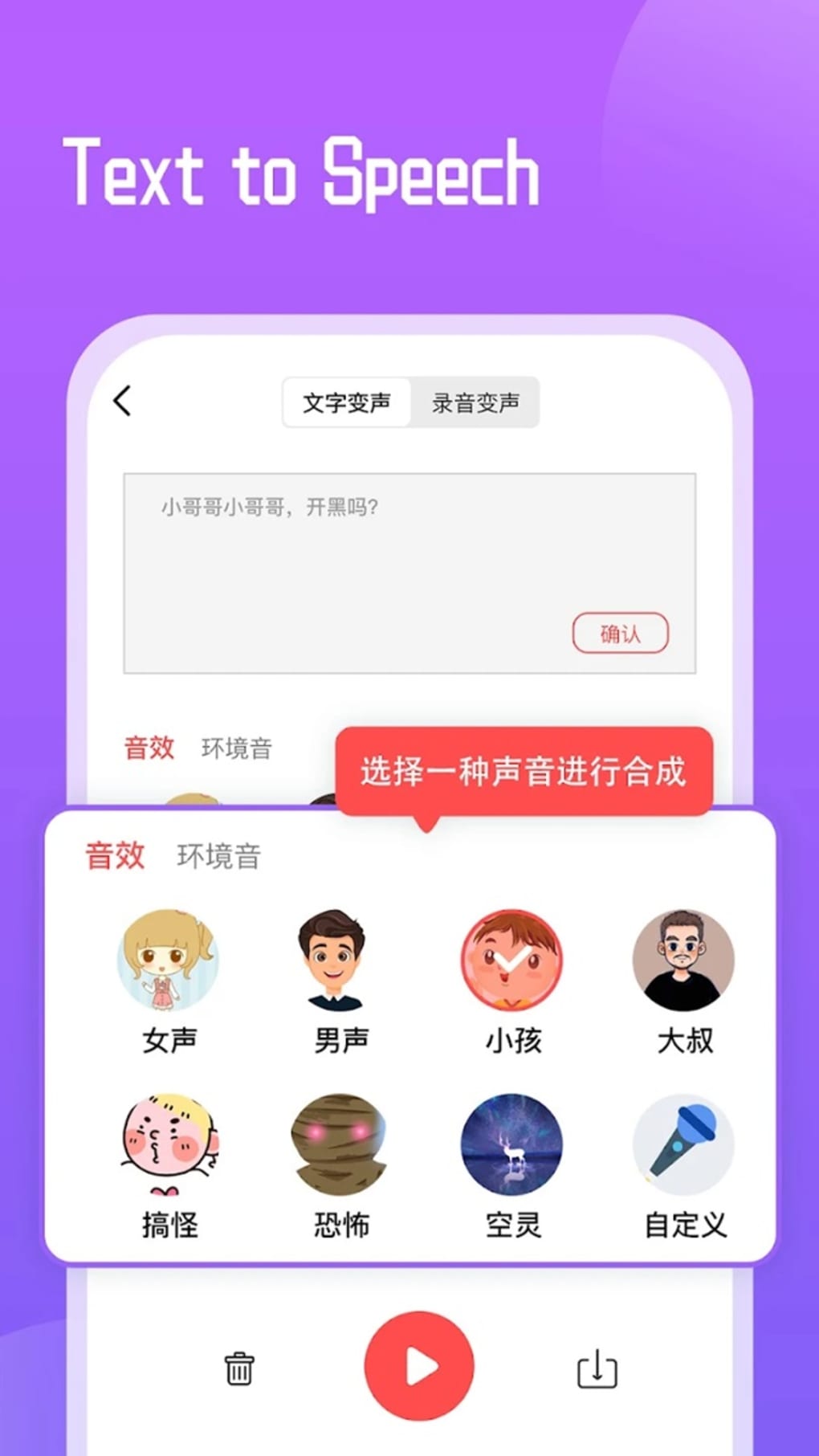
The app’s core function involves recording your voice and then applying various voice filters or “voice packs” to change its pitch, tone, and overall timbre. While it offers a range of male and female voices, a significant drawback is the fact that the voice pack names are presented in Chinese, creating a usability challenge for many users.
Beyond its basic voice-changing capabilities, Voice Changer for Gaming integrates several additional features:
-
Built-in Recorder: The app incorporates a convenient recording function, eliminating the need for users to use separate recording applications. This streamlined approach simplifies the voice-changing process.
-
Sound Extractor: This feature allows users to extract audio from video files, enabling voice modification for clips from gameplay footage or other videos. This is a valuable addition for creating comedic or highlight reels.
-
AI-Powered Voice Imitation: Leveraging artificial intelligence, the app attempts to imitate different voices, offering a range of altered vocal styles beyond basic pitch shifting. While the effectiveness of this imitation varies, it adds a layer of creative flexibility.
- Text Changer: A unique feature allows users to convert typed text into speech, using the selected voice pack. This functionality is beneficial for creating personalized audio messages or narrations within games or videos.
However, the app is not without its flaws. A reported issue involves the app frequently getting stuck on a “loading” screen when selecting a voice pack. This necessitates using the device’s back button to resolve the problem, interrupting the user workflow.
Performance and Usability
The user interface of Voice Changer for Gaming is relatively simple, making it easy to navigate even for those unfamiliar with audio editing software. The recording and playback features function reliably, and the application is generally responsive. However, the aforementioned “loading” issue significantly impacts usability, creating a frustrating experience for users.
The quality of the voice changes varies depending on the selected voice pack. Some voice alterations sound natural and convincing, while others might exhibit artifacts or unnatural qualities. The AI voice imitation, while a promising feature, sometimes produces results that are far from realistic.
The app’s reliance on pre-recorded audio significantly limits its application. Gamers seeking real-time voice modification during live streams or online matches will be disappointed. Its suitability is primarily limited to post-game editing and content creation.
Pricing and In-App Purchases
Voice Changer for Gaming is offered as a free download, but it contains in-app purchases. These purchases offer users access to premium voice packs, an ad-free experience, and seemingly, unrestricted access to all features. While the free version provides basic functionality, the limitations might encourage users to consider subscribing to remove ads and unlock all voice options. The nature of the free trial period for the premium packages is not explicitly detailed in the provided information.
Comparison with Other Voice Changers
Compared to other voice changers on the market, Voice Changer for Gaming occupies a niche. While many competitors provide real-time voice modification, this application focuses on post-processing of recorded audio. This approach caters to a different user base, those who prioritize editing existing audio files over live voice altering.
Applications that offer real-time voice changing generally cater to streamers and online gamers, while applications like Voice Changer for Gaming primarily serve users who want to add humorous or creative effects to pre-recorded audio. The lack of real-time functionality is both a significant limitation and a defining characteristic of this particular software.
Conclusion: Who is this App For?

Voice Changer for Gaming is a decent application for users who need a simple tool to modify pre-recorded audio files, particularly for gaming-related content. Its built-in recorder, sound extractor, and text-to-speech features add value. However, its inability to provide real-time voice alteration severely restricts its potential user base.
Gamers who require real-time voice changing for live streams or in-game communication should look elsewhere. This app is not designed for that purpose. The app’s biggest weaknesses are the loading issue, the Chinese-only voice pack names, and the absence of clear information regarding the premium subscription model and its features.
Therefore, the target audience for Voice Changer for Gaming is limited to individuals who need a simple, free (with in-app purchase options) post-recording voice modifier, and are prepared to navigate the challenges posed by its interface quirks and lack of real-time capabilities. Consider your specific needs and expectations carefully before downloading and using this application. If real-time voice changing is crucial, explore alternative options that offer this functionality. If, however, you need a simple and accessible tool for post-recording voice modification, Voice Changer for Gaming might just meet your requirements, despite its limitations. Always remember to be mindful of the laws concerning the use of such software in your region.
Alternative Apps
Given the limitations of Voice Changer for Gaming, several alternative applications provide similar or enhanced functionalities:
-
Applications with Real-Time Voice Changing: Numerous apps offer real-time voice modification, ideal for live streaming and online gaming. These applications often provide a wider range of voice effects and often include more advanced features.
-
Advanced Audio Editors: For users requiring more control over audio editing, professional-grade audio editing software offers advanced tools for precise adjustments to pitch, tone, and other audio parameters. These applications are typically more complex and may require a steeper learning curve.
-
Voice Cloning Software: While generally more advanced and potentially more expensive, voice cloning applications offer the ability to recreate voices with higher fidelity, potentially opening up more sophisticated possibilities for gaming-related content creation.
The selection of the best alternative will depend greatly on the user’s specific needs, technical skills, and budget. Researching available options is highly recommended to find the application that best fits the user’s specific requirements.
File Information
- License: “Free”
- Version: “1.2.2”
- Latest update: “March 24, 2025”
- Platform: “Android”
- OS: “Android 13.0”
- Language: “English”
- Downloads: “115.5K”
- Download Options: “Google Play”


