
VSO ConvertXtoDVD is a software application designed to simplify the process of converting various video formats into DVD-compatible files and subsequently burning them onto DVDs. This review delves into its capabilities, strengths, weaknesses, and overall user experience, based on user feedback and feature analysis. The software aims to bridge the gap between digital video files and traditional DVD playback, offering a convenient solution for archiving personal videos or enjoying digital content on a larger screen.
Converting and Burning: Core Functionality
At its core, VSO ConvertXtoDVD serves as a video converter and DVD burner. Its primary function is to take video files in a wide array of formats – including AVI, WMV, MKV, OGM, MPEG, and QuickTime – and transform them into a format suitable for playback on standard DVD players. This conversion process is crucial because DVD players typically support only a limited set of codecs and resolutions. The software handles this intricate conversion automatically, abstracting away the technical complexities from the user. Beyond basic conversion, the software integrates a DVD burning engine, allowing users to finalize their converted videos onto physical DVDs or even USB drives. This all-in-one approach streamlines the entire process, eliminating the need for multiple applications.
The software boasts a robust conversion engine, capable of handling a significant variety of video formats. This broad compatibility is a significant advantage, as it allows users to consolidate their diverse video collections into a unified DVD format. However, the conversion process can be time-consuming, particularly for large video files with high resolutions or complex codecs. The time required for conversion varies significantly depending on factors such as the file size, video codec, and the user’s system specifications. While VSO ConvertXtoDVD offers a preview window to allow users to check their video before burning, the extended conversion time remains a potential drawback.
Customization and Menu Creation: Beyond Basic Burning
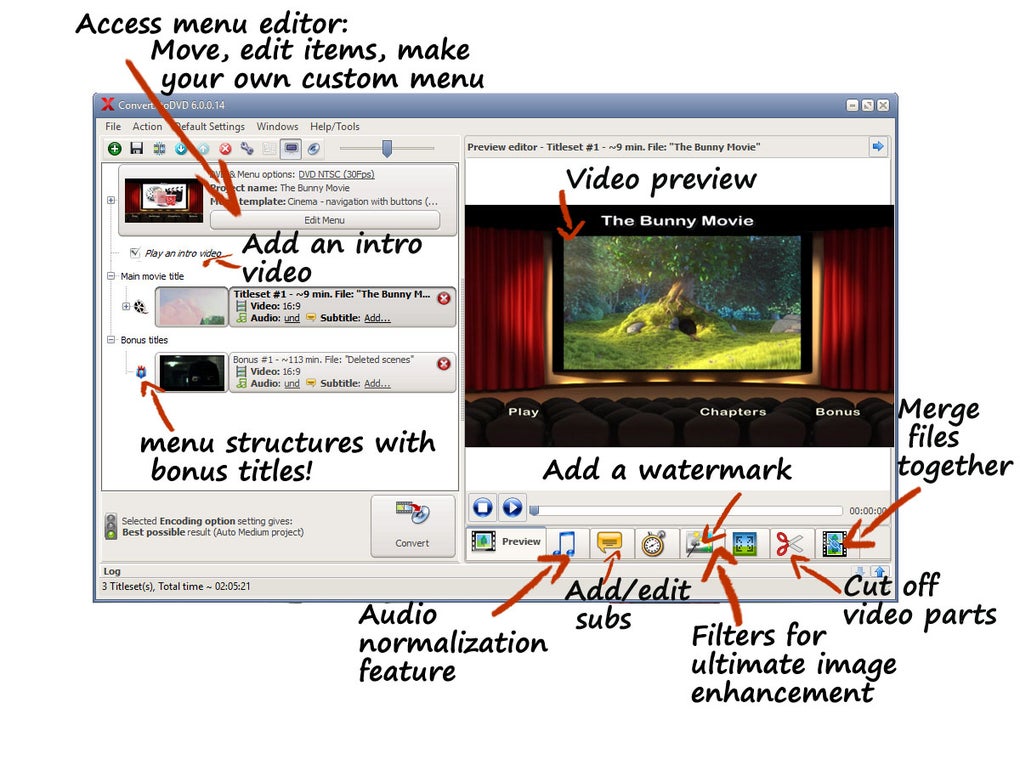
VSO ConvertXtoDVD extends beyond basic conversion and burning functionalities. The software provides a comprehensive suite of customization options, allowing users to tailor their DVDs to their preferences. One notable feature is its built-in DVD menu editor. This editor offers a selection of pre-designed templates, providing users with a starting point for creating professional-looking menus. Users can also delve into advanced customization, adjusting various aspects of the menu’s design, including the layout, font styles, colors, and background images. This level of customization allows users to create personalized DVDs that reflect their individual style or match the theme of the content being burned.
Furthermore, users have extensive control over the video playback settings. Options to adjust video quality, normalize audio levels, and even add watermarks (for copyright protection) are readily accessible. The inclusion of a subtitle editor is another noteworthy feature. It supports various subtitle formats (SRT, SUB/ID, and SSA), allowing users to seamlessly integrate subtitles into their DVD projects. This feature is particularly useful for users who want to make their videos accessible to a broader audience or for those who wish to provide multilingual support. However, some users have criticized the way these customization options are integrated into the interface. The nested tree-view structure, while comprehensive, can be somewhat cumbersome to navigate, especially for users unfamiliar with the software. A more intuitive interface with separate windows for different customization options might enhance the user experience.
User Interface and Ease of Use
The user interface is a critical aspect of any software application, and VSO ConvertXtoDVD’s interface presents a mixed bag. While the software aims for user-friendliness, particularly for novice users, the abundance of features and options can initially feel overwhelming. The software’s main strength lies in its single-click functionality, providing a quick and easy way to convert and burn videos for users who don’t want to delve into complex settings. This simplicity is ideal for users who prioritize speed and convenience over intricate control. However, the software’s more advanced features, particularly those related to customization, are deeply nested within the interface’s tree view, requiring users to navigate multiple layers to access them. This can be frustrating, and the software would benefit from a more streamlined approach to presenting these options, possibly through a tabbed interface or separate dialog boxes.

Despite the interface’s complexities, many users praise the software’s intuitive design and straightforward workflow. The overall experience, for users who are comfortable exploring the options, is generally positive. The software’s ability to handle a vast range of video formats and its extensive customization capabilities compensate for the occasional interface quirks. However, the interface could be significantly improved by streamlining its navigation and providing clearer visual cues for users unfamiliar with the software’s capabilities.
Performance and Conversion Speed
The software’s performance is a key area of consideration. As mentioned earlier, the conversion speed is a potential drawback. While the conversion engine is powerful and efficient, it can still require a considerable amount of time, particularly when dealing with large high-definition videos. This lengthy process can be frustrating for users expecting near-instantaneous results. The conversion time significantly depends on several factors: the size and complexity of the source video, the target DVD format, the specifications of the user’s hardware (CPU, RAM), and the selected encoding settings. Users with more powerful hardware are likely to experience faster conversion times compared to users with older or less capable systems.
Despite the potential for extended conversion times, the software typically produces output of high quality. Users report that the conversion process maintains a good balance between video quality and file size, resulting in DVDs that offer a satisfactory viewing experience. The software also incorporates several image enhancement features, further enhancing the quality of the converted videos. These features, though, might also increase the conversion time, adding to the already noticeable waiting period. The balance between quality and speed is a factor that users should consider before choosing the software.
User Reviews and Feedback
User reviews provide valuable insights into the software’s real-world performance and user experience. While many users express satisfaction with the software’s core functionality and its ability to handle various video formats, there are also some recurring criticisms. The conversion speed is a frequent point of concern, with users reporting lengthy processing times. Some users have also expressed frustration with the software’s error messages, which are occasionally unhelpful or unclear, making it difficult to troubleshoot issues. The complexity of the interface, as discussed earlier, is another recurring theme in user reviews, with some users finding the nested menus and options challenging to navigate.
Conversely, many users praise the software’s ease of use for basic tasks, emphasizing its one-click conversion feature as particularly convenient. The software’s ability to handle a variety of video formats without any manual intervention is highly valued, while the options for advanced customization are appreciated by more technically-inclined users. The software’s ability to burn to both DVD and USB drives is also a popular feature, adding to its versatility. The availability of both a free trial and a paid version allows users to test the software and decide if it meets their requirements before making a purchase.
Conclusion
VSO ConvertXtoDVD is a capable and versatile video conversion and DVD burning software. Its ability to handle a wide range of video formats, coupled with its comprehensive customization options and integrated DVD burning engine, makes it a compelling choice for many users. However, its shortcomings in conversion speed and interface complexity need to be considered. The extended conversion times can be frustrating, and the nested menu structure may present a challenge for less tech-savvy users. The software would benefit from interface improvements to streamline navigation and clearer error messaging to enhance the user experience. Nevertheless, for users who can tolerate the potential wait times and are willing to explore the software’s features, VSO ConvertXtoDVD offers a powerful solution for creating high-quality DVDs from diverse video sources. The available free trial allows potential users to evaluate the software’s capabilities and determine if it meets their specific needs before committing to a purchase.
File Information
- License: “Trial version”
- Latest update: “August 5, 2024”
- Platform: “Windows”
- OS: “Windows 10”
- Language: “English”
- Downloads: “509K”
- Size: “39.66 MB”


