
In the ever-evolving landscape of digital media, where streaming platforms and cloud storage dominate, there was a time when physical media reigned supreme. DVDs were the standard for home entertainment, providing a tangible way to enjoy movies, home videos, and digital content on televisions worldwide. During this pivotal era, software solutions that could bridge the gap between burgeoning digital video formats and the ubiquitous DVD player became indispensable. Among these crucial tools, VSO DivxToDVD emerged as a standout, offering a simple yet powerful way for Windows users to convert their diverse video files – including DivX, XviD, Quicktime, and WMV – into a universally compatible DVD format.
First introduced to the digital media scene, VSO DivxToDVD quickly carved out a niche for itself. Developed by VSO Software, a name synonymous with reliable multimedia tools, this application was designed with a clear purpose: to demystify and streamline the often complex process of video conversion. For many, the ability to take a downloaded or created digital video file and burn it to a DVD meant newfound freedom. It allowed for easy playback on any standard DVD player, sharing with friends and family without internet dependencies, and a tangible archive of precious memories or favorite content. The software’s appeal was its straightforward approach, enabling users, regardless of their technical proficiency, to achieve professional-looking DVD conversions. On platforms like PhanMemFree, it garnered significant attention, praised for its efficiency and user-friendly interface. This introduction will delve into the enduring legacy and specific capabilities of VSO DivxToDVD, exploring why it became a go-to choice for digital video enthusiasts during its prime, and how its fundamental principles of multimedia conversion remain relevant even today.
Multimedia: Bridging Digital Formats to Physical Media
The realm of multimedia software encompasses a vast array of tools designed to create, edit, play, and convert various forms of digital content, from audio and video to images and animations. Within this expansive category, video conversion tools hold a particularly vital place, serving as the connective tissue between disparate digital formats and different playback devices. VSO DivxToDVD perfectly exemplifies this role, acting as a crucial bridge that allowed users to transition their digital video collections from the computer screen to the living room television via a standard DVD player.
At its core, VSO DivxToDVD addresses a fundamental challenge of early digital video: format incompatibility. In the early 2000s, digital video formats were fragmented. Users might download movies in DivX or XviD, record home videos in WMV, or encounter Quicktime files. While these formats offered advantages like smaller file sizes and good quality for PC playback, they were largely incompatible with the dedicated DVD players that were standard in homes. This created a significant barrier for users who wished to enjoy their digital content on a larger screen, share it easily, or preserve it on a physical disc. VSO DivxToDVD stepped into this void, offering a seamless solution that took these varied digital inputs and transformed them into the widely accepted MPEG-2 format, which is the standard for DVDs. This conversion process wasn’t just about changing file extensions; it involved re-encoding the video and audio, ensuring proper aspect ratios, and creating the necessary DVD structure (VOB files, IFO files, BUP files) that standalone players could interpret.
The software’s placement within the “Multimedia” category on platforms like PhanMemFree underscored its fundamental purpose. It wasn’t just a file utility; it was a tool for media consumption and management. It allowed users to bypass the technical complexities of codecs, resolutions, and frame rates, abstracting these details into a simple, guided process. This made it accessible to a broad audience, from casual users wanting to burn a family video to a disc, to enthusiasts archiving their digital movie collection. Its significance lies not just in its technical capabilities, but in its ability to empower users to take control of their digital media, adapting it to their desired viewing experience, particularly in an era dominated by physical media distribution.
A Deep Dive into Video Conversion Capabilities
VSO DivxToDVD’s primary strength lay in its robust and versatile video conversion engine. It was engineered to handle a range of popular digital video formats, making it a highly adaptable tool for the average Windows user. The specific formats it was designed to convert – DivX, XviD, Quicktime, and WMV – represented a significant portion of the digital video files commonly encountered during its heyday. Each of these formats presented its own challenges, but VSO DivxToDVD was adept at parsing them and re-encoding them into a DVD-compatible stream.
DivX and XviD Conversion: These two codecs were immensely popular for compressing video files, especially movies, into smaller sizes while retaining a good degree of visual quality. They allowed for quicker downloads and efficient storage on hard drives. However, their proprietary nature or specific codec requirements often meant they wouldn’t play directly on most standalone DVD players. VSO DivxToDVD acted as the crucial intermediary, taking these highly compressed files and converting them into the MPEG-2 standard required for DVD playback. This process involved not just decompression and re-compression, but also ensuring that the converted video maintained a watchable quality on a standard definition television, balancing file size for the DVD disc with visual fidelity. The software efficiently handled the technical intricacies, allowing users to simply load their DivX or XviD file and let the program do the heavy lifting.
Quicktime and WMV Support: Beyond DivX and XviD, VSO DivxToDVD also extended its support to other prevalent formats like Apple’s Quicktime (MOV files) and Microsoft’s Windows Media Video (WMV files). Quicktime, often associated with Apple products and professional video editing, could be challenging for Windows users to play universally without specific software. WMV, being Microsoft’s proprietary format, was common on Windows PCs but equally limited in standalone player compatibility. By including these formats, VSO DivxToDVD significantly broadened its utility, ensuring that users with diverse video sources—whether from a Mac-based friend, a digital camera, or a Windows Media Player export—could all convert their content to DVD. This comprehensive format support made it a one-stop solution for many, reducing the need for multiple, specialized converters.
Output to DVD Standard: The ultimate goal of VSO DivxToDVD was to create a fully compliant DVD that could be played on any consumer DVD player. This wasn’t a simple “copy and paste” operation. The software handled the entire DVD authoring process, including:
- Video Encoding: Converting the input video stream to MPEG-2, the DVD video standard.
- Audio Encoding: Converting the audio track to AC3 (Dolby Digital) or PCM, the DVD audio standards.
- Chapter Creation: Often automatically segmenting the video into chapters for easy navigation.
- Menu Generation: While perhaps basic, it could create simple menus to navigate between videos if multiple files were being burned.
- Disc Structure: Arranging the encoded video and audio into the VOB, IFO, and BUP files that constitute a DVD-Video disc.
- Burning Engine: Integrating a burning engine to write the created DVD structure directly to a blank DVD-R/RW disc.
The conversion process itself was designed for efficiency. While conversion times naturally varied depending on the source video length, resolution, and the user’s system hardware, VSO DivxToDVD was known for its optimized algorithms that aimed for a balance between speed and output quality. Users often reported that the software performed a “brilliant job” with “easy to use and quick” operations, delivering satisfying results that maintained a good visual and auditory experience on a standard television. This focus on both broad compatibility and effective execution solidified its reputation as a reliable tool in the video conversion niche.
User Experience and Accessibility: Simple Tools for Complex Tasks
One of the most frequently lauded aspects of VSO DivxToDVD was its unwavering commitment to user-friendliness. In an era where many software applications, especially those dealing with multimedia conversion, could be intimidatingly complex, VSO DivxToDVD stood out for its intuitive design. The underlying philosophy was clear: simplify a technically involved process so that anyone, from a novice computer user to an experienced media enthusiast, could successfully convert their videos to DVD format without needing an in-depth understanding of codecs, bitrates, or DVD specifications.
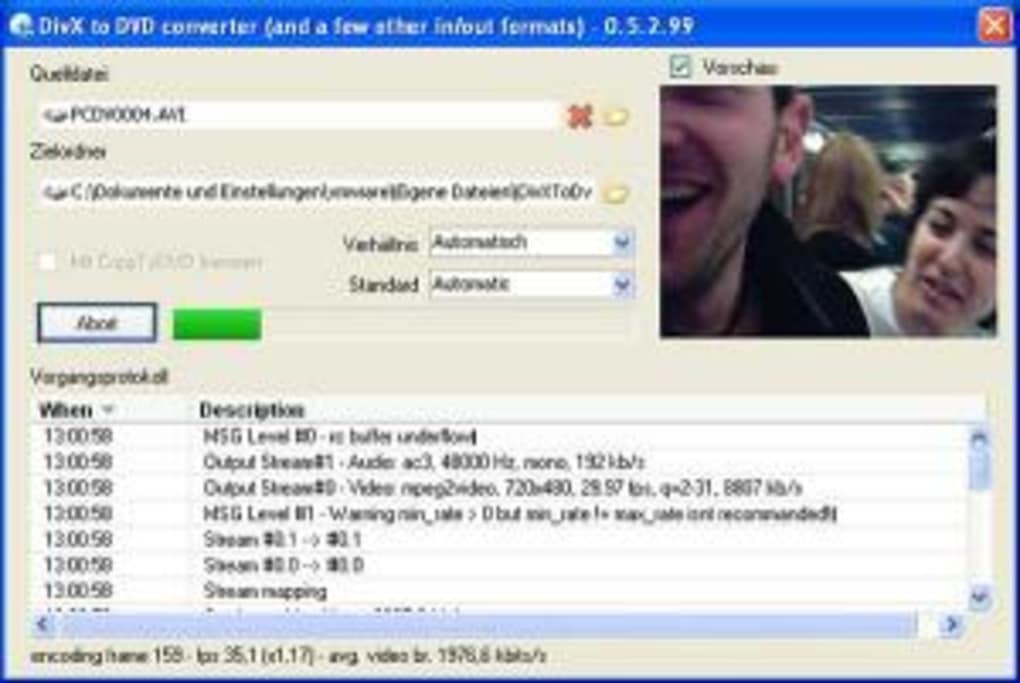
The interface of VSO DivxToDVD was a testament to this design principle. Users described it as “simple” and “uncluttered,” features that are highly valued when tackling what could otherwise be a daunting task. The typical workflow was structured in a logical, step-by-step manner, guiding the user through each stage of the conversion and burning process. This usually involved:
- Loading Source Files: Users would easily import their DivX, XviD, Quicktime, or WMV files into the program. The interface made drag-and-drop functionality or simple file browsing readily available.
- Configuration (Minimal): While advanced options might be available, the default settings were often sufficient for most users. If adjustments were needed, such as selecting an aspect ratio or audio track, they were presented clearly and concisely, often with helpful tooltips.
- Preview: A playback window might allow users to preview their loaded video, ensuring they had selected the correct file.
- Output Selection: Specifying the target disc size (DVD-5 or DVD-9) and the burning drive.
- Conversion and Burning: A single click often initiated the entire process, from re-encoding the video to burning it onto the physical disc. Progress bars and status messages kept the user informed throughout.
This streamlined approach meant that users didn’t need to consult extensive manuals or spend hours troubleshooting. The “easy to use and quick” sentiment echoed in user reviews on PhanMemFree highlighted the software’s effectiveness in delivering a smooth experience. For many, the simplicity was a major “Pro,” with no significant “Cons” related to usability reported, a strong indicator of a well-executed user interface.
Beyond its intuitive workflow, VSO DivxToDVD also demonstrated a commitment to broader accessibility through its multilingual support. While the primary language of the software available for download on PhanMemFree.org was English, VSO Software understood the global nature of its user base. The program was made available in a respectable number of languages, including German, Spanish, French, Italian, Dutch, Polish, Portuguese, and Russian. This multilingual support was crucial, as it allowed users in various regions to interact with the software in their native tongue, further lowering the barrier to entry and enhancing the overall user experience. It ensured that the clarity and simplicity of the English interface were replicated for non-English speakers, reinforcing the idea that this tool was designed for everyone, everywhere, who needed to convert their digital videos to DVD. This commitment to accessibility played a significant role in its widespread adoption and positive reception among a diverse international user base.
Beyond Conversion: The Broader Landscape of Utilities & Tools
VSO DivxToDVD, while specialized in video conversion, fits neatly into the broader category of “Utilities & Tools” – software designed to assist users in managing, maintaining, and enhancing their computer’s functionality or data. These tools are characterized by their practical purpose, often performing specific tasks that complement the primary operating system or other applications. VSO DivxToDVD, by facilitating the transition of digital video into a usable physical format, served as a vital utility for media management and accessibility.
As a product from VSO Software, a developer known for its range of burning and conversion tools, DivxToDVD benefited from a lineage of expertise in digital media manipulation. This developer’s focus on robust and efficient engines translated into a reliable product. The software’s technical specifications paint a picture of a lean yet powerful application. With a download size of just 2.49 MB for version 5.2.99, it was a lightweight program that didn’t demand significant system resources, a crucial factor during its peak in the early 2010s when internet speeds and hard drive capacities were more limited than today. Despite its small footprint, it offered powerful conversion capabilities, demonstrating efficient coding and optimization.
The software was compatible with a broad range of Windows operating systems, from Windows 98 and prior versions up to Windows 7, as indicated by its latest update information from March 1, 2013. This wide compatibility ensured that a vast number of Windows users, across different generations of hardware and software, could benefit from its functionality. Its trial version model, common for specialized utilities, allowed users to test its effectiveness before committing to a purchase, building trust and showcasing its capabilities upfront. The popularity of VSO DivxToDVD was evident in its download statistics on platforms like PhanMemFree.org, with hundreds of thousands of installations since its addition to the catalog in 2011, and consistent downloads across regions like India, the United States, and South Africa. This widespread adoption underscores its utility and relevance in the digital media ecosystem of that era.
In the context of “Utilities & Tools,” VSO DivxToDVD also faced a competitive landscape. While it stood out for its simplicity and efficiency, other applications like Format Factory offered broader file conversion capabilities, and dedicated video editors like CapCut or Adobe Premiere Pro provided more extensive manipulation tools. However, VSO DivxToDVD carved its niche by focusing sharply on the specific problem of converting prevalent digital video formats to DVD. Its existence also highlights the ongoing need for tools that bridge technological gaps, whether it’s converting outdated file types, managing storage, or ensuring compatibility across different devices. Even today, while DVDs are less central, the principles of format conversion and ease of use remain paramount for many other digital tasks, from cloud storage synchronization to preparing videos for specific social media platforms. The legacy of VSO DivxToDVD is a testament to the value of well-designed, focused utility software that addresses a clear user need with efficiency and simplicity.
In conclusion, VSO DivxToDVD represents a pivotal piece of software from a transitional period in digital media consumption. It masterfully addressed the critical need to convert a variety of popular digital video formats—DivX, XviD, Quicktime, and WMV—into a standard DVD format, making content accessible on virtually any standalone DVD player. Its strengths lay not only in its robust conversion engine, capable of handling complex re-encoding and DVD authoring, but also significantly in its exceptional user experience. Praised for its “simple, uncluttered, easy” interface, it democratized the DVD creation process, allowing users of all technical levels to produce high-quality, playable discs.
Developed by VSO Software, VSO DivxToDVD, with its compact size and broad Windows compatibility, proved to be an efficient and widely adopted utility. Its multilingual support further enhanced its accessibility, contributing to its popularity on platforms like PhanMemFree, where it garnered hundreds of thousands of installations. While the digital media landscape has evolved dramatically, shifting towards streaming and cloud-based solutions, the fundamental principles that made VSO DivxToDVD successful—solving a specific technical challenge with an intuitive design and reliable performance—remain highly relevant. It stands as an excellent example of how a specialized utility can profoundly impact user interaction with technology, bridging formats and empowering individuals to enjoy and share their digital content in the most convenient way possible for its time. For those seeking to revisit legacy media or for specific niche applications, the principles and ease of use exemplified by VSO DivxToDVD continue to resonate.
File Information
- License: “Trial version”
- Version: “5.2.99”
- Latest update: “March 1, 2013”
- Platform: “Windows”
- OS: “Windows 7”
- Language: “English”
- Downloads: “19.7K”
- Size: “2.49 MB”


