
VUPlayer presents itself as a free, multi-format audio player for Windows, boasting a range of features designed to appeal to users seeking a robust and versatile solution beyond the limitations of more mainstream players. However, its strengths are intertwined with significant drawbacks, leaving it a niche offering with a specific appeal. This review will explore VUPlayer’s functionalities, advantages, and limitations to provide a comprehensive understanding of its capabilities and suitability for different users.
Feature Set: A Blend of Strengths and Quirks
VUPlayer distinguishes itself through its broad format support, extending far beyond the typical MP3 and WAV files handled by most common players. It comfortably plays less common formats like MOD, MTM, S3M, XM, and MPC, making it a valuable tool for users with extensive music libraries containing obscure or legacy file types. This extensive compatibility alone could make it an attractive option for those frustrated by players that fail to recognize their entire collection.
Beyond its broad format support, VUPlayer incorporates a collection of advanced features aimed at enhancing the listening experience and providing greater control over audio playback. These include:
-
Gapless Playback: This feature ensures seamless transitions between tracks, eliminating the often jarring pauses that can interrupt the flow of an album or playlist. This is a welcome addition for those who appreciate a continuous listening experience, particularly valuable when listening to classical music or live recordings.
-
32-bit Mixing: While the technical implications may be lost on casual users, the option for 32-bit mixing suggests a potential improvement in audio quality and precision, particularly noticeable in complex mixes with many instruments. This detail, however, requires a level of audio expertise to fully appreciate its impact.
-
9-Band Graphic Equalizer: This powerful tool provides granular control over the frequency response of the audio, allowing users to sculpt their listening experience to their preferences. Users can boost or cut specific frequencies, effectively customizing the sound signature to compensate for speaker characteristics or personal taste.
-
Volume, Balance, and Pitch Controls: These standard but essential features offer basic yet powerful tools for adjusting the playback to match individual preferences and listening environments. The ability to fine-tune balance and pitch adds flexibility, useful for correcting minor imbalances or experimenting with different playback speeds.
-
System Tray Functionality: The ability to minimize VUPlayer to the system tray allows for background playback while freeing up desktop space for other applications. This is a convenient feature for users who want to listen to music while working on other tasks.
-
Timer Playback/Screen Saver Feature: This is a useful feature for those who wish to use VUPlayer as a sleep timer or for timed listening sessions. This can prevent accidental battery drain or unwanted late-night listening.
-
Visual Plugin Support: While not a core feature for many, the support for visual plugins allows for user customization of the player’s appearance, adding a layer of personalization beyond the basic interface. The availability and quality of these plugins would, however, determine their value.
-
Encoding Support (Ogg Vorbis, FLAC, APE, WMA, WV): This advanced capability allows users to convert audio files into different formats, which can be advantageous for storage space optimization, compatibility with other devices, or improving file quality. This functionality, however, requires a degree of technical understanding to utilize effectively.
-
Audioscrobbler and Freedb Support: Integration with Audioscrobbler (Last.fm) enables automatic music tracking and social sharing. Similarly, Freedb support streamlines the process of automatically retrieving CD metadata, enriching the playback experience with accurate track information.
These features, individually, represent valuable additions to a basic audio player. Collectively, they present a sophisticated tool capable of handling diverse needs and preferences. However, their implementation within VUPlayer presents both opportunities and challenges.
User Experience: A Double-Edged Sword
While VUPlayer’s feature set is comprehensive, the user experience is where the player falls short. The interface, while simple in its basic layout, lacks intuitive navigation, particularly when it comes to accessing and managing the advanced features. Many of these options are buried within menus or require a degree of technical knowledge to understand and utilize effectively. This makes the player less accessible to casual users who might be overwhelmed by the sheer number of settings and options.
The confusing navigation is compounded by occasional instability. Reports indicate a susceptibility to crashes, particularly when another application attempts to access the sound card simultaneously. This lack of stability significantly detracts from the user experience, disrupting the listening experience and generating frustration. These technical flaws undermine the potential of the otherwise robust feature set. The absence of a comprehensive user manual or online resources further exacerbates the learning curve for navigating the player’s advanced features.
Comparison with Alternatives
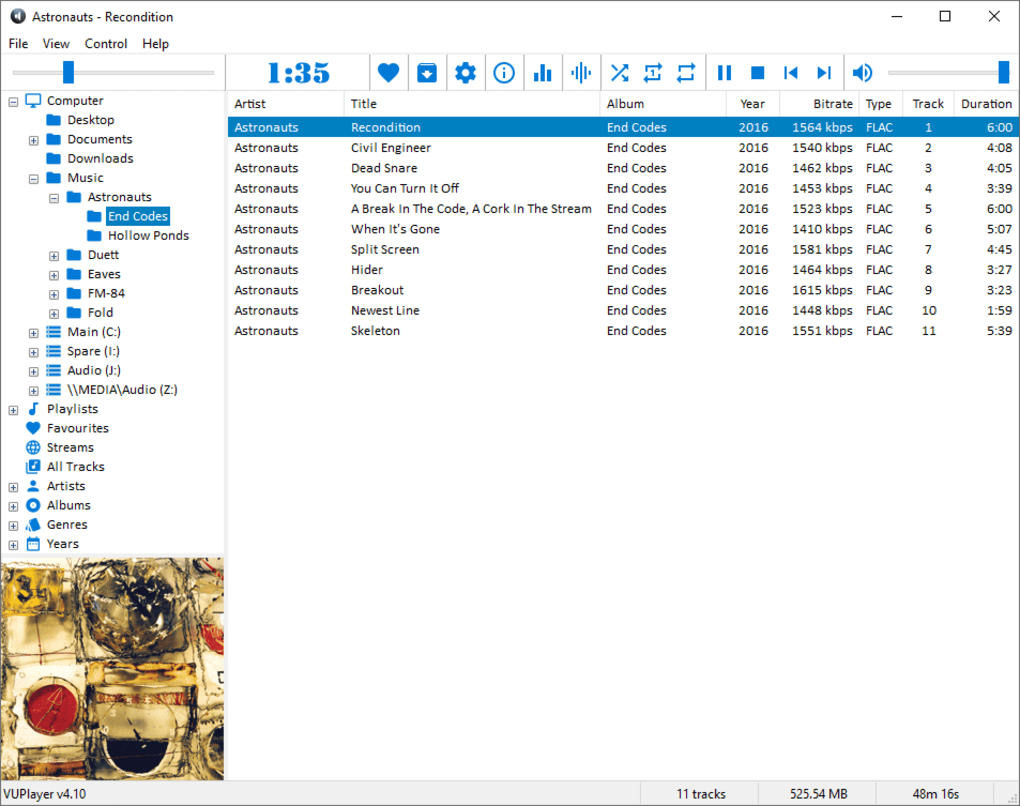
VUPlayer’s primary strength lies in its broad format support, especially for less common file types. However, it lacks the polished user experience and stability offered by more established players such as VLC Media Player or Foobar2000. VLC, for instance, also supports a vast range of formats and provides a more intuitive interface, greater stability, and a wider community for support and troubleshooting. Foobar2000, while known for its advanced features and customization options, provides a steeper learning curve but ultimately offers a far more polished experience for those willing to invest time in learning its intricacies.
While VUPlayer offers a unique blend of advanced features, the considerable flaws in user interface design and stability significantly impact its competitiveness. The learning curve for its advanced options, coupled with instability, makes it a less attractive choice for casual users compared to alternatives with simpler, more stable, and user-friendly designs.
Conclusion: A Niche Player with Limitations
VUPlayer is a multifaceted audio player with strengths and weaknesses. Its robust format support makes it a potential lifesaver for users struggling with less common audio files. The inclusion of advanced features, such as gapless playback, a graphic equalizer, and encoding capabilities, further enhances its versatility. However, the challenges in navigation, coupled with reports of instability, severely hinder its usability. The lack of a polished user experience and potential for crashes significantly detract from its overall appeal.
Therefore, VUPlayer is best suited for users with a specific need: those who require broad format support and are willing to overlook the interface challenges and potential instability. For users prioritizing a seamless, user-friendly experience and prioritizing stability above all else, established alternatives provide a far superior experience. Ultimately, the choice depends on individual priorities and tolerance for technical quirks. The strong points are undeniable for certain users, but the inherent flaws in design and stability make VUPlayer far from a universally appealing option.
File Information
- License: “Free”
- Latest update: “July 3, 2025”
- Platform: “Windows”
- OS: “Windows 7”
- Language: “English”
- Downloads: “34.1K”
- Size: “21.04 MB”


