VuzeVPN is a security and privacy software designed to protect your online presence. Developed by Azureus Software, Inc., the same company behind the popular BitTorrent client Vuze, this VPN service aims to enhance the security of your online activities, particularly when using P2P file-sharing applications. While it offers a straightforward and user-friendly interface, its functionality remains relatively basic compared to some competitors, leaving room for feature expansion.
Ease of Use and Interface Design
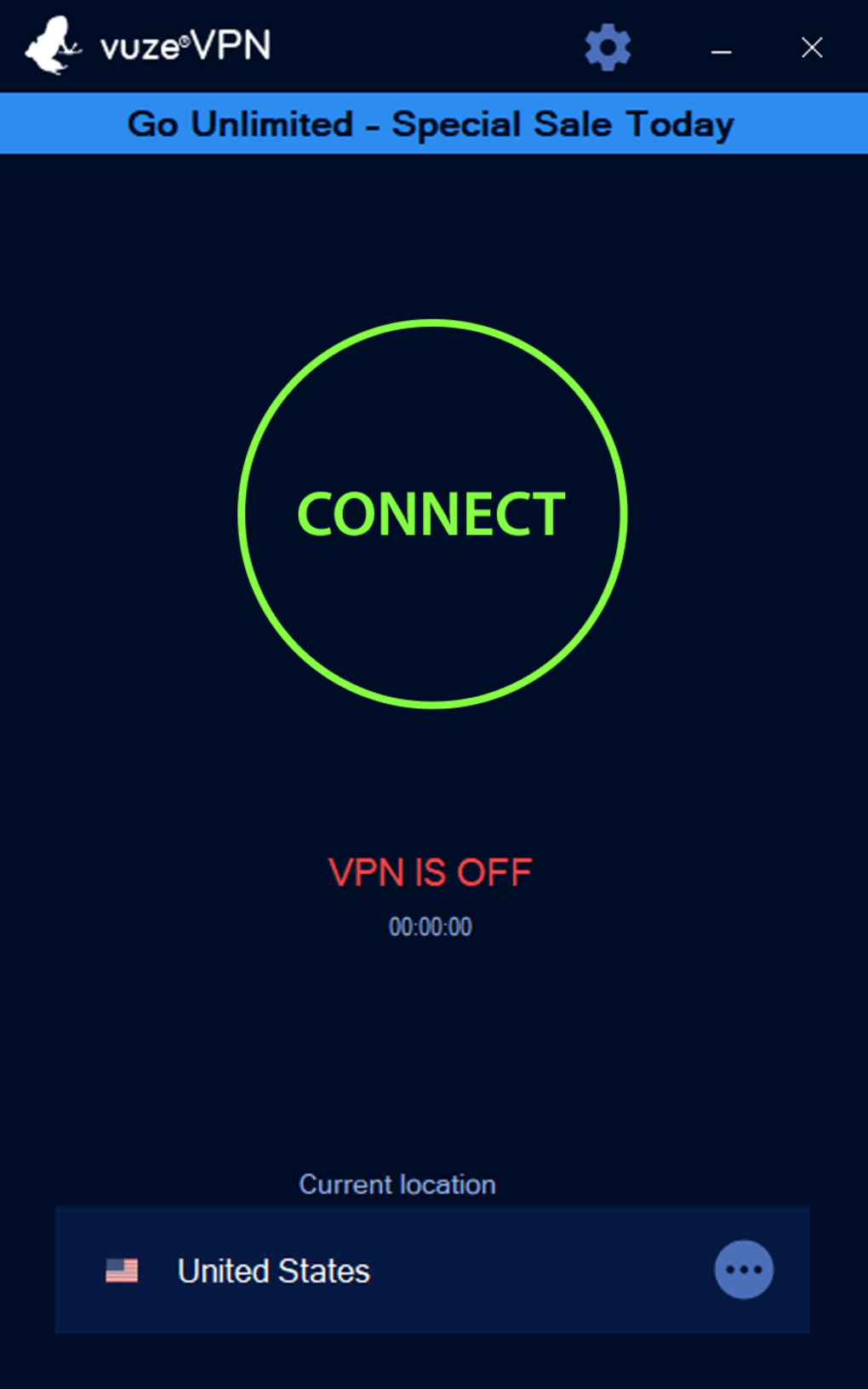
VuzeVPN boasts a remarkably simple interface, prioritizing ease of use over extensive customization options. The main window presents a prominent “Connect” button, clearly indicating the primary function. Below this, the connection status and duration are displayed, along with the currently selected location. When disconnected, the last used location is shown. This minimalist approach may appeal to users who prioritize simplicity and straightforward functionality. However, the lack of advanced features and settings might disappoint users seeking granular control over their VPN experience.
Navigating to the settings, accessed via a gear icon, reveals three sections: General, Account Information, and About. The General settings offer only two toggles: launching the application at system startup and minimizing it upon connection. Account Information displays your email address, account type, and provides a sign-out option. Finally, the About section contains version information, links to the privacy policy, and details on available updates. This limited configuration restricts users’ ability to fine-tune their VPN connection for optimal performance and security.
Features and Functionality
VuzeVPN delivers the core functionalities expected of a VPN:
-
IP Address Masking: The VPN effectively hides your real IP address, shielding your online identity from websites and services you visit. This protects your privacy and helps bypass geographical restrictions.
-
Data Encryption: VuzeVPN encrypts your network data, preventing unauthorized access and monitoring by your Internet Service Provider (ISP) or other entities on your network. This encryption creates a secure tunnel for all your online activities.
-
Geo-Restricted Content Access: By connecting to servers in different locations, VuzeVPN allows you to access content that might be blocked in your region, such as streaming services like Netflix and Hulu. However, the number of server locations and their performance are not explicitly detailed in the readily available information.
-
No-Log Policy: VuzeVPN claims a strict no-log policy, meaning it does not monitor, track, or store your online activities. This is a crucial aspect of privacy, ensuring your browsing history and other data remain confidential. Independent verification of this policy is advisable for users with high security and privacy needs.
-
Multi-Device Compatibility: A single account allows simultaneous connections from up to five devices. This caters to users with multiple computers, smartphones, or tablets.
-
Customer Support: VuzeVPN offers free email support for subscribed users, a valuable resource for troubleshooting and assistance.
Despite these features, several notable omissions limit the VPN’s overall appeal to tech-savvy users accustomed to more comprehensive options. There’s no mention of specific protocols supported (e.g., OpenVPN, WireGuard), kill switch functionality, split tunneling, or advanced security features like obfuscation. The lack of these features might make it less suitable for users in highly restrictive regions or those requiring advanced privacy protections.
Pricing and Subscription Options
VuzeVPN offers a 7-day free trial, allowing users to test the service before committing to a subscription. This trial requires providing an email address to receive a download link, which simultaneously creates a user account with a generated password. The premium version offers three subscription plans based on duration: one month, one year, and two years. All three plans offer the same features, including multi-device compatibility (up to five devices), free email support, and a 30-day money-back guarantee. The pricing details are not specified in the original source material. This straightforward pricing structure makes it easy for users to choose a plan that suits their needs and budget.
Security and Privacy Considerations
The security and privacy of VuzeVPN are crucial aspects for potential users. While the software claims a no-logs policy and encrypts data, independent verification of these claims is advisable. The absence of information regarding specific encryption protocols and security features raises concerns for users requiring robust security measures. Additionally, users should be aware that the software might be flagged by antivirus programs, requiring manual approval or exception configuration. This could be due to aggressive detection methods or the software’s relatively small market share, leading to less frequent updates in antivirus databases.
Comparison with Competitors
Compared to other VPN services, VuzeVPN appears to be a more basic offering. Many competitors provide a wider range of features, including more server locations, advanced security options (e.g., kill switch, split tunneling), and more customizable settings. However, VuzeVPN’s simplicity and ease of use might be appealing to users who prioritize user-friendliness over extensive feature sets. A direct comparison with other VPNs would require more detailed specifications on server locations, protocols, and speeds for VuzeVPN.
Conclusion
VuzeVPN presents a simple, user-friendly solution for those seeking basic VPN functionality. Its straightforward interface and lack of overwhelming configuration options make it accessible even to novice users. The inclusion of a free trial and a money-back guarantee helps mitigate the risk for potential customers. However, the lack of advanced features, limited configuration options, and potential antivirus flags could be drawbacks for users seeking a more robust and configurable VPN solution. Therefore, VuzeVPN might be a suitable option for casual users requiring a simple and easy-to-use VPN but may not meet the needs of individuals prioritizing advanced security and privacy features. Further investigation and comparison with other VPN services are highly recommended before making a final decision.
File Information
- License: “Trial version”
- Latest update: “May 23, 2023”
- Platform: “Windows”
- OS: “Windows 7”
- Language: “English”
- Downloads: “12.8K”
- Size: “4.45 MB”