
Vysor Android Control on PC is a free application that allows users to seamlessly control and interact with their Android devices directly from their Windows PC. This comprehensive review explores its features, functionalities, pricing, safety concerns, and overall user experience. We will also compare it to alternative solutions and consider its pros and cons.
Functionality and Features: Mirroring and Beyond
Vysor’s primary function is screen mirroring. It casts your Android device’s display onto your PC’s larger screen, providing a more comfortable and efficient user experience for tasks that are often cumbersome on a smaller mobile screen. This mirroring functionality isn’t simply a passive display; Vysor allows full control of your Android device using your keyboard, mouse, or trackpad. This translates to a significantly improved typing experience, easier scrolling, and precise interaction with Android apps and games. The application mimics the touch input accurately, allowing you to click and interact with on-screen elements as if you were using your finger on the phone itself.
The application offers a clean and intuitive interface. The main screen displays connected Android devices, clearly indicating their name and serial number. For each device, you have options to view the mirrored screen and share the screen with others. The interface provides visual cues regarding connection status. A prominent red notification appears if no devices are detected, prompting the user to ensure that USB debugging is enabled on their Android device. This straightforward design minimizes confusion for both novice and experienced users. Basic settings such as enabling the international keyboard and sharing all connected devices are easily accessible from the main interface.
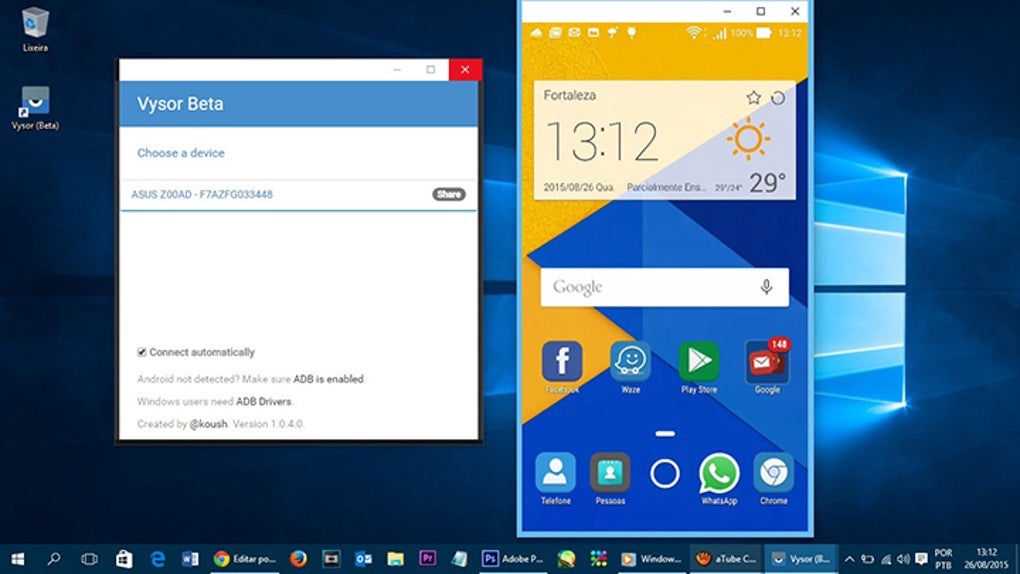
Vysor’s capabilities extend beyond basic mirroring and control. The free version provides core functionality, including screen mirroring, control via keyboard and mouse, and screenshot capture. However, the free version suffers from limitations in resolution, resulting in a blurry image. The paid, Pro version unlocks higher resolution mirroring, providing a vastly improved visual experience. It also includes features not available in the free version, such as fullscreen mode, drag-and-drop file transfer between PC and Android, the Vysor Share feature for quick screen sharing, and wireless connectivity (the free version requires a USB connection). The paid version also removes the advertisements present in the free version.
The mirrored screen itself presents a familiar Android interface. The top of the interface displays useful control buttons, including headphone controls, settings, video controls, camera access, volume adjustment, screen refresh, and power options. Below this control bar, the mirrored Android home screen and applications appear, accurately replicating the appearance and functionality of your mobile device.
Pricing and Plans: Balancing Free and Premium Features
Vysor offers a tiered pricing model. A basic, free version is available, providing fundamental screen mirroring and control functionalities. However, the limited resolution in the free version can significantly impact the user experience, making it less appealing for those who prioritize visual clarity. The free version serves as a good introduction to the software’s core capabilities but falls short for extended or intensive use.
To unlock the full potential of Vysor, users must subscribe to the Pro version. This paid subscription unlocks high-resolution mirroring, greatly enhancing the usability of the application. It also introduces features like fullscreen mode, streamlined file transfer using drag-and-drop, enhanced screen-sharing options through Vysor Share, and the ability to connect wirelessly, eliminating the need for a constant USB connection. The absence of advertisements in the Pro version further improves the overall user experience. The subscription-based model ensures that users have access to ongoing updates and new features as they become available.
Security and Privacy: Weighing the Risks
One of the most significant concerns regarding Vysor is its security and privacy implications. The application requires extensive access to your Android device, including your Google account profile. This broad access raises concerns about potential data breaches or unauthorized access to personal information stored on the device. While the developers state that they do not collect or store user data, the extensive permissions granted to the application are a cause for caution.
It’s crucial to understand that granting access to an application that controls your entire Android device inherently carries risks. Users should carefully consider the potential implications before granting the necessary permissions. It’s advisable to only use Vysor with trusted devices and networks. The lack of explicit information regarding data security measures further raises concerns.
User Experience: A Mixed Bag
Vysor’s user experience is a dichotomy. The simplicity and ease of use of the interface are significant strengths. The intuitive layout and straightforward controls allow for quick setup and effortless navigation. The ability to control your Android device using a keyboard and mouse dramatically enhances productivity for tasks such as typing long messages or playing games that require precise controls. Using a larger screen significantly improves visibility and reduces eye strain compared to using a small mobile display.
However, the blurry, low-resolution mirroring of the free version significantly detracts from the overall experience. This limitation makes the free version less usable for extended periods or tasks that require fine details. The premium version addresses this issue, but the cost of upgrading is a significant consideration. The misleading nature of the free version’s settings, restricting access to many features, also contributes to a somewhat frustrating experience for those unfamiliar with the application’s pricing model.
Alternative Applications: Exploring the Competition
Several alternative Android mirroring and control applications are available, each with its own strengths and weaknesses. AirDroid, ApowerMirror, MobiZen, Reflector, and Scrcpy are some notable competitors. These applications often offer similar functionalities, such as screen mirroring and PC control. However, their interfaces, features, pricing models, and security measures may differ significantly. A comparative analysis of these alternatives is essential for users to determine the application that best aligns with their individual needs and priorities. Some alternatives may offer superior wireless connectivity, more robust security features, or more advanced control capabilities.
Conclusion: A Powerful Tool with Cautions
Vysor Android Control on PC is a powerful application capable of transforming the way users interact with their Android devices. The ability to mirror and fully control your Android phone on a larger PC screen with a keyboard and mouse significantly enhances productivity and user experience. The clean interface and intuitive design are major strengths, although the free version’s limitations should be considered. However, the significant security and privacy concerns arising from the application’s wide-ranging permissions necessitate a cautious approach. Users should carefully weigh the benefits against the potential risks before granting Vysor access to their device and data. Exploring alternative applications and comparing their features and security measures is essential to make an informed decision. The choice between the free and Pro versions is heavily dependent on your tolerance for low resolution and the importance of features like wireless connectivity and high-resolution mirroring. Ultimately, Vysor is a valuable tool, but only if you understand its limitations and potential downsides.
File Information
- License: “Free”
- Latest update: “July 27, 2024”
- Platform: “Windows”
- OS: “Windows 10”
- Downloads: “205.3K”
- Size: “125.90 MB”


