waircut, short for Wireless Air Cut, is a free, portable, and surprisingly powerful WiFi Protected Setup (WPS) network auditing tool. Designed for both novice and experienced users, this application provides a crucial layer of security assessment for your wireless network, helping you identify and mitigate potential vulnerabilities before they can be exploited. While its installation process might present some initial hurdles, waircut’s straightforward operation and valuable security checks make it a worthwhile addition to any user’s security arsenal.
Understanding the Importance of Wireless Network Security
In today’s hyper-connected world, the security of our wireless networks is paramount. We rely on these networks for everything from online banking and shopping to accessing sensitive personal data and communicating with loved ones. Yet, many users overlook the crucial step of securing their wireless routers, leaving themselves vulnerable to a range of attacks. Connecting to a new router without first checking its security settings is akin to moving into a new house without changing the locks—an invitation to trouble.
waircut directly addresses this security gap by focusing on the WiFi Protected Setup (WPS) protocol. WPS, intended to simplify network configuration, has unfortunately become a common target for attackers due to vulnerabilities in its implementation. Many routers employ default or easily guessable WPS PINs, making them susceptible to brute-force attacks, which systematically try various PIN combinations until the correct one is found. Other attack vectors, such as pixie-dust attacks, exploit weaknesses in the WPS handshake process to gain unauthorized access. waircut acts as a vital defense against these threats, offering a proactive method to assess the security of your network.
waircut’s Functionality: Testing for Vulnerabilities
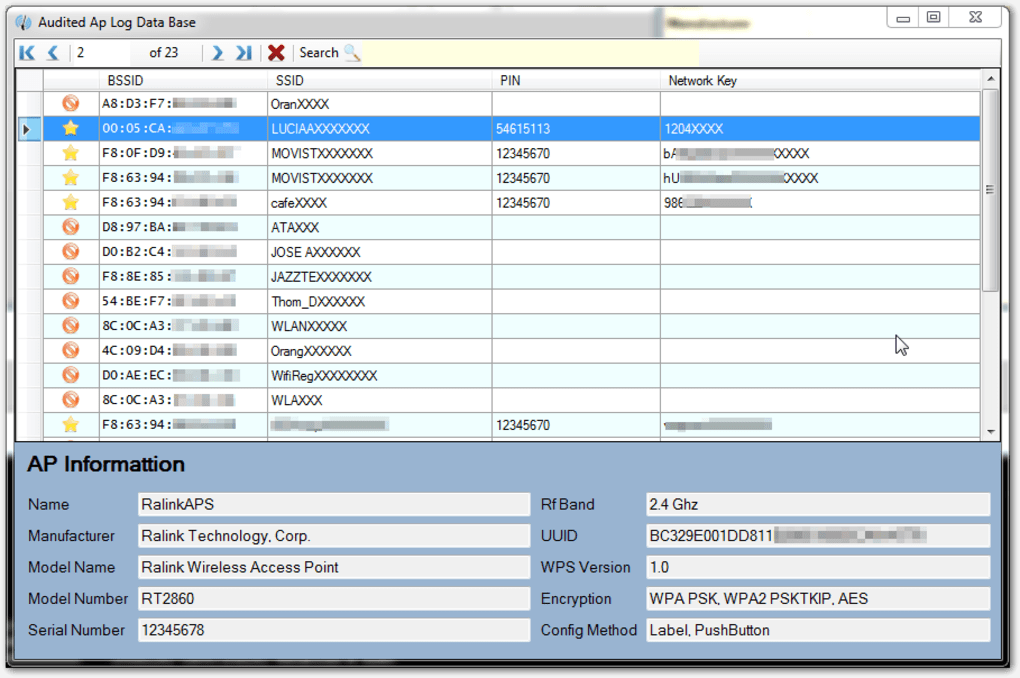
waircut’s primary function is to rigorously test your router’s security, focusing on WPS vulnerabilities. It performs several key checks:
-
Generic WPS PIN Check: This test attempts to identify routers using easily guessable or default WPS PINs, a common weakness found in many devices. These pre-programmed PINs significantly reduce the time and effort required for a successful attack, allowing unauthorized access to your network in a matter of minutes. waircut’s ability to identify these generic PINs is a critical first step in ensuring your network’s security.
-
Brute-Force Vulnerability Assessment: This crucial test simulates a brute-force attack, attempting to crack your WPS PIN using a range of algorithms and techniques. While a successful brute-force attack can take considerable time, depending on the complexity of the PIN, this function reveals how resilient your router is against this common attack vector. The identification of weaknesses allows you to proactively strengthen your security measures, such as changing your WPS PIN to a strong, randomly generated one.
-
Pixie-Dust Attack Detection: Pixie-dust attacks leverage vulnerabilities in the WPS handshake process, allowing attackers to bypass the PIN requirement entirely. This sophisticated form of attack targets inherent weaknesses in the WPS protocol, making it a significant concern for network security. waircut’s capacity to identify susceptibility to pixie-dust attacks highlights another critical area that demands attention.
Beyond WPS: A Holistic Approach to Network Security
While its focus on WPS vulnerabilities is central to its functionality, waircut indirectly contributes to a more comprehensive approach to network security. By identifying weaknesses in WPS, it encourages users to adopt better security practices across the board. This includes:
-
Strong Password Implementation: A robust and unique password for your router’s administrative interface is crucial, regardless of the WPS configuration. A strong password acts as an additional layer of defense, even if the WPS PIN is compromised.
-
Regular Firmware Updates: Keeping your router’s firmware up-to-date is essential for patching security vulnerabilities and improving overall performance. Manufacturers regularly release updates to address known issues, including those that affect WPS security.
-
Disabling WPS: If possible, disabling WPS entirely is the most effective way to prevent WPS-related attacks. While convenient, WPS’s inherent vulnerabilities make it a risky feature to leave enabled.
-
Firewall Configuration: A properly configured firewall on your router provides an additional barrier against unauthorized access, blocking malicious traffic and protecting your network from unwanted connections.
-
Regular Security Audits: Performing periodic security audits using tools like waircut helps to ensure your network remains protected against evolving threats and emerging vulnerabilities. Proactive security measures are far more effective than reacting to a breach after it has already occurred.
Installation and Usage: Navigating Potential Challenges
While waircut offers valuable security features, its installation process is not always straightforward. Users might encounter several challenges, particularly on Windows systems. Some users have reported needing to disable User Account Control (UAC) in Windows 10, and in some cases even install a prerequisite like Jumpstart. These complexities highlight the importance of carefully following the instructions provided by the developers and understanding the system requirements.
Accessing and modifying registry values, a necessary step for some users, requires technical expertise and should be approached with caution. Incorrectly modifying the registry can lead to system instability or even data loss. Therefore, it’s crucial to thoroughly understand the implications before undertaking this step. For those unfamiliar with registry editing, seeking assistance from a tech-savvy friend or professional might be necessary.
Despite these installation difficulties, the operational use of waircut itself is relatively simple and intuitive, even for users with limited technical knowledge. The results of the security tests are presented in a clear and concise manner, allowing users to easily understand the identified vulnerabilities and take appropriate action.
Pros and Cons of Using waircut
Pros:
-
Free and Open-Source: waircut is completely free to use and download, making it accessible to everyone. Its open-source nature allows for community scrutiny and continuous improvement.
-
Portable and Wireless: waircut’s portable nature makes it highly convenient to use on multiple devices or systems without the need for complex installations.
-
Comprehensive Security Checks: waircut conducts thorough checks for various types of WPS vulnerabilities, providing a detailed security assessment of your network.
-
Simple Operation: Despite the potential installation hurdles, the program’s core functionality is user-friendly, making it accessible to users regardless of technical expertise.
- Proactive Security: waircut allows you to proactively identify and address security flaws before they can be exploited by attackers.
Cons:
-
Complex Installation: The installation process can be challenging for less experienced users, potentially requiring registry edits and/or the installation of additional software.
-
System-Related Issues: Depending on your system configuration, you might encounter various system-related issues during the installation or execution of the program.
Conclusion: Is waircut Right for You?
waircut is a valuable tool for assessing the security of your wireless network, particularly focusing on vulnerabilities related to the WPS protocol. While the installation process presents some challenges, the information it provides about potential security risks is invaluable. For users prioritizing network security and willing to navigate the initial setup hurdles, waircut offers a powerful and free way to improve the safety of their wireless network. Its comprehensive approach to WPS vulnerability detection, combined with its user-friendly operation, makes it a beneficial tool for both tech-savvy users and those with less technical experience who are willing to seek assistance if needed. By identifying and addressing these vulnerabilities, you can take proactive steps towards safeguarding your data and ensuring the integrity of your home network.
File Information
- License: “Free”
- Version: “2.0”
- Latest update: “July 15, 2022”
- Platform: “Windows”
- OS: “Windows 8”
- Language: “English”
- Downloads: “29.2K”
- Size: “2.98 MB”