
WallPapa is a free, lightweight, and user-friendly wallpaper manager designed for Windows operating systems. It simplifies the process of automatically rotating your desktop background images, ensuring your screen always looks fresh and engaging. Tired of staring at the same desktop image day after day? WallPapa offers a simple solution to inject dynamism and visual variety into your Windows experience. This comprehensive guide will explore WallPapa’s features, benefits, and limitations, providing a thorough understanding of this helpful utility.
Effortless Wallpaper Rotation: The Core Functionality
At its heart, WallPapa excels at automating the process of changing your desktop wallpaper. Forget manually selecting new images; WallPapa seamlessly cycles through a pre-selected collection of images at your defined intervals. This eliminates the monotony of a static background and allows you to enjoy a constantly evolving visual landscape on your computer screen.
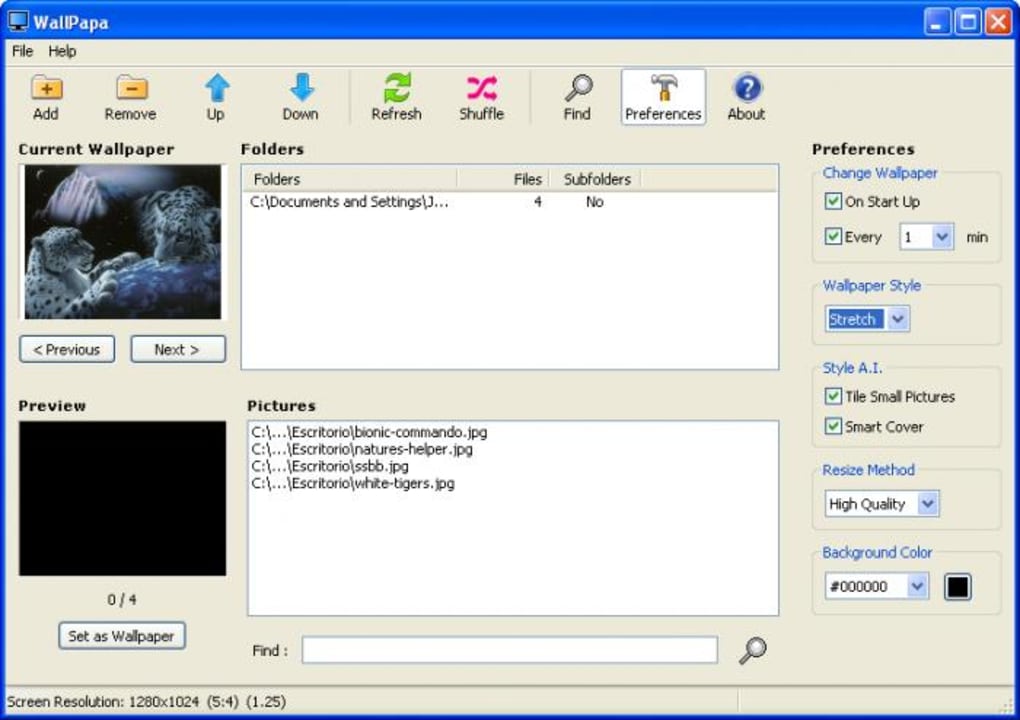
The application’s strength lies in its simplicity. The interface is intuitive and straightforward, making it accessible even to users with minimal technical expertise. Adding folders containing your preferred wallpaper images is quick and easy, and the settings for rotation frequency are clearly presented. WallPapa supports a wide range of common image formats, eliminating the need for cumbersome conversions before adding your images to the rotation queue.
Customization and Control: Tailoring Your Wallpaper Experience
While WallPapa’s core functionality is straightforward, it still offers several customization options to personalize your wallpaper experience. You can specify the frequency at which your wallpaper changes, ensuring the pace matches your preferences. However, it’s important to note that the currently available version only allows setting the rotation rate in minutes – a more granular control, such as specifying changes per hour or even daily, would enhance the application’s flexibility.
Furthermore, WallPapa currently lacks the ability to control the order in which the images are rotated. While the random selection offers a degree of spontaneity, the ability to manually define a specific rotation sequence (e.g., chronological, alphabetical) would appeal to users who prefer a more organized approach.
Despite these limitations, the ease of adding and managing your image folders remains a key advantage. Simply point WallPapa to the directories containing your desired wallpapers, and it will automatically begin the rotation process, providing an effortless and visually stimulating experience. This makes it ideal for users who want a simple, yet effective, solution for dynamic desktop backgrounds.
Supported Image Formats and File Management
WallPapa’s broad compatibility with common image formats is a considerable advantage. It supports a wide range of file types, meaning you can typically use your existing image collections without needing to convert files to a specific format. This eliminates a potential source of frustration and streamlines the wallpaper management process.
The application does not, however, include any pre-loaded wallpapers. This is a minor drawback, as users will need to source their own images. However, the abundance of free and paid wallpapers available online easily compensates for this omission. A simple online search will yield countless options for customizing your desktop background collection.
System Requirements and Performance
WallPapa is designed for minimal system impact. Its small file size (2.03 MB) and lightweight design ensure it operates smoothly without significantly impacting system resources. This is particularly beneficial for users with older or less powerful computers. Its compatibility with a variety of Windows versions further broadens its appeal. The simple design and efficient operation contribute to a responsive and user-friendly experience.
The software has been tested and proven stable on various Windows versions, however, compatibility with the newest Windows releases should always be confirmed before installation. Due to its inherent simplicity and reliance on pre-existing images, it places minimal load on the system’s processing power and memory.
Comparison to Alternative Applications and Future Enhancements
While WallPapa provides a functional and straightforward wallpaper rotation solution, the market offers several alternative applications with more advanced features. Some competitive apps include more advanced features like customizable transitions, support for live wallpapers, and integration with online image repositories. These applications often come with more sophisticated interfaces, potentially at the cost of increased system resource consumption and a steeper learning curve.
For users primarily seeking a basic, yet effective, automatic wallpaper rotation solution, WallPapa’s simplicity makes it a compelling choice. However, users who desire more intricate customization options, such as choosing transition effects, specific rotation order, or connecting directly to online wallpaper sources, may find more advanced alternatives more suitable.
Future updates to WallPapa could significantly enhance the user experience. The addition of features like customizable rotation order, more granular time intervals (e.g., hourly or daily settings), and support for live wallpapers would greatly expand the application’s capabilities and cater to a wider range of user preferences. Integrating with popular online wallpaper resources would also significantly improve the user experience, offering a readily available source for new images.
Conclusion: A Simple Yet Effective Tool
WallPapa provides a clean, efficient, and user-friendly way to automate the process of rotating your desktop wallpapers. Its simplicity is its greatest strength, making it easy to use for anyone, regardless of technical expertise. While it lacks some of the advanced features found in more complex wallpaper managers, its lightweight design, broad compatibility, and ease of use make it an excellent choice for users who prioritize simplicity and efficiency. For those seeking a basic but reliable tool to keep their desktop backgrounds fresh and engaging, WallPapa is a worthy consideration. The potential for future updates to include additional features further strengthens its appeal as a viable option within the ever-expanding landscape of Windows desktop customization tools.
File Information
- License: “Free”
- Version: “1.0.4.2”
- Latest update: “July 15, 2022”
- Platform: “Windows”
- OS: “Windows ME”
- Language: “English”
- Downloads: “5.3K”
- Size: “2.03 MB”


