
WALTR 2 is a software application designed to simplify the process of managing files on iOS devices (iPhones and iPads). It offers a wireless alternative to the traditional cable-based method of transferring data, promising a seamless and user-friendly experience. This review delves into the features, performance, and overall value proposition of WALTR 2, examining its strengths and weaknesses to determine whether it lives up to its claims of being “amazing, effortless, and magical.”
Effortless File Transfer and Management
At its core, WALTR 2 streamlines the often cumbersome task of transferring files between your computer and iOS devices. The software boasts a speed of up to 5 MB/s, a significant improvement over the limitations of some other methods. Its intuitive drag-and-drop interface eliminates the need for complex configurations or settings adjustments. Users can simply select the files they wish to transfer (music, videos, books, etc.) and drag them into the WALTR 2 window. The software automatically handles the transfer process, eliminating the need for manual intervention. This simplicity extends to a wide variety of file types, ensuring compatibility with most common formats. The software automatically detects the type of file being transferred, displaying relevant information such as artist, album, or title. This metadata recognition enhances organization and convenience, providing a more polished user experience.
Beyond the ease of transfer, WALTR 2 further simplifies management by intelligently adapting files for optimal compatibility with your specific iOS device. This ensures that transferred content plays correctly and displays without issues. This intelligent file handling extends to features like subtitle conversion, further streamlining the workflow and improving the overall user experience. WALTR 2 supports a wide range of Apple devices, including older models that may not be fully compatible with other file transfer applications. This backward compatibility broadens the software’s appeal and makes it a versatile solution for a diverse range of users.
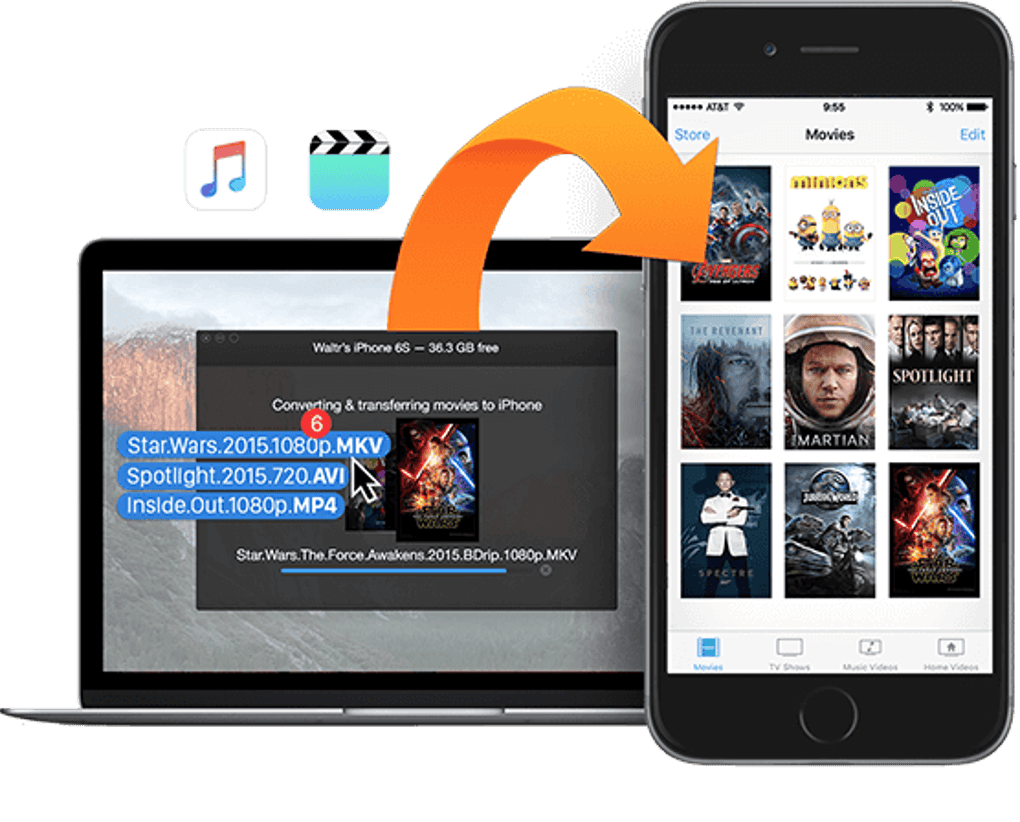
The wireless connection facilitated by WALTR 2 is a significant advantage. Unlike many alternative solutions, it eliminates the need for a physical cable connection, enhancing portability and convenience. The software automatically searches for nearby Wi-Fi-connected iOS devices, establishing a connection quickly and effortlessly. This seamless connection process is a core element of WALTR 2’s user-friendly design, minimizing any potential technical hurdles for users.
A Polished and Intuitive User Interface
WALTR 2’s visual appeal is noteworthy. The designers have adopted a visually appealing and contemporary aesthetic that elevates the user experience beyond mere functionality. The interface is intuitive and uncluttered, ensuring that even novice users can navigate the software effortlessly. The use of clear visual cues and a logical layout further enhance user interaction. The overall design creates a sense of modernity and professionalism, setting it apart from other, less aesthetically pleasing file transfer applications. The clean and uncluttered design ensures a smooth and efficient user experience.
Compatibility and Supported File Types
WALTR 2 boasts broad compatibility, supporting a wide array of file types, ensuring users can transfer nearly any type of media. This includes, but is not limited to: MP3s, WAV files, M4A audio files, MKV video files, AVI files, MP4 video files, and a variety of eBook formats. The comprehensive support for different file formats is a critical factor in the software’s overall usefulness, ensuring it caters to a diverse range of user needs and preferences. It also supports older iOS devices and various file formats, catering to a wide range of users and their diverse media libraries.
The versatility of WALTR 2 extends to its ability to handle different types of content. Whether it’s transferring a large library of music files, syncing videos for offline viewing, or adding a new book to a digital reading list, WALTR 2 simplifies the process, regardless of file size or format. This adaptability makes it a powerful tool for users with diverse media needs. The software’s ability to seamlessly handle different file types and sizes contributes to its overall value proposition.
Pricing and Value
While WALTR 2 offers a free trial period allowing users to experience its capabilities before committing to a purchase, the full feature set requires a paid license. The pricing model might be a consideration for some users. However, it’s essential to evaluate the cost against the time saved and the convenience offered by the software’s effortless transfer capabilities. For users who frequently transfer large amounts of data to their iOS devices, the time and frustration saved by using WALTR 2 could significantly outweigh the cost of the license. The convenience of wireless transfer and the automatic file adaptation provided by WALTR 2 are factors that enhance its value proposition, justifying the expense for some users.
Comparison with Alternatives
Several alternative applications exist for transferring files to iOS devices. These often involve iTunes (or its successor, Finder), which can be complicated for transferring specific file types or managing large media libraries. Other applications often lack the speed, ease of use, and wide file format compatibility offered by WALTR 2. The wireless transfer capability of WALTR 2 is also a key differentiator. Many competing applications require a wired connection, limiting their convenience and portability. This wireless convenience, combined with the intuitive interface and automatic file adaptation, sets WALTR 2 apart from many alternative solutions.
Conclusion
WALTR 2 successfully delivers on its promise of effortless file transfer and management for iOS devices. Its intuitive interface, high transfer speeds, wide file format compatibility, and wireless operation combine to create a powerful and user-friendly solution. While the paid license may be a deterrent for some, the convenience, time savings, and enhanced management capabilities offered by WALTR 2 justify the expense for many users, particularly those who regularly transfer significant amounts of data to their iOS devices. The software’s overall design and functionality contribute to a positive user experience, making it a worthwhile investment for users seeking a superior alternative to traditional methods of iOS file management. The combination of speed, ease of use, and broad compatibility makes WALTR 2 a strong contender in the iOS file management software market.
File Information
- License: “Free”
- Latest update: “May 23, 2023”
- Platform: “Windows”
- OS: “Windows 10”
- Language: “English”
- Downloads: “33.3K”


