
WAV to MP3 Converter is a free application for Windows operating systems, designed to facilitate the conversion of audio files from the WAV format to the MP3 format. While seemingly straightforward in its functionality, user reviews and analysis reveal a more complex picture, highlighting both its utility and potential drawbacks. This review delves into the software’s features, performance, security concerns, and user experience, providing a comprehensive assessment for potential users.
Functionality and Ease of Use
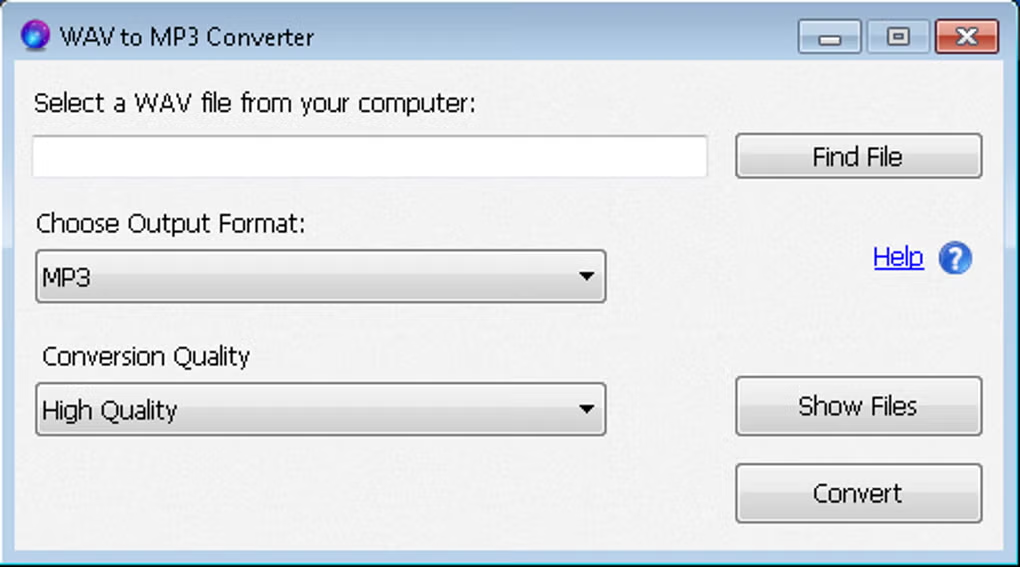
At its core, WAV to MP3 Converter fulfills its primary function: converting WAV files to MP3. The process is reportedly straightforward, with users indicating a simple and intuitive interface. However, this simplicity comes at a cost. The application lacks advanced features found in more sophisticated audio converters. There’s no option to adjust bitrate, sample rate, or other audio parameters during the conversion process. This limited control might be acceptable for users needing basic conversions, but it severely restricts the software’s appeal for users who require fine-tuned audio adjustments. The lack of a settings menu further underscores this simplicity.
Another significant drawback is the automatic saving location. The converted MP3 files are automatically saved to the user’s desktop. This lack of user-defined save locations can be disruptive, especially for users with organized file systems. The inability to choose a destination folder forces users to manually move files after conversion, adding an extra step to the workflow. Furthermore, the software truncates filenames, reducing them to only the first two characters. This unexpected behavior can lead to confusion and the need for manual renaming, further diminishing the overall ease of use.
The absence of a robust help system is also a critical flaw. While a “Help” link is present, user reports indicate that clicking it leads to malicious websites, posing a significant security risk. This unreliable “Help” functionality undermines the user’s ability to troubleshoot any problems or learn more about the software’s capabilities. The lack of detailed documentation or online support further exacerbates this issue.
Security Concerns: Malware Risks
The most alarming aspect of WAV to MP3 Converter is the reported presence of malware associated with the “Help” link. Multiple users have reported that clicking the help link redirects them to malicious websites attempting to install malware onto their systems. This security vulnerability is a major concern and renders the software potentially unsafe for use. The fact that this issue has been reported multiple times suggests a significant flaw in the software’s development or distribution process. The lack of any official response or update addressing this critical vulnerability raises serious questions about the developer’s commitment to user safety.
Antivirus software is crucial when using this application. It’s imperative that users employ up-to-date and reputable antivirus software to mitigate the risk of malware infection. Regularly scanning your system after using WAV to MP3 Converter is a recommended precautionary measure. The potentially harmful nature of the “Help” link severely undermines the overall value proposition of the software, outweighing its limited conversion capabilities. Users should seriously consider the security risks before using this tool, and alternative, more reputable software should be explored.
Performance and Audio Quality
While security concerns overshadow other aspects, the performance and audio quality of the conversion process itself warrant consideration. Reports suggest that the conversion process is relatively fast and efficient, completing tasks quickly without significant delays. Users who have successfully converted files reported no noticeable loss in audio quality, indicating the converter handles the process without introducing significant artifacts or distortions. However, this positive assessment is tempered by the overall lack of control over conversion parameters. The absence of bitrate and sample rate adjustments prevents users from optimizing the output for different purposes, limiting the flexibility of the tool.
Alternatives and Recommendations
Given the significant security risks and the lack of essential features, WAV to MP3 Converter is not recommended. Numerous alternative WAV to MP3 converters are available, offering a wider range of features, better security practices, and a more user-friendly experience. Many of these alternatives include adjustable parameters for bitrate, sample rate, and other audio properties. These advanced settings provide users with greater control over the conversion process, allowing for optimization based on specific needs and preferences. Many reputable alternatives offer integrated help systems and active developer support, addressing potential issues and providing assistance to users. Choosing a reputable alternative ensures a safer and more productive audio conversion experience.
Conclusion: Weighing the Risks and Rewards
WAV to MP3 Converter presents a classic case of functionality overshadowed by significant security risks. While its basic conversion functionality might appear appealing to users needing a simple and quick solution, the documented malware associated with its “Help” link renders it potentially harmful. The lack of user-defined save locations and filename truncation further detract from its usability. Considering the readily available alternatives that offer similar functionality without compromising user security, there is little justification for using WAV to MP3 Converter. Users should prioritize security and choose a reputable alternative to ensure a safe and productive audio conversion experience. The limited features and lack of support are additional reasons to steer clear of this software. Ultimately, the potential risks significantly outweigh the minimal benefits offered by this application.
File Information
- License: “Free”
- Version: “1.0”
- Latest update: “July 4, 2023”
- Platform: “Windows”
- OS: “Windows 8.1”
- Language: “English”
- Downloads: “4.7K”
- Size: “14.50 MB”


