
Wave Editor, developed by Abyssmedia, presents a straightforward and accessible approach to audio editing, specifically tailored for beginners and casual users. Unlike professional-grade software, which often comes with a steep learning curve and a hefty price tag, Wave Editor prioritizes simplicity and ease of use without sacrificing essential functionality. This makes it an ideal choice for those who need to perform basic audio modifications without investing time in mastering complex tools.
Beginner-Friendly Interface and Intuitive Design
One of Wave Editor’s most significant strengths lies in its user-friendly design. The software is exceptionally intuitive, making it accessible even to those with minimal technical expertise. The installation process is remarkably smooth, requiring only a quick download and a few simple clicks to get started. There’s no complex configuration or troubleshooting involved, ensuring a hassle-free onboarding experience.
The program’s interface is equally straightforward. The central focus is a large waveform viewer, prominently displaying the audio file’s visual representation. This allows for easy selection of specific audio segments for editing. Above the waveform viewer, a clear menu bar and a row of command icons provide quick access to essential functions. Below the waveform, users find a concise options menu offering precise control over editing parameters.
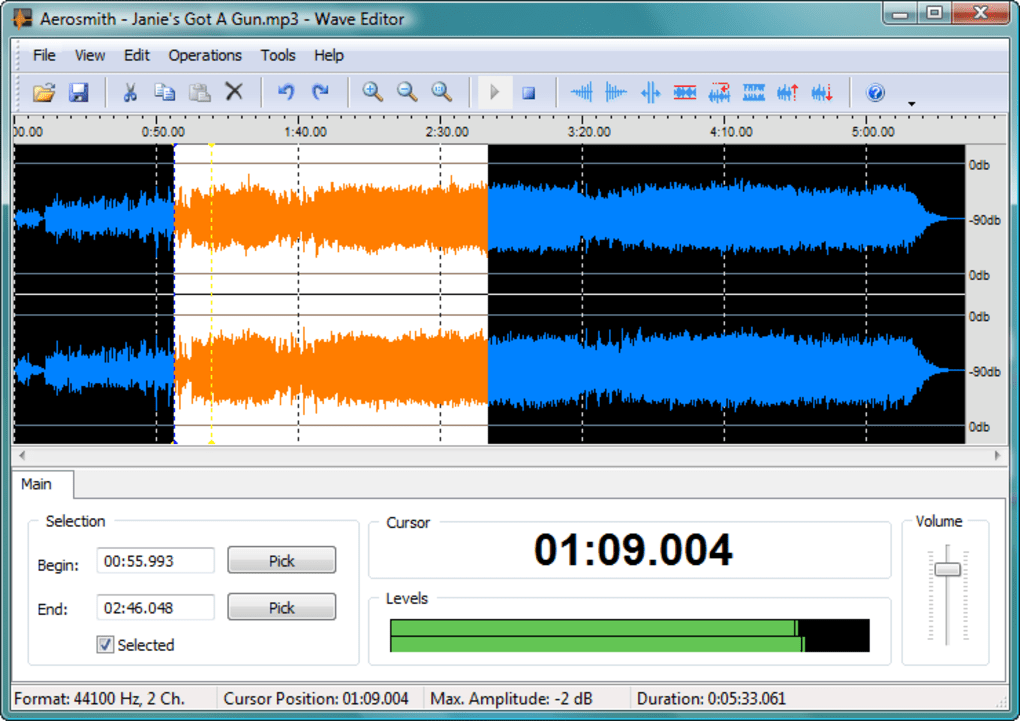
A crucial element of the interface is the Cursor display, providing real-time feedback on the precise location of the cursor within the audio file. This eliminates guesswork when selecting specific portions of the audio for editing. The Levels display, activated during playback, visually represents the audio’s volume levels, offering a dynamic visual cue for monitoring loudness and potential clipping. Finally, a convenient Volume slider allows for quick adjustments to the overall audio volume. This comprehensive yet simple interface contributes to Wave Editor’s overall ease of use, making it approachable for users of all technical skill levels.
Simple Yet Effective Audio Editing Capabilities
While Wave Editor’s simplicity is a significant advantage for beginners, it also defines its limitations. This tool isn’t designed for advanced audio manipulation or fine-grained control over complex audio parameters. Users shouldn’t expect the extensive feature set or granular control offered by professional audio editing software. For instance, Wave Editor’s capabilities regarding tone and frequency adjustments are limited, and minute details of audio manipulation are not easily accessible.
However, Wave Editor excels at performing basic audio editing tasks effectively. It provides the necessary tools to tackle common audio editing needs. Users can seamlessly reduce the volume of their audio files, easily insert periods of silence (although the measurement in milliseconds might be a minor inconvenience for some), and apply fade-in and fade-out effects. The editing process itself is streamlined; users select the desired section directly from the waveform viewer and apply the chosen effect with a single action. This intuitive workflow emphasizes efficiency and ease of use, allowing for rapid completion of simple editing tasks.
Strengths and Weaknesses: A Balanced Perspective
Wave Editor’s strengths lie in its user-friendly design and ease of use, making it an excellent entry point for individuals new to audio editing. Its intuitive interface, simple installation, and straightforward workflow make it an accessible tool for casual users who require only basic audio editing capabilities. The support of several common audio file formats further enhances its practicality.
However, its simplicity also constitutes its primary weakness. The lack of advanced features and granular control will inevitably limit its appeal to experienced users or those working on complex audio projects. The limitations in controlling tone and frequency, and the constraints on more detailed manipulation, may prove frustrating for those accustomed to the extensive capabilities of professional audio editing software. Additionally, the software’s file size limitations and the presence of potentially redundant commands might hinder its usage in specific scenarios.
Wave Editor Compared to Professional Alternatives
Compared to professional audio editing software such as Audacity, Adobe Audition, or Pro Tools, Wave Editor occupies a distinct niche. Professional-grade software offers far more extensive capabilities, allowing for in-depth audio manipulation, advanced effects processing, multi-track editing, and a myriad of other specialized features. These programs cater to professional audio engineers, musicians, and sound designers who need precise control over every aspect of their audio projects.
However, this enhanced functionality comes at a price—both literally and figuratively. Professional audio editing software often carries significant costs and demands a considerable time investment to master its complexities. Wave Editor, on the other hand, offers a free and accessible alternative for users who don’t require these advanced features. It’s a practical solution for quick edits and basic audio enhancements, making it a viable option for beginners and those seeking a simple, efficient tool for routine tasks.
Conclusion: A Valuable Tool for Basic Audio Editing
Wave Editor provides a valuable solution for users needing a simple, user-friendly, and free audio editor. Its strengths lie in its intuitive design, ease of use, and straightforward editing capabilities. While its lack of advanced features restricts its appeal to casual users, its simplicity and accessibility make it an excellent choice for beginners and those who need to perform basic audio editing tasks quickly and efficiently. For users requiring more advanced audio editing functionalities, professional software remains a better choice. However, for straightforward tasks such as volume adjustments, silence insertion, and fade effects, Wave Editor offers a convenient and accessible solution, making it a valuable tool for a specific user demographic. Its free availability further enhances its appeal, making it a worthy addition to any user’s software toolkit.
File Information
- License: “Free”
- Latest update: “May 23, 2023”
- Platform: “Windows”
- OS: “Windows 8”
- Language: “English”
- Downloads: “55.2K”
- Size: “2.05 MB”


