
WBFS Manager is a user-friendly application designed for Nintendo Wii enthusiasts seeking a simple and efficient way to manage their game backups. This Windows-based program streamlines the process of creating, organizing, and accessing backups of your favorite Wii games, eliminating the need for complex technical knowledge or cumbersome command-line interfaces. Its intuitive graphical user interface (GUI) makes it accessible to both seasoned gamers and newcomers alike.
Streamlining Wii Game Backups: A User-Friendly Approach
WBFS Manager serves as a convenient graphical front-end for the WBFS_Win command-line application. This means it provides the same powerful functionality of the command-line tool but with a significantly more accessible interface. Instead of navigating complex commands, users interact with a visually intuitive system, allowing for effortless management of Wii game backups stored on externally formatted drives. This simplification makes WBFS Manager an ideal solution for those unfamiliar with command-line interfaces or the intricacies of the Wii Backup File System (WBFS). The program significantly reduces the technical barrier to entry, empowering users to effortlessly manage their game libraries.
The core functionality of WBFS Manager centers around managing Wii backups stored in the WBFS format. WBFS is a file system specifically designed for storing Wii game backups on external hard drives, optimizing storage space by significantly reducing the size of game files. Without WBFS Manager or a similar third-party application, managing Wii game backups on a Windows PC would be a considerably more challenging task. The program’s ease of use is a significant advantage, enabling users to quickly and easily transfer ISO images to a WBFS-formatted drive and then launch these games from an external hard drive connected to their Wii console.
Effortless Installation and Intuitive Interface
Unlike some other Wii management tools, WBFS Manager boasts a remarkably straightforward installation process. The installation generally takes only a few minutes and has minimal system requirements, making it compatible with a wide range of Windows systems (Windows 7 and higher). Its lightweight nature ensures that it doesn’t consume excessive system resources, leaving ample room for other applications to run smoothly.
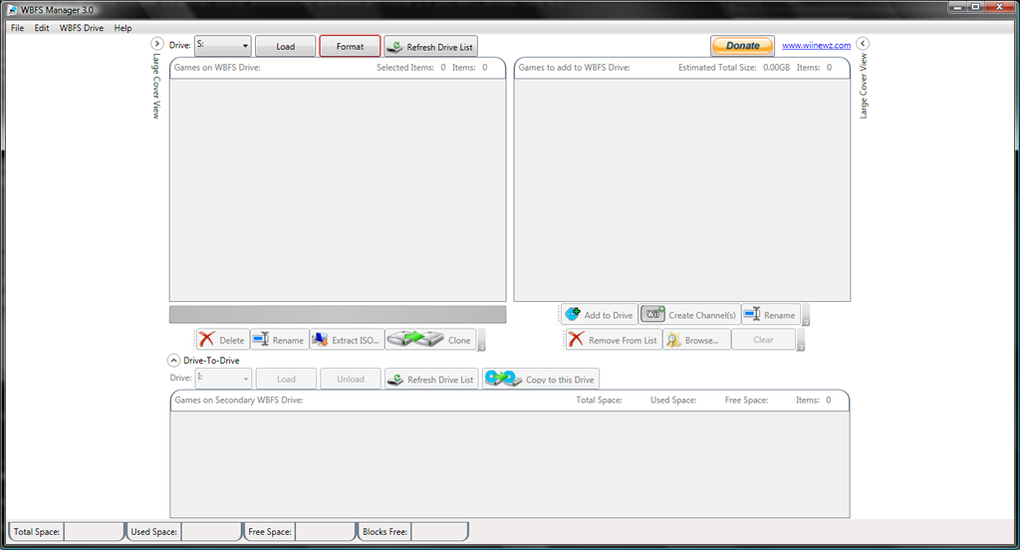
The program’s intuitive interface further contributes to its user-friendliness. The simplistic design avoids overwhelming users with unnecessary complexity. A streamlined layout with clearly labeled buttons and menus allows for easy navigation and access to key features. This intuitive design philosophy ensures a smooth and efficient user experience, regardless of the user’s technical expertise. Even individuals with limited computer skills can quickly grasp the program’s functionality and manage their Wii game backups without difficulty.
The process of formatting a drive for WBFS compatibility within the program is also remarkably simple. Upon initial installation, the user is guided through the formatting process, ensuring that the chosen storage device is properly prepared to work with the Wii console. This essential step ensures compatibility and avoids potential issues. It’s crucial to remember that the WBFS format is exclusive to the Nintendo Wii and is not compatible with the Windows operating system, highlighting the necessity of WBFS Manager for seamless integration.
Extensive Functionality Beyond Basic Backup Management
WBFS Manager’s capabilities extend far beyond basic backup management. The program provides a comprehensive suite of features designed to enhance the user’s overall gaming experience. Beyond simply adding and organizing games, WBFS Manager allows users to:
- Add new games: Easily import new Wii games in ISO format to the formatted WBFS drive.
- Rename games: Organize game titles for improved clarity and navigation within the backup collection.
- Create channels: Manage and create channels for enhanced organization within the Wii menu.
- Create copies of files: Duplicate game files as needed for various purposes.
- Display cover art: Visually enrich the library by displaying game cover art for each entry, enhancing browsing and selection.
- Download game covers: Acquire missing cover art directly from within the application.
These additional features significantly enhance the user experience, transforming WBFS Manager from a simple backup manager into a comprehensive Wii game management solution. This level of functionality simplifies the overall process of managing a Wii game collection, eliminating the need for multiple applications or manual processes.
Batch Processing and Advanced Features
Unlike some emulators that focus solely on running Wii games on PC, WBFS Manager functions as a comprehensive tool for managing the games themselves on an external drive. This practical approach makes it an indispensable tool for Wii owners. The program’s robust feature set extends to include batch processing, granting users the ability to efficiently manage multiple files simultaneously. This efficiency boosts productivity by allowing for the simultaneous management of numerous game backups.
This batch processing capability allows for streamlined execution of various operations, including:
- Closing WBFS drives: Safely dismounts WBFS drives to prevent data corruption or system errors.
- Deleting WBFS drives: Permanently removes WBFS drives and their contents.
- Renaming WBFS drives: Renames the drive for improved identification and organization.
- Extracting ISO files: Extract individual ISO files from the WBFS drive.
- Exporting backup lists: Generates a list of all backups stored on the drive, useful for record-keeping or organization purposes.
These capabilities transform WBFS Manager into a powerful and versatile tool for organizing and managing a sizable Wii game collection. This level of control and efficiency makes it a highly valued asset for both casual and serious Wii game collectors.
Advantages and Disadvantages of WBFS Manager
WBFS Manager presents a compelling combination of advantages and disadvantages. Understanding these aspects is crucial in determining its suitability for individual needs.
Advantages:
- Automatic hard drive formatting: Simplifies the process of preparing a drive for use with the Wii console.
- Support for ISO format: Enables easy transfer and management of ISO game files.
- Display of game cover art: Provides a visually appealing and organized game library.
- Renaming capabilities for backups: Allows for customized organization of game backups.
- Simple and clean interface: Offers an intuitive and user-friendly experience.
- Batch processing: Supports efficient management of multiple game files simultaneously.
Disadvantages:
- Limited OS Support: Currently only supports 64-bit Windows systems. This limitation restricts its usability for users with older or 32-bit systems.
- .NET Framework dependency: Requires the installation of specific .NET frameworks, which may add complexity for some users.
Despite these limitations, the advantages significantly outweigh the disadvantages for most users, especially those primarily concerned with ease of use and effective Wii backup management. The program’s streamlined interface and robust feature set solidify its position as a valuable asset within the Wii community.
Conclusion: A Must-Have for Wii Enthusiasts
WBFS Manager emerges as a compelling solution for Nintendo Wii owners seeking a straightforward and efficient method for managing their game backups. Its user-friendly interface, coupled with a comprehensive feature set, sets it apart from more complex or technical alternatives. While some limitations exist regarding OS compatibility, the program’s overall ease of use and powerful functionalities solidify its place as an essential tool for anyone looking to streamline their Wii gaming experience. For Windows users with a Nintendo Wii, WBFS Manager is a highly recommended download.
File Information
- License: “Free”
- Latest update: “July 12, 2023”
- Platform: “Windows”
- OS: “Windows 7”
- Language: “English”
- Downloads: “48.2K”
- Size: “39.29 MB”


