
Web Browser Web Explorer is a free mobile web browser designed for users seeking a fast, simple, and efficient browsing experience without the resource demands of more feature-rich alternatives. Developed by Leopard V7, this browser prioritizes speed and reliability, offering a minimalist design that focuses on core browsing functionalities. Its lightweight nature makes it a particularly attractive option for users with older devices, limited storage, or data-restricted plans.
A Minimalist Interface for Effortless Browsing
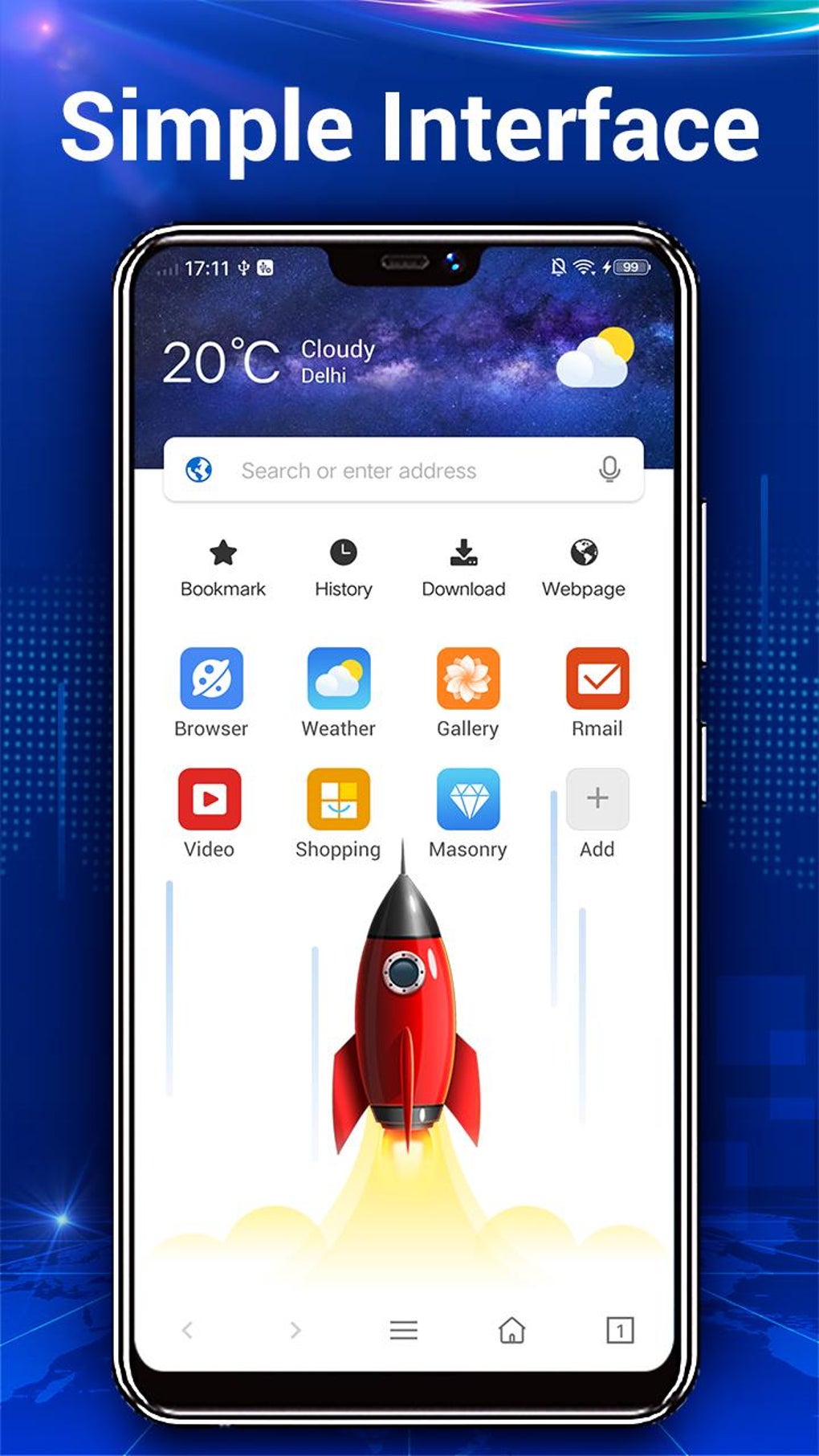
The app’s user interface is characterized by its clean and uncluttered design. The homepage presents a central search bar, complemented by readily accessible icons for bookmarks and browsing history. This straightforward layout ensures easy navigation, eliminating any potential for overwhelming complexity. The focus is squarely on providing a streamlined and intuitive user experience, prioritizing ease of use over extensive customization. This minimalist approach aligns perfectly with the browser’s overall aim of delivering a fast and uncomplicated browsing experience.
Core Functionality and Performance
Web Browser Web Explorer offers a basic set of features sufficient for everyday browsing needs. Standard functionalities such as bookmarks, history tracking, and a private browsing mode are all included. The browser’s core strength lies in its speed and efficiency. Pages load quickly and smoothly, even on devices with limited processing power or memory constraints. This responsiveness is a key differentiator, making it an ideal choice for users who value swift browsing performance above extensive feature sets. Furthermore, the browser’s design minimizes data usage, a significant advantage for users with limited data plans or those seeking to conserve mobile data. The inclusion of a night mode further enhances usability, reducing eye strain during prolonged nighttime browsing sessions.
Security and Privacy Considerations
Web Browser Web Explorer incorporates a private browsing mode that prevents the browser from saving browsing history or cookies. This feature offers a basic level of privacy protection, ensuring that browsing activity remains confidential within the confines of the session. However, it’s crucial to acknowledge that this private browsing mode alone doesn’t offer the same level of security and privacy as browsers with more robust features, such as integrated ad blockers and enhanced encryption protocols. Users seeking advanced security features should consider alternative browsers with more comprehensive protection measures.
Limitations and Missing Features
While Web Browser Web Explorer excels in its speed and simplicity, it lacks certain advanced features commonly found in other, more established browsers. The absence of a built-in ad blocker is a notable limitation, potentially exposing users to unwanted advertisements during browsing sessions. This lack of ad-blocking functionality could be a significant drawback for users accustomed to ad-free browsing experiences. Furthermore, the browser doesn’t support extensions or add-ons, hindering its adaptability and customization options. This limitation restricts the ability to enhance functionality or personalize the browsing experience through third-party extensions. Users reliant on browser extensions for specific tasks or enhanced productivity may find this a significant constraint.
Comparison with Other Browsers
Web Browser Web Explorer distinguishes itself by its lightweight design and focus on speed and efficiency. In contrast to browsers like Chrome or Firefox, which offer extensive functionality, customization, and a wide range of extensions, Web Browser Web Explorer prioritizes a simpler, more streamlined approach. This makes it suitable for users prioritizing speed and minimal resource consumption over extensive features. However, this simplicity also means that users sacrificing features like ad blocking, robust security protocols, and extensive customization options. The decision of which browser to use ultimately depends on the individual user’s priorities and needs.
Target Audience and Use Cases
Web Browser Web Explorer’s target audience includes users who prioritize speed and efficiency above all else. Its lightweight design and minimal resource consumption make it well-suited for older devices or those with limited processing power and storage space. Users with limited data plans will also appreciate the browser’s efficient data usage. Individuals seeking a simple, no-frills browsing experience without complex settings or extensions will also find it appealing. In summary, the browser caters to users who value speed and simplicity over advanced features and extensive customization.
Pros and Cons Summary
Pros:
- Fast and Efficient Performance: Loads web pages quickly and efficiently, even on low-powered devices.
- Simple and Easy-to-Use Interface: Intuitive design and straightforward navigation.
- Lightweight on System Resources: Minimal impact on device performance and battery life.
- Low Data Usage: Conserves mobile data, making it ideal for users with limited data plans.
- Private Browsing Mode: Provides a basic level of privacy protection.
- Night Mode: Reduces eye strain during nighttime browsing.
Cons:
- Lacks Advanced Features: No built-in ad blocker, extensions, or add-ons.
- Limited Customization Options: Minimal settings and personalization options.
- Basic Security Measures: Private browsing mode is the only security feature.
- Potential for Ads: The lack of an ad blocker could lead to intrusive advertisements.
Conclusion
Web Browser Web Explorer serves a niche within the mobile browser market. Its strengths lie in its speed, simplicity, and minimal resource consumption, making it a suitable option for users who prioritize these aspects above advanced features. However, the absence of features like an ad blocker and extensions limits its appeal to a wider audience. Users seeking a more comprehensive browsing experience, with advanced security measures, extensive customization options, and add-on support, should consider exploring other available browsers. Ultimately, the choice of browser depends on individual user needs and preferences. The decision hinges on whether speed and simplicity outweigh the need for a more feature-rich and customizable browsing experience. Web Browser Web Explorer excels in its specific niche but may not meet the requirements of all users.
File Information
- License: “Free”
- Latest update: “August 3, 2025”
- Platform: “Android”
- OS: “Android 13.0”
- Language: “English”
- Downloads: “17.8K”
- Download Options: “Google Play”


