
Webcams have become an indispensable part of modern communication and security. They facilitate seamless connections with loved ones, and when integrated with monitoring software, they enhance home and business security. However, what if you could extend the capabilities of your webcam beyond personal use and access a global network of cameras? This review delves into XRMX WebCam Viewer, a free utility software designed to provide just that – access to a worldwide network of online webcams.
Connecting to a Global Network of Webcams
XRMX WebCam Viewer offers a straightforward approach to connecting to and monitoring numerous webcams across the globe. Unlike many dedicated webcam monitoring programs focused solely on personal or security applications, this software opens a window to a diverse range of online camera feeds. The user experience is designed for simplicity, making it accessible to users of all technical skill levels. The initial setup and installation are quick and uncomplicated, requiring minimal user intervention. Upon launch, the application presents a curated list of webcam locations ready for immediate viewing.
The software’s inherent convenience lies in its automatic refresh feature. The list of webcams is regularly updated, ensuring a constant stream of new and interesting views, preventing the user from becoming stuck with the same limited selection. This dynamic nature is a significant advantage over applications that offer only a static list of camera feeds, ensuring a constant flow of new visual experiences. Moreover, the application allows users to customize this list, adding their own preferred webcam locations and editing existing entries. This flexibility empowers users to create personalized viewing lists catering to their specific interests and locations.
This application, however, extends beyond simple viewing. It transcends the basic function of a viewer by incorporating features that enhance the user experience. Beyond offering access to a live feed of diverse locations, XRMX WebCam Viewer allows users to capture still images from these feeds. This functionality enables users to document noteworthy scenes or memorable moments witnessed through the software. The captured images can be stored locally, allowing users to maintain a personal archive of their webcam viewing experiences. The program provides a degree of customization over the image saving process. Users have control over file naming conventions, timestamping options (including hours, minutes, seconds, and the choice of separators), ensuring a well-organized and easily searchable image library.
Interaction and Communication Features
XRMX WebCam Viewer acts as a bridge connecting users to a network of webcams, facilitating real-time interaction (depending on the capabilities of the webcams themselves). Similar to video-chatting applications, the viewer enables communication with individuals who are actively using their webcams and are accessible through the software’s network. However, it’s important to note that this functionality is contingent upon having a stable internet connection and the willingness of the users on the other end of the camera feed to engage in communication. The success of real-time interaction relies on mutual access and the active participation of both parties.
Beyond connecting to a network of webcams, the application also allows users to save and manage the locations of the cameras they’ve accessed. This creates a dynamic history of previous connections, allowing for quick and easy revisiting of specific locations. The ability to manage and recall past connections adds a layer of convenience that goes beyond the simple view-only functionality, enhancing the overall utility of the application. This feature is especially useful for individuals who frequently monitor specific webcams and want to quickly access those cameras without having to search through the entire list. This function streamlines the viewing experience and saves considerable time and effort for regular users.
User Interface and Image Quality: A Critical Analysis
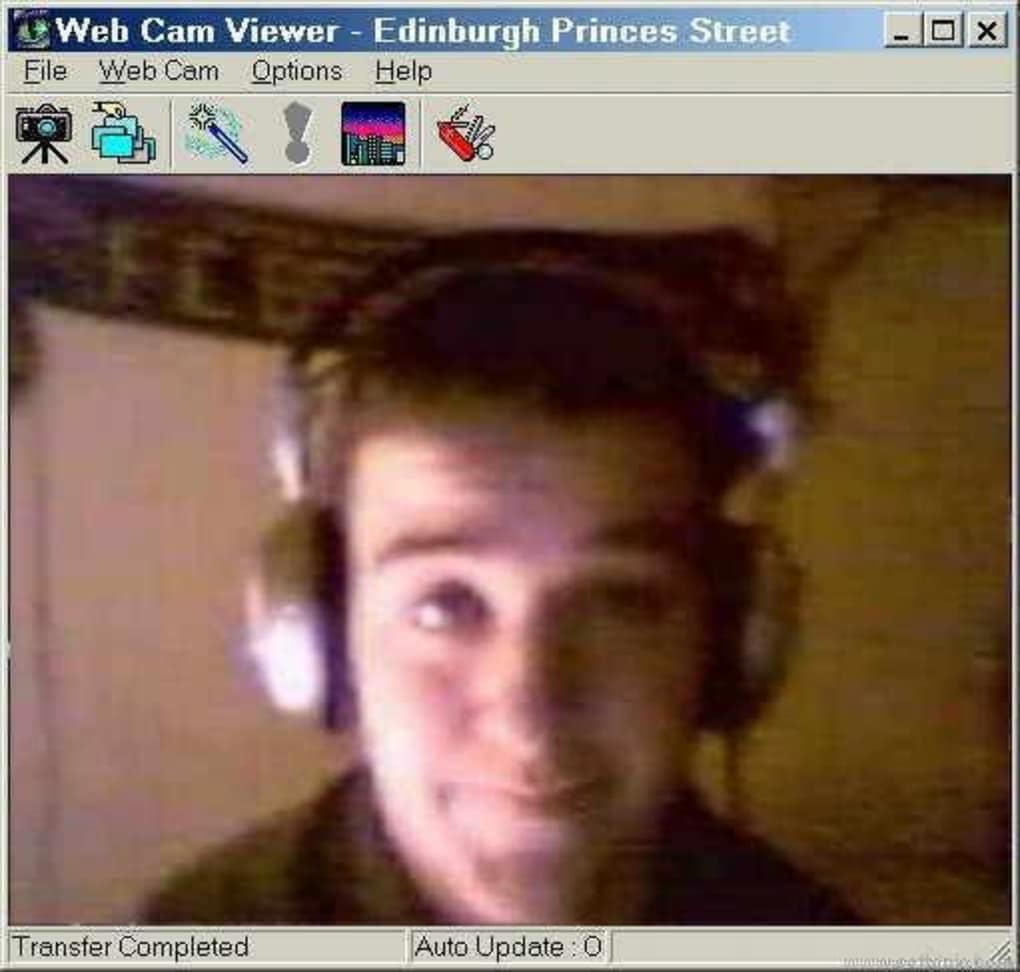
While XRMX WebCam Viewer delivers functionality, it presents a significant shortcoming in its user interface (UI) and image quality. The UI’s design appears outdated and lacks the modern aesthetic of contemporary software. The visual elements, including text, buttons, and icons, all exhibit a dated appearance that contrasts sharply with the user interface standards of current applications. This dated design can be jarring for users accustomed to modern, visually appealing software.
Furthermore, the image quality offered by XRMX WebCam Viewer falls short of expectations set by today’s high-resolution webcams and modern video streaming software. The resolution of the displayed webcam feeds is noticeably lower than what many contemporary applications provide, making it less than ideal for users seeking high-quality visuals. The lower resolution can limit the usefulness of the application, especially for those who need to observe details or capture high-quality images.
Verdict: Functionality Versus Aesthetics
XRMX WebCam Viewer presents a compelling functionality to connect to and monitor a global network of online webcams. Its ease of use, automatic webcam updates, and ability to save images are significant advantages. The capacity to maintain a history of accessed cameras and the simple act of connecting with individuals via those cameras adds value to the application. However, the dated interface and underwhelming image quality significantly detract from the user experience. The software’s functional strengths are undeniable, but the visual aspects are in dire need of improvement.
The application’s lightweight nature is another positive aspect. It does not demand excessive storage space compared to similar programs, making it ideal for users with limited hard drive capacity. Its free-to-use nature further enhances its accessibility, eliminating any financial barrier to entry.
For users who prioritize functionality and access to a global network of webcams above modern aesthetics and high-resolution visuals, XRMX WebCam Viewer offers a viable solution. However, those who value a visually appealing and contemporary user experience alongside high-quality image resolution might find the software’s shortcomings difficult to overlook. The software sits at a crossroads between compelling functionality and a less-than-ideal user interface. The decision to use this application will depend heavily on the individual user’s priorities.
Pros and Cons Summary
Pros:
- Global Webcam Access: Connects to online webcams across the globe, offering a wide array of viewing options.
- Automatic Updates: Regularly updates the webcam location list, providing consistent fresh views.
- Image Capture and Saving: Allows users to take and save screenshots of webcam feeds with customizable file naming and timestamping options.
- Lightweight and Free: Consumes minimal storage space and is available free of charge.
- Simple to Use: Straightforward interface for easy navigation and usage.
Cons:
- Outdated Interface: The user interface appears dated and lacks the modern aesthetics of current software.
- Low Image Quality: The resolution of the webcam feeds is significantly lower than many modern applications.
- Limited Interaction: Real-time interaction depends on the capabilities of the connected webcams and user participation.
Ultimately, the choice of whether to utilize XRMX WebCam Viewer comes down to a cost-benefit analysis. Users must weigh the functionality and access it provides against the aesthetic limitations and potentially lower-quality image resolution. The application represents a functional tool, but one that could greatly benefit from a substantial visual and technological overhaul.
File Information
- License: “Free”
- Version: “1.0”
- Latest update: “September 22, 2021”
- Platform: “Windows”
- OS: “Windows NT”
- Language: “English”
- Downloads: “12.2K”
- Size: “971.10 KB”


