
WebCopier, a Windows-based application developed by MaximumSoft Corp., allows users to download and archive entire websites for offline access. This comprehensive review delves into the software’s features, performance, history, alternatives, and overall usability, providing a detailed assessment for potential users. While the software is no longer actively developed, understanding its capabilities and limitations remains relevant in the context of web archiving and offline browsing.
WebCopier: Functionality and Features
WebCopier’s primary function is to create complete offline copies of websites. This means it not only downloads the main HTML pages but also recursively retrieves linked images, CSS files, JavaScript files, and other resources necessary to render the website correctly, even without an internet connection. This functionality makes it a valuable tool for researchers, educators, developers, and anyone who needs to access specific website content reliably without relying on an active internet connection.
The software’s robust downloading capabilities are a key strength. It handles various file types and efficiently manages the downloading process, aiming to maintain the integrity and structure of the original website. This ability to capture the complete structure of a website is crucial, especially for archiving purposes, ensuring that all elements of a website are preserved for later review.
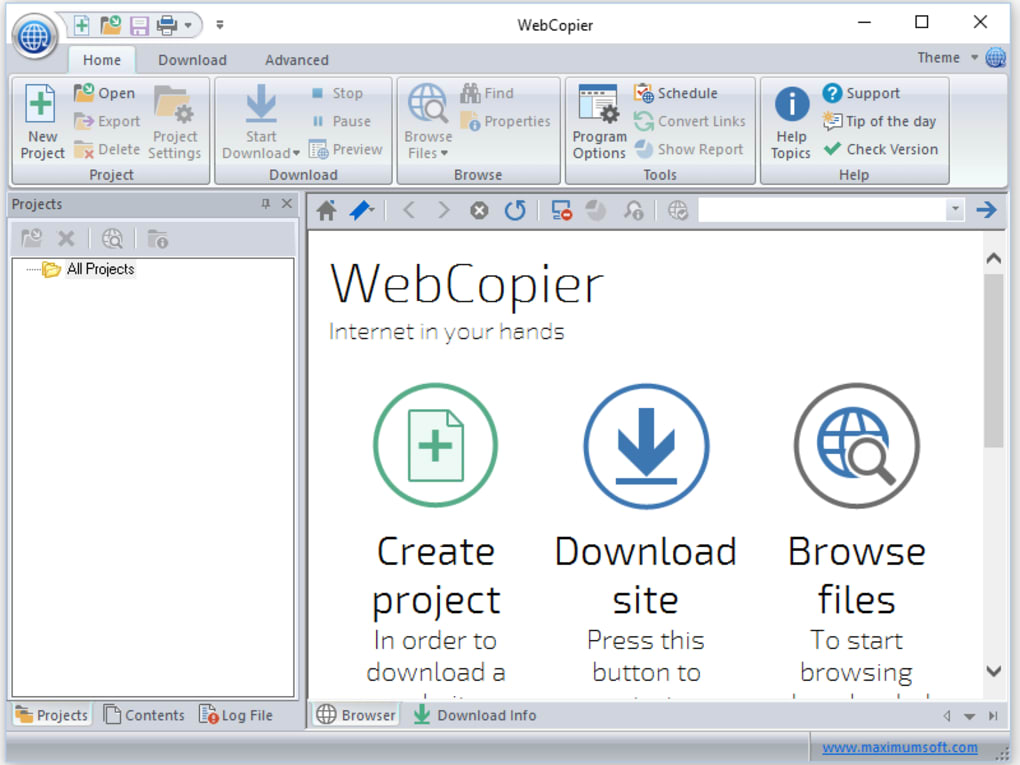
WebCopier’s interface, while perhaps dated by modern standards, presents a straightforward and intuitive design. Users can input a website URL and initiate the download process. The software typically provides options to customize the download, such as selecting specific file types to include or exclude and setting parameters related to the depth of the download process (how many layers of linked pages to include).
While lacking the sophisticated features found in more modern web archiving tools, WebCopier’s simplicity is its advantage for users seeking a basic yet functional method for downloading entire websites.
WebCopier: Historical Context and Evolution
WebCopier, released in 2007, represents an earlier generation of web archiving software. Its last update in April 2024 suggests that while it is still available for download, it hasn’t received active development or feature updates for quite some time. This lack of recent updates may be a key consideration for potential users; security vulnerabilities and compatibility issues with newer web technologies are a possibility.
The software’s compatibility with older Windows operating systems (Windows 95 and earlier) points to its longevity. However, its compatibility with modern Windows versions is a key question to be explored. The absence of detailed information on this aspect could pose a challenge for users relying on up-to-date systems.
WebCopier: Alternatives and Comparisons
Given the age of WebCopier and the absence of active development, several alternatives offer more robust functionality, better security, and broader compatibility. These alternatives range from open-source projects to commercial software packages.
One such alternative is Cyotek WebCopy. This free and open-source tool shares many similarities with WebCopier but often boasts more refined features and updated codebase, which addresses compatibility issues and security concerns. Cyotek WebCopy also typically includes improvements to the downloading process, resulting in faster and more efficient web archiving.
Another contender is Teleport Pro. A commercial software application, Teleport Pro provides extensive features that surpass the functionality of WebCopier. Its capabilities include features such as enhanced downloading speed, improved handling of complex websites, and advanced scheduling options. However, these features come at the cost of a price tag, unlike the free-to-use WebCopier or Cyotek WebCopy.
Additionally, various open-source web archiving tools and libraries exist, empowering users to create their own custom solutions. These options may require more technical expertise, but they offer unparalleled flexibility and control over the archiving process.
The choice between WebCopier and these alternatives depends on specific needs and technical proficiency. Users seeking a simple and free tool might still consider WebCopier, but those requiring advanced features, better security, and ongoing updates should strongly consider the alternatives.
WebCopier: Performance and Usability Considerations
While WebCopier successfully achieves its primary function of downloading complete websites, its performance might be comparatively slower than modern alternatives. The lack of recent updates could be a contributing factor. Users could potentially encounter issues related to processing speed and efficiency, especially when downloading large or complex websites with many interconnected pages.
The software’s usability is generally positive for its simplicity. The straightforward interface makes it accessible to users with limited technical experience. However, the lack of advanced features and customization options might prove limiting to experienced users who need finer control over the archiving process. For example, the absence of detailed log files and progress monitoring could make troubleshooting errors more challenging.
Further considerations are compatibility with modern website technologies and security. Websites today use complex JavaScript frameworks and dynamic content loading that older software might not handle efficiently, which could result in incomplete archives. The absence of consistent updates introduces potential security vulnerabilities.
The small size (97.41 MB) compared to average Download Managers is a positive aspect mentioned in the original description, signifying less system resource consumption. This can be a valuable aspect for users with limited storage capacity. However, the positive impact of this small size needs to be balanced against the possible performance limitations due to older technologies.
Overall, WebCopier provides a basic, functional approach to downloading entire websites. Users should weigh the benefits of its simplicity against potential limitations in performance, security, and feature limitations compared to modern alternatives. The lack of active development should be a significant concern.
File Information
- License: “Trial version”
- Latest update: “April 6, 2024”
- Platform: “Windows”
- OS: “Windows XP”
- Language: “English”
- Downloads: “7.9K”
- Size: “97.41 MB”


