
Webex Meetings, developed by Cisco, is a robust video conferencing and communication platform designed to streamline collaboration for businesses of all sizes. This comprehensive guide explores its features, functionality, and overall effectiveness as a remote communication tool. From setting up meetings to utilizing advanced features, we’ll delve into what makes Webex Meetings a leading contender in the video conferencing market.
Feature-Rich Collaboration for Modern Businesses
Webex Meetings transcends the basic functionality of video calls. It provides a centralized hub for various communication needs, supporting video and audio conferencing, screen sharing, instant messaging, and more. The platform is specifically designed to boost office productivity, even in entirely remote work environments. Its extensive feature set aims to address the diverse needs of modern collaborative teams.
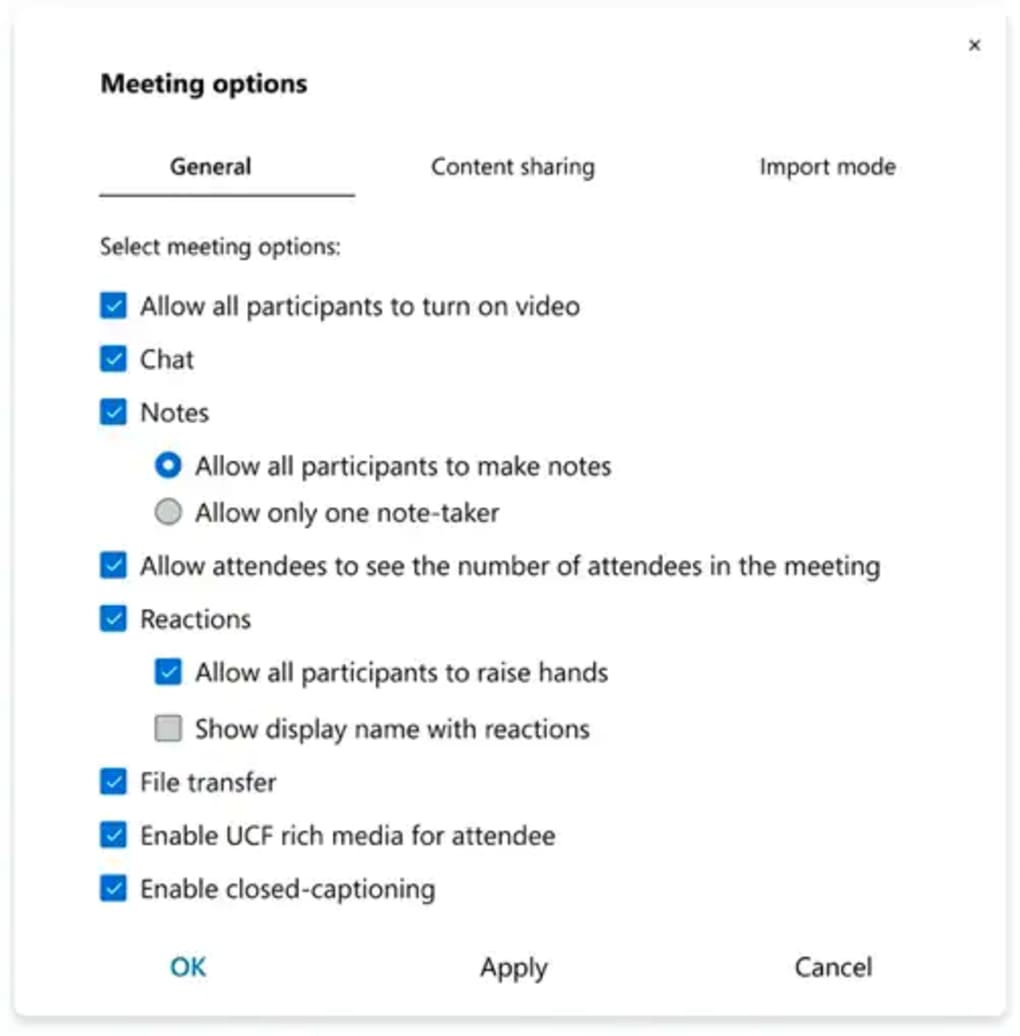
One standout feature is the platform’s impressive scalability. Unlike many competitors, Webex Meetings can accommodate up to 40,000 participants in a single call. This capacity significantly surpasses the limits of platforms like Microsoft Teams, Skype, and Zoom Meetings, making it ideal for large-scale events, company-wide announcements, or extensive training sessions. This high participant limit is a crucial competitive advantage, setting Webex apart in scenarios demanding mass communication.
Beyond sheer scale, Webex offers a rich array of collaborative tools. Users can seamlessly integrate screen sharing for presentations or collaborative problem-solving. The platform incorporates instant messaging capabilities, allowing for real-time text-based communication alongside the video or audio call. The inclusion of on-screen emojis facilitates quick expressions and reactions, adding a layer of informal communication that can be particularly beneficial in larger meetings. Furthermore, the ability to set call agendas, pin important messages, and manage other meeting details within a single interface enhances organization and efficiency. Features like language translation filters and background noise reduction further refine the user experience, ensuring clarity and accessibility. The ability to easily switch between video and audio calls, and to adjust video layouts, allows users to tailor their experience based on their specific needs and preferences.
Getting Started with Webex Meetings: A Simple Process
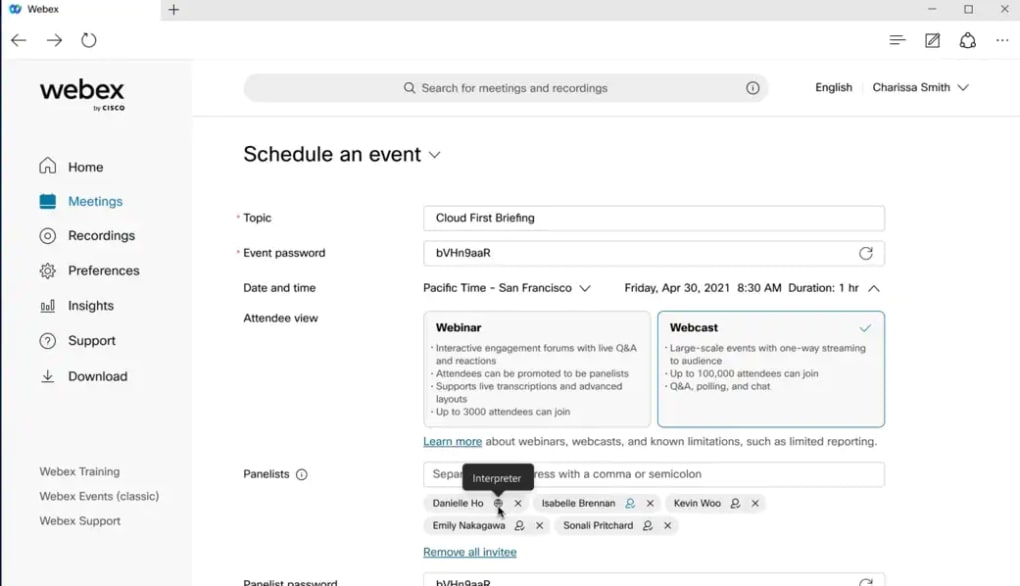
The initial setup process mirrors that of other similar platforms. Users typically need to provide organizational credentials and select a payment method (depending on the chosen plan). Once registered, initiating a new meeting is straightforward. The home screen provides readily accessible options for starting immediate meetings or scheduling future ones. The scheduling functionality allows users to set dates, times, and other meeting parameters in advance.
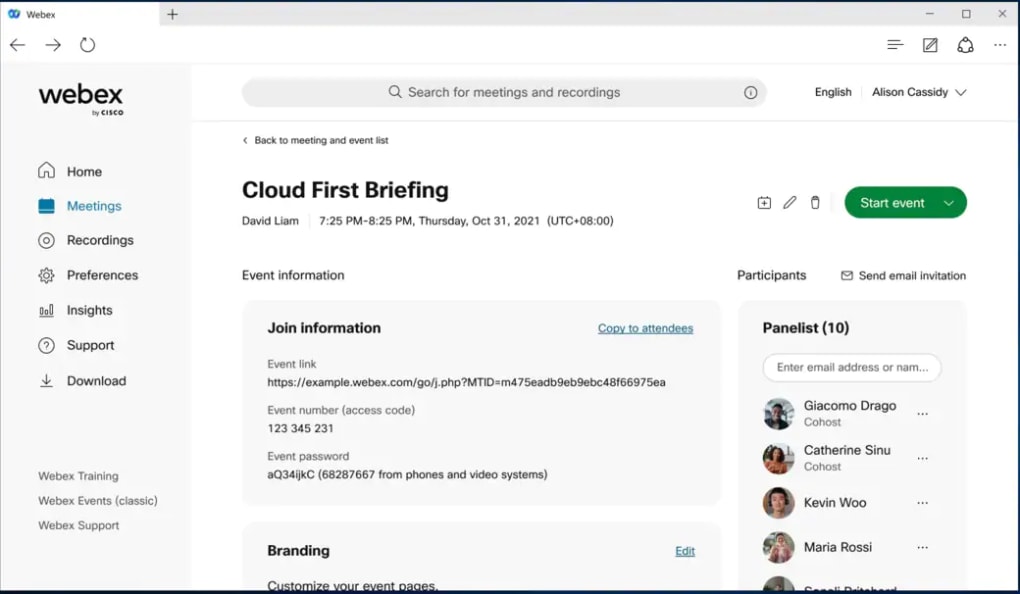
Webex Meetings makes critical meeting information easily accessible. The platform provides dedicated sections for inputting the meeting agenda, password (for security), and an attendee list. For organizations hosting exceptionally large meetings, Cisco offers Webex Productivity Tools, though access to these enhanced tools typically requires a paid subscription.
User Interface and Navigation: Clean and Intuitive
The Webex Meetings interface maintains a clean and user-friendly design. During a meeting, basic controls such as muting/unmuting the microphone and starting/stopping the video are prominently displayed at the bottom of the screen. A dedicated button provides easy access to screen sharing functionality.
The screen-sharing feature offers a refined level of control. Users can choose to share their entire screen (beneficial for multiple-monitor setups) or select a specific application for sharing, providing a measure of privacy by preventing the display of unrelated content. The platform also supports sharing documents and playing media files, accommodating a wide variety of presentation and collaboration scenarios.
Functionality and Integrations: Seamless Cross-Platform Collaboration
Webex Meetings operates similarly to other popular video conferencing apps like Zoom and Skype, offering a comprehensive suite of common features, including cross-platform compatibility, chat messaging, screen sharing, and file sharing. The ease of setting up meetings, whether impromptu or scheduled, contributes to its user-friendliness.
A key advantage of Webex lies in its extensive integration capabilities. It seamlessly integrates with popular applications such as Google Workspace, Microsoft Office 365, and Outlook. This integration automatically synchronizes meetings with users’ calendars, eliminating the need for manual updates and maintaining schedule consistency across platforms.
Furthermore, Webex Meetings integrates with other productivity and communication tools like Slack, Moodle, Canva, and even Microsoft Teams, enabling users to consolidate workflows across multiple platforms. This interoperability significantly enhances the platform’s versatility and broadens its appeal to organizations already utilizing specific software ecosystems.
Advanced Features: Recordings, Live Streaming, and More
Webex Meetings provides automatic meeting recordings accessible to all participants. These recordings can be conveniently shared via the platform’s contact list or email. This feature ensures that all participants can review the meeting content, regardless of their attendance. The functionality also extends to live streaming via Facebook Live, opening opportunities for broader audience reach.
A recent update introduced an emoji button, mirroring a trend among video conferencing platforms. While not essential, this feature allows for quicker emotional expression, particularly helpful in larger or more informal meetings. More uniquely, Webex also incorporates the display of emojis through hand gestures, adding a distinctive interactive element to the platform.
Account Requirements and Accessibility
Webex Meetings distinguishes itself with its ability to support incredibly large meetings, accommodating up to 40,000 participants in a single session. Remarkably, participation doesn’t necessitate a dedicated account or the installation of the application. The platform also offers a browser-based version, maximizing accessibility. Attendees can typically join meetings using only their email address, though password protection may require a unique meeting ID and password.
For users preferring a dial-in option, Webex offers a “Call Me” feature. The platform also supports hands-free voice controls, integrating with popular virtual assistants such as Siri, Google Home Hub, and Google Assistant, providing added convenience. Upon joining a meeting, users can customize audio and video settings, and select preferred screen layouts without impacting the experiences of other participants.
Strengths and Weaknesses: A Balanced Perspective
Webex Meetings presents a compelling blend of strengths and weaknesses. Its ability to handle exceptionally large meetings, automatic recording functionality, and cross-platform synchronization are significant advantages. The comprehensive screen-sharing capabilities and robust integration options further enhance its appeal.
However, as with any platform, certain drawbacks exist. While generally delivering good video and audio quality, the platform’s performance can be contingent upon network stability. Occasional difficulties in accessing recordings have also been reported by some users.
Conclusion: A Powerful Tool for Remote Collaboration
Webex Meetings stands as a robust and feature-rich video conferencing platform well-suited for businesses and remote teams. Its scalability and advanced features address the needs of organizations seeking efficient and effective remote communication solutions. Despite minor drawbacks relating to occasional connectivity or recording access issues, the platform’s overall functionality, accessibility, and integration capabilities make it a strong contender in the competitive video conferencing market. The platform’s strength lies in its ability to not just facilitate basic communication, but to provide a comprehensive collaborative environment designed to enhance productivity and streamline workflows.
File Information
- License: “Free”
- Latest update: “October 2, 2024”
- Platform: “Windows”
- OS: “Windows 8.1”
- Language: “English”
- Downloads: “243.4K”
- Size: “1.64 MB”


