
In today’s diverse digital landscape, video formats are abundant, each serving specific purposes and offering unique advantages. However, this variety often leads to compatibility headaches, a common plight for users encountering the WebM format. While WebM is an excellent open-source standard for web-based video, its lack of universal support across all media players and editing suites can be a significant hurdle. Imagine downloading a crucial video, only to find your preferred media player refusing to open it, or your editing software unable to import it. This is where a dedicated and efficient conversion tool becomes indispensable.
Enter the PhanMemFree WebM Converter, a straightforward yet powerful solution designed specifically for Windows users grappling with WebM video files. As its name explicitly states, this application offers a completely free and remarkably easy way to transform your WebM videos into more universally recognized and compatible formats like AVI, MP4, and WMV. This isn’t just about changing a file extension; it’s about unlocking your media, ensuring that your videos play smoothly on any device, can be easily edited, and shared without compatibility concerns. In an age where digital content is king, the ability to seamlessly manage and adapt your video files is no longer a luxury but a necessity, and the PhanMemFree WebM Converter provides just that – a reliable bridge between the WebM format and the rest of your digital ecosystem.
Understanding WebM: The Open, Royalty-Free Video Format and Its Compatibility Quagmire
Before diving deeper into the solution, it’s crucial to understand the nature of the problem. What exactly is WebM, and why does it often pose compatibility challenges that necessitate a converter like the PhanMemFree WebM Converter?
WebM is an open, royalty-free media file format developed by Google. It was initially introduced in 2010, primarily conceived to be the core video format for HTML5 video, offering a high-quality, open alternative to proprietary formats like H.264. At its technical core, WebM utilizes VP8 or VP9 video codecs for video compression and Vorbis or Opus audio codecs for audio compression, all encapsulated within a Matroska-based container format. This combination is designed to deliver efficient compression and excellent streaming performance, making it particularly suitable for online video delivery, especially on platforms like YouTube, which extensively use WebM. Its open-source nature means developers can implement it without licensing fees, fostering innovation and broad adoption across the web.
The advantages of WebM are clear: it promotes openness, reduces licensing complexities for content creators and platform developers, and offers efficient performance. However, despite these merits, WebM hasn’t achieved the same ubiquitous hardware and software support as older, more established formats like MP4 (which typically uses H.264 video and AAC audio). Many dedicated hardware media players, smart TVs, older mobile devices, and even some popular desktop media players might not natively support WebM playback. Professional video editing software, too, can sometimes struggle with direct WebM imports, requiring a preliminary conversion step.
This discrepancy in support creates a “compatibility quagmire” for the end-user. You might download a tutorial video, a gameplay clip, or a stream archive in WebM format, only to find it unplayable on your television, your older tablet, or within your preferred video editor. The solution to this common problem isn’t to abandon WebM entirely, as it remains an important and efficient format for web distribution. Instead, the most practical approach is to convert these WebM files into formats that are universally supported, thereby unlocking your content and making it accessible across all your devices and applications. This is precisely the critical role that a tool like the PhanMemFree WebM Converter plays, acting as an indispensable translator between formats and ensuring your digital media experience remains seamless and frustration-free.
PhanMemFree WebM Converter: Bridging the Gap in Video Playback
The PhanMemFree WebM Converter stands as a testament to practical utility, directly addressing the aforementioned compatibility issues with a simple, effective, and free solution. Its primary objective is singular: to bridge the gap between the less commonly supported WebM format and the universally embraced video standards, thereby ensuring your content is always accessible and playable.
At its core, this application serves as a powerful yet user-friendly conduit, transforming your WebM files into formats that are compatible with virtually any media player, editing suite, or device. The converter supports a robust array of output formats, including the highly popular MP4, the widely used AVI, and the more legacy-friendly WMV. It also caters to mobile needs by supporting 3GP, making it versatile for older phones or specific mobile-oriented workflows.
Let’s delve into why these target formats are so crucial and how their support elevates the PhanMemFree WebM Converter’s utility:
- MP4 (MPEG-4 Part 14): This is arguably the most ubiquitous video format today. MP4 files are highly compressed, offer excellent quality, and are supported by almost every modern device, operating system, and software application, from smartphones and tablets to smart TVs and professional editing suites. Converting WebM to MP4 ensures maximum compatibility and portability for your videos.
- AVI (Audio Video Interleave): Developed by Microsoft, AVI is one of the oldest and most widely recognized video container formats. While it might be larger in file size than MP4 for comparable quality, its broad support, especially on Windows-based systems and some legacy media players, makes it a reliable choice for general playback and certain editing scenarios.
- WMV (Windows Media Video): Another format primarily associated with Microsoft, WMV offers good compression and is optimized for the Windows ecosystem. If your primary consumption devices are Windows PCs, Xbox consoles, or Windows Media Player, WMV can be an excellent target format.
- 3GP (3GPP file format): While less common for high-definition content today, 3GP remains relevant for specific mobile applications, particularly for older feature phones or environments where minimal file size and basic compatibility are paramount.
The beauty of the PhanMemFree WebM Converter lies not just in its broad format support but also in its fundamental promise: it’s completely free. In a market often saturated with trialware, premium versions, or converters bundled with unwanted extras, finding a dedicated, high-quality tool that doesn’t cost a dime is a significant advantage. This free access democratizes video conversion, making professional-grade utility available to everyone, regardless of budget.
By offering this crucial conversion capability without any cost, the PhanMemFree WebM Converter empowers users to take full control of their digital media. No longer will a WebM file sit idly on your hard drive, unplayable or uneditable. With just a few clicks, it can be transformed into a format that seamlessly integrates into your existing digital life, playable on your preferred media player, ready for editing, or shareable with anyone, anywhere. It simplifies a complex technical problem into an effortless user experience, making it an indispensable utility for any Windows user.
A Closer Look at Features and User-Centric Design
The true value of any software lies not just in what it does, but how well and how easily it does it. The PhanMemFree WebM Converter excels in this regard, boasting a design philosophy centered on simplicity, efficiency, and accessibility for all users, regardless of their technical proficiency. Every aspect, from its visual layout to its underlying processing, is crafted to ensure a smooth and productive user experience.
Intuitive Interface for Effortless Conversion
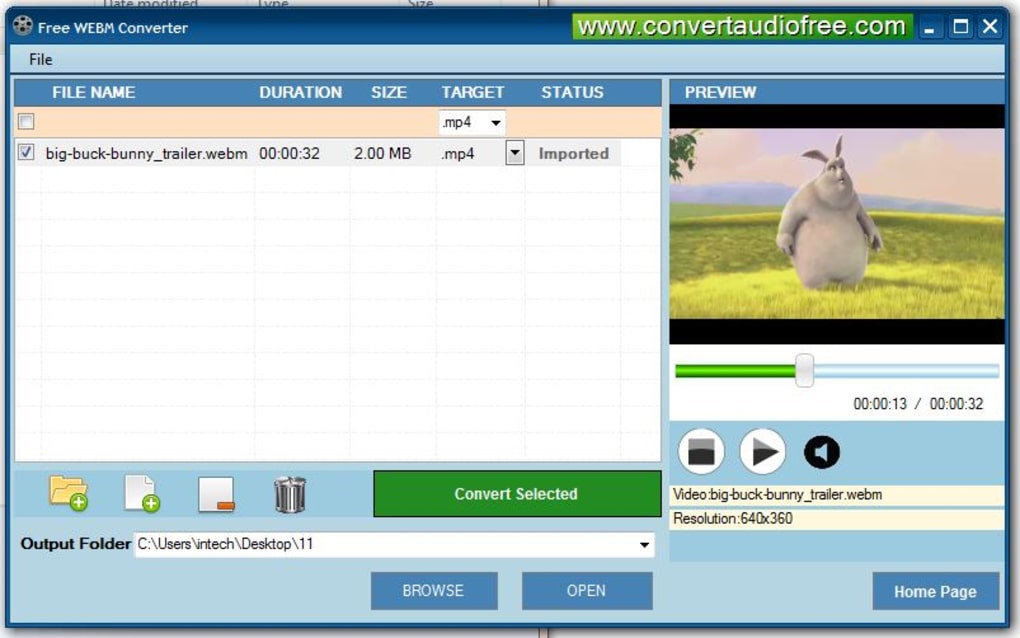
One of the most striking features of the PhanMemFree WebM Converter is its incredibly straightforward and intuitive user interface. The designers clearly prioritized clarity and ease of use, resulting in a layout that is “well organized with simple features.” There are no convoluted menus, no hidden settings, and no overwhelming array of options that might intimidate a novice user.
The core conversion process is designed to be a three-step affair:
- File Selection: Users are presented with a clear area to add their WebM files. This typically involves a simple “Add File” or “Add Folder” button, or even drag-and-drop functionality, allowing you to quickly load the WebM videos you wish to convert. The interface then lists the selected files, often displaying relevant information like file name and size.
- Output Format/Settings: Once files are loaded, the next logical step is to choose the desired output format. The converter makes this easy with clearly labeled options for MP4, AVI, WMV, 3GP, and any other supported formats. While the emphasis is on simplicity, there might be basic options for output quality or destination folder, presented in an easy-to-understand manner.
- Initiate Conversion: With the input files and desired output format chosen, the final step is a prominent “Convert Selected” button. Clicking this initiates the conversion process, and the software provides clear feedback on the progress, often with a progress bar for each file or for the batch.
This streamlined workflow ensures that even someone using a video converter for the very first time can successfully convert their WebM files without needing to consult a manual or search for tutorials online. The “nice user interface” and its “simple features” are not just cosmetic; they are functional advantages that significantly reduce the learning curve and potential for user error.
Rapid Conversion Times for Enhanced Productivity
In the digital age, time is a precious commodity, and waiting endlessly for a video to convert can be a frustrating experience. The PhanMemFree WebM Converter understands this, and one of its standout features is its commitment to “quick conversion.” While the exact conversion time will naturally “vary depending on how long the video is” and the specifications of your computer’s hardware, the general consensus is that “it’s not too long.”
This efficiency is crucial for several reasons:
- Batch Processing: If you have multiple WebM files to convert, rapid conversion times mean you can process an entire collection in a reasonable amount of time, boosting your overall productivity.
- Immediate Playback: For users who need to quickly convert a file to play it on a specific device, the speed ensures minimal delay between downloading and viewing.
- Reduced Resource Strain: Faster conversion often implies optimized algorithms that use system resources efficiently, preventing your computer from bogging down during the process.
The “quick conversion” capability transforms a potentially time-consuming chore into a swift and manageable task, allowing users to move on to enjoying or utilizing their converted videos almost immediately.
Broad Format Support: Your Gateway to Universal Compatibility
As highlighted earlier, the PhanMemFree WebM Converter isn’t just a WebM to one format tool; it’s a versatile solution that supports conversion to multiple popular video formats. This “Convert WebM video files into other formats” capability, specifically mentioning MP4, AVI, and 3GP, is vital for ensuring universal compatibility.
- MP4: As the most widely recognized format, MP4 ensures your videos can be played on virtually any smartphone (iOS, Android), tablet, smart TV, gaming console, and web browser. It’s also the go-to for social media sharing and cloud storage.
- AVI: While older, AVI remains a reliable choice for many Windows users and can be easily imported into a vast array of editing software without complex codecs.
- 3GP: Essential for reaching audiences on older mobile devices or for situations requiring extremely small file sizes for quick sharing over limited bandwidth.
- WMV: Perfect for users deeply embedded in the Microsoft ecosystem, ensuring seamless playback and integration with Windows-specific applications and devices.
This broad format support ensures that whatever your target device or platform, the PhanMemFree WebM Converter provides a suitable output option, making your WebM videos truly accessible across your entire digital landscape.
Seamless Installation Process
Beyond its operational efficiency, the user-friendly approach extends to the very first interaction with the software: its installation. The source content explicitly praises the installation process as “very simple and above standard in terms of program installers.” This detail is often overlooked but contributes significantly to the overall positive user experience. A smooth installation means less frustration, fewer potential errors, and a faster path to using the software. It typically implies a clean installer without unnecessary bloatware or confusing options, reflecting the developer’s commitment to user satisfaction from the outset.
In summary, the PhanMemFree WebM Converter’s design is a thoughtful fusion of powerful functionality and intuitive usability. From its easy-to-navigate interface and rapid processing to its extensive format support and hassle-free installation, every feature is geared towards making WebM conversion an effortless and efficient task for every Windows user.
Practical Considerations: System Requirements, Developer Insights, and Support
Beyond the immediate features and user experience, understanding the practicalities of a software tool, such as its system requirements, the developer behind it, and available support, is crucial for comprehensive evaluation. The PhanMemFree WebM Converter provides clarity in these areas, reinforcing its position as a reliable and accessible utility for Windows users.
System Compatibility: Accessible to a Broad User Base
One of the significant advantages of the PhanMemFree WebM Converter is its modest system requirements, making it accessible to a very broad range of Windows users. The software lists Windows Vista as its primary compatible operating system. While Vista is an older OS, this specification inherently means that the converter will run flawlessly on all subsequent versions of Windows, including Windows 7, 8, 10, and 11. This wide compatibility ensures that even users with older machines or those who haven’t upgraded to the latest operating systems can still benefit from this free tool.
Furthermore, its compact size, at 18.63 MB, indicates a lightweight application that won’t consume excessive disk space. Coupled with its efficient conversion processes, this suggests a low resource footprint during operation. Users can expect the converter to run smoothly without significantly impacting system performance, even on less powerful computers, making it an ideal utility for everyday use without demanding high-end hardware.
Developer Insights: Convert Audio Free and PhanMemFree’s Commitment
The developer listed for the PhanMemFree WebM Converter is “Convert Audio Free.” While the name might suggest an exclusive focus on audio tools, this product clearly demonstrates their capability and commitment to providing effective solutions across various media formats, including video. This suggests a developer team with expertise in media conversion technologies, capable of producing specialized tools that are both functional and user-friendly.
PhanMemFree, as a platform, curates and offers a wide array of free software, and the inclusion of the WebM Converter aligns perfectly with its mission. Phanmemfree.org aims to provide users with essential utilities that enhance their digital experience without incurring costs. By hosting and recommending tools like the WebM Converter, Phanmemfree.org reinforces its dedication to offering valuable, accessible software solutions that address common user needs, from productivity to multimedia management. The developer’s background, combined with Phanmemfree.org’s vetting, lends credibility to the software’s reliability and its adherence to user-centric design principles.
Support and Community: Addressing User Needs
While the “Cons” section of the original review mentions “No help files available,” the developer’s “attentive support” is also highlighted as a perk. This creates an interesting dynamic:
- Absence of Dedicated Help Files: For a tool as straightforward as the PhanMemFree WebM Converter, extensive help files might be deemed less critical. The intuitive interface and simple workflow mean that most users can grasp its functionality within minutes. However, for those who prefer detailed documentation or encounter an unusual edge case, the lack of an integrated help system could be a minor drawback.
- Attentive Support: The mention of “attentive support” from the company is a significant positive. It implies that despite the absence of on-device help files, users can reach out to the developer directly for assistance. This kind of direct, responsive support can often be more valuable than generic documentation, as it provides personalized solutions to specific user queries. It also demonstrates a commitment to user satisfaction beyond just the software itself.
In essence, while self-service help files are missing, the availability of direct support ensures that users are not left stranded if they encounter issues or have questions. This blend of simplicity (reducing the need for help files) and responsive human support creates a robust safety net for users. The overall picture is one of a well-considered product, backed by a developer and a platform (Phanmemfree.org) committed to delivering practical, free, and supported software solutions to the Windows community.
Weighing the Pros and Cons: What Users Need to Know
No software is perfect, and a balanced evaluation requires looking at both its strengths and its limitations. The PhanMemFree WebM Converter, while an exceptionally useful and free tool, is no exception. Understanding its pros and cons allows users to make an informed decision about whether it’s the right solution for their specific WebM conversion needs.
The Abundant Pros: Why Choose PhanMemFree WebM Converter?
The advantages of the PhanMemFree WebM Converter are numerous and directly address the core needs of users struggling with WebM compatibility:
- Completely Free: This is arguably the biggest selling point. In a market flooded with subscription-based services and costly premium software, the PhanMemFree WebM Converter offers full functionality without any financial commitment. This democratizes access to essential video conversion capabilities for everyone.
- User-Friendly Interface: The “simple interface” and “nice user interface” are not just buzzwords. The software’s design is genuinely intuitive, making it accessible even to absolute beginners. The clear layout and logical workflow eliminate the learning curve, allowing users to start converting files almost immediately.
- Quick Conversion Speed: Time is valuable, and the converter respects this by offering “quick conversion.” While actual speeds depend on video length and system specs, the software is optimized for efficiency, ensuring that your WebM files are transformed into compatible formats without unnecessary delays.
- Broad Format Compatibility: The ability to convert WebM to popular formats like MP4, AVI, WMV, and 3GP ensures that your videos become universally playable. This versatility means you can prepare your files for virtually any device, software, or sharing platform.
- Easy and Clean Installation: The installation process is described as “very simple and above standard.” This indicates a smooth, hassle-free setup that avoids common pitfalls like bundled bloatware or confusing configuration options, making the first interaction with the software pleasant.
- Attentive Developer Support: Despite the lack of built-in help files, the developer’s “attentive support” is a significant plus. Knowing that direct assistance is available if needed provides a safety net for users and demonstrates a commitment to customer satisfaction.
- Lightweight and Resource-Friendly: With a small file size and modest system requirements, the converter is easy on your computer’s resources, ensuring it runs efficiently without slowing down your system, even on older hardware.
The Minor Cons: Areas for Improvement
While the PhanMemFree WebM Converter shines in its core functionality, there are a couple of minor points that users should be aware of:
- Lack of Dedicated Help Files: As noted, there are “No help files available.” For the vast majority of users, the simplicity of the interface will render dedicated help files unnecessary. However, for those who prefer comprehensive documentation or might encounter niche issues, the absence of an integrated manual could be a slight inconvenience. This means users might need to rely on the developer’s direct support for complex queries.
- Non-functional Maximize Function: A small user interface glitch, the “Maximize function doesn’t work,” is mentioned. This is a minor bug that affects the window management rather than the core conversion capability. While it doesn’t hinder the software’s primary purpose, it can be a minor annoyance for users who prefer to work with maximized windows.
- Limited Advanced Features (Implied): As a free and simple tool, the PhanMemFree WebM Converter is highly focused on its core task: WebM conversion. This means it might lack advanced features found in more comprehensive (and often paid) video converters, such as batch editing, video trimming, watermarking, subtitle integration, extensive codec configurations, or resolution scaling. While this simplicity is a pro for most, power users might find it less versatile for complex video manipulation tasks.
Contextualizing with Alternatives
When considering alternatives mentioned, such as WonTube Free Video Converter, AceThinker Free Video Converter, or more comprehensive tools like Format Factory or VLC Media Player (which offers conversion features), the PhanMemFree WebM Converter carves out a niche. It distinguishes itself by offering a highly specialized, free, and incredibly simple solution specifically for WebM conversion. While other tools might offer a broader range of features or support more formats, they can also be more complex, larger in size, or come with their own set of limitations. The PhanMemFree WebM Converter remains an excellent choice for users whose primary need is quick, hassle-free WebM conversion on Windows.
In conclusion, the PhanMemFree WebM Converter presents a compelling package of robust, free functionality with a user-centric design. Its pros far outweigh its minor cons, especially given its free nature and focused utility. For any Windows user encountering WebM files and seeking a straightforward solution to compatibility woes, this converter from Phanmemfree.org is an excellent and highly recommended choice.
Conclusion: Unlock Your WebM Videos with PhanMemFree
In an ever-evolving digital landscape where video content reigns supreme, the importance of seamless media playback and management cannot be overstated. The WebM format, while technically advanced and crucial for the open web, frequently presents a compatibility challenge for many users. This is where the PhanMemFree WebM Converter emerges as an indispensable tool, specifically designed to eliminate these hurdles for Windows users.
We’ve explored how WebM, despite its merits as an open and royalty-free format, often falls short in universal software and hardware support. This gap creates a genuine need for a reliable conversion utility that can transform WebM files into widely accepted formats. The PhanMemFree WebM Converter rises to this occasion with remarkable efficiency and user-friendliness. It expertly bridges the compatibility gap, converting your WebM videos into popular formats like MP4, AVI, WMV, and 3GP, thereby ensuring your content is playable on virtually any device, editable in any software, and shareable with anyone, anywhere.
The software’s design philosophy is centered on the user, offering an “intuitive interface for effortless conversion” that makes the process as simple as selecting a file and clicking ‘convert.’ This ease of use, combined with “rapid conversion times” and a “seamless installation process,” means that even the most technically challenged users can achieve professional-grade results without frustration. Its broad format support is a testament to its practical utility, making it a versatile asset for diverse media consumption and production needs.
Furthermore, the PhanMemFree WebM Converter stands out for being “completely free,” offering invaluable functionality without any financial burden. While it might lack some of the advanced features found in premium converters and has a couple of minor UI quirks, its core strengths—simplicity, speed, and reliability—make it a powerful solution for its intended purpose. The commitment of its developer, Convert Audio Free, and its availability through Phanmemfree.org, underscore its credibility and dedication to serving the Windows community with essential, accessible software.
If you are a Windows user who has ever struggled with a WebM video that wouldn’t play, wouldn’t edit, or simply couldn’t be shared, the solution is clear. The PhanMemFree WebM Converter offers a direct, efficient, and cost-free path to unlocking your digital media. It’s more than just a converter; it’s a gateway to unfettered video access, ensuring your content is always at your fingertips, ready to be enjoyed. We highly recommend you experience the simplicity and effectiveness of this essential tool. Head over to Phanmemfree.org today and download the PhanMemFree WebM Converter to transform your video experience.
File Information
- License: “Free”
- Version: “1.0”
- Latest update: “October 13, 2018”
- Platform: “Windows”
- OS: “Windows Vista”
- Language: “English”
- Downloads: “28.2K”
- Size: “18.63 MB”


